C100: White Balance Metering - Manual vs A/B Presets Metering - Same 3100K Diferent Colors?

PedroAquiles

Active member
Hi,

I have make some testes with the white balance metering on my c100 mark I, and found some something strange that don´t match WB colors and values, and i need help.

This model have 2 Auto Metering Presets the AWB A - AWB B.
I press the WB Metering button for 2 seconds on a A4 white sheet paper and the metering give me 3100K , i check the screen and the image and the value its correct with good colors, but if i change the mode to manual Kelvin mode and put the exact same number 3100K the images have different WB colors?

How this its possible? Check the images, Images

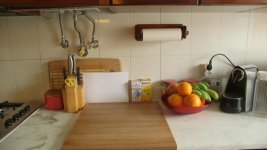
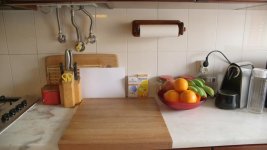
(A1) with AW Metering give 3100K and are correct - The (A2) the same 3100K dialed with Manual K mode are more much green
(B1) with AW Metering give 4500K and are correct - The (B2) the same 4500K dialed with Manual K mode are more green too

Its this normal ? the Auto metering value its not the same the manual? ( Is me Auto metering correcting Magentas ? And Greens and the Manual K mode, only more or less Blue/yellow?
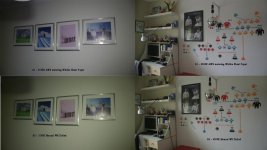
Test C100 WB.jpg

 
Last edited:
Another test, i make a closeup Custom Auto WB Read on the A4 paper Sheet, and it give me 5300K with good colors and nice clean white (bottom image).

I change the Mode from the WB Preset A to Manual WB and put the exact K5300 in manual mode, and the color of the same WB kevins are diferente? (upper image)

Its possible that the Auto WB metering for the presets A and B change colors space in a wide color gamut and remove the green and add mangenta? ? and the Manual WB just from 2000-7000K in more/less Blue/Yellow ?

AutoWB 5300K.jpgManual WB 5300K.jpg
 
On AWB and and manual wb A & B where you make a white balance using something white the camera adjusts whitebalance on all three channels Red ,green & blue so you get accurate white balance.
On (K)elvin mode the camera only adjusts the red and blue channel and leaves the green channel as is!!!! so you'll get a green shift.

It's strange that canon hasn't adressed this problem yet and i'm curious if this fenomenon still exists in the mark II
 
Its this normal ? the Auto metering value its not the same the manual? ( Is me Auto metering correcting Magentas ? And Greens and the Manual K mode, only more or less Blue/yellow?
Yes.

Auto white balance adjusts all color channels.

Dialing in the color temperature only affects red/blue, and does not affect cyan/magenta.

For this reason, it will always, always, always be more accurate to set the white balance using the AWB function. Dialing in a manual color temperature is only valid if the light source has perfect color rendition.

I know that using a variable white balance and dialing in the color temperature is popular, but it is also (IMO) a mistake in many situations. The white balance metering will provide more accurate color in more situations than dialing in the color temperature will.
 
This its a little disturbing for me, i came from a 15 years professional photography, starting this year with video. And i always use manual WB in my 5DM3 with great results.
Now with my C100 i have to always meter with AWB White Card to have accurate colors.
Its a Canon thing ? or all the video cameras brands have the same issue?
Thanks Barry
 
This is nothing new, it's how it works on pretty much every camera, stills or video etc. Manual White balance kelvin adjustment does not account for green-magenta shifts. You can dial in your green-magenta shift elsewhere in the menus usually.

Probably the only difference you are seeing is that on a DSLR you probably weren't use auto WB to compare your manual dialed in WB against. If you switch between AWB and manual kelvin WB on your 5dmk3 you will see the same thing happen under lighting with a green or magenta spike/cast.

If you have done 15 years of professional photography, then you probably know about the green-magenta tint slider in any Camera RAW or any other RAW development program. AWB adjusts that but dialing in manual WB leaves it at 0. You'll only see a difference if the scene you are shooting has a green/magenta cast that the AWB is trying to neutralize by changing the green-magenta tint component of your whitebalance.

That said, I do find it frustrating that most cameras with push-auto WB will tell you their metered kelvin reading but will not tell you the tint adjustment reading. On many cameras if you want to match AWB to a manual setting, you have to switch back and forth between them and match them by eye while adjusting your manual tint setting.
 
Last edited:
That said, I do find it frustrating that most cameras with push-auto WB will tell you their metered kelvin reading but will not tell you the tint adjustment reading. On many cameras if you want to match AWB to a manual setting, you have to switch back and forth between them and match them by eye while adjusting your manual tint setting.

In photography i see this in RAW vs JPG but i never used the AWB white card read for tunning in Jpegs.

Thanks Noah
 
So dialing in a kelvin number does not account for green/magenta. What about setting the WB with a grey/white card?
 
Anyone could post some screenshoots of this test with other models and brands? The diference its huge. I like to see some opinions about making the correct WB on run and gun situations with multiple light sources.
 
To the OP, Barry and everyone who posted in this thread, thank you, I learned something new today. I usually shoot with the same set of lights and I usually dial in manual kelvin temp. Because I always shoot a B&W + Gray card, I never have problems getting my color to where I want it but it's good to know what's going on underneath the hood.
 
So what strategies are best for doing a multi-cam shoot? Shoot a grey card on each camera from the same position? From the position each camera will be in?
 
The diference in colors are huge AWB metering and the manual AW in Kelvin.
I need a good card...
Now i have to test the best WB reading White VS Gray
 
May I suggest to have another point of view? How on earth should the cam 'know' which light conditions are on set?

adjusting WB per look and feel works greatly outdoors, as long as no artifical light sources with a strange spectrum are involved; it's the dubious quality of light and not the the cam itself.
By the way, it's same same with my Nikons, they too let people look quite strange in bad light.
If you could not make a quick custom WB during/before the shots (have you for example considered a special lens cap for this purpose?), I would love to have at least a quick shot with a grey (or white) card somewhere in the footage as a reference point.
 
White or gray cards cab work equally well for white balance though way back in the AF 100 days that particular camera gave better results with a gray card than a white card. The the C series canons are much more forgiving. You mentioned earlier in this thread about using a sheet of white paper for white balance. THis works in a pinch but white paper can actually be a bit blue due to whiteners that are added to the paper which will skew white balance a bit.
YOu might also want to check out expo- discs . I carry one in my kit and when shooting in fluid situations it's easy to pop one on the lens and point the camera at your light source and get a consistent white balance.
 
Question... Once you AWB with a gray card, which accounts for the cyan - magenta shift)... Can we save that WB settings to recall later. This would be great if shooting in exact conditions and need some flexibility to change on the fly quickly.
 
Question... Once you AWB with a gray card, which accounts for the cyan - magenta shift)... Can we save that WB settings to recall later. This would be great if shooting in exact conditions and need some flexibility to change on the fly quickly.

that's the purpose of A and B presets.
 
Great thread! I have a guy flying out to shoot some guitar videos this coming weekend. Best classical guitar player in the world...... So this shoot is really important for me. I'll be using the C100 MK1 with a canon 70-200 2.8 mkII on the main camera, and then a 85 f2.8 on the 5d3, also my neighbor is lending me her 5d3 as well so 3 cameras in all. I just bought the Aputure Araman lighting kit 3 led lights. Before I used a potturii of various incandescent, fluorescent and cheap LEDs, so I'm excited to see the outcome with the new Aputure lights.

Lately for for both photos and video I just set the kelvin to 5600, to the Aputure 5600 K, but now this thread has me confused a bit. How should I proceed with 2 5D3's and a C100? Should I set them all to 5600 K or use a gray card, or set everything to auto WB? Thought I knew a little bit about what I was doing until reading this thread....... Ahaw!
 
Great thread! I have a guy flying out to shoot some guitar videos this coming weekend. Best classical guitar player in the world...... So this shoot is really important for me. I'll be using the C100 MK1 with a canon 70-200 2.8 mkII on the main camera, and then a 85 f2.8 on the 5d3, also my neighbor is lending me her 5d3 as well so 3 cameras in all. I just bought the Aputure Araman lighting kit 3 led lights. Before I used a potturii of various incandescent, fluorescent and cheap LEDs, so I'm excited to see the outcome with the new Aputure lights.

Lately for for both photos and video I just set the kelvin to 5600, to the Aputure 5600 K, but now this thread has me confused a bit. How should I proceed with 2 5D3's and a C100? Should I set them all to 5600 K or use a gray card, or set everything to auto WB? Thought I knew a little bit about what I was doing until reading this thread....... Ahaw!

To my understanding....using a gray/white card and a custom white balance...by targeting the card and use the AWB button...then dialing it in to taste...is the only method of adjusting the cyan/magenta shift and give you an accurate balance. The manual kelvin adjustment only adjusts the red and blue channels....I believe. This is why the Mark I always has a green cast if you are manually adjusting the Kelvin. That method does not give you the tint adjustment...and without it...the camera leans towards the green.

Please correctly if I am wrong.
 
I haven't tested this, but I'm pretty certain the canon dslrs automatically compensate tint along with white balance. Imo dialing the kelvin without tint control is pretty useless, especially when shooting to avchd. You should be fine if you use a white card on your c100.
 
Back
Top