Mike, are you on Final Cut?
Yes, 7.0.3.

Follow along with the video below to see how to install our site as a web app on your home screen.
Note: This feature may not be available in some browsers.
Mike, are you on Final Cut?
You should care. And if you don't then in the near future you're going to be in a world of hurt, because that's the way everything is going. Not too far down the road all content will be streaming from teh Internet. There's already hundreds of web series that are very popular and have large audiences and some even make money. You're DVD and Blu-ray players? Say goodbye to them. You'll watch movies streaming over the Internet from various outlets (Netflix, iTunes, Hulu, Amazon, etc., even YouTube and Vimeo and whatever else comes out in the future). And they'll be viewed on computer screens in addition to TV's, and even phones and tablets like the iPad. You may not like it, but that's the way it's going. So yes, it's very important how the footage performs when viewed online.

I like X-Rite Eye-One (MacBeth) for computer monitor calibration. $149 well-spent.
Well, THAT'S relevant.
Like I said before: Color grading? The other videos you viewed before were color graded. This video wasn't.
Hey Guys. I sincerely believe that this will be a great thing to learn about. (Monitor calibration) (No if's/and's/but's) So don't let my comment DERAIL your pursuit. As a Computer Science freak and techno bone head, my trouble shooting skills are kicking in...so bear with me.
Although it will likely ~help~ what I see on this computer....it doesn't CHANGE the fact that I'm watching the other videos on this SAME monitor...and they don't look HALF as severe (as far as noise)....therefore....although it will help what I see....it doesn't change the fact that OTHER VIDEOS on this SAME monitor don't look as noisy. So...we can concluded that there is ALSO something else at work here. That doesn't mean that calibration won't help...so don't stop that pursuit....but the facts point at something else ALSO.
Man, I gotta say... your CAPS are cracking me up! but don't let me slow you down...


OK. That's possible. Duly noted. We'll have to grade this after a download (when it's available)...and see the results. I'll try some different workflows and repost once the download is available too. Do you grade? If so...do it and post it, so we can see if that's the issue. Thanks!
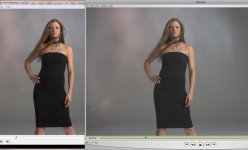
The point was that it's not the pro's opinion in the end that matters. It's the end user or the consumer. If on their "pro" calibrated monitors and such they saw less noise then that's good for them. The point is, is that I'm seeing more noise than my 7D on my monitor at the same time as the AF footage. Calibration is irrelevant when this happens because any calibration or adjustment that would make the noise less apparent in the AF-100 footage would make the 7D footage less noisy as well.
BTW, I'm on a 24" Apple LED Cinema, and yes, it's calibrated for video editing/monitoring.
O.K. Mr. Moonay - why don't you go ahead and show us what you've got from that 7D - you spoke of a demo you were putting together - we'd like to see how your stuff stands up to the AF100
I downloaded the mov file and played it back with media player classic ...colors look great ,nice contrast but there's a lot of noise hmmm abit dissapointed BUT
So I waited recalibrated my monitor for the x time .... still the same results.
Then I just played it back with quicktime pro and yes you need to buy this version but geuss what Noise is almost gone , maybe a compression issue, her dress looks clean and so does her hair .
ISO 400 great ISO 800 good.
Your observation here has to do with black levels, RGB vs 601/709 mismatch can often reveal this. If the blacks get crushed enough, either in a camera or in post or on a monitor, it will hide the noise that's dancing in there. When you bring up the blacks, you also bring up and reveal the noise. The less noise you start out with, the less there is to be revealed. I've dealt with this quite often with the HVX. It can look super clean in a low light situation if the blacks are held down.I downloaded the mov file and played it back with media player classic ...colors look great ,nice contrast but there's a lot of noise hmmm abit dissapointed BUT
So I waited recalibrated my monitor for the x time .... still the same results.
Then I just played it back with quicktime pro and yes you need to buy this version but geuss what Noise is almost gone , maybe a compression issue, her dress looks clean and so does her hair .
ISO 400 great ISO 800 good.
Now here's the thing I played back 7d files on both players.
And they both looked the same ...slightly more contrast with media player classic but they were of the same quality.
So there's is disconnect !
Now how do we solve this because the end user as in the client/viewer doesnt have the time or maybe not even the knowledge to calibrate theire monitors.
View attachment 26391
Compressing it right now...
Anyways while I was editing my dumb little test the answer hit me... and it's so obvious. The AF-100 sensor only has a 3-4MP, if I remember correctly, which is great to reduce aliasing because not much down scaling is being done. However, the 7D and GH2 both have a HUGE mega-pixel count in comparison, 16-18MP. That means that the noise is physically being applied to smaller pixels in the first place... PLUS, it's being down-sampled further, which creates the possibility of aliasing, but decreases noise due to more pixel averaging. Therefore I actually believe it's impossible for this camera to perform BETTER than the GH2 and 7D in high ISO areas. The AF-100 image might be brighter at ISO 800 than a 7D because of bigger pixel size, but there will always be more noise because it has less pixels to work with.

I think you're going to find that this is a workflow issue.