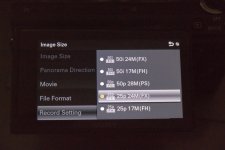
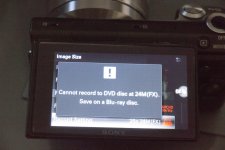
GH2 Thankyou Panasonic for the GH2 firmware 1.1, yes it does do 25p and 30p

Bulls**t, the HBR mode is 1080/30 wrapped in a 60i. This is not 30P. I'm still seeing upper dominance fields. Looks like crap! Stick with the hacks guys. Although the focus does look better with the 20 pancake.

yes it is PsF, some NLEs have a problem with the these files from the GH2 as do some players. Try transcoding with 5D2RGB. The hacks haven't enabled 30p or 25p, just wait until the hack opens up these modes.
 
What happened with the GH1 with firmware 1.34 was that it was never released as a downloadable update so VK couldn't reverse engineer it and Panasonic purposely changed the way it did it firmware update checks(though that changed when he got the hardware to extract that firmware).

The 1.1 preloaded onto new GH2 should be identical to the web firmware which we already have, and even if it isn't, VK could just extract the firmware now he has the hardware. But I don't think Panasonic will do that this time around, I think they finally realise that this hack is beneficial to them as well. Hopefully they will be willing to take a gamble and release a camera with appstore like modular software expansion capability
But then someone that gets a new GH2 preloaded with Firmware 1.1 would still have to wait for the firmware to be hacked, isn't that correct? Unless it would be possible to install 1.0 in the camera. Sorry, I don't have a GH2 yet so maybe this doesn't make much sense.
 
But then someone that gets a new GH2 preloaded with Firmware 1.1 would still have to wait for the firmware to be hacked, isn't that correct? Unless it would be possible to install 1.0 in the camera. Sorry, I don't have a GH2 yet so maybe this doesn't make much sense.

It would be possible to install 1.0 hacked into the camera, not that you'd want to. Vitaliy will have a new version of pTools in a week I am guessing, he is the man
 
AVCHD in sony nex and a65-a77 is pure 25-30p
Why Pany cant do the same ?
Its very time consuming to convert all clips in progressive format.
FCPX , Avid and Premiere report interlace input format !

I really hope that Vitaliy can flag the clips as progressive.
 
Not having any experience using hacks etc, would someone please advise me on a newby question: I've dowloaded the firmware update for my GH2 as instructed. The site then advises me to transfer to a formated SD card and gives an illustration of a Windows XP example. I have Windows 7 and have the SD card in the laptop's SD card slot. What I have on the SD card is three folders: DCIM, MISC and PRIVATE. Which one do I transfer the update data to? Many thanks in advance.
 
Are you sure about that toxotis? I was reading on dpreview about people complaining that the Nex-5n and Nex-7 only have 60i and no 30p video, only 60p. I don't know much about the A65 and A77
http://forums.dpreview.com/forums/readflat.asp?forum=1042&thread=40007788

I don't think it's all that time consuming, just another step that you can do batch in your workflow. I'm sure there is someway you could just change the metatag.

They did it to conform to AVCHD standards so it will play in bluray and other media players easily

@David

Neither of the folders, put them in the root of the SD card right beside the DCIM, MISC and PRIVATE folders, so say if your SD card is drive E: it would be in E:\
 
P1000003.jpgP1000004.jpg


yes i am sure.
There is an option , you can select 25i or 25p (and 50p) and then camera informs you that this format isnt compatible with dvd etc (who cares ?).

Sony nex 5 and 3 doesnt have this option, newer 5n and 7 have it.

Dont know for NTSC users, i am in PAL land.
 
Well, 25p is terrible news. Do you know how much harder this makes it for PAL users to choose a camera now? We actually have to choose between the GH2 and 60D now, rather than just defaulting to Canon.

A little too late for me - I already sold my GH1 and bought up big with Canon when the GH2 was first released with no 25p, but this certainly has me peeking through my neighbours fence to see what the grass looks like there.
 
if you want bd , you can do it in authoring program.
Its better to have an option to shoot pure progressive ...
if you want , you can also shoot interlaced.
 
Bulls**t, the HBR mode is 1080/30 wrapped in a 60i. This is not 30P. I'm still seeing upper dominance fields. Looks like crap! Stick with the hacks guys. Although the focus does look better with the 20 pancake.

It is 1080p @ 30 FPS in 1080i. However, it is far from CR@P. It is the exact same thing as 1080p @ 30 FPS as long as the program playing/editing sees it that way. Everything I have come across so far has seen it as 1080p @ 30 FPS. It looks just the same as the 1080p @ 24 FPS except it has a much more usable frame rate for action shots.
 
AVCHD in sony nex and a65-a77 is pure 25-30p
Why Pany cant do the same ?
Its very time consuming to convert all clips in progressive format.
FCPX , Avid and Premiere report interlace input format !

I really hope that Vitaliy can flag the clips as progressive.

There is no converting necessary. Treat it as 1080p @ 30 FPS and it will give you the exact same output. Each field in the interlaced frame is from the exact same instant in time.
 
You're probably still better using a hacked bitrate low GOP 720p60 if you want to use Twixtor as it is a progressive image.

Your better off using 720p @ 60 FPS because it has a faster frame rate. The 1080p @ 30 FPS in the new firmware is a true progressive image. There is no processing required to extract the 1080p image. Each field is from the same instant.
 
Hi mpgxsvcd, I saw your thread over at DPreview on the improvements in RAW at NR +2, quite a difference with the fur and wool detail. I did a little looking myself I don't think there is any difference between -2, 0 or +2 NR on the RAW files now, which is really the way it should be. I did do some comparisons with some of my older photos that were taking at NR 0, the noise seems to be finer and less intrusive now.
 
Not having any experience using hacks etc, would someone please advise me on a newby question: I've dowloaded the firmware update for my GH2 as instructed. The site then advises me to transfer to a formated SD card and gives an illustration of a Windows XP example. I have Windows 7 and have the SD card in the laptop's SD card slot. What I have on the SD card is three folders: DCIM, MISC and PRIVATE. Which one do I transfer the update data to? Many thanks in advance.​
 
As well as the GH2 i have an FZ150 that has a mpeg4 25P option would the GH2s 25P be the same or mpeg2.
 
There is no converting necessary. Treat it as 1080p @ 30 FPS and it will give you the exact same output. Each field in the interlaced frame is from the exact same instant in time.

this is true, but only if you have content from one source.
I have nex and sony footage , that is pure progressive.
When i put them together in the same timeline ... it needs render.
 
Not having any experience using hacks etc, would someone please advise me on a newby question: I've dowloaded the firmware update for my GH2 as instructed. The site then advises me to transfer to a formated SD card and gives an illustration of a Windows XP example. I have Windows 7 and have the SD card in the laptop's SD card slot. What I have on the SD card is three folders: DCIM, MISC and PRIVATE. Which one do I transfer the update data to? Many thanks in advance.​

copy the file at the root, not in one of the folder

So when you've dragged it over you should see: DCM, MISC, PRIVATE, and GH2_V11.bin
They're all in the same place visible as soon as you click on the card.
 
Back
Top