FS5: Sony PXW-FX6

This whole dual sensitivity thing is a bit of a sham if you take the time to do some serious testing with proper scopes.


This is actually the main reason why I returned the A7sIII and decided to get FX6. While the dual sensitivity has similar ranges (in A7sIII the low base is set to 640 for Slog3 vs 800 on FX6), at least FX6 has a proper Cine EI implementation allowing greater control. On A7sIII this can sort of be done by staying at base ISOs and simply overexposing / underexposing or by using external monitor with compensating LUTs as MLUTs - a Cine EI for poor. I wouldn't even bother trying to use it that way at all but I find the gap between the two ideal ISO bases too big in practical use, the higher 12800 ISO is very limiting unless you EI offset it to lower values, especially without built in NDs. A7sIII also handles all the intermediate ISO ranges differently than FX6 in Cine EI mode (actually I suspect that it's more like FX6 in Custom mode in that regard), gain is applied to the underlaying signal, it's not just an EI offset. There's definitely some trickery going on under the hood in both cameras, it does not seem to be a true dual gain camera as FX9 I'm afraid. What it really means in practice, can't tell. Can't test FX6 yet as I'm still waiting to receive it... but my hope is that addition of Cine EI and greater (any!) control over noise reduction will be worth it (on top of obvious improvements such as form factor, monitoring tools, internal ND's, audio, etc, etc).
 
This whole dual sensitivity thing is a bit of a sham if you take the time to do some serious testing with proper scopes.

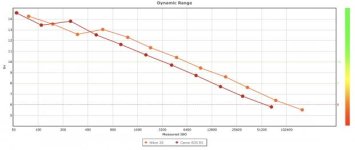
I don't think that dual native ISO is anything new or controversial. Most digital photo cameras get a little boost in dynamic range 2 or 3 stops above the base ISO and then resume their steady decline. But yeah, the higher native ISO is clearly not as clean as the lower. Per dxomark:

Screen Shot 2021-02-09 at 8.34.24 AM.jpg
 
Yes, not controversial or new. But on my S1H there is a far smaller difference in noise levels between Hi/Lo than what the FX6 provides when you compare Hi/Lo. If someone thinks they are going to get a 4-stop boost in sensitivity at the cost of maybe only a 1-stop boost in noise, they are in for a rude awakening. I think it is better to understand reality than to have unrealistic expectations.

With all that said, overall the FX6 is probably the most noise-free, light-sensitive camera I have ever used, so boosting the gain a little is not a huge deal. it is really, really clean. You have to look closely to see the noise, but it does increase as you boost the gain (no surprise there) and jumping to Hi does almost nothing to reduce the noise vs. just adding more gain in the Lo mode.

You'll notice that Sony uses the term "enhanced ISO" and not Dual ISO because it isn't a dual ISO camera.
 
What's the story with the FX6 MXF recordings having 8 Audio Tracks? I thought the FX6 only supported a max of 4 audio tracks on body (the Audio Menu seems to also only have controls for 4 tracks). I don't have a MI audio adapter so it's hard for me to test if you can get more than 4ch, but with my setup I get 4 channels with 2 x Internal Handle Mic and 2 x XLR, and then I also get 4 x Empty Tracks (5-8).
 
What's the story with the FX6 MXF recordings having 8 Audio Tracks? I thought the FX6 only supported a max of 4 audio tracks on body (the Audio Menu seems to also only have controls for 4 tracks). I don't have a MI audio adapter so it's hard for me to test if you can get more than 4ch, but with my setup I get 4 channels with 2 x Internal Handle Mic and 2 x XLR, and then I also get 4 x Empty Tracks (5-8).

I may be wrong but I think you can use the Multi Interface Shoe devices, such as Sony wireless receivers and this way use the extra tracks.
 
What's the story with the FX6 MXF recordings having 8 Audio Tracks? I thought the FX6 only supported a max of 4 audio tracks on body (the Audio Menu seems to also only have controls for 4 tracks). I don't have a MI audio adapter so it's hard for me to test if you can get more than 4ch, but with my setup I get 4 channels with 2 x Internal Handle Mic and 2 x XLR, and then I also get 4 x Empty Tracks (5-8).

EDITED.

XAVC-I codecs always record 8 tracks and there is nothing you can do to stop it. XAVC-L codecs always record 4 tracks. That's part of the official specifications of those codecs. However, only certain studio decks are capable of actually using tracks 5 - 8 for XAVC-I. The MI-SHOE will give you additional input options, but it doesn't change anything regarding how many tracks are captured.
 
Last edited:
What's the story with the FX6 MXF recordings having 8 Audio Tracks? I thought the FX6 only supported a max of 4 audio tracks on body (the Audio Menu seems to also only have controls for 4 tracks). I don't have a MI audio adapter so it's hard for me to test if you can get more than 4ch, but with my setup I get 4 channels with 2 x Internal Handle Mic and 2 x XLR, and then I also get 4 x Empty Tracks (5-8).

I may also be wrong but I believe it's just how the MXF container is implemented for Sony's cinema cameras, regardless of whether they can use all the tracks. This was also the case with the Fs5, whose MXF files had 4 tracks of audio despite it being impossible to record more than 2 with the camera (MI shoe or not).

But I think broughtonfilm is also correct in saying that you can get more than 4 tracks with the FX6.

EDIT: Doug beat me to it with a more accurate answer.
 
From what I can see in the manual, even if you add more Audio devices to the MI Shoe, the FX6 will max out at 4ch recording (but you do get to assign what 4ch to use).

Attach the XLR adaptor to the multi-interface shoe, and set CH3 >Source to Shoe CH1 and CH4 >Source to Shoe CH2 on the Audio Status screen (page 14). Or, set Audio Input >CH3 Input Select to Shoe CH1 and CH4 Input Select to Shoe CH2 in the Audio menu of the full menu. Camcorder functions that overlap will be
disabled for channels on which the XLR adaptor is selected as the input.
 
Smaller local shops may be a better bet ...

[...]

Back to topic ... my main dealer in California quoted me late April ... look around ... the bigger dealers are swamped with orders ... not so
the smaller ones and they still get product.

In the unlikely event that our paths cross, I owe you a coffee/beer/beverage of your choice.

I took your advice to check some local shops—unfortunately I'm not in a big market, so there was nothing in my city. I expanded my search to nearby cities and then some not-so-nearby cities—still nothing.

So I decided to check with a random DFW store (Competitive Camera) that I found just by scrolling around Dallas in Google Maps, as you mentioned you got your FX6 in DFW. I called them up, they said they had one in stock, I ordered it on the spot, and it arrived today. Thank you for the tip! This will probably tank my productivity for the week but I'm excited to finally have the camera and start learning it.
 
I was hoping to use the FX6's Stereo Mics for some general atmos and a NTG-1 for directional sound for general run and gun doco style street and in house recordings. Unfortunately, the FX6's Stereo Mics are not great. Picks up lots of handling noise, has a high noise floor, and almost no separation between the L/R channels. So I chucked on a Rode Videomic X and it is much much better in all these areas. The downside is I've now used all my XLR ports so can't plug in a shotgun mic like the NTG-1 (on camera).

I'm interested in any thoughts you may have for 3ch On Camera Audio (L/R for atmos and 1ch for directional) without rigging it out, here is where I got to:

- MI Shoe Adapter: There used to be small adapters like the "Sony VMC-K100" / "Pearstone Microphone Adapter for Sony Camcorder Hot Shoe" that gave you a 3.5mm input via Sony's MI Shoe but these seem to have been discontinued over a decade ago (though you can still get them). Anyone know anything about these adapters or why they were discontinued? I don't want anything as bulky as the XLR-K3M.

- Swap the Rode Videomic X for the Sony XYST1M (stereo MI shoe Mic) for atmos and keep the NTG-1.

- Swap the NTG-1 for the Sony ECM-B1M (shotgun MI shoe Mic) for directional and keep the Videomic X.

- Go back to using the onboard FX6 Stereo Mic and NTG-1 combo (as it's "only atmos")

- Just use the Rode Video Mic X

- Something else altogether like a upcoming Azden SMX-30V (combo Stereo / Mono Shotgun but only in 3.5mm and the mixing is done in mic)
 
If you don’t have to record the single, directional track in-camera, you could get a Tentacle Track E and hook it up to that mic to record it. Put the camera TC in Free Run, jam the Track E and then sync them in post. The Track E is small, weighs almost nothing and is supposed to run for 10 hours or so on a charge and the included 16GB card will record over 30 hrs in 24bit/48khz and 23 hrs in 32bit float/48khz.

But... Do you really need stereo nats? I have stereo nat mics on my VariCams and I can’t say that watching anything I’ve ever shot, on TV, when they had the nats ‘full up’, that I could tell it was stereo.
 
I think the real answer is going to be practicing with what I've got and seeing what combinations I like. I'm really thinking outloud on what might work well.
 
The cameras that record XAVC-I and XAVC-L always record 8 tracks and there is nothing you can do to stop it. That's part of the official codec specification. However, only certain studio decks are capable of actually using tracks 5 - 8. The MI-SHOE will give you additional input options, but it doesn't change anything regarding how many tracks are captured.

I have to correct myself on something I posted yesterday that is incorrect. I rarely shoot XAVC-L but I suddenly remembered this morning that XAVC-L only records four channels. Only XAVC-I always records eight channels. Sorry for that mistake. I have changed my previous post.
 
Eugene at Competitive is very good ... big store in a small storefront ... and the store does make an effort to get
what you need if the manufacturer will allow them to sell it.

Was going by there today ... but we have icing conditions on the roads so might wait until tomorrow.

I may have them send my Sigma Cine Primes in for a mount conversion to E mount ... am going to try the Metabones locking
Cine smart adapter today ... if it is secure I will keep the EF mount ...

Good to hear that they were able to help you with the FX6 ... and it is a bit of a learning curve ... I filmed with it on Monday after
a week of testing ... was very pleased that I did not screw too much up ... now if my Shogun 7 shows up soon ... another rabbit hole
to explore. One thing I found is that when you input TC you must set it up and connect the TC generator with the camera running and
the generator outputting signal ... so that it can lock onto the signal.

Share your insights ... not a lot of information other than what shows up here ... and the initial CVP reviews.
 
I have to correct myself on something I posted yesterday that is incorrect. I rarely shoot XAVC-L but I suddenly remembered this morning that XAVC-L only records four channels. Only XAVC-I always records eight channels. Sorry for that mistake. I have changed my previous post.

I was a bit surprised this week ... synced my FX6 to TC from a nanolockit while I recorded audio from a SD MIXPre 10 II ... when I brought the XAVC-I into Resolve ... only one channel from the FX6 handle mic populated the timeline ... the MIXPre track I added looked identical ... I had synced the two based on the TC ... previously without the TC sync I was seeing eight channels.

I need to go back and look at that ... not sure if Resolve just dropped the extra empty channels ...
 
Last edited:
Agree ... already part of my routine ... and has saved me with its 32 bit float ...

Recording a choir and grand piano 200 feet apart while running the video ... levels
looked good until the pianist decided to take it up by a factor of 4 ....

But yes if I started with a true video camera rather than a series of mirrorless/dslrs would not
have been a step I needed.
 
For those looking to shoot ProRes RAW with the FX6, Atomos have released an updated Ninja V Pro Kit, that allows RAW recording to the Ninja V with the Atom X SDI module, which gives you an additional option to the Shogun 7, if you don't want to user a monitor of that size. Kit is $949. Current owners of the Ninja V and the Atom X SDI can activate the RAW recording through the SDI with a $99 activation key:

https://www.atomos.com/products/ninja-v-pro-kit

https://www.youtube.com/watch?v=Jj_CRJLbzOg
 
Last edited:
Back
Top