Sony A7sII Initial Impressions

Sgamut3.Cine aligns the green primary better with the standard color spaces (sRGB/rec709 and P3) and allows general grading controls to produce usable results. This also enables simple saturation adjustments. With SGamut you'd need to tweak primaries, use a 3D LUT or compress hues in various directions.

Noisier slog3 is to be expected. After all, it just raises the shadows and makes the noise more visible as all flat profiles do.

Looking at Paul's DR test I get the impression Cine4/Cine1 is still gonna be the best choice for decent skin.
 
@Paulcurtis:
One possibility is that the camera needs to switch to 12-bit ADC in order to record video, as it does when you use some photography modes. This could be the reason we're getting much less DR than what RAW stills provide.

Regarding sgamut, this is what I have:

The color primaries (edge of color space triangle) of S-Gamut3 are the same as conventional S-Gamut. Current S-Gamut needs color temperature setting to select color conversion matrix. But S-Gamut3 is optimized to combine these color conversion matrix. The conversion matrix does not depend on color temperature any more.

I understand that as "sgamut3 and sgamut3.cine are linear, sgamut is not, there are non-linear transformations baked in".
 
Sgamut3.Cine aligns the green primary better with the standard color spaces (sRGB/rec709 and P3) and allows general grading controls to produce usable results. This also enables simple saturation adjustments. With SGamut you'd need to tweak primaries, use a 3D LUT or compress hues in various directions.
Noisier slog3 is to be expected. After all, it just raises the shadows and makes the noise more visible as all flat profiles do.
Looking at Paul's DR test I get the impression Cine4/Cine1 is still gonna be the best choice for decent skin.

That green primary change makes sense, i can see that.

But then who actually works in SGamut space? Every grading software i know brings the image into it's primary space so increasing sat happens elsewhere.

The noise in Slog3 is very visible actually, to the point where i thought something was wrong. All that blobby noise was back, but we're seeing raised levels that really should never been seen. So i really don't see any reason yet to shoot Slog3 in 8 bit and every reason not to.

@Paulcurtis:
One possibility is that the camera needs to switch to 12-bit ADC in order to record video, as it does when you use some photography modes. This could be the reason we're getting much less DR than what RAW stills provide.
Regarding sgamut, this is what I have:
I understand that as "sgamut3 and sgamut3.cine are linear, sgamut is not, there are non-linear transformations baked in".

Good point about 12 bit ADC, the electronic silent shutter does that AFAIK.

So the idea is that the camera will be outputting different colours depending on white balance setting? Yet i have never seen a reverse SGamut process in any mainstream software that requires a white point or a different LUT for conversion? In that tech paper the non linear part refers to the knee of the gamma curve.

I confess to not quite getting the issue of white balance being backed into the primaries.

I've never seen multiple matrixes for SGamut either (but to be fair most matrix conversions allow the setting of white point)

I've been using the matrixes in the spreadsheet on this post for SGamut3

http://community.sony.com/t5/F5-F55...Gamut3-Cine-S-Log3-and-S-Gamut3-S/td-p/282639

So far there's no magic i can see...

cheers
Paul
 
I don't understand the details of the sgamut thing. I just know that Sony themselves say it has stuff baked in (which in my mind makes it nonlinear) and that in tests I see the skin tone changing with exposure (which doesn't happen with e.g. Cinema, so it's not a sensor thing). From that I make up the rest: I think the primaries are not altered but there's a different gamma for each channel or something like that (the speed at which each channel ramps up with exposure is different); this may be uninformed nonsense but for me it's enough to know that it does weird stuff and I don't like what it does.
 
Here's some more.

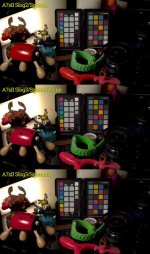
First up is a straight comparison between A7s and A7sII Slog2/SGamut, you can see that the red is less orange. There are other subtle differences. I need to look at skin tests soon too.

These are exposed up a little bit and there isn't a roll off on the highlights, this is not about range it's about trying to compare colours.

Slog2SGamutComparison.jpg

The more complicated one is the various SGamut3 comparisons. I'm trying to compare and trying to keep the workflow identical between them. The images are quite low level exposure and are targetting Rec709. I'm trying to do the right thing, not just drop someones LUT on it but to using the colourspaces and keep it as neutral as possible.

So my conversions are YUV -> Slog2 -> Matrix from whatever to Rec709

Firstly there really isn't that much in it, no huge difference between them. The tests were done under daylight remote phosphor. If you download and pop them into photoshop and flip layers then you'll see the differences more clearly.

Honestly i don't know what's right. I'm leaning towards plain SGamut as having the most accurate red compared to the original but i don't know how much colour temperature is playing a role here. Aside from that i do think that cine3 is marginally better than plain SGamut3, the blues are a touch better and i feel the red is a bit better. But i think we're in the realm of splitting hairs now and your own monitor calibration would probably totally change the results at that level.

It is difficult working with the footage, i feel the Slog3 curve that i'm using hasn't quite got the right levels. But with the higher compression of Slog3 and the even more raised shadow it is very easy to bring in horrible blobby noise. This camera still shows very low level blobs of red. However i'm 99% sure they should never been seen because they should be absolute black.

Of course 99% of people are just going to slap a LUT on and be done with it. I plan on doing all this once at this level of detail and then keeping my preferred settings.

SGamut3cine comparions.jpg

here's a link to a 16 bit tif version https://www.dropbox.com/s/yqpyz7izwozipay/a7sII_slog3_Sgamut3Cine.tif?dl=0

So i'm all ears if anyone has any better workflows?

Skin is really my next task and i'm shooting with this properly next week. Candlelit too so that will be challenging.

cheers
Paul
 
I'm at work, without a calibrated monitor, but aren't reds going magenta on those sgamut3 and sgamut3.cine shots? or is the sgamut one going yellow? (it could be the original footage, the LUT you used, or my monitor, which is a nice Eizo but not being calibrated, well, who knows)
 
I'm at work, without a calibrated monitor, but aren't reds going magenta on those sgamut3 and sgamut3.cine shots? or is the sgamut one going yellow? (it could be the original footage, the LUT you used, or my monitor, which is a nice Eizo but not being calibrated, well, who knows)

Yes, they are. The SGamut3 reds have blue in them whereas the SGamut is pure red.

As i mentioned i'm using the matrixes published on that sony site, but i would agree they're heading towards magenta. The original A7s has green in by comparison.

The first two tests (top of the post) are the same scene at a much higher exposure, here the A7sII red has slightly more green in than the lower exposure.

Still more investigation to do as i'm not 100% happy that these results are correct...

cheers
Paul
 
Seeing footage emerging... Clever move on Sony side. 10bit and you wouldn't need ANYTHING ELSE ANYMORE. 8 bit leaves space for other options,
 

Cool. What did you think about it?

There's a lot of banding in the video, but that could be vimeo. Are you able to share uncompressed stills of walls with lights on? You mentioned Slog3 in the write up but it appears that could well lead to this kind of banding so curious what the source is like. The skin is very green but that could be intentional? I know my tests are dead boring by comparison but i'm trying to quantify what i can get out of it before shooting for real with it.

You mentioned in that article that Full HD is ISO 3200, but i'm not sure it is? I've just switched to XAVC HD and my iso is still 1600, maybe i'm missing something?

cheers
Paul
 
Seeing footage emerging... Clever move on Sony side. 10bit and you wouldn't need ANYTHING ELSE ANYMORE. 8 bit leaves space for other options,

It's a fair point. I would still go to my fs700 4k raw first. It will take competitors to push the boundaries then everyone has to unlock a bit more. Leica with 10bit HDMI output for example.

I do wonder whether there's some magic way of combining the XAVC output with the external pro res and average together to reduce noise and increase tonality at 4K. It very much depends at what processing stages each output is split apart.

cheers
Paul
 
Hi Paul.

-Had to be more specific. In full HD 100M the basic ISO is 3200 (updated my article, thank you).
-The exported 4K ProRes file of this video (about 10 GB) has much less banding and obviously is much cleaner.
-It was all shot on Slog 2. Please let me know from what part of the video you would like an uncompressed still (or better yet the video portion), and I'll send it to you.
-To my taste, skin is green only at the beginning of the police woman walking with her dog sequence. I left it intentionally.
-Will be happy to see some of your tests and happier to learn even from others.

Thanks!

Johnnie
 
Hi Paul.

-Had to be more specific. In full HD 100M the basic ISO is 3200 (updated my article, thank you).
-The exported 4K ProRes file of this video (about 10 GB) has much less banding and obviously is much cleaner.
-It was all shot on Slog 2. Please let me know from what part of the video you would like an uncompressed still (or better yet the video portion), and I'll send it to you.
-To my taste, skin is green only at the beginning of the police woman walking with her dog sequence. I left it intentionally.
-Will be happy to see some of your tests and happier to learn even from others.

Thanks!

Johnnie

Hi Johnnie,

I think in 100p mode it's 3200, but in full (frame) HD i only get 25p or 50p at 50mbit. That 100p mode is the centre crop (around 2.2x)
What did you colour this in, how was the workflow? Was it Slog2/SGamut or some other combination?
The sequence with the kettle around 50s is quite a tough one, lots of banding in the shadows and the wall around 1:44 is also subtle grads.

If you want to send direct PM me for my email!

Some of my tests are littered throughout this thread but i'm working on more.

cheers
Paul
 
Hi Paul.

-Yes, the normal PP/ Slog2/SGamut

-Adobe Premiere Pro CC 2015, created an adjustment Layer and under "Basic correction" chose "SLOG2- SL- Profile. Then, under "Creative", added one of James Miller's LUT. After seeing how the result is, each clip was treated separately for minor exposure adjustments (under "Basic correction".Exposure) till I got what I liked. Very strait forward and not so complicated as I am not a colourist.

-Will send you the original file


Thanks!

Johnnie
 
Hi Paul.

-Yes, the normal PP/ Slog2/SGamut

-Adobe Premiere Pro CC 2015, created an adjustment Layer and under "Basic correction" chose "SLOG2- SL- Profile. Then, under "Creative", added one of James Miller's LUT. After seeing how the result is, each clip was treated separately for minor exposure adjustments (under "Basic correction".Exposure) till I got what I liked. Very strait forward and not so complicated as I am not a colourist.

-Will send you the original file


Thanks!

Johnnie

Be careful with the footage in PPro at the moment, look out for

a) When the footage comes in ensure there are no super-brights because (depends on your version of PPro) the Lumetri exposure control won't bring them back into range, you'll need to use an another PPro effect like RGB Color Corrector to bring the exposure down before going into Lumetri. I think XAVC is generally okay but ProRes can be a bit difficult at times with super brights.

b) The Input LUTs in Lumetri may not be assuming the black level that the A7sII Slog2 log is designed for, so you may clip some blacks. Sadly you can't adjust the levels going in to that first Input LUT.

cheers
Paul
 
Some more time shooting now, as in real things not just charts.

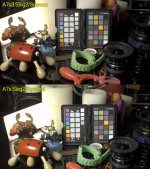
I'm enclosing two images (okay so there's a chart in there, but last one i promise). This workflow is now PPro. Firstly is with PPros built in Slog2 Input LUT and the second one is a tweaked one i've generated with the LUTCalc application. I'm enclosing that LUT here too for others to try out.

So first is footage in PPro with the Slog2 transform on the left, bit green and yellow.

And then with a LUT on the right doing a 709A thing.

I'm liking where everything is with the custom LUT. I've settled on shooting Slog2/SGamut3.cine. I felt the .cine was a little nicer on the reds funnily enough. There isn't much in it though. And yes our skin is that pale, we are in the UK afterall.

The LUT is targeting ISO 1600, Sgamut3.cine and Slog2

I've boosted constrast and saturation a bit.

The LUT :

https://www.dropbox.com/s/iwn1l2qgskvz3sb/A7sII_Slog2_SGamut3cine_1600.cube?dl=0

I've been using the Gamma Assist display too and that helps you expose with eyeballs. I tried using the spot meter which is fine if you've got the time, i'm keeping skin +1 or so ideally. But more recently been trying zebras at 50 +5 or so. However i find the zebras a bit too distracting when trying to focus at the same tie. So in a way eyeballing skin via Gamma Assist seems to give good results.

The IBIS is making all the difference for me though. I'm able to hand hold and be happier with the results.

There is still the issue of whether one of the cine curves would yield better results but in post i find them tough to work with, the highlight rolloff is quite unforgiving with adjusting exposure.

Noise is tamed at 1600 for sure. I've done a few low light tests and will do more. Generally it is better to up the ISO to get an exposure rather than exposing at a low ISO and trying to boost up.

There is an annoying chroma style noise in the shadows (in all cameras) but i've always has some Nuke based scripts that's removed that. So i'd generally process all 'real' footage for use anyway.

All in all, still happy with the changes even though they're not as dramatic as we'd like to see

cheers
Paul
 

Attachments

  • PPSlog.jpg
    PPSlog.jpg
    14.9 KB · Views: 0
  • MySlog2.jpg
    MySlog2.jpg
    16 KB · Views: 0
Back
Top