Sony A 6300 Overheating is a real problem

My experience thus far - and having the camera only about two weeks - without extensive use - is that indoors - specifically shooting HD or taking pics (which is what I've used it for on paid gigs) - no problems to speak of.
Outdoors is certainly a different animal altogether. Even in the shade, at around 87 F - recording HD internally - I get the overheat symbol warning around the 20 min mark.
One should certainly not get this camera for continuous recording IMO. It remains to be seen if it will have a staying place in my kit - for gimbal work and possible 2nd camera stuff.


Thats how I feel, for now it stays in my kit as a slow mo cam, B cam, and gimbal camera. That is until the A7R II drops in price (I do photo work as well and have the A7R for stills and wouldnt mind a a7r II so I have a back up camera with 36+mp)
 
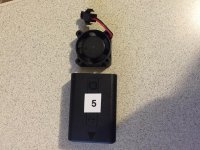
I have also purchased a small USB cooling fan and a Peltier effect device so I will try these when they arrive.

Your reference to “Peltier effect devices” sent me scrambling off to Google. Very interesting. Now the challenge is researching devices that:
-Have the right voltage for whatever battery you might use.
-Match up well with appropriate heatsinks. (I suspect you can avoid fans).
-Are the right size to match the camera base. (Or a camera cage).
-Could be attached to the base of the camera in a removable way.
-Are priced reasonably. (I was seeing items in the $10-$40 range)

If anyone comes up with good solutions here, please let us know.
 
Last edited:
Right, I am chasing a number of solution's the Peltier device was a 6 euros and is 25mm x 25mm and requires 5v, suitable to power of a USB supply, i have also ordered a mini heatsink for it and a 5v mini fan 30mm x 30mm x 5mm.

Another possible solution uses the small 5v fan.
I will mount it on my camera cage, right under the battery compartment with the door open and make a airtight seal it with blue tac or something.
Then I open the door housing the USB and mic inputs, I hope to draw cooler air from the openings near these usb connectors,across the sensor and processors and suck it out via the battery compartment. Does that make sense?

Incidentally I tried another test today, in 28C / 82F (55% humidity) I left the camera running outdoors (no wind) but in the shade under an car port, it recorded HD for 45 min before the temp alert appeared.

I will be out this weekend at a festival with the a6300 with no cage using its internal battery to see how I fare shooting run and gun 5-10 min clips, I want a real world evaluation for my style of shooting and its pretty warm here at the moment.

Also as soon as the stuff i have ordered via eBay arrives I will do more tests.
 
Last edited:
I can't even start to conceive how badly you have to write your firmware so that this actually helps. Amazing.

Great find, Erik!
 
Great work Eric, I had my suspicions the SDHC card was adding to the problems ...see earlier posts.

Anyhow I may have gone one better, I have just purchased an SDHC card extender cable, that allows the card to sit outside the camera whilst recording. Hence I have removed another heat generator from inside the camera, the battery is now outside as is the card.

More tests to come when it arrives.
 
Last edited:
Great work Eric, I had my suspicions the SDHC card was adding to the problems ...see earlier posts.

Anyhow I may have gone one better, I have just purchased an SDHC card extender cable, that allows the card to sit outside the camera whilst recording. Hence I have removed another heat generator from inside the camera, the battery is now outside as is the card.

More tests to come when it arrives.

Vultch your a MAD MAN! lol!
 
Thanks guys! Glad I can contribute.

I really wanted to get the camera working with the smallest footprint possible so a cage is about as big as I wanted to go. Adding a dummy battery sure makes the camera awkward but in some situations it will be fine. Also will come in handy for those long shoots.

Next step is getting the a6300 outside in temps around 85-90 degrees and shoot normal in 4K. The fast SD Card makes a huge difference but don't forget to also pull the LCD off the body a little. It doesn't have to be much but I found it will avoid the high temp warning. I only pulled it back a 1/4 of an inch. As for shooting in full sun I doubt it wont overheat so try to shade the camera if you can. I was surprised when I took a temp reading and the difference between the 2 cards was 8 degrees! My copy would shut down around 107 degrees. The Transcend card got up to 109 degrees and the Lexar was 101. This is HUGE. I didn't retest with the Cage off so keep that in mind. I will try that this weekend. I've had so many shoots this week it's been crazy. Heading out for another today and tomorrow it's a big editing day. This weekend i'll have some free time and the indiPro Dummy Battery will arrive on Friday too.
 
Last edited:
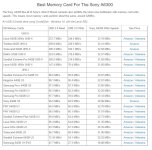
Eric, these results are really strange!! Apparently the Sony A6300 is not UHS II compliant. It also has a bottleneck in writing, and is limited to about 33 MB/s. This is a pretty good comparison of the write speeds of different memory cards. See the screen grabs below:


http://alikgriffin.com/best-sd-memory-card-sony-a6300


* SD Memory Card Type: UHS-I


++++
I have the SanDisk Extreme Pro 64 GB SD cards. They are the fastest cards in just about every UHS-I camera. My Sony A6300 consistently overheats with those cards. The SmallRig cage also didn't seem to help at all. :(

Camera Memory Speed is a great web site, with actual wrote time tests for a number of cameras. Unfortunately, they haven't tested the A6300 yet:

http://www.cameramemoryspeed.com


I am not saying you are wrong! It is just really strange, because the camera shouldn't be doing anything different with a UHS-II card. Weird!!!

I'd love to hear from anyone else who has had a chance to try the UHS-II cards.

ETA: Okay, I just ordered a Lexar 64 GB 2000x UHS-II card. It should be here on Saturday.

Thanks Eric!

Cheers!
 

Attachments

  • a6300 1.JPG
    a6300 1.JPG
    134.9 KB · Views: 0
  • a6300 2.JPG
    a6300 2.JPG
    56.5 KB · Views: 0
Last edited:
If Erik's theory is right, then it would also mean using an external recorder and not recording internally at all would greatly reduce the overheating issue...
I have used mine with PixE5 quite a bit... but have been too busy to actually test or compare this in controlled setting
 
Eric, these results are really strange!! Apparently the Sony A6300 is not UHS II compliant. It also has a bottleneck in writing, and is limited to about 33 MB/s. This is a pretty good comparison of the write speeds of different memory cards. See the screen grabs below:


http://alikgriffin.com/best-sd-memory-card-sony-a6300


* SD Memory Card Type: UHS-I


++++
I have the SanDisk Extreme Pro 64 GB SD cards. They are the fastest cards in just about every UHS-I camera. My Sony A6300 consistently overheats with those cards. The SmallRig cage also didn't seem to help at all. :(

Camera Memory Speed is a great web site, with actual wrote time tests for a number of cameras. Unfortunately, they haven't tested the A6300 yet:

http://www.cameramemoryspeed.com


I am not saying you are wrong! It is just really strange, because the camera shouldn't be doing anything different with a UHS-II card. Weird!!!

I'd love to hear from anyone else who has had a chance to try the UHS-II cards.

ETA: Okay, I just ordered a Lexar 64 GB 2000x UHS-II card. It should be here on Saturday.

Thanks Eric!

Cheers!

I wish I knew more about the tech in those Lexar chips. They don't heat up like my other cards due. Maybe it's not the speed but the efficiency of the new memory Lexar is using. Again when I took laser readings from the Lexar card it was 8 degrees less than the Transcend.

If the a6300 can only write at 32MB/s it doesn't make mathematical sense but something about the card is improving performance and preventing overheating. Crazy stuff guys.
 
Wouldn't it be a lot cheaper, just to buy a JVC LS300 - instead of trial and error to fix the A6300 over heat problems?
 
I wish I knew more about the tech in those Lexar chips. They don't heat up like my other cards due..... Crazy stuff guys.

It was a great find Eric! Let's see if I can duplicate the trick when my Lexar 2000x UHS-II arrives on Saturday. :)

I was getting pretty frustrated with the A6300, like you were. I saw that you had posted yours here a few days ago.

+++

I also just bought a used Nikon D500. That will be here on Saturday too.

It is a bit too expensive for an APS-C camera for just stills for me. I would be happy with a D7200. But if the 4K looks good, it could help me to "rationalize" my camera kit. So far there is no one system that does everything.

Wish me luck! And thanks again. :)
 
re the chart, what am I missing, it does seem slightly confusing.
I assume MB/sec is MBytes not Mbits so assuming an 8 bit Byte so 30 odd MBytes/sec is roughly 240Mbits/sec ????
The camera states 60 or 100Mbits video data stream so thats well within the 240Mbits/sec

Camera selection, why not a JVC LS300, I guess everyone is different, the JVC seems to be a solid camera, I just wanted something very small as a B cam that could match my FS5. I travel a lot and I wanted a very small covert cam for filming in European cities that will not attract much attention. Pull out something larger in certain cities and city wardens etc can make you life hell. Never mind thieves and muggers.

Throw in its performance image wise, the ability to shoot LOG, that amazing autofocus system, it will sit nicely on my pilotfly gimble etc etc...

Run and gun I am happy with my a6300, getting a 5 or 10 min clip the camera has no issues I have tested it with no issues overheating shooting short clips.
Its when doing an long interview with repeated takes that the overheating becomes an issue, hence the cage, external battery and other mods I am working on.All the extra bits hanging off the camera is not an issue in that scenario.
 
The fact that changing the card reduces overheating so much means that there's a big bug on the firmware somewhere. It can't be the card's power consumption if the bad cards don't come out of the camera really, really hot after shooting. So it has to be something that triggers an awful computing loop when the card is... let's say slow but I'm not even sure it's that.

I wouldn't try to get the full truth because it's probably pretty difficult: I bet even Sony devs will be deeply puzzled when they read this. Let them fight with this. What you can do is build a list of which SD cards solve the problem.

In any case, even if we don't understand exactly how it works, it makes a lot of sense to me because it would explain the huge variation in overheating in different a6300 bodies: some people said it was a huge problem, others didn't have overheating issues at all.
 
The fact that changing the card reduces overheating so much means that there's a big bug on the firmware somewhere. It can't be the card's power consumption if the bad cards don't come out of the camera really, really hot after shooting. So it has to be something that triggers an awful computing loop when the card is... let's say slow but I'm not even sure it's that.

I wouldn't try to get the full truth because it's probably pretty difficult: I bet even Sony devs will be deeply puzzled when they read this. Let them fight with this. What you can do is build a list of which SD cards solve the problem.

In any case, even if we don't understand exactly how it works, it makes a lot of sense to me because it would explain the huge variation in overheating in different a6300 bodies: some people said it was a huge problem, others didn't have overheating issues at all.

Totally agree. I'm tempted to buy the SanDisk 64GB Extreme Pro SD (SDXC) Card UHS-II 280MB/s to compare but these cards are $100.
 
All my tests were done with a Sandisk Extreme Pro SDXC UHS-1 card 4k ultra HD class 10 /3 with a claimed max writing speed of 95 MBytes/sec, it still overheated.
 
I'm using Lexar 1000x 128gb cards and can confirm that these cards get longer recording times before overheating than PNY cards do. The cards definitely make a difference in terms of overheating. Eric is using the 2000x model, sounds like it might get even better performance than the 1000x in terms of overheating.
 
Back
Top