
Navigation
Install the app
How to install the app on iOS
Follow along with the video below to see how to install our site as a web app on your home screen.
Note: This feature may not be available in some browsers.
More options
You are using an out of date browser. It may not display this or other websites correctly.
You should upgrade or use an alternative browser.
You should upgrade or use an alternative browser.
Sony A 6300 Overheating is a real problem
- Thread starter JAPWOLF
- Start date
I want to bust open my Lexar card so bad to see what chips are in it. Would be cool to compare them to other brands too. I really think it comes down to the newer memory and it running cooler when writing.
Agreed. I would have went to the 2000x card but I was getting "good enough" results with the 1000x so in combination with the cage etc I was content with my continuous recording times. If the 2000x wasn't such a big step up in price I'd go with those, it sounds like it's completely cured the overheating. The 1000x improves it substantially, but doesn't take care of it completely.
Great feedback and update Eric!
Jim Ritscher
Well-known member
Eric has made the reasonable assumption that faster cards overheat less. But it might just be that some cards have better support circuitry that is largely independent of the speed. Only tests will tell.
Let me try to formulate this more clearly:
++++++
1.) One hypothesis at this point is that the newer standard UHS-II cards might enable the Sony A6300 to run cooler than the older UHS-I cards.
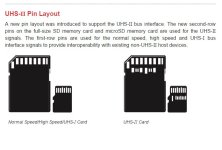
Although the Sony A6300 is not able to take advantage of the extra contact points on the UHS-II cards, for some reason Eric's Lexar 2000x UHS-II card was able to run much longer without overheating.
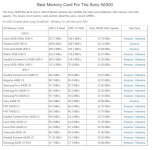
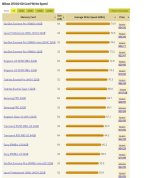
From another test from the Alik Griffin web site, the throughput of the UHS-II cards was almost identical to that of the UHS-I cards. For example, the Lexar UHS-II card had a throughput of 33.19 MB/s. The very fast Sandisk Exteme Pro UHS-I card had a throughput of 32.87 MB/s.
That very small difference in throughput cannot account for the difference in the running time. My A6300 overheats in about 30-35 minutes at "room temperature" with the Sandisk Extreme Pro 64 GB card.
+++++++
2.) An alternate hypothesis, is that the structure of the memory in the Lexar 2000x UHS-II card allows the camera to run more coolly. That is, it isn't just the UHS-II architecture/ designation, it is the specific Lexar card. So this may not apply to the Sandisk Extreme Pro UHS-II cards, for example.
We seem to have a partial conformation of this. unomas said that he achieves better times using a slower Lexar 1000x UHS-II card, but not as good as Eric with the 2000x UHS-II card.
This is still pretty odd, because the data rate/ throughput of the A6300 still seems to be capped at 33 MB/s. All of the "fast" cards have a data rate within 5% of the fastest card- within 1.65 MBs. Most are within .5 MBS.
Although the Lexar 1000x UHS-II card seems to be slower than most UHS-I cards in existing cameras. (see cameramemoryspeed.com) For example, on the Nikon D7200, a UHS-I compatible device, the Sandisk Extreme Pro 64 GB achieves 74.9 MB/s, while the Lexar 2000x achieves vitrtually the same speed, 74.5 MB/s. The Lexar 1000x achieves only 54.9 MB/s.
++++
I just received a Lexar 2000x UHS-II card an hour ago. I am running my own test. I will post back soon with my results. I also have a heat gun.
DerekDock, have you been able to test yet?
++++++
1.) One hypothesis at this point is that the newer standard UHS-II cards might enable the Sony A6300 to run cooler than the older UHS-I cards.
Although the Sony A6300 is not able to take advantage of the extra contact points on the UHS-II cards, for some reason Eric's Lexar 2000x UHS-II card was able to run much longer without overheating.
From another test from the Alik Griffin web site, the throughput of the UHS-II cards was almost identical to that of the UHS-I cards. For example, the Lexar UHS-II card had a throughput of 33.19 MB/s. The very fast Sandisk Exteme Pro UHS-I card had a throughput of 32.87 MB/s.
That very small difference in throughput cannot account for the difference in the running time. My A6300 overheats in about 30-35 minutes at "room temperature" with the Sandisk Extreme Pro 64 GB card.
+++++++
2.) An alternate hypothesis, is that the structure of the memory in the Lexar 2000x UHS-II card allows the camera to run more coolly. That is, it isn't just the UHS-II architecture/ designation, it is the specific Lexar card. So this may not apply to the Sandisk Extreme Pro UHS-II cards, for example.
We seem to have a partial conformation of this. unomas said that he achieves better times using a slower Lexar 1000x UHS-II card, but not as good as Eric with the 2000x UHS-II card.
This is still pretty odd, because the data rate/ throughput of the A6300 still seems to be capped at 33 MB/s. All of the "fast" cards have a data rate within 5% of the fastest card- within 1.65 MBs. Most are within .5 MBS.
Although the Lexar 1000x UHS-II card seems to be slower than most UHS-I cards in existing cameras. (see cameramemoryspeed.com) For example, on the Nikon D7200, a UHS-I compatible device, the Sandisk Extreme Pro 64 GB achieves 74.9 MB/s, while the Lexar 2000x achieves vitrtually the same speed, 74.5 MB/s. The Lexar 1000x achieves only 54.9 MB/s.
++++
I just received a Lexar 2000x UHS-II card an hour ago. I am running my own test. I will post back soon with my results. I also have a heat gun.
DerekDock, have you been able to test yet?
Attachments
Last edited:
Well, no miracle cure for me! 
I just got the Lexar 2000x 64 GB UHS-II card today. I tested 3 times shooting 4K 24P video in the A6300, with more than an hour between tests. My last, best result was 53 minutes (at almost 9:00 pm, as it is cooling off outside.) That is in a near perfect, "best case" environment, indoors at 68 degrees. With 2 minutes between the finish of the first recording and the start of the second.
It is marginally better than before (maybe.) But this is also the first time that I recorded with the camera on a tripod, with a large metal Arca Swiss plate on the A6300, bolted to a big ball head (heat sink.) I also turned OSS off, opened the battery compartment door, opened up the flash, and pulled out the LCD. The camera was pointed at a static subject- basically a blank wall with a TV that was turned off. No movement, no action.
+++
I am throwing in the towel on using the A6300 for video. I still have my Panasonic cameras that work fine. If I keep the A6300 for stills, I may occasionally use it for short video takes. The Panasonic GX85 in particular is a lot of fun to use, with it's 5 Axis stabilization, as well as Dual IS with Panasonic lenses with IS.
I could spend $1k to $1.5k to buy an external 4K recorder. But my $400 (used) Panasonic G7, and my $687 (new) Panasonic GX85 just keep recording, without a problem, to the end of their battery life. Pop in a new battery and keep going. The internal 4K is "good enough" for most of my needs when downsized to 1080. I don't really need a 4K recorder for my work right now. And I would rather work with multiple cameras from the same system when I use 2-3 cameras, rather than mixing menu systems, lenses, etc.
+++
Frustrating. This camera is so close!
Good luck.
Michael
I just got the Lexar 2000x 64 GB UHS-II card today. I tested 3 times shooting 4K 24P video in the A6300, with more than an hour between tests. My last, best result was 53 minutes (at almost 9:00 pm, as it is cooling off outside.) That is in a near perfect, "best case" environment, indoors at 68 degrees. With 2 minutes between the finish of the first recording and the start of the second.
It is marginally better than before (maybe.) But this is also the first time that I recorded with the camera on a tripod, with a large metal Arca Swiss plate on the A6300, bolted to a big ball head (heat sink.) I also turned OSS off, opened the battery compartment door, opened up the flash, and pulled out the LCD. The camera was pointed at a static subject- basically a blank wall with a TV that was turned off. No movement, no action.
+++
I am throwing in the towel on using the A6300 for video. I still have my Panasonic cameras that work fine. If I keep the A6300 for stills, I may occasionally use it for short video takes. The Panasonic GX85 in particular is a lot of fun to use, with it's 5 Axis stabilization, as well as Dual IS with Panasonic lenses with IS.
I could spend $1k to $1.5k to buy an external 4K recorder. But my $400 (used) Panasonic G7, and my $687 (new) Panasonic GX85 just keep recording, without a problem, to the end of their battery life. Pop in a new battery and keep going. The internal 4K is "good enough" for most of my needs when downsized to 1080. I don't really need a 4K recorder for my work right now. And I would rather work with multiple cameras from the same system when I use 2-3 cameras, rather than mixing menu systems, lenses, etc.
+++
Frustrating. This camera is so close!
Good luck.
Michael

Erik Naso
Veteran
Today I had some wildly inconsistent overheating issues. This camera is crazy!!! Check out the blog post for the UPDATES at the bottom of the post.
Basically it started to overheat with any card I used at around 17 minutes. I didn't do anything different than before. I tried taking the cage off then putting it back and using three different cards. All overheated around 17 minutes. I felt pretty defeated to be honest. I decided to try one more thing. I doubted it would do anything but why not. I forced the camera to do a pixel remapping by changing the cameras date to 2017 and restarting it. Did another record and it kept going and going with no high temperature or overheating. WTF? Why did this work?
Unadog could you try this? Heck anyone that is having a episode of overheating try this! The camera is so inconsistent with this overheating. Just when you think you figure it out it does something different.
Basically it started to overheat with any card I used at around 17 minutes. I didn't do anything different than before. I tried taking the cage off then putting it back and using three different cards. All overheated around 17 minutes. I felt pretty defeated to be honest. I decided to try one more thing. I doubted it would do anything but why not. I forced the camera to do a pixel remapping by changing the cameras date to 2017 and restarting it. Did another record and it kept going and going with no high temperature or overheating. WTF? Why did this work?
Unadog could you try this? Heck anyone that is having a episode of overheating try this! The camera is so inconsistent with this overheating. Just when you think you figure it out it does something different.
C100Scottie
Active member
Mine overheated at 1080p yesterday. Not really happy about. My A7R2 overheated in 1080p last week. My Samsung NX1, sitting out in high temps, no problems.
Bassman2003
Veteran
Thanks for all of your testing. Just sounds like the a6300 needs a MKII version to be trusted for video use. 4k + processing is asking a lot of these small cameras. Too bad Samsung was not in it for the long haul as the NX-2 would have been a cracker!

NorBro
Major Contributor
I shot another project with the A6300 this past week with the Ninja Flame and a dummy battery.
B-roll all day long for 8 hours straight. Rolling from a few seconds up to 2 minutes. 4K/24p. No issues.
I know people have mentioned each camera behaves differently, but anyone that really loves theirs should at least try an external recorder once and see if that helps.
B-roll all day long for 8 hours straight. Rolling from a few seconds up to 2 minutes. 4K/24p. No issues.
I know people have mentioned each camera behaves differently, but anyone that really loves theirs should at least try an external recorder once and see if that helps.
I forced the camera to do a pixel remapping by changing the cameras date to 2017 and restarting it. Did another record and it kept going and going with no high temperature or overheating. WTF? Why did this work?
Unadog could you try this?
I changed the date to 2017. Then I turned it off and back on. I didn't notice any long process running for remapping? Does it have to be in P/S/A/M mode instead of vidoe mode to run?
Then I ran another test using my Sandisk Extreme Pro 64 GB card. Same setup as yesterday. The room temperature at start was 72.5 (versus 68 degrees yesterday.)
It ran for 51 minutes, versus 53 minutes yesterday - with the Lexar 2000x 64 GB UHS-II. So it is pretty consistent at least.
++++
Details: I restarted it at 25 minutes, then at every 10 minute intervals.
At 42 minutes the heat warning was on (might have gone on a little earlier.) At 45 minutes, when I restarted it again, it had a temperature of 105 degrees F, +- . It ran another 6 minutes after that, to 51 min total, then shut off. At least the last file wasn't corrupted this time.
The hottest spot on my camera seems to be along the top, right at the corner between the top plate, back plate, and the EVF. Is that consistent with your experience?
++++
I guess I will run one more test. I will bump the date again to 2018 in photo mode to see if it makes any difference in the remapping process?
Unless something major happens, I don't think Sony makes sense for me right now. I still have 4 systems for stills & video: Nikon, Canon, Sony, and Panasonic. I would ideally like to thrift that to 2 systems, but getting to 3 right now would still be a big help.
Thanks for all of the hard work on this Eric!
Best,
Michael
Okay, I just ran another test. Higher room temp of 76 degrees. I used the Lexar 2000x 64 GB UHS-II card again. I set the date to 2019 to force the "remap." It seemed to pause after startup.
Results: 39 minutes.
That is what I was getting a couple of weeks ago, so no real change in my timings. It also seems pretty linear with teh room temperature for me. Oh well...
Results: 39 minutes.
That is what I was getting a couple of weeks ago, so no real change in my timings. It also seems pretty linear with teh room temperature for me. Oh well...
no problems today running multiple 20+min clips under semi sunny conditions (cage, usb power, swap battery once).
Temp:75f Wind 5mph Humidex 84f
cage remained 'cool' the battery grip and part of the cage was in the sun and the grip was hot, but not overheat warning. I think the breeze was cool enough to prevent it from overheating.

Temp:75f Wind 5mph Humidex 84f
cage remained 'cool' the battery grip and part of the cage was in the sun and the grip was hot, but not overheat warning. I think the breeze was cool enough to prevent it from overheating.
Last edited:
Were you shooting 4K or 1080? Were the 20 min clips back to back?
Thanks! Still struggling with this thing. How can you rely on it?
4K 24p, back to back within 30 seconds; ceremony went for about 1.3 hours.
Q: Would I rely on it for long outdoor events?
A: not for paid work, only due to the risk.
Q: Would I rely on it for long indoor events?
A: I'm beginning to think it will be fine with cage/ext. battery/flash popped/door open. as I shoot more with it, I will get a better feeling.
Perhaps next time it's sunny and hot I'll leave the camera out in the sun and try to shoot multiple 4K clips.

Another test. With the SmallRig cage on, which is the first time in my recent tests.
Battery door open, flash popped up, Sandisk Exteme Pro. On a tripod like recent tests. The air conditioning is on in the house for the first time. It is 70 degrees. No change of battery, like all of my recent tests.
I got 34 minutes!
My last test was 39 minutes. Prior ones were 51 and 53. Maybe no breeze with the air conditioning on? I was trying to see if the cage helped any, after I decided it didn't help a week ago.
I don't actually use the camera, but it is a lot of fun to test with it!
Battery door open, flash popped up, Sandisk Exteme Pro. On a tripod like recent tests. The air conditioning is on in the house for the first time. It is 70 degrees. No change of battery, like all of my recent tests.
I got 34 minutes!
My last test was 39 minutes. Prior ones were 51 and 53. Maybe no breeze with the air conditioning on? I was trying to see if the cage helped any, after I decided it didn't help a week ago.
I don't actually use the camera, but it is a lot of fun to test with it!

Vultch
Well-known member
Ok chaps...mixed results
Yesterday I ran the a6300 recording 4k video XAVC for 3 and half hours back to back non stop with out any issues.
My only problems were running out of rechargeable battery power and memory on the SDHC card.
The camera was filming a TV screen to stress the codec and generate as much heat as possible.
I did a further 2 tests each approx an hour back to back and the camera kept recording with no temp alarms.
Room temp was 24C / 75F as it was inside there was no wind to assist cooling.
As well as running of an external battery I had also moved the memory card outside of the camera using a cheap SDHC cable extender. I was measuring the temp of the camera using a laser thermometer. The panel behind the sensor in front of the LCD display sat constantly at 32C or 89F.
So I was quite happy a solution had been found, sadly today after an approx hour back to back recording an temp alarm came on. room temp was again 24C / 75F
Considering the battery is now out and the memory card is also outside the camera still gets warm, max temp around the C1 button of 36C / 96F.
I liked this solution as it involved no moving parts or additional battery power.
Anyhow I will move on trying other fixes, I feel moving the card outside has helped but its not 100% reliable yet.
Yesterday I ran the a6300 recording 4k video XAVC for 3 and half hours back to back non stop with out any issues.
My only problems were running out of rechargeable battery power and memory on the SDHC card.
The camera was filming a TV screen to stress the codec and generate as much heat as possible.
I did a further 2 tests each approx an hour back to back and the camera kept recording with no temp alarms.
Room temp was 24C / 75F as it was inside there was no wind to assist cooling.
As well as running of an external battery I had also moved the memory card outside of the camera using a cheap SDHC cable extender. I was measuring the temp of the camera using a laser thermometer. The panel behind the sensor in front of the LCD display sat constantly at 32C or 89F.
So I was quite happy a solution had been found, sadly today after an approx hour back to back recording an temp alarm came on. room temp was again 24C / 75F
Considering the battery is now out and the memory card is also outside the camera still gets warm, max temp around the C1 button of 36C / 96F.
I liked this solution as it involved no moving parts or additional battery power.
Anyhow I will move on trying other fixes, I feel moving the card outside has helped but its not 100% reliable yet.