Removing wrapper

I'm not quite sure:
http://www.dvxuser.com/V6/showthread.php?252435-Edius-conversion

There is no chance that Edius recognizes video clips made by VirtualDub as progressive (even when I created video from picture sequence and then encoded it with Canopus codecs), except if encoded to XViD. I've tried with UT as well.
I was 100% sure that the problems were with NTSC clips, but it seems that PAL is not immune as well.


Do you understand what's going on? The screenshots in your other post supports what I said above...


Since the output clips from vdub do not have an interlaced flag (if you've done it properly), Edius "sees" it as progressive and upsamples the chroma as progressive. Notice the last 2 screenshots have cleaner edges

The native GH1 clips have progressive content, but are encoded interlaced (There is a flag in the elementary stream that indicates this). As a result Edius upsamples the chroma with interlace upsampling, not progressive upsampling. As a result, you get CUE (chroma upsampling error). If you notice in your 1st 2 screenshots, there are little notches . That is CUE.

There is no simple procedure to wrap or unwrap to fix this; because the flag is in the elementary stream. Further, it's not a soft flag - there is nothing to strip. The only way is to re-encode it.
 
Let me recap, let's see if I got it right:

1- the flag in the mts says it's progressive, recorded as interlaced, ie not interlaced
2- ffdshow reads the flag and interpretates the stream as separate frames of the same field, and recomposes them
3- AviSynth serves the recomposed raw stream which is at this point pure progressive, not two fields, without the need to merge anything
4- virtualdub transcodes full stop.

Therefore, you say, it's impossible for VD to export an interlaced avi.
AND no preprocessing other than calling directshow is needed.

Okay.

About blender, well, I found the editor very basic and highly userunfriendly.
Lightworks on the other hand is complete and, despite it's counterintuitive, once you get hands on it it's nice to use.

It hugely lacks codex support doh, and there's an importing 1080p/i bug that's still not solved..... ;)
 
Let me recap, let's see if I got it right:

1- the flag in the mts says it's progressive, recorded as interlaced, ie not interlaced

It's actually in the elementary avc video stream, not the .mts transport stream. Read a few posts above, it explains it better


2- ffdshow reads the flag and interpretates the stream as separate frames of the same field, and recomposes them
3- AviSynth serves the recomposed raw stream which is at this point pure progressive, not two fields, without the need to merge anything
4- virtualdub transcodes full stop.

It just decodes the avc stream content . Content is what's important here. Content is NOT necessarily the same as type of Encoding. You can have progressive content encoded as interlaced, or interlaced content encoded as progressive. There are other variations as well, and different types of interlaced encoding.


So it decodes it as 25p. When you frameserve to an encoder, you get 25p native. No flags. Progressive content encoded as progressive. If you've set this up properly, there should be no way to mess this up, unless your program is unstable. (i.e lightworks) , or there is some sort of communication error with the decoder .

If you did some tests and all intermediate formats (e.g. huffyuv, lagarith, ut video codec, uncompressed) suffer from this , then you can very strongly suspect the NLE is at fault.


Therefore, you say, it's impossible for VD to export an interlaced avi.
AND no preprocessing other than calling directshow is needed.

No , I didn't say that. You can frameserve interlaced content and encode interlaced if you want. For example, UT video has an interlaced video checkbox.

If you've set it up properly for this specific GH1 25p case, then I can't see where the problem is. It must be the other software. There is no other way to goof this up.


About blender, well, I found the editor very basic and highly userunfriendly.

Ok... I have to agree there. But at least it's a free option that actually works.


Lightworks on the other hand is complete and, despite it's counterintuitive, once you get hands on it it's nice to use.

If you ignore the crashes, instability, lack of format support, and lack of functionality or integration , then it's nice to use :)
 
@frear

If you want to, you can upload a tiny sample that you have processed through avisynth + vdub and I will examine it.
 
@frear

If you want to, you can upload a tiny sample that you have processed through avisynth + vdub and I will examine it.

I have uploaded two 100 frames long (140mb each) samples transcoded via AviSynth + VD to UT in page 2 (together with the original mts). I've indicated the syntax I've used for each.

If you mean a sample created with just the directshowsource command, I will, but I'm on holiday with an iPad only, so you will have to wait one week. ;)
 
Are you sure? All of my clips come from VirtualDub encoded to Canopus and are seem in Edius as progressive...

I am sure. Now I tried the following:
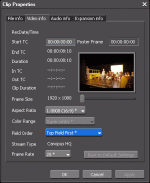
I imported XViD clip to VirtualDub (which is recognized by Edius as progressive) and transcoded it into Canopus HQ codec. Then I opened such transcoded clip into Edius and it shows "Top Field First" instead of "progressive".

Interlaced.gif

Please, tell me how do you succeed to generate progressive clip by Edius? I really NEED progressive clips.
Which version of Edius do you have? I have Edius 6.02 and Edius Neo 2.0.
 
Do you understand what's going on? The screenshots in your other post supports what I said above...
Since the output clips from vdub do not have an interlaced flag (if you've done it properly), Edius "sees" it as progressive and upsamples the chroma as progressive. Notice the last 2 screenshots have cleaner edges

I cannot completely agree. When I import such "progressive" and "nice-looking" clips into Edius, it shows (under clip properties) that the clips are interlaced. Funny, isn't it? When I mark them as progressive and export those clips again by using Edius, there are again the colour problems. :-(
 
I cannot completely agree. When I import such "progressive" and "nice-looking" clips into Edius, it shows (under clip properties) that the clips are interlaced. Funny, isn't it? When I mark them as progressive and export those clips again by using Edius, there are again the colour problems. :-(


This is a classic case of chroma upsampling error (google it)

Actually Premiere used to do this too. It would upsample native progressive AVCHD as interlaced, and you would get the notching as well


Leave them "labelled" interlaced then. It just means Edius has it reversed.

Do you care what it's "labelled" ?, or do you care about the end result ? Which do you think looks "better?" picture 1 & 2 , or picture 3 & 4 ?

The upsampling is what is important , if you care about how it looks
 
Progress report: I get a ton of crashes with the blackout/powell patch.... What could I possibly be doing wrong to get that much crashing. And this is happening in low detail shots too... Typically get 10 seconds and then it goes... It just boggles my mind that most people talk about great results with the patch... As I have the same GH1 as others I have to assume I'm doing something wrong. Advice?
 
Persistent write-speed errors may indicate an SD card problem. Be sure to use the camera to format the SD card before using it to shoot video. If it still fails to record reliably, try a different SD card to make sure the first card is not defective.
 
This is a classic case of chroma upsampling error (google it)

This makes sense. Very interesting to know about this problem!!

Do you care what it's "labelled" ?, or do you care about the end result ? Which do you think looks "better?" picture 1 & 2 , or picture 3 & 4 ?

What I would like is the following: Import MTS clip into Edius, edit and export it. Exported clip should have the same or similar picture quality as the original. Now I can't achieve it. There are always some noticeable degradations.
I mean, when I put MTS clip into VirtualDub and export by using Canopus LossLess codec, the resulted clip has the same quality to the original. I would like to know how to achieve this by importing MTS clip into Edius.
 
Persistent write-speed errors may indicate an SD card problem. Be sure to use the camera to format the SD card before using it to shoot video. If it still fails to record reliably, try a different SD card to make sure the first card is not defective.

Hey, just wanted to say that worked like a charm. Shooting great now! Feel kinda dumb that it was that simple of an issue. Anyway, thanks!
 
Back
Top