Paint menu FX9 - getting a perfect baked-in look

Even scenes that were lit usually had some elements that would burn up without a knee and many were only semi controlled real world environments. Us ancient relics in this business had to shoot video for many years before hyper-gammas and Log . It was all 709. T

Lenny, thanks for the walk down memory lane. Did you notice that your entire post is written in the past tense? "We used to this, and we used to that," I, on the other hand, am talking about camera technology and methods of shooting today in 2022 with modern cameras. Yeah, knee was a necessary tool back in the days of Betacam, but now? No way. I can handle talent wearing a white shirt today just fine without Knee. A look back at the hoops we had to jump through in the past is interesting, but ulitmately of no help to anyone now.

As for bringing an engineer out on a shoot tto paint the camera on-location (could be called grading on-location) while the client patiently waits is hardly a feasible approach for routine shooting on a daily basis. I have no doubt you did it back then, but I can't imagine you are recommending it as a legitimate solution for today's production environment, where even having an audio tech at all, let alone one who doubles as a colorist or engineer, is becoming increasingly rare.

In 2022 with a modern camera, are you still using knee?
 
Last edited:
Out of interest, I would love to know what combo of settings you would dial into the FX9 for such a scenario. In fact, more than just interest - I will go and test these settings out this coming week!

Uh, did you read my post? As I said . . . "I can't tell you exactly what combination of settings would be best on the FX9 without having a camera in front of me to dial them in with my charts and scopes".

It's impossible for me to setup a camea that don't have access to, so send me your camera and I will set it up for you and then you can go out and test the settings next week. :-)
 
Uh, did you read my post? As I said . . . "I can't tell you exactly what combination of settings would be best on the FX9 without having a camera in front of me to dial them in with my charts and scopes".

It's impossible for me to setup a camea that don't have access to, so send me your camera and I will set it up for you and then you can go out and test the settings next week. :-)

oops! I misread "can't" for "can" and got my hopes up.
 
I would completely disagree with Doug about the idea of ever shooting STD 5 709 with knee off unless you have absolute control of everything including someone simply wearing a white shirt. Its rare to have that limited a palette. Even scenes that were lit usually had some elements that would burn up without a knee and many were only semi controlled real world environments. Us ancient relics in this business had to shoot video for many years before hyper-gammas and Log . It was all 709. The knee was my very good friend as long as I knew how not to let it screw up a shot. Back then I would often have a tech (who often doubled as the audio guy) who could paint the camera setting to the shot and a good part of that was adapting the knee to the scene. Techs with good eyes were rare and they were artists and the DP's collaborator. People who were good at "painting" were in high demand though gradually with the advent of Log that specialty has sadly disappeared.

So I would never consider it a tool of the Devil - just a tool like any other and I would never shoot Std5 with the Knee off. I don't know anyone who did. It actually can function fairly well on whites as illustrated in the stills from Sony that Chris posted. In fact I prefer to only let it work in the whites which is probably why i set it a bit higher than Chris. Std 5 with a properly set knee can still produce great looking video and I shot plenty of extremely pretty and natural looking shots even without a paintbox. Just required skill.

Cine & Hypergammas are trickier to use for WYSIWYG. Alister Chapman said that they were designed to actually be underexposed by as much as a stop and then printed up in post though I never used them that way . As mentioned above they can look flat . For that reason I would usually tend to set my black level and saturation to the shot when using hypergammas. Of course that requires a decent monitor, but that can help giving you a WYSIWYG shot that looks like typical 709.

Auto Knee is absolutely a tool of the Devil though :-)

Doug, I would agree with Lenny on the bulk of his comments re STD5 with Knee OFF. The only time I would consider that is if it was a 100% controlled situation where I could light and limit the whole exposure range to around five stops because as Sony states ITU Rec 709 is technically 5.2 stops. For live broadcast where 709 is still the dominant standard and on Sony cameras STD 5 is still the preferred setting it is imperative to run a knee otherwise you don't have a hope of capturing any reasonable degree of dynamic range. Our games coverage today was a classic situation of a harsh sunny day with a stadium that late in the afternoon was what we call "soot and whitewash" In the deep stadium shadows we needed to run F/3.4 and in the bright sunlit areas of the stadium, it was close on F/11.0. These being the correct exposures for the players. That's about a 4.5 stop range for optimal exposure. Obviously wanting the best-handled exposure either side of that optimal exposure at any given second in a fast-moving game and to capture the greatest dynamic range on either side of that optimal exposure using the knee allows us to capture far more than five stops.

Doug as you would have to know today's modern cameras have a far greater dynamic range than older cameras. This means that the full dynamic range of the sensor no longer fits within the gamma curves used for TV’s and monitors. In broadcast television, any signal that goes over 100% gets clipped off and is discarded, so the camera's entire brightness range has to be squeezed into 0 to 100%. As you say it may be in your world that the devil's knee may indeed be the devil's tool and you hate it. But in the 709 broadcast world where we have to squeeze these later wider dynamic range cameras into this devil's world of 709 we have no option other than to use the dreaded devil's knee as you call it. Sony's basic setting recommendations for cameras operating in the broadcast 709 color space is to start off with the knee at 88 and slope set to +20 to get good latitude, albeit with quite highly compressed highlights. Which are far better than no knee uncompressed clipped highlights. Fine-tune from there depending on the shooting conditions at hand. Lowering the knee down to 83 gives you almost another stop of latitude, but you have to be careful as skin tones on certain people can creep up towards 83%. Doug I will agree with you if you think 709 is a devil's construct against the capabilities of modern cameras. It is... but unfortunately we have to live with it in the television world. Outside of that broadcast constriction? Fine grab as much as you can in a linear way without compression. That is a freedom broadcasters don't have.

And yes, I do cut and paste if I feel it helps clarify issues by doing so. I have often had people, especially younger people coming into the industry, where no one seems to train operators these days asking for help and clarity on certain questions. The web can be a veritable source of information for these untrained keen learners. There is a lot of good information out there but for the untrained beginner, it's hard to find. For those beginners, Sony amongst others produces a good range of training/info material and pointing people towards it can only be of assistance.

Finally I will conclude by seconding Lenny's comment "Auto Knee is absolutely a tool of the Devil though :)" Totally agree with that!

Chris Young
 
True, I haven't had anyone paint the camera in years and work with a few sound men who are sad that they no longer get to do their favorite side of the job . It used be standard for medium to high end corporate video, anything dramatic and even for interviews in docs etc. The cameras are of course much better now and especially with Log the need is less. I haven't checked Std on the FX9 , but while I expect it to be better than years ago, it still sounds nutty to me to turn off the knee altogether. It usually works great and when it doesn't cine/hypergammas are always there for the rescue . I still use my Ex-1 and that still looks great.
 
Feel free to try my matrix below.
I find most matrix settings will work the same with any gamma.

Matrix - ON - Std
Level : +2 or to taste
Phase : -8 though sometimes I go -7 or -9


R-G + 64
R-B - 10
G-R + 5
G-B 0
B-R - 5
B-G - 21

Lenny, it's a lazy Sunday here so I took the time to give your matrix a run. Yes, I don't mind this at all. Definitely leaning toward warmer skin tones, something I don't mind. The R-G of +64 is whacking a large amount of Red into the Green channel so this will give you an enhanced warming effect in that channel. Seeing that the green channel accounts for 59% of the encoded signal's total luminance (30% from Red and 11% from Blue) putting +64 Red into the Green channel will have quite a warming effect. Which aesthetically goes down well with most caucasian eyes. I have filed your matrix to use on a job sometime. I'll start with a single camera shoot and go from there. Thanks.

Chris Young
 
Cy , Thanks a lot . Your opinion means a lot to me . I just found a website way back that showed graphically what changing the matrix #'s would do and then I just whacked away at it with a bunch of different color magazine photos till I found something that seemed to make all the pictures look good ( different faces, exteriors etc). Turned out to work just as good in the real world and a few techs I respected ( in the old tech=painter days) told me they really liked it . But I need to try your settings because you seem to understand what 's going on better than me. I could never go in to those numbers again now because I don't remember what i did - only that it worked. :-)

I think a lot of the techs would play with the matrix numbers to make the vectorscope on a DSC chart form a perfect diamond shape that hit all the target boxes. Good for accuracy, but that didn't necessarily give you the most pleasing color. Of course the good techs could manipulate the matrix to improve the flesh tones, make product colors on a TV spot look the way the client wanted them to, or especially on multicam shoots make the camera's colors match . I couldn't do that.

I got the magazine idea from Tony Salgado who is a DP/ Tech/editor/colorist in LA now. (Shout out to you Tony!) Tony is a genius with matrix . He worked as my tech with his own Ikegami 57 and had a remote matrix box that he preferred to use often instead of the gels most of us used over the lens or lights to make things look pretty . He was a whiz and would have the picture painted before I could even do half the things I was used to. Actually made me a little nervous because I didn't have the slightest idea what he was doing but it always looked great . Anyway i still use the same magazine photos ( mostly Nat Geo) whenever I want to analyze camera colors and LUTs. I recommend everyone do that.

What surprised me was when the same matrix worked on the Sony F3 for a perfect match with the EX-1. Then when it looked crappy on the FS7 (later the FX9) was surprised to find that just turning the phase got a perfect match with the other cameras. Unfortunately the A7 cameras use a different system and frankly I can't do much with those settings. Don't understand them - wish In did and if you do let me know.

Let me know how the "Lenny Matrix" compares to yours or if you modify it.
 
Last edited:
I think a lot of the techs would play with the matrix numbers to make the vectorscope on a DSC chart form a perfect diamond shape that hit all the target boxes. Good for accuracy

Yes Lenny that's where I nearly always start. When you service a camera or tune one up straight out of the box this is the way it's normally done. Once that is done then the "Objective" technical alignment is done. Now I normally store this as a Tech Matrix. After that then comes the "Subjective" or artistic tweaks to satisfy the DP, director, client or whoever had the call on the final look. Then that's saved with an appropriate name. I remember one commercial for a biscuit company where they were absolutely happy with the color of their jam biscuits, cookies etc but were not at all happy with the color of the jam itself. And I remember the director saying "No, don't tell me it can be graded in post... I know it can. But this client wants to look at and approve the rushes before they go to post." So time was spent in the Paint Multi Matrix to change the hue and saturation of the appropriate red vectors to make them happy.

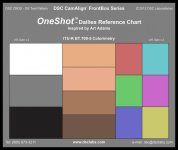
Since 2016 I've been using DSC Labs "One Shot Dailies" for lining up camera matrices and when shooting on set, single or multi camera. That way I get a consistent start point from which to work in post. This single tool has been, for me at least the most simple and accurate way for getting consistent results across most locations and varied lighting scenarios when working with a range of cameras. If you can shoot this chart and get the image segments to hit the vector boxes on ingesting you know you are at a very good starting point and you can then grade from there. Download and chuck this DSC dailies chart in Resolve and see what it delivers on the vector scope. Remember the vector scope must be set to 2 x mag for the correct color placement. Why 2 x? If it's of interest watch the videos below and that's all explained. I will let you know if I "fiddle" with your matrix. Unlikely as it looks like another option of settings that look good and has its place in a cameraman's toolbox.

Chris Young

dsc_labs_fbos_frontbox_oneshot_dailies_reference_2  000 x 1686.jpg

24 The DSC OneShot


DSC Labs OneShot Plus Chart

 
Yes I also use Art Adams' One shot as my basic chart, but I don't attempt to screw around with my Matrix settings. Actually the Multi-matrix is much more intuitive . I rarely touch it but I wouldn't be afraid to.
 
Back
Top