dmitrizigany
Veteran
I want donuts and coffee too! 

Follow along with the video below to see how to install our site as a web app on your home screen.
Note: This feature may not be available in some browsers.


It is based on the 1D LUT for the F3, so converts only gamma, not colour space.One specfic question at this point about the LUTS in the Odyssey/Apollo. Is the Slog 1 LUT based on the color space and gamma of the F35 or the F3?
It is based on the 1D LUT for the F3, so converts only gamma, not colour space.
- FIXED Apple ProRes recording artifacts 2016.06Mitch, does this new firmware fixes the issue you stated in the Service bulletin from August 5 2016:
"When shooting FSRAW -> Apple ProRes in either 4K50/60p or 2K100-240p, image artifacts can occur. Such artifacts generally only happen in low contrast images."
We have added a number of embedded preset LUTs to the Odyssey LUT Routing System in the latest firmware. I think that we still offer a number of additional LUTs on the website that you can choose to load into the Odyssey if you wish. I think we're up to something like 25 presets and another 25 or so additional LUTs. There's a lot more nice free LUTs available out there, like Allister Chapman's.Mitch are the camera LUTs that are posted on the website embedded in the firmware update or are they in addition to?
One specfic question at this point about the LUTS in the Odyssey/Apollo. Is the Slog 1 LUT based on the color space and gamma of the F35 or the F3?
I might as well ask you this tangential question, do you know if the Slog 1 DITs in the ACES software are based on the F35 and/or F3?
Up on Monday. Had to chain the engineers to their desks. ;-)So what's going on? It's still not online...
With Odyssey RAW Bundle, C500 4K/UHD RAW->ProRes up to 30p. This includes Apple ProRes 422 (Proxy).Mitch,
Will the prores proxy support 4K 60FPS on the C500? Also have you guys added a baked in LUT option? Thanks!
Yes, this is absolutely addressed.Mitch, does this new firmware fixes the issue you stated in the Service bulletin from August 5 2016:
"When shooting FSRAW -> Apple ProRes in either 4K50/60p or 2K100-240p, image artifacts can occur. Such artifacts generally only happen in low contrast images."
I've had some of those huge image artifacts, so just want to make sure it is fixed before I go on with 2016.10.
Thanks
Up on Monday. Had to chain the engineers to their desks. ;-)

24-hour rental price for Titan HD Extract is $149.Hey Mitch, couple quick ?
1. What will be the rental price for Titan?
2. I don't see any different options in my audio output screen. Do the channel selections only become visible when 8 channel audio is detected?
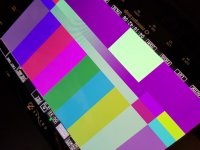
3. The Test Pattern (all) look weird, but only in ProRes mode. I changed to RAW...and they looked perfect so I thought it was a temporary issue, but when I went back into ProRes...back to this.
View attachment 117752
These are the recording options I tested.
FS 4K RAW - UHD ProRes (all flavors) - Purple Hue
FS 4K RAW - HD ProRes - Purple Hue
FS 4K RAW - RAW - No Hue
Canon RAW - ProRes - Purple Hue
Canon RAW - RAW - No Hue
Panasonic RAW - 4K/UHD Prores - Purple Hue
VARICAM RAW - .DNG - No Bar at all. Black screen.
So it looks like mostly a ProRes issue. You know what might help with that?
DNx
:cheesy:
