F3: Noise in Slog?

Im gonna look for a cleaner profile Cine One seems a lot darker and I suspect therefore cleaner (once fed more light or opened up Tstop), but what the costs of that will be (lost highlights) I will discover in time.

If you are playing with the built in cinegammas I highly recommend cine3 + cine4 since they let you record illegal signal up to 108% and in the case of cine4 it boosts middle grey to almost 60% which will help reduce any tendencies to open up the iris too much just to see better in the shadows. This was my favourite cinegamma to shoot with the majority of the time.

Here is a doc. I put together with charts for all the cinegammas.
http://www.starcentral.ca/Sony PMW.pdf


EDIT: Regrading the F5, it will always be there should you one day decide you want to get one.
 
PMW-F3 S-log test shots

PMW-F3 S-log test shots

*This was captured internally so it is 8-bit 420 material*

Here are some samples I was able to play with today from down the street where I found some nice extremes. The F3 with s-log really is a baby Alexa, like people have said. This was hard, afternoon SW USA sun.

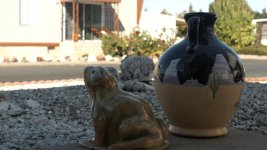
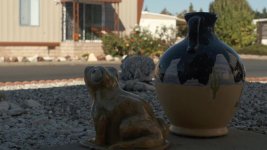
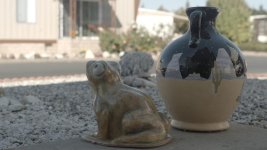
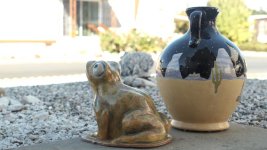
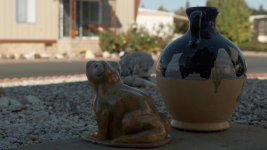
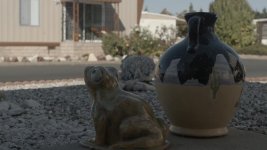
This was some yard decor I found that was in shadow with direct sun hitting the house in the background. I exposed one time to well protect all highlights and then again to let them go a over little to help bring shadows and mids up. Letting the shadows expose a little more in the next frames did away with most of the mosquito noise I was seeing in the lower left of the skin colored pottery in these shots. These were not fully graded! I am showing the raw slog, the Abel LUT applied and then an adjusted frame with highlights pulled way down, with spikes barely touching 100 and shadows pulled down to almost 0. Mids were lifted slightly.

Again this was the protected underexposed shot. In order, S-log shot, LUT applied, LUT with basic adjustments.

Frog SLog.jpgFrog Delogged LUT.jpgFrog Delogged.jpg
 
These were the "over exposed" shots. I say that because some highlights were just starting to clip with zebras set to 100%. If they had been set at 109 maybe the white building would have finally gone over. Everything held here, which is amazing. I could bring up the "skin" easily since this eliminated most of that noise I saw... which was still very light and fine film-grain looking when I did see it.

S-log, Abel LUT applied, then basic adjustments.

Frog SLog Over.jpgFrog Delogged LUT Over.jpgFrog Delogged Over.jpg
 
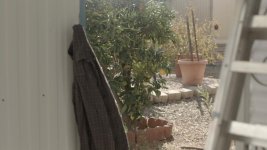
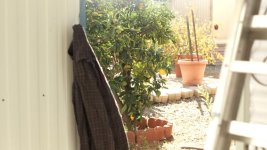
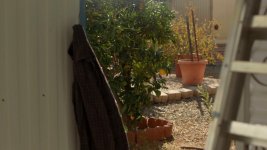
Here we are with the same scenario but this time a dark shirt is in frame and this is where I saw some fine noise pop up as well as some odd color artifacts. I need to play with this some more. Again, this is very basic with one minute adjustments.

This shirt was around 17% and the lemon tree was around 34 to 42. The shirt was completely in shadow under an awning with some bounce coming in. Pure sun on the tree and ground. Focus set on leaves.

Lemon Log.jpgLemon Delogged LUT.jpgLemon Delogged.jpg
 
With this much to work with, the codec might work fine without an off-board recorder for many, but not all, situations.

The mids here were lifted way up and highlights pulled way down in Color with some tuning in FCP. If this had been a run and gun interview, it would still be usable if needed. I think if I ran into this in real life and that pot were a person's face, I would let the background go right under clipping further than I did here. It holds so well. A colorist could probably make this work much better but at least I am getting a grip on what I have here. I think a better LUT might have helped some as well. I need .mga LUTs to work with Color.

Can you really use more than the 13 or 14 stops this is giving? I believe I'm ok for a while.

Frog Delogged advanced.jpg
 
Last edited:
that final grade looks bang on. good color saturation too.

I don't know if you notice it, but I use to always find a bit too much red in the red channel and have to bring it down. I wonder if your F3 is the same.
 
Thanks but this is about as basic as it can get considering I am not set up for color work. Raw is nice and all but this log file is all I need to deal with for 99% of work. In fact I bet that much of it will be set up with cine gamma if Im using my own camera and a client wants something to hand off quickly. I only touched color in this file by bumping saturation up a little. I have seen an endless supply of F3 footage posted looking too red or too magenta or blue, that is for sure. The last time I shot with an F3 was a critical interview with lots of set up time. I noticed mostly too much green and blue in the files actually. This may have been due to the Kino's I had to use since they are NOT corrected as many people assume. If I could have spec'ed lighting, I would have asked for some Hive plasma which is amazing, full spectrum light. You need to try it out if you haven't yet.

I was going to ask about IR on the F3 and if the internal ND does a decent job of filtering it? It seems fine in these tests, which was using all of it.
 
IR or more accurately "far red contamination" is still a bit of a problem on the F3 but to a far lesser degree than it was on the EX-1 and 3 . in practice I rarely pay attention to it. I think a Tiffen T1 filter will still fix it.
 
What's interesting about all of this is that with SLOG, I never use LUT's in post. I don't need to.
It's really quite simple.
I only use a histogram in the camera, and/or waveform monitoring on my Samurai blade when shooting.
With the histogram I make sure there is headroom in the most equal proportions possible on both sides of the "mountain".
I just keep the mountain centred and stretched out as possible with my exposure.
I don't even need to look for 38% middle grey with spot metering in the camera.
If I am clipping in either the shadows or the highlights of the scene, I need to find a way to either control the lighting or the framing.
Just like in film. That's it.

In post there is no need for even using a LUT if you are looking at your waveform's.
You can do this in Apple Color just as easily as Resolve.
In this beginning part of the process, you don't even need to look at the image.
You bring your shadows down to 2 or 3 IRE and your highlights to 97 IRE.
If you want them to be neutral you level the three values for RGB out at both ends of the spectrum.
You get to play with everything else in between like seasoning for your favorite dish.
It's all there for your pleasure.
 
Last edited:
I think some people here will disagree with this method but I'd like to see some results from it if you can post something. From what I understand, and not being a colorist so bear with me, but a LUT will allow a certain level of contrast control later in the mids, for example, that is very hard to make happen without it.
 
I think some people here will disagree with this method but I'd like to see some results from it if you can post something. From what I understand, and not being a colorist so bear with me, but a LUT will allow a certain level of contrast control later in the mids, for example, that is very hard to make happen without it.

To be honest I think the 'need' for LUTs to restore mid-tone contrast is somewhat overstated. All you need to do is play around with your curves to add or subtract contrast from any part of your image; your shadows, your highlights, your mid-tones or everywhere in between.
 
To be honest I think the 'need' for LUTs to restore mid-tone contrast is somewhat overstated. All you need to do is play around with your curves to add or subtract contrast from any part of your image; your shadows, your highlights, your mid-tones or everywhere in between.

+1
LUT's are for quick compensating corrections (curves) when you haven't got a lot of time to play around and need to turnaround a project.
Colorist's use them, because time is money and sometimes they have got 300 shots to grade in a day.
There is nothing in a LUT that you cannot achieve by hand. It is simply a curve. (which is a series of matrix'ed values)
What you do need however, is a good grading monitor that is color and exposure accurate.
I have a FSI 17" Grade 1 monitor and a BM video card. It wasn't too expensive and I can count on it.
 
This is becoming a very interesting thread and helping me to try and get my head together on how to use the cameras, which is clearly capable of excellent results in many situations.

What is also clear to me is that it may be appropriate to change settings due to the shooting circumstances if one is to pull the maximum quality.

With a raw camera I 'change settings' by putting my 'lump' (histogram) at different positions on the histogram, this will not, as far as I am currently seeing work so well with this camera.

I need to shoot with specific settings and know an ideal 'lump' for that setting, the lump I have used in the main for the last decade is ETTR which certainly does not sing in Slog.

====

Dennis thanks for those grabs from the Abel video! He goes through that so fast that I was going to do the same thing.

====

Shoot56
Nice work - so important to learn the camera..
I would comment that Slog is proving to be a flexible setting suitable for doco work where you may hit large DR scenes and/or get your exposure a little off (as happens in the heat of a real moment, with poor exposure tools that we must all suffer - unless you have a montor with full frame WF)

That may be enough for you and your needs - but it does have costs we as well as benefits.

SLog is clearly a bit noisy and IMO flattens the highlights a little too much to offer the colourist ultimate choice set (as would be expected with a grey point geared for highlight retention), I think it may be worth you examining the camera in a non Slog mode - Im looking to check out Cine1 which appears from the linked image to be high and harsh/linear (which would be clean, more malleable in post, and have poor highlight retention)- I guess this will work well if exposed well and you use reflectors/fill lights where required - Kodachome 64 - super quality, low ISO, and any exposure error and it is 'game over'

As for LUTs - In resolve I find Luts annoying because they mess up the sensitivity on the controls (basically giving them an undesired 'turbo'). Resolve has every tool for working without luts. I have not written them off however as a LUT enables one to use a start point made by someone with a lot of tools and time - time you may not have.

==
CineEI

I was asking earlier about CineEI vs Gain - for those interested my cursory search notes that they are different. Gain is a (global) amplifier, CineEI is a boost to the LUT which can 'enhance' monitoring (and IMO is snake-oil like Red's 'ISO slider'), the CineEI boost is/is not recoreded depending on the pipe you choose going to your recorder, which method of amplification degrades the S/N ratio of the camera worse is not clear, I would guess that the dedicated amplifier at the front end of the image chain does a better job - but that is a guess.

S
 
Last edited:
I have read some posts from very experienced camera guys stating different things when it comes to LUT's and cc work. I'll have to do my own tests like usual.

I think the fact that colors seem to be recorded differently in Slog needs to be talked about more. The Cine gammas, while very useful, seem to lack something when it comes to color and I get more of that electronic, Sony look with them but in log mode, something different happens. I read and saw an older post about this with good stills showing a comparison but I dont know how to find it. i think Timur did it. That first Vegas video that was made when S-log was announced on the F3 at an NAB show displays this fact too.
 
Indeed - testing testing.

Im checking out cinegammas because 'on paper' a deeper exposed image should have a better s/n ratio, and with raw shooters is well known to be true, but that is on paper. Certainly the FS100 gammas had a Sony look that was just too baked.

S
 
As for LUTs - In resolve I find Luts annoying because they mess up the sensitivity on the controls (basically giving them an undesired 'turbo'). Resolve has every tool for working without luts. I have not written them off however as a LUT enables one to use a start point made by someone with a lot of tools and time - time you may not have.

S

The problem with using pre-made LUTs for the F3 in Resolve, is that there have been virtually no official ones made specifically for SLOG on the F3. Most are designed for SLOG from the F35, or the Alexa, or other log-encoding cameras. As a result they don't play nicely with the F3 (without considerable adjustments at least - and those can over-stress the image).

Abel Cine made a couple of F3 LUTs, and from memory Sony did trickle out one or two very quietly, but none of them have been very good.

Most of my images I tend to push harder in the grade than just a basic de-log (normalising the SLOG curve), but I created a couple of basic de-logging LUTs to provide a starting point, and it sounds like a few people on here might benefit from that, so here's my standard de-log LUT for SLOGged F3 footage for anyone who wants to use it:

http://www.mediafire.com/?47k57vkcihi8t7p

Call it the 'Dreamsmiths F3 SLOG De-Log'.

Hope it helps.
 
Grug - thanks I will check your LUT.

My wider point was all LUTs seem to ruin the 'feel' of Resolve controls as they are additive even if that can be arranged in a manner that is non destructive. Id prefer a share of the nodes used to create it (if that is possible or how it was done). My personal LUT is not a LUT but a set of nodes globally stored, this seems more flexible to my little brain.

S
 
Grug - thanks I will check your LUT.

My wider point was all LUTs seem to ruin the 'feel' of Resolve controls as they are additive even if that can be arranged in a manner that is non destructive. Id prefer a share of the nodes used to create it (if that is possible or how it was done). My personal LUT is not a LUT but a set of nodes globally stored, this seems more flexible to my little brain.

S

Obviously nodes with the physical curves and settings embedded in them would give you more control and flexibility (to adjust what the LUT is doing right from the core). But a LUT is what it is, a standardised container to transport 'looks' to cameras, monitors and grading software - so they can't really function as Resolve nodes, they have to be more broadly applicable than that (or else they aren't much good for anything except use in Resolve).

That said, I'm quite comfortable starting with a LUT and adjusting my curves further to customise the look - so long as you're starting with a LUT that doesn't stretch the image too far, you're in a fairly safe position to push things further (with 10-bit 4:2:2 footage - or better - at least)

I'd like to try it but do you have an .mga version?

I'm afraid I can only export it directly from Resolve, which doesn't appear to support or save LUTs in an .mga wrapper.
 
Thanks but this is about as basic as it can get considering I am not set up for color work. Raw is nice and all but this log file is all I need to deal with for 99% of work. In fact I bet that much of it will be set up with cine gamma if Im using my own camera and a client wants something to hand off quickly. I only touched color in this file by bumping saturation up a little. I have seen an endless supply of F3 footage posted looking too red or too magenta or blue, that is for sure. The last time I shot with an F3 was a critical interview with lots of set up time. I noticed mostly too much green and blue in the files actually. This may have been due to the Kino's I had to use since they are NOT corrected as many people assume. If I could have spec'ed lighting, I would have asked for some Hive plasma which is amazing, full spectrum light. You need to try it out if you haven't yet.

I was going to ask about IR on the F3 and if the internal ND does a decent job of filtering it? It seems fine in these tests, which was using all of it.

I'm not sure where you set your whites in slog during your first frog test, but as a tip one thing you can try doing on the F3 is turning on the spot meter in the menu and holding up a white piece of paper where your light is falling and measure for 65-70% IRE (in slog). This is an alternative way of getting your exposure on the F3 if you don't happen to have a grey card.
 
Back
Top