ROCKMORE
Veteran
YOU ARE THE MAN! Thank you - I was losing my mutha f'n mind.....
+1 working now

Follow along with the video below to see how to install our site as a web app on your home screen.
Note: This feature may not be available in some browsers.
YOU ARE THE MAN! Thank you - I was losing my mutha f'n mind.....
Sorry for asking the dump question again, but if the aim of the end result is a contrasty and sharp image anyway with partially crushed blacks and partially blown highlights, what is the advantage of preserving detail in the shadows, if such detail is not visible in the end result? I can understand that an experienced colorist may appreciate the liberty to color correct and not leave this up to the camera, but for an inexperienced or intermediate user isn't this going to add more trouble and more potential "errors"?
I have loaded the new picture style and looking forward to trying it too, so maybe my questions are purely academic.
No it does not.Its actually wasting space cause under 16 there is nothing and there is no black.You need to add contrast to get details and adding contrast will reduce dynamic range blow out whites and crush blacks.it records a lot more DR than neutral with contrast=-4
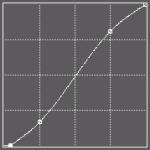


- scroll down to User Def 1., press DISP. button

Sweet!FYI. I made a how to video for installing and setting up CineStyle for video mode on 550D/T2i with ML. Since I'm sure a few of you are aware of the issue, simple fix, but some people prefer to have a video guide them.
http://vimeo.com/23195500
PS. I am loving CS so far, the blacks are actually useable and not crushed! WHO KNEW!?
Me too...I did the same steps, but without removing the ML card. What problems did you have with ML?
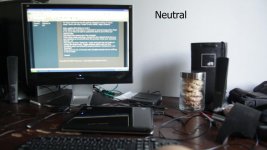
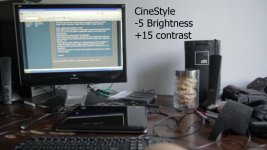
The Technicolor Profile is about the same as the first picture the second picture, there is a ever so slight burnout and loss of detail on the 3 wheeler front wheel I personally like the first picture is just ever so darker, but it is a close one.ROCKmore are these your own 2 profiles you created?

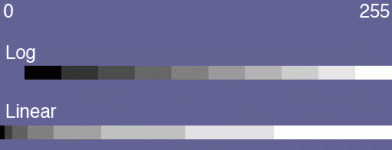
bwwd, have you tried this picture style? It most definitely records more dynamic range. It does this by spreading out more information and putting it into the same space. Essentially some tonal ranges will get more data coverage, and others will get less.
I have attached a simple graphic to this post. This illustrates MY UNDERSTANDING of approximately how log data is stored vs. linear data. The left of the graph is 0 and the right is 255. The two strips indicate ROUGHLY how the various tonal ranges are mapped into the 8-bit space. I want to stress again that this is based on my understanding of how this works, and it may not be accurate. If I am wrong, please someone point me toward facts that indicate otherwise.
View attachment 33694
My information is based on two sources. A previous poster in this thread indicated that the log format can store 10 stops of dynamic range, and allocates 25 numbers per stop to make this happen. My other source for the linear data is the "Expose to the right" mantra, as described on Luminous Landscape. In that article, the author indicates that the highest stop in your exposure takes up fully half of the bits (from roughly 128 to 255). This makes sense if you think about how binary counting works.


So is it true that I don't need to use the LUT in Premiere Pro all I need is a simple Luma 'S' curve?