New Technicolor Profile Is Amazing

Sorry for asking the dump question again, but if the aim of the end result is a contrasty and sharp image anyway with partially crushed blacks and partially blown highlights, what is the advantage of preserving detail in the shadows, if such detail is not visible in the end result? I can understand that an experienced colorist may appreciate the liberty to color correct and not leave this up to the camera, but for an inexperienced or intermediate user isn't this going to add more trouble and more potential "errors"?
I have loaded the new picture style and looking forward to trying it too, so maybe my questions are purely academic.

Try working with it for a while. Then go back to standard picture profile and make your own choice. It will actually prevent many underexposed and overexposed problems. Film negative works in much the same way.


These cameras usually work best in flat even lighting. Previously I was shooting everything in neutral and adding contrast.
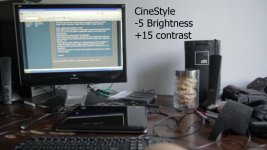
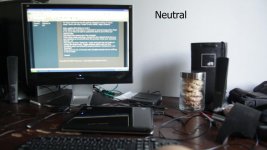
I can see already in one second from a look on the camera's playback between Cinestyle and Neutral that there will be 100% more information to work with in post. This is a big improvement in capturing data.

This test may add a whole new meaning to term down and dirty, but it shows the detail at the top of the computer (although badly out of focus) is there with the CineStyle profile where it is gone with Neutral. I just woke up, finally got CineStyle to work and this is the first shot.
 

Attachments

  • Neutral.jpg
    Neutral.jpg
    49.8 KB · Views: 0
  • CineStyle.jpg
    CineStyle.jpg
    55.4 KB · Views: 0
Last edited:
it records a lot more DR than neutral with contrast=-4
No it does not.Its actually wasting space cause under 16 there is nothing and there is no black.You need to add contrast to get details and adding contrast will reduce dynamic range blow out whites and crush blacks.
When i import vids with neutral -4 contrast and cinestyle -4 contrast then there is equal amount of detail in highlights but in cinestyle dark areas are brighter and theres nothing below 16
Contrast setting in camera decides if whites are more blown out.
 
Last edited:
bwwd, have you tried this picture style? It most definitely records more dynamic range. It does this by spreading out more information and putting it into the same space. Essentially some tonal ranges will get more data coverage, and others will get less.

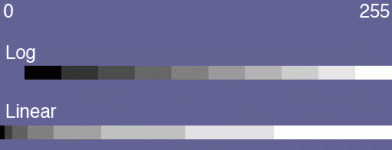
I have attached a simple graphic to this post. This illustrates MY UNDERSTANDING of approximately how log data is stored vs. linear data. The left of the graph is 0 and the right is 255. The two strips indicate ROUGHLY how the various tonal ranges are mapped into the 8-bit space. I want to stress again that this is based on my understanding of how this works, and it may not be accurate. If I am wrong, please someone point me toward facts that indicate otherwise.

log-vs-lin.gif

My information is based on two sources. A previous poster in this thread indicated that the log format can store 10 stops of dynamic range, and allocates 25 numbers per stop to make this happen. My other source for the linear data is the "Expose to the right" mantra, as described on Luminous Landscape. In that article, the author indicates that the highest stop in your exposure takes up fully half of the bits (from roughly 128 to 255). This makes sense if you think about how binary counting works.
 
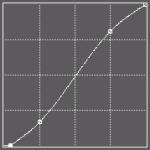
By the way, for everyone worrying about LUTs, I loaded up the official Technicolor LUT and came up with a way to approximate it (although with settings that aren't quite as extreme) using curves. I think you could easily do this in just about any program.

Essentially, you want to crush the blacks at the bottom of the range entirely, and then apply a gentle S curve to the footage. The curve image I've posted here looked virtually identical to the Technicolor LUT as viewed from the free LUT Buddy program.

technicolor-cinestyle-lut-curve.gif

In Apple Color you can make a curve like this in the Primary In room, and then save it to a file. Then, the next time you are color grading a project where you've shot the whole thing with the Technicolor CineStyle picture style, simply load the Primary In preset in Color for the first clip. Then you can hit the apply to all button and your whole project will have a good starting point for further grading. Nice and easy!
 
robotsound, your understanding is exactly what I've gleened from this whole exercise with the new Technicolor CineStyle. I created an almost exact preset for the color curves in Vegas this afternoon to bring back my clips to life :)

I really don't think it has all that much value for shots that are perfectly composed, but I believe it might be the saving grace for shots that are marginal in the run and gun world of wildlife video I'm concetrating on right now. Most of my work this winter has been a mixed background of rocks, brush, dark timber and bright snow. The combination of all three in one shot is virtually impossible to capture cleanly with these DSLR's. I haven't been able to film any critters since loading it, but from my testing it seems it might just be the ticket.

Cheers,
Pete
 
Hey I did a test with this new style a couple of days ago.

Check it out here:
http://vimeo.com/23133960

Password: sneekybeaver

I blew stuff out, changed ISO's (high/Low) 60fps, daylight, tungsten....a bunch of different stuff.

SKIP AHEAD TO ABOUT 5:06
 
- scroll down to User Def 1., press DISP. button

There was a little confusion because I could not find the DISP. button on my 60D. Turns out it is the INFO button to isolate the picture style and lock it in movie mode.

Here are 3 film grabs with simple adjustments to brightness and contrast to try to
match the 3 different picture profiles. Could you tell then apart if they were not labeled?
 

Attachments

  • NEUTRAL-CONTRAST--4--BR+3-CT+27.jpg
    NEUTRAL-CONTRAST--4--BR+3-CT+27.jpg
    114.3 KB · Views: 0
  • NEUTRAL-BR+7-CT+22.jpg
    NEUTRAL-BR+7-CT+22.jpg
    115.9 KB · Views: 0
  • CINESTYLE-BR-3-CT+47.jpg
    CINESTYLE-BR-3-CT+47.jpg
    113.1 KB · Views: 0
Last edited:
The Technicolor Profile is about the same as the first picture the second picture, there is a ever so slight burnout and loss of detail on the 3 wheeler front wheel I personally like the first picture is just ever so darker, but it is a close one.ROCKmore are these your own 2 profiles you created?
 
FYI. I made a how to video for installing and setting up CineStyle for video mode on 550D/T2i with ML. Since I'm sure a few of you are aware of the issue, simple fix, but some people prefer to have a video guide them.

http://vimeo.com/23195500

PS. I am loving CS so far, the blacks are actually useable and not crushed! WHO KNEW!?
 
FYI. I made a how to video for installing and setting up CineStyle for video mode on 550D/T2i with ML. Since I'm sure a few of you are aware of the issue, simple fix, but some people prefer to have a video guide them.

http://vimeo.com/23195500

PS. I am loving CS so far, the blacks are actually useable and not crushed! WHO KNEW!?
Sweet!
I have a 7d. This tutorial would be about the same just that I wouldn't worry about magic lantern since they haven't done one for the 7d, correct?
 
I did the same steps, but without removing the ML card. What problems did you have with ML?
 
I did the same steps, but without removing the ML card. What problems did you have with ML?
Me too...

I cautioned about it long ago but got no reply from you so I figured (hoped) that it will be fixed at some point.

The problem was - and is - that ML in MOVIE MODE does not register Picture Style names. one just sees "picture style 1" (or 2 or 3) without the names (you have to switch to picture mode in order to know what PS you are at)
I think (almost positive) that the setting ARE there, just without the names.
 
The Technicolor Profile is about the same as the first picture the second picture, there is a ever so slight burnout and loss of detail on the 3 wheeler front wheel I personally like the first picture is just ever so darker, but it is a close one.ROCKmore are these your own 2 profiles you created?

1. Neutral customized by lowering the contrast to -4 which looks about half way between CineStyle and Canon's Neutral style.
2. Neural
3. CineStyle

What I was doing here was just to see how close I could get the different styles with simple brightness and contrast adjustments. I spent a total of about 3 minutes on it and with a little more time could have gotten closer.

This is not to undermine the value of CineStyle, because in other situations it will save overexposure and underexposure a great deal. I do question the need for it with controlled lighting and delicate skin tones though.
Just as I would add warm or cool filters to my lights to get the right color temperature in my image out of the camera. Lighting is the first decision and post production comes second. I've never believed in the concept of "Fix it in post"
Each profile should be selected for it's own strengths in a given situation.

*BTW With this quick test shot with auto ISO the 3 wheeler is burned out on all 3 images including CineStyle which again shows that your lighting should be as even as possible to get the best well balanced image.
 
Last edited:
Thanks, Robotsound, your explanation is exemplary and easy to follow. Still, I'd really like to hear others weighing in to corroborate on these assertions. I guess I'm taking this question in a different direction, but if general consensus is that this is correct, why would all camera makers use the linear way of storing data instead of this way?

OTOH, what looks good for you is what matters, but to untrained eyes it would be great to at least have a theoretical understanding to fall back on.

/Gustaf


bwwd, have you tried this picture style? It most definitely records more dynamic range. It does this by spreading out more information and putting it into the same space. Essentially some tonal ranges will get more data coverage, and others will get less.

I have attached a simple graphic to this post. This illustrates MY UNDERSTANDING of approximately how log data is stored vs. linear data. The left of the graph is 0 and the right is 255. The two strips indicate ROUGHLY how the various tonal ranges are mapped into the 8-bit space. I want to stress again that this is based on my understanding of how this works, and it may not be accurate. If I am wrong, please someone point me toward facts that indicate otherwise.

View attachment 33694

My information is based on two sources. A previous poster in this thread indicated that the log format can store 10 stops of dynamic range, and allocates 25 numbers per stop to make this happen. My other source for the linear data is the "Expose to the right" mantra, as described on Luminous Landscape. In that article, the author indicates that the highest stop in your exposure takes up fully half of the bits (from roughly 128 to 255). This makes sense if you think about how binary counting works.
 
Thanks for everyone chiming in on how to use this new style. I have tried all the flat styles and always returned to neutral but this one looks like a winner.

I also did a video on how to install picture styles some time ago if anyone needs another look at how to do it - it is not hard, the only confusing part is at the end when you need to register the style within the menu (not shown in this video):

So is it true that I don't need to use the LUT in Premiere Pro all I need is a simple Luma 'S' curve?

 
So is it true that I don't need to use the LUT in Premiere Pro all I need is a simple Luma 'S' curve?

yes, the LUT is just an S curve, you can open the .lut file on a text editor and plot it on excel or something to see exactly what shape it has

I'm sure someone will come up with a more precise description, or even downloadable preset files for different programs, but all I remember is that in the test I did it was defined by just two points, and they were, on a [0-255]x[0-255] grid, something like (31,11) and (223,243) or very close to that (a simmetric S shape, with two points at 1/8 and 7/8 on the horizontal axis; I just don't remember how strong that S shape was, i.e. how low and high those points were) (I wouldn't want to give more detail anyway, as I did that S curve in two minutes, and my aim was just to get it close enough; if you look at the histograms it's clear it's not quite perfect, though it is pretty close)
 
Technicolor CineStyle LUT curve

Technicolor CineStyle LUT curve

Here is the exact Technicolor CineStyle LUT curve, represented in a 256x256 grid. To generate this data, I wrote a small Perl script to take the numbers from the LUT and plot them on a graph using the Image Magick library. Therefore, this is as accurate of a visual representation of the LUT as you can possibly get.

If you don't have LUT support in your color grading application, or don't want to use the LUT, you can get pretty much identical results by setting a luma curve with the slope shown below.

curve.gif

Enjoy!
 
Back
Top