New Technicolor Profile Is Amazing

Ok I got it to load in photo mode but the it is still titled as User Def.1. When I switch back to movie mode it the cinestyle settings return ti the default Def 1 settings
 
Before you pay anyone for a LUT,

LUT Buddy and Colorista are free from Red Giant:

http://www.redgiantsoftware.com/downloads/free-products/

The free Technicolor LUT is here:

http://www.technicolor.com/en/hi/ci...-printer-lights/cinestyle/cinestyle-downloads

Load it up in LUT Buddy, and like magic you have a really nice place to start grading your footage with Colorista.

It works really well.

Cheers,

Visugeek

Been there, unfortunately they don't work with Avid MC :(

Dave
 
Ok I got it to load in photo mode but the it is still titled as User Def.1. When I switch back to movie mode it the cinestyle settings return ti the default Def 1 settings
- upload them to the camera with EOS Utility, in P mode
- disconnect USB cable
- turn dial to Movie mode
- press MENU button, go to 4th tab with Left/Right buttons, enter Picture Styles
- scroll down to User Def 1., press DISP. button
- press SET on the first menu item (Picture Stlye)
- with Up/Down buttons select your custom style (Flat, Marvel etc)
- press SET again, then MENU to go back
- do the same for User Def 2 and 3.
- exit by pressing MENU several times

After this, when in Movie mode, press Q button, with Up/Down buttons select the picture styles icon, and with the dial scroll to your desired custom style. Its name will be displayed on the bottom right of the screen.
 
Any solution for grading the Technicolor profile that doesn't involve a high price plug in?
Red Giant Magic Bullet LUT Buddy; being free, I don't think you can complain at the price (yet, as someone else said, it doesn't work on avid)

BUT YOU DON'T EVEN NEED IT: I opened the .lut file on a text editor, and it's just three S curves, for RGB, and they're all the same! So I got the Technicolor Cinestyle ultra flat image, applied some curves to it, and got basically the same result as with the LUT! This means that this ultra flat picture style is so nice that you can get back your pretty colors with a simple luma S curve. COMPLETELY DIFFERENT FROM MY EXPERIENCE WITH PREVIOUS ULTRA FLAT PICTURE STYLES. Amazing.
http://www.similaar.com/foto/picturestyles/picturestyles.html

If you grade it and use the LUT the histogram gets really stretched, which cant be good for the details... only 0-255 of possible values, remember?

attachment.php

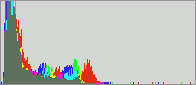
take a look at these two histograms:

picture taken with Neutral picture style and contrast=-2:
crop_neutral1_2_h.gif
same picture, taken with Technicolor and contrast=-4, then LUT applied:
crop_technicolor3_lut_h.gif
the first one represents "trying to get in camera something close to your final image", the second one is "shoot with the Technicolor picture style and then get your final image as you want it in post"

as you see, if you don't need the DR, it's best not to stretch your color space too thin; apart from making the codec closer to 7-bit (128 shades instead of 256) at the time of capturing your images, with the LUT you're adding contrast to all the noise and sharpening artifacts in your recorded images
here you can see the original pictures and further explanations:
http://www.similaar.com/foto/picturestyles/picturestyles.html


on the other hand, as Evangelos said on this other thread, having a log color space is nice:
http://www.dvxuser.com/V6/showthread.php?247555-Technicolor-Cinestyle-released!&p=2325079&highlight=#post2325079
Let’s assume that we want to capture an 8 stops image from a sensor that has 12 bits internal processing that’s 4096 steps of light intensity to an 8bit compressed H264 file that’s 256 steps.

In “linear” the top brightest stop n. 8 will consume 128 steps, the stop n. 7 will consume the next 64 steps and the stop n. 6 will consume the next 32 steps. The top 3 brightest stops of an image when is being described in linear will result to “consume” the 87,5% of the available bits in a file, leaving the lower 5 stops of the mid-tones/shadows to be described by just 32 bits…!!!

On "Log" we allocate 10 stops in equivalent segments like 25 bits for each stop. That results to a secondary data compression of an applied curve, which needs to be decompressed with the use of an appropriate 3D LUT in order to counteract accurately also the saturation of the converted image. By doing that we effectively recreate information that wasn’t visible in the original file but was there in the original image the sensor was capturing.

So the difference between Linear and Log is night and day… given that you use the correct conversion 3D LUT.
 
Last edited:
- upload them to the camera with eos utility, in p mode
- disconnect usb cable
- turn dial to movie mode
- press menu button, go to 4th tab with left/right buttons, enter picture styles
- scroll down to user def 1., press disp. Button
- press set on the first menu item (picture stlye)
- with up/down buttons select your custom style (flat, marvel etc)
- press set again, then menu to go back
- do the same for user def 2 and 3.
- exit by pressing menu several times

after this, when in movie mode, press q button, with up/down buttons select the picture styles icon, and with the dial scroll to your desired custom style. Its name will be displayed on the bottom right of the screen.
thanks, man ! :thumbup:
 
It doesnt really add any more dynamic range than neutral and -4 contrast, but it doesnt make specular clay-like faces when you bump contrast in color correction ,adding contrast will reduce dynamic range tho and blow out whites quickly so i dont know... its harder to judge white balance with this technicolor profile.So you record flat picture and bring back contrast and end up with picture like with regular picture styles,is it worth it i dont know really,blacks are bumped up ,there is no black actually and you need to crush blacks adding contrast to get details on faces.
 
it records a lot more DR than neutral with contrast=-4, then crushes it in post with the LUT/Scurve, that brings it close to what you would get in camera if you shot neutral with contrast=-2; but it's a non-destructive crush: it doesn't destroy your shadow detail (it is still there, under your S curve or LUT, and you can recover it if you want)
 
Sorry for asking the dump question again, but if the aim of the end result is a contrasty and sharp image anyway with partially crushed blacks and partially blown highlights, what is the advantage of preserving detail in the shadows, if such detail is not visible in the end result? I can understand that an experienced colorist may appreciate the liberty to color correct and not leave this up to the camera, but for an inexperienced or intermediate user isn't this going to add more trouble and more potential "errors"?
I have loaded the new picture style and looking forward to trying it too, so maybe my questions are purely academic.
 
Sorry for asking the dump question again, but if the aim of the end result is a contrasty and sharp image anyway with partially crushed blacks and partially blown highlights, what is the advantage of preserving detail in the shadows, if such detail is not visible in the end result?

Options. Versatility (of the camera). At least those are my justifications.
 
Also keep in mind, this was ultimately designed for Technicolor. If they can get everyone shooting 5D stuff have a similar starting point, it makes their life a heck of a lot easier in post. For a lot of shooters, I don't know if it is going to make a huge difference. But to others, it will be everything. Already though it has shown some great promise compared to other flat settings in regards to bringing back highlights.
 
What happens if I use the technicolor preset with sharpness 3? It looks too soft for my taste with sharpness 0. Does it bring disadvantages?
 
- upload them to the camera with EOS Utility, in P mode
- disconnect USB cable
- turn dial to Movie mode
- press MENU button, go to 4th tab with Left/Right buttons, enter Picture Styles
- scroll down to User Def 1., press DISP. button
- press SET on the first menu item (Picture Stlye)
- with Up/Down buttons select your custom style (Flat, Marvel etc)
- press SET again, then MENU to go back
- do the same for User Def 2 and 3.
- exit by pressing MENU several times

After this, when in Movie mode, press Q button, with Up/Down buttons select the picture styles icon, and with the dial scroll to your desired custom style. Its name will be displayed on the bottom right of the screen.


Is Canon support the last to know how to install the picture profile into movie mode?

Here is what they told me/

We appreciate your continued correspondence regarding your EOS 60D.

Any custom Picture Style settings that are changed in the camera are not
used while shooting video. This is why they revert to a default
setting.

I hope this information is helpful to you. Please let us know if we can
be of any further assistance with your EOS 60D.

Thank you for choosing Canon.

Sincerely,

Michael
Technical Support Representative
 
Sorry for asking the dump question again, but if the aim of the end result is a contrasty and sharp image anyway with partially crushed blacks and partially blown highlights, what is the advantage of preserving detail in the shadows, if such detail is not visible in the end result? I can understand that an experienced colorist may appreciate the liberty to color correct and not leave this up to the camera, but for an inexperienced or intermediate user isn't this going to add more trouble and more potential "errors"?
I have loaded the new picture style and looking forward to trying it too, so maybe my questions are purely academic.

the reasons that apply to me:
being protected against exposure mistakes (oh, I didn't want to crush those shadows! that reflection there is clipping one channel and turning nasty!)
being able to decide in post exactly how you want the shot to look like

and some that apply to bigger players:
being able to shoot without having a clue about how the footage will end up looking like
not having to kill your clients if (when) they change their mind over how the shot should look like
 
For those still having trouble getting Cinestyle working in movie mode: Here's the way I made it work (550D, Magic Lantern).

First, update EOS Utility to 2.10.1
Then follow the instructions in Techicolor's manual (using photo Mode P, Tv, Av or M) to be able to upload the style to one of the user defined slots.
Disconnect the camera from the computer.
Enter Movie mode and Menu, choose the User defined style that you put CineStyle on (it will still show the previous mode (e.g. Standard, Neutral ...))
Press Disp. to enter "Detail set." mode and press the set button to choose the Picture style. Toggle between styles until you find CineStyle which now should be present between 'Monochrome' and 'Standard'.
Press menu to exit. If all went well, CineStyle should now be working in movie mode.

/Gustaf

YOU ARE THE MAN! Thank you - I was losing my mutha f'n mind.....
 
big deal for me is all these beautiful interior shots that you can expose without clipping the light outside (this sorta) . Having range is vital, it's just that when people se ungraded stuff they go like "bleh too flat!"

edit: Anyone bothered to make a comparison with the asp-c cameras VS. 5D? (whom already has an extra stop but maybe even more now?)
 
Last edited:
Back
Top