New Technicolor Profile Is Amazing

i tried to color correct Technicolor to match neutral flat setting, what i see is that the color of Technicolor is pretty much the same as neutral setting in canon
all i did is add general saturation and adjust luma curve slightly with a light "s"

i have never color correct with LUT, so i cant really say or see the real advantage.


"story2rewrite "
when i was doing my test, in order to add some real punch to the video, it tend to blow the highlight much easier than neutral flat
as i see
your Technicolor seem to blow the high light as well
 
i have never color correct with LUT, so i cant really say or see the real advantage.

Read this http://www.motionfx.gr/workflows-lut.html and go to the first image and toggle between Log and REC709 linear and see the difference... also in the waveforms below I'm explaining the difference in grading... In Log you can't "blow" as easy the highlights as in Linear, which are simply clipping... that's a huge diference in aesthetics...
 
I might try using the highlight recovery a bit more in finesse as well as doing more of a highlights tweak for the grade. This was just quick and dirty. I'm really looking forward to seeing how it performs with people and skin tones. If anyone has done that yet I'd love to see.
 

Downloaded the new Technicolor Cinestyle preset for the 5D Mark II today and tested it out on the field. I compared it to the Neutral Preset and the Super Flat (0, -4, -2, 0) Preset.

I love the preset. I get details in shadow areas that not even the Super Flat setting can achieve. Safe to say, it will be the new preset I will be shooting all my projects from now on.

I've made the video downloadable in full 1080p for those of you who want to see it in full res
 
For those still having trouble getting Cinestyle working in movie mode: Here's the way I made it work (550D, Magic Lantern).

First, update EOS Utility to 2.10.1
Then follow the instructions in Techicolor's manual (using photo Mode P, Tv, Av or M) to be able to upload the style to one of the user defined slots.
Disconnect the camera from the computer.
Enter Movie mode and Menu, choose the User defined style that you put CineStyle on (it will still show the previous mode (e.g. Standard, Neutral ...))
Press Disp. to enter "Detail set." mode and press the set button to choose the Picture style. Toggle between styles until you find CineStyle which now should be present between 'Monochrome' and 'Standard'.
Press menu to exit. If all went well, CineStyle should now be working in movie mode.

/Gustaf
 
Hi there, I was testing a bit more today with the cinestyle and I am not sure yet if I like it or not.

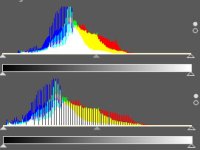
Well, it really seem to extend the dynamic range a bit to the bottom (at least it looks like this). I noticed, that the blacks are clipped at 16, so there is nothing in between the 0-16 range... Do you have an idea why its doing this?
I don't understand, because the small range of 8-bit seems now even more limited to me.

If you grade it and use the LUT the histogram gets really stretched, which cant be good for the details... only 0-255 of possible values, remember?

histogram.jpg

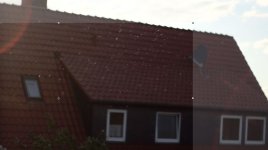
Nevertheless, I captured some nice images which look nice after applying contrast to them:
cinestyle01.JPGcinestyle03.JPGcinestyle02.JPG

I am open for all hints and ideas about recording 'flat' or not or something in between.

Best regards,
Dorian
 
Guys I downloaded Marlons footage... it will also be good if someone send me at lakis@motionfx.gr an original short file to play with... Tomorrow I will put some effort to fix what is visible in the histogram above which is exactly what I'm saying all this time... its the quality of the conversion...

The close up with the cat Dorian will be super...
 
If you use Apple Color or DaVinci the generic LUT costs 30euros... I don't thing this is high cost...

After Effects also the same... only in FCP you need something more powerful to load a 3DLUT... for now.. the new FCP it might integrate Color...
 
Have a problem loading the profile. I got as far as the camera icon and User Def 1, but the Registered User Defined style key doesn't activate and no other window appears on the computer screen. I have the Technicolor Cinestyle file on the desktop which unzipped is 5.535kb. What is missing here.
Thanks.
 
@dxl
Well, it really seem to extend the dynamic range a bit to the bottom (at least it looks like this). I noticed, that the blacks are clipped at 16, so there is nothing in between the 0-16 range... Do you have an idea why its doing this?

Yes that is the point. While it seems extreme that's how a flat image looks out of a camera. I've seen Alexa look similar if not more extreme but that how it's supposed to be. Read the PDF that comes with the file.
 
Have a problem loading the profile. I got as far as the camera icon and User Def 1, but the Registered User Defined style key doesn't activate and no other window appears on the computer screen. I have the Technicolor Cinestyle file on the desktop which unzipped is 5.535kb. What is missing here.
Thanks.
you have to import into a picture profile ,after that is done switch over to video mode and go to your user defined modes ,then click disp and scroll down to it
 
Back
Top