C100: New Atomos Ninja Blade With HDMI

You're right. It is a big deal. I should have said it's just not as big of a deal for me (temporarily) as I do my own editing and don't really mind slightly reframing my shots that are ultimately going to 720p YouTube. I know that some of you have other workflows that this really messes up. That being said, there does need to be a fix and soon. (Btw, my other cameras also do the crop on 24p mode with 3:2 pulldown, so it's not just the C100). I'll push Atomos on Facebook for an update.
 
Last edited:
Hello, if you help me someone Information...Today I ordered Ninja Blade, as I C100 camera .. can shoot 25P and 50i with Ninja Blade?can edit with Windows 7 and Adobe Premiere Pro CS6? Fotage have here given interpret fotage to recognize 25P?
recommendation 500GB HDD and HDMI cable if possible...thanks
 
I'd recommend the Apple 1.8m HDMI cable for now - short ones I found were too short, and the heavier the cable, the more likely it was to work loose.

SanDisk Extreme II seems to be the current 'favourite' SSD - I've a few of them and they have been rock solid in both the Ninja and the Pix220. There is a list of disks that Atomos have tested - some work well, some 'work', others don't work well: http://www.atomos.com/discovery-what-drives/

We're currently being asked to shoot 25PSF coming out of the camera, and the Ninja Blade recording 50i (in other words, the 2:2 pulldown, top left of screen, is turned off), then in your edit software, tell Premiere to interpret it as PSF. If you use 2:2 pulldown AT THE MOMENT (check date, lurkers), you'll get a 2 pixel wide black line down the right hand edge. We're waiting for a software update to correct that. Until then, Camera is 25PSF, Nina is 50i no pulldown, re-interpret in Premiere.
 
Thanks Matt,However if you register 50I (PAL) then it's all ok?I kind wedding film events and we need a better monitor on C100,I never thought that I could not shoot 25P with C100 and Ninja Samurai .. now that I ordered
can solve this problem somehow

Thanks
 
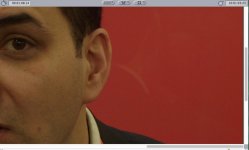
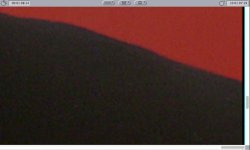
I have just noticed these, odd ladder artifacts on the right hand edge of frame - and only on red, it would seem. I've added a CU to show where the red transitions into black (presenter's jacket) and you can see that the artifact doesn't continue over the black.


Screen Grab red artifacts.jpgScreen Grab red artifacts CU.jpg

Ben.
 
Last edited:
Not sure where the issue is occurring in the Premiere Pro workflow, but there is NO shift/crop/blanking error with FCP7.

Sorry, dear chap - so what's with your black line down the left hand edge next to the funny stripey bits? Looks a bit like a 2 pixel wide black line to me. LOL

if you register 50I (PAL) then it's all ok?I kind wedding film events and we need a better monitor on C100,I never thought that I could not shoot 25P with C100 and Ninja Samurai .. now that I ordered can solve this problem somehow

Essentially yes - the rule, which comes from Atomos Tech Support (who have identified this fault and can replicate it, BTW) is to NOT USE the pulldown removal. The Pull Down removal has a bug in it. So we shoot 25p on the C100, we record it as 50i, then bring the 50i in to FCPX or Premiere (or even FCP7, Ben) and ensure it interprets it as progressive, not 50i. After all, that's part of the current C100 workflow.

This is why I had to be very careful at the BVE show. When I heard that the C100's cheif engineer was there, I needed to forcibly restrain myself from reenacting a scene from the Sopranos or Goodfellas or something: everything's lovely. You're a lovely person. You make people happy. Make me happy. Fix the PsF. Can you do that for me? Fix it. It'll be lovely. Then fix everything else.
 
Last edited:
Beg your pardon - yes, indeed. Have edited post to reflect that.

Hmmm - I wasn't zoomed in enough and was using a right-handed crop to check against a matte on the layer underneath.

Sorry - but, hey, looks like I may have unwittingly stumbled on a different issue in the process.

Will do the right thing and submit a ticket to Atomos...

Ben.
 
hey, looks like I may have unwittingly stumbled on a different issue in the process.

Dude, that's totally awesome! Well, of course, no - it isn't for Ninja Blade owners, but Post That Bug!

It would be really interesting if one can reproduce that. I'll have a go. Then I'll swap out the Ninja for the Pix220 (which has a recent update for Canon users). Just wondering, is this a Canon or an Atomos issue? Reds on the internal AVCHD recordings are a bit of a bummer, it's as if the chroma is interlaced whilst the image is trying to be progressive in PsF, leading to the curious triangular pattern on red edge transitions that we see on the C100. Are your bars an echo of this on the HDMI feed?
 
Nate, it is indeed a big deal. We bought a $1K device to get the most out of our C100, if you end up having to scale up your image in post it makes absolutely no sense then. Not just for the quality, but also for the inconvenience...

I have a shoot on Friday where I will need an external recorder. Well I am very bummed by the blade's problem. I am not going to give the client an interlaced footage and ask them to do the pull down themselves... who would do that???? ( or who would do that and want to work again...)

If the samourai blade have this problem, that means it's been a year and they didn't fix it with a firmware update... that's not a good sign.

It does suck big time! Should I rent a Pix220 for Friday? Arrrr.....

Old Link I found
http://forum.atomos.com/showthread.php?37852-Black-line-on-right-edge-of-picture
 
Last edited:
Hallo
a recommendation to the HDD if possible..HDD some atoms occurring on the site, no longer find in store.ssd yet for me it's too expensive,so we have to find a 500 GB HDD to be tested on ninja, if someone successfully uses HDD on ninja blade.I ordered an apple hdmi cable 1.8m..I prefer a shorter cable.I though that a wedding shooting HDD goes, someone has a negative experience about shooting the HDD to an event..if someone can post a few minutes of shooting RAW ninja blade .. or ninja2 and C100 avchd. try editing in adobe and see how it goes.

Thanks
 
Last edited:
Screen grabs of ungraded ProRes422 zoomed to 400% , showing:

1) The Atomos NB with blanking and artifacts on right of frame

Atomos NB Original.jpg

2) Same clip, grabbed from the AVCHD -> ProRes422 transcode (using FCPX.)

AVCHD Transcode.jpg

Ben.
 
From Atomos Tech Support (who, I must say, responded within minutes - I'm very impressed):

Hi Ben,
we had just chat with our devolpement team. They are aware of this issue. It's a pulldown issue. There will be a fix soon.
Thank you for working on this with us.
Best wishes
Shahid Iqbal
Atomos Worldwide Technical Support
 
I am very pleased to read that Ben. My only worry is the definition of the word soon….reading around Atomos seem to take forever to resolve some issues. It seems the Samurai Blade has also had the 2 pixel wide fault on the right hand side long before the Ninja Blade was even launched…and that fault remains/they then go and launch the Blade with an identical problem.

Personally, I would advise any potential purchasers to await this fix before considering buying, just in case. In the meantime I'll use 50i on my Ninja Blade with C100 footage.
 
Is it possible to shoot 24P and record to the NB in 60i and then remove the pulldown in post and alleviate this issue? Or.....in the case that I am in where I do all of my own editing, is it easier to just work around this issue by doing a minor resizing in post when the problem is obvious. Both of these are only temporary solutions until Atomos resolves this glitch.

I've seen everyone talking about 25P and 50i where there is no 3:2 pulldown and you can easily just reinterpret footage.
Thanks.
 
Don't know about 24p as I only shoot 25p (or PsF actually) on my C100. Certainly, I'd only go the reinterpret 50i in post route as that way there should be no image degradation - unlike cropping in slightly. I have to do this anyway (using Modify as CS6 treats Canon's C100 AVCHD PsF as interlaced otherwise - and that looks horrible!)

As you and others note, reinterpreting footage in post is relatively painless to do…BUT this is not what I would expect of a $1000 recorder - after all the Samuari and Ninja Blades currently do this with other cameras, not just the Canon C100. So over to you Atomos - please deliver what your specs promised and professionals expect.
 
Last edited:
It's a shame. It's a really nice monitor but I can't live with this workaround. Sent mine back for a refund until Atomos figures out what's going on. I spoke to Atomos on the phone today and they confirmed that we will not be getting a fix anytime before NAB
 
Oh man... I am still in my 30 days of purchasing and I may return it as well depending on what shows up at NAB. I feel the same way rgdfilms, the monitor is really nice, it's a shame. I had so many problems with the ninja 2 and I decided to give the blade a go... Now there is that line problem, it's been a year since the samourai was released and no fix... I basically never got an atomos product that worked well and as described, sorry. And their forum gets no real support. Too bad.
 
Last edited:
The right side pixel is quite real. Confirmed that it only occurs on pulldown. Doesn't make things better. Scaling is not a viable solution.

Still having record command issues which Atomos says is a product issue and issued an RMA. In it goes.

At $1K I guess it's worth keeping because I'm already invested in drives and the batteries from the Ninja2. I have to assume they will eventually fix pulldown ... my support ticket was actually responded to by the same person as the user earlier and it said basically the same thing. At least it's on the radar. I've come to rely on the monitor and would prefer to keep it.
 
Back
Top