
Navigation
Install the app
How to install the app on iOS
Follow along with the video below to see how to install our site as a web app on your home screen.
Note: This feature may not be available in some browsers.
More options
You are using an out of date browser. It may not display this or other websites correctly.
You should upgrade or use an alternative browser.
You should upgrade or use an alternative browser.
MPEG Streamclip on PC, Premiere Pro
- Thread starter El Producto
- Start date
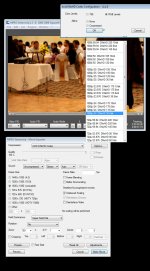
Perone you said select RGB ( what if you select 709) like visugeek showed in his image.
uncheck the interlaced scaling if you use a 7d. What about 5d?
Also there is an unchecked box for deinterlaced video
I just did my first convert and it was pretty quick, yet it slowed down the video yet kept the sound perfect. I think is slowed it down to 24fps
uncheck the interlaced scaling if you use a 7d. What about 5d?
Also there is an unchecked box for deinterlaced video
I just did my first convert and it was pretty quick, yet it slowed down the video yet kept the sound perfect. I think is slowed it down to 24fps

PerroneFord
Deals in Lead
This is why I don't like the screenshot method. It doesn't teach, it just shows.
I've found that I got somewhat unpredictable results when selecting 709. It clips the luma i the source material has values that fall outside of broadcast range.
Uncheck the interlaced scaling if you are converting progressive footage.
If the video is progressive, then you do not need to ask the utility to deinterlace. And I prefer to deinterlace where I have more control anyway.
If you're video slowed down, did you put something in the frames per minute box? Leave that blank.
I've found that I got somewhat unpredictable results when selecting 709. It clips the luma i the source material has values that fall outside of broadcast range.
Uncheck the interlaced scaling if you are converting progressive footage.
If the video is progressive, then you do not need to ask the utility to deinterlace. And I prefer to deinterlace where I have more control anyway.
If you're video slowed down, did you put something in the frames per minute box? Leave that blank.
PerroneFord
Deals in Lead
Do uo know how to post a screen of your settings?
Your vague terms like "slow" "huge" just don't tell us anything that might give a clue to what is going on. There are just times that something like a netmeeting would be ideal. This is one of them.
Your vague terms like "slow" "huge" just don't tell us anything that might give a clue to what is going on. There are just times that something like a netmeeting would be ideal. This is one of them.
PerroneFord
Deals in Lead
The sound plays fine. The video plays a tad slower than real time. It looks like a bad voice over.
I get what you're saying. The question is why it's happening. So let me ask two very important questions.
1. Which DNxHD template did you choose when you converted the file.
2. Does the out of sync video get worse as the video goes along, or is it always just a bit slow or fast.

visugeek
Well-known member
Enginvr, that is pretty close, good to know! : )
I may be mistaken, but the 709 setting seems to take the 0-255 color space and squeeze it into 16-235 computer RGB, keeping the extended gamma of the 7D in tact. Although trying both and checking them in Premiere's wave form monitor, I'm getting identical results. So pick your poison I guess. Both 709 and RGB seem to yeild the same results, at least with the 10-bit codec which is what I use.
I may be mistaken, but the 709 setting seems to take the 0-255 color space and squeeze it into 16-235 computer RGB, keeping the extended gamma of the 7D in tact. Although trying both and checking them in Premiere's wave form monitor, I'm getting identical results. So pick your poison I guess. Both 709 and RGB seem to yeild the same results, at least with the 10-bit codec which is what I use.
PerroneFord
Deals in Lead
it does look like the video gets slower towards the end. audio is good. see my screen grab
Well, that explains the problem. You've selected 24.00p and you aren't shooting 24p. The 7D is not capable of it. You are shooting 23.976 (23.98) so that is what you need to select. This will cause audio drift.

PaPa
Major Contributor
I don't know about you guys, but in CS3, when exporting through adobe media encoder, MOV crashes my program, H.264 gives me an error message, Windows media video doesn't have 23.976, only 24 which gives a ghost image and bluray flat out doesn't work for me.... God damnit..
I can only export full quality with mpeg 2..... Grrr
I can only export full quality with mpeg 2..... Grrr
PerroneFord
Deals in Lead
What speed did you shoot on the 5D? 30fps? I need to test that in mpeg streamclip to see if it honors the frame rate.
PerroneFord
Deals in Lead
Ok, so I just tested 3 things in Mpeg Streamclip with 5D footage.
1. 30.00p source converted to DNxHD 36 1080p/23.98
2. 30.00p source converted to DNxHD 36 1080p/24.00
3. 30.00p source converted to DNxHD 36 1080p/24.00 with 30fps typed into Mpeg Streamclip frame rate box.
In each case, the output was exactly the same. Same size, same numer of frames, and each was exactly 30.00fps. So, DNxHD is NOT changing the frame rate at ALL. Since I have now verified that, I need to ask you the question we've not been asking.
How did you record your audio?
1. 30.00p source converted to DNxHD 36 1080p/23.98
2. 30.00p source converted to DNxHD 36 1080p/24.00
3. 30.00p source converted to DNxHD 36 1080p/24.00 with 30fps typed into Mpeg Streamclip frame rate box.
In each case, the output was exactly the same. Same size, same numer of frames, and each was exactly 30.00fps. So, DNxHD is NOT changing the frame rate at ALL. Since I have now verified that, I need to ask you the question we've not been asking.
How did you record your audio?
with a rode video mic. http://www.amazon.com/dp/B0007U9SOC...e=asn&creative=380341&creativeASIN=B0007U9SOC
Still coming slow and I tried changing almost all the different options for export. It plays the video almost 98% smooth and perfect audio so I am almost there I can taste it.
I only have one option as of now to shoot at 30 fps
Still coming slow and I tried changing almost all the different options for export. It plays the video almost 98% smooth and perfect audio so I am almost there I can taste it.
I only have one option as of now to shoot at 30 fps
PerroneFord
Deals in Lead
Ok, if the problem is what I THINK it is, then change the speed of the audio by .1%. I can't advise you to move it up or down by .1%, so try both. One should be worse. The other, if my guess is right, should be bang on.
PerroneFord
Deals in Lead
How were you converting it to 24p?