Micro Gimbal for GH4, BMPCC, A7s - $699 USD

Sorry, I didn't mean he did trial and error. I agree, his videos are fantastic. I need to watch again. He's the one who gave me the tip to turn off all the settings, isolate one axis, and experiment. That's SUPER helpful.

On the subject of camera plates. I bought two, a $20 fancy version, and a $10 inexpensive version. The only real difference was the more expensive one had an extra level, measurement markings, and a finger-twist camera screw. The problem with both is they are NOT light. They seem to work fine with my A6000 and definitely make getting the camera on and off 100% easier. And easier to balance because you slide. However, if anyone knows of a light camera plate, please let me know. Another improvement would be a longer plate that slide back and forth.
 
http://youtu.be/ba_vddU7Yq4?list=PLgkvoj84P7qDg-H8w36CgdOIeh5qJG90u

Shot this with the GH4 and Lumix 7-14. I used the Fig Rig and I'm glad I did. After over two hours of shooting around the Mission my arms got very tired. Having both hands on the Fig Rig sure helped. I do think it also smoothed out the bounce too. I'm no gimbal expert in fact I have only used them a few times and don't own one so this was a great learning experience. You can read more HERE.

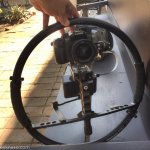
GH4 Setup.jpg
 
Last edited:
That looks like a sweet rig Erik! I made another quick video about a technique I found useful. Before one mounts a camera/lens setup, they should figure out the center of gravity so they can mentally add that to the camera plate when balancing. Takes some of the guess work out of balancing. This is especially useful for big cameras that must sit close to the pitch motor screws.

https://www.youtube.com/watch?v=My7RGeZ2EPM
 
Mine went back for repair and came back in the same condition (camera gyrates wildly). Once it decided to halfway work for a few minutes, that was it. Have asked for a refund but they are non responsive. I'm waiting until the end of the Chinese holiday before assuming anything.

Yea, I'm waiting on a response from them too
 
hello guys i seem to have a problem wanted to try fly my n4000 today but had some problem, when i tried to turn it on it just has one beep and the pan/pitch motor keep moving up and down. if anybody has some leads would be great hope the unit is not faulty only had it for a month or so...

https://www.dropbox.com/s/qndecnecd85xroj/problem.mp4?dl=0
 
hello guys i seem to have a problem wanted to try fly my n4000 today but had some problem, when i tried to turn it on it just has one beep and the pan/pitch motor keep moving up and down. if anybody has some leads would be great hope the unit is not faulty only had it for a month or so...

https://www.dropbox.com/s/qndecnecd85xroj/problem.mp4?dl=0

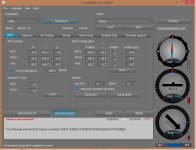
Am I seeing your PC screen correctly? The pitch / roll / yaw meters don't seem to be showing data; that is, the arrows aren't moving. If that's the case, a wire to the sensor may have come out, been compromised, or maybe you just need to re-calibrate the IMU? Hopefully it's the latter! Check to see that the wire into the IMU (little box under camera plate) isn't pulling out. Possible it pulled out a bit and you need to push it back in. You may need to remove IMU case to check.
 
Hello Max for a more HQ version you can download the link, how to i re-calibrate the IMU? ok (You may need to remove IMU case to check.) i will look into it , thanks for all your help! i love the most recent videos you did about the pre balancing and balance on your youtube channel help me from pulling out all my hair :D


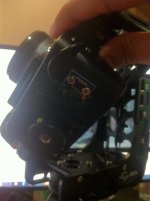
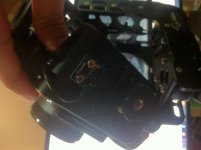
*update looks like the IMU is not going anywhere. you think its on the mainboard above the YAW motor?
 

Attachments

  • photo (2)444.jpg
    photo (2)444.jpg
    43.3 KB · Views: 0
  • photo (2).jpg
    photo (2).jpg
    69.7 KB · Views: 0
Last edited:
First, just to make sure, when you connect the Nebula to the software, you see the arrows spin in the meters when you move the camera around. If they spin, then the IMU is talking to the board and there are other issues. Let's first make sure that's the case before we proceed to anything risky.

When the IMU is working (even if not calibrated), one arrow will point to where the camera should be pointed, the other will move around, to where it is currently pointed.
 
Last edited:
Okay, I opened mine up. Looks like those leads are soldered in. So probably not at IMU board. BE VERY CAREFUL with those connections. They come off easily.

1. The next possibility is the wire from the IMU. Is it severely pinched anywhere? Is there anything that happened between when it was working and not working?
2. You have NOT upgraded board's firmware? (different from profile).

Generally, AFAIK, if the IMU is connected to the board it should work. My best guess is the wire is shorted out somewhere. Unfortunately I2C connections can be fragile. Don't know the effect of I2C pullups, but you might check that on the other "advanced" of the software. I don't remember what the default is. I believe it is I2C pullups enable. You shouldn't see few, if any errors, on I2C errors on bottom right.
 
Last edited:
looking at the wire that talks with the IMU nothing looks pinched from the outside,sometimes when the camera goes haywire, the handle starts spinning 360* that did just happen right before the units sensor error started to show up, so that might mean one of the wires got detached on the main-board?

with the firmware update, i was not sure about doing that as i did not want to brick the unit, is it safe to do? and so how do i update the firmware with out bricking the n4000

I2C is ticked and yes on the bottom right the I2C errors keep generating numbers.
 
Last edited:
You do NOT want to update the firmware! Unless FilmPower tells you to do so. I don't believe that's the problem.

The only leads from the handle to the board is the power and the YAW motor leads, AFAIK. So I don't believe they would effect the unit's IMU cable. I haven't opened it up, so don't know the layout inside. The board does sit close to the handle, so it's certainly possible something was shorted, or knocked loose inside.

The bad news is that if there is a problem with the IMU wiring, or something is shorted out on the board, there is nothing you can do without the right equipment. If you know anyone who does a fair amount of robotics (Arduino, etc.) they might be able to figure it out and fix it. My bad news is I think you're going to have to send back to manufacturer.
 
You do NOT want to update the firmware! Unless FilmPower tells you to do so. I don't believe that's the problem.

The only leads from the handle to the board is the power and the YAW motor leads, AFAIK. So I don't believe they would effect the unit's IMU cable. I haven't opened it up, so don't know the layout inside. The board does sit close to the handle, so it's certainly possible something was shorted, or knocked loose inside.

The bad news is that if there is a problem with the IMU wiring, or something is shorted out on the board, there is nothing you can do without the right equipment. If you know anyone who does a fair amount of robotics (Arduino, etc.) they might be able to figure it out and fix it. My bad news is I think you're going to have to send back to manufacturer.

Yeah i think that's the case too max! thank you again so much for all your insight! very strange that the unit is build like a tank but its so fragile inside, i might be asking for a refund if this could happen just from the unit every once in a while thats not very reliable and sending it back every time for repair would be a pain... but its very lovely to fly and the engineering is topnotch :( shame it had to happen.

and yes i decided to turn on the error box in the software to see what it beeps it gave, does not sound very positive https://www.youtube.com/watch?v=I5WpwekTOno
 
Hopefully FilmPower, or someone else, will know a problem I don't see that can be fixed!

In defense of these devices, Basecam provides lost cost boards and software, and China the structural engineering, to make a $700 stabilizer possible. I've beat my Nebula to death and it's still working. Like you say, it IS built like a tank. It is odd to me that yours isn't working. Whatever the problem is, I believe it is simple. I don't worry about mine as much because I've dabbled with a bunch of robotics and can solder a bit and re-wire stuff. In fact, a friend of mine's gimbal is broken (one of the early large ones) and the problem was that the lead into the IMU sensor was frayed off. I soldered a new one back in. Then the lead to the board frayed off!!! Got it working now.

I2C is an electronics industry standard. It's really good at allowing one to connect low power sensors to embedded cards. The trade-off is that one has to be careful about not running more power through those wires than they can handle, interference, etc.

So again, if you had someone who does robotics, they could probably fix.

In short, if you want low-cost stabilization these problems are unavoidable. I've had friends who have had problems with the "brand" ones too. They all use the same components. They're all susceptible to shorting, voltage spikes, etc.

See what FilmPower says. Maybe someone else will chime in here. I'm in Boston, or I'd offer to look at it personally ;)
 
Last edited:
Interesting that my unit, which went in for repair and came back basically the same, has EXACTLY the same symptoms. Starts with one beep rather than several, then the camera pitches back, hitting the lens on the frame. If I lay the unit down a certain way, it will start with several beeps as it should, but still pitches back, with the handle trying to do 360's (I feel that allowing the handle to turn 360 degrees without stops is a major flaw). . I'm unable to communicate via Windows laptop/USB, I have someone bringing an Android tablet by later today to see if that will work (it did when I first got the Nebula). They are ignoring my request for a refund and sending programming advice instead, which does me no good due to lack of USB communication. I'm just about done with being a nice guy and about to be a real pain to them.
 
Hopefully FilmPower, or someone else, will know a problem I don't see that can be fixed!

In defense of these devices, Basecam provides lost cost boards and software, and China the structural engineering, to make a $700 stabilizer possible. I've beat my Nebula to death and it's still working. Like you say, it IS built like a tank. It is odd to me that yours isn't working. Whatever the problem is, I believe it is simple. I don't worry about mine as much because I've dabbled with a bunch of robotics and can solder a bit and re-wire stuff. In fact, a friend of mine's gimbal is broken (one of the early large ones) and the problem was that the lead into the IMU sensor was frayed off. I soldered a new one back in. Then the lead to the board frayed off!!! Got it working now.

I2C is an electronics industry standard. It's really good at allowing one to connect low power sensors to embedded cards. The trade-off is that one has to be careful about not running more power through those wires than they can handle, interference, etc.

So again, if you had someone who does robotics, they could probably fix.

In short, if you want low-cost stabilization these problems are unavoidable. I've had friends who have had problems with the "brand" ones too. They all use the same components. They're all susceptible to shorting, voltage spikes, etc.

See what FilmPower says. Maybe someone else will chime in here. I'm in Boston, or I'd offer to look at it personally ;)


Yes i think it might be just a small problem as you said, i got nothing against film power in no way I'm bashing there product, I've already sent an email to the support team at filmpower hope they get back to me soon and for sure I'm guessing they will say please send back the unit for repair :) my location at Bangkok so I hope I can send it to Hong Kong but from the details below it looks like will need to send it off to the USA.

this gentleman experience was not so positive and said he had to send it back to the USA

http://videolifestyle.com/a-nebula-4000-lite-disappointing-experience/

(a caption from the webpage)

"Being in Singapore, they now tell me that I must send the Gimbal back to USA. ( i have no issues paying to send back )I believe that they send the gimbal out from Hong Kong and they want me to send the gimbal back to USA California.
On top of that, they want me to send the Nebula 4000 with the warranty card and with my order number
of which i am sure i had not received just like the strap. All that was in the casing was an iphone adapter,
some screws and one hex key. This is their email reply.

hello,
if you need return back, please pack the product well and arrange for the delivery;(Please pay for \
the delivery fee in advance,freight collect at destination or narmal mail is not accepted);
marked your order number on the warranty card send out with the package;

Please send to Filmpower designated after-sales address ;
Yong Liang
1304 Beringer Ct.
Modesto CA 95358
Tel:415-866-3262
Please send the tracking number to us
the powerbank is $69,

Please wait patiently ,thank you .
 
Interesting that my unit, which went in for repair and came back basically the same, has EXACTLY the same symptoms. Starts with one beep rather than several, then the camera pitches back, hitting the lens on the frame. If I lay the unit down a certain way, it will start with several beeps as it should, but still pitches back, with the handle trying to do 360's (I feel that allowing the handle to turn 360 degrees without stops is a major flaw). . I'm unable to communicate via Windows laptop/USB, I have someone bringing an Android tablet by later today to see if that will work (it did when I first got the Nebula). They are ignoring my request for a refund and sending programming advice instead, which does me no good due to lack of USB communication. I'm just about done with being a nice guy and about to be a real pain to them.

i have the driver that you need to install for it to talk with the USB port. please find the zip file here http://we.tl/DDbiq5sQuR if your using a 64bit windows install this CP210xVCPInstaller_x64 and if your using 32 use this CP210xVCPInstaller_x86
 
After getting the android device I was able to connect with Bluetooth. About all I can do though is turn the motors on and off. Changing settings does not "take", and when I move the camera, the pitch/roll/yaw meters do not move.
 
Back
Top