
Navigation
Install the app
How to install the app on iOS
Follow along with the video below to see how to install our site as a web app on your home screen.
Note: This feature may not be available in some browsers.
More options
You are using an out of date browser. It may not display this or other websites correctly.
You should upgrade or use an alternative browser.
You should upgrade or use an alternative browser.
T2i Magic Lantern for 550D in progress!
- Thread starter ...
- Start date
I had the strangest ML issue a few weeks ago and I still can't even begin to understand what could have gone wrong, here's what happened:
I packed up all my gear for a shoot, making sure to have the most up to date version of ML on every card, and checked to make sure they were all fully functioning. They were, so off to the airport I went. The cards traveled with me in my carry on, so they weren't subjected to any crazy heat or cold. Once I got to my hotel to prep all my equipment for the shoot, none of the 6 cards I had tested booted with ML. I checked the cards in my reader and they all had the necessary ML files in the right place, it was just that none of the cards had the boot flag anymore. I must emphasize that fixing it was simple and led to abolsutely no problems on the shoot day (i just had to make them all bootable again) but it was just such a strange, unexpected problem with seemingly no explanation. Anybody have any clue to as what happened: do x Ray machines ever mess with sd cards?? I'd really just like to know that I'm not possessed by some career-sabotaging demon!
I packed up all my gear for a shoot, making sure to have the most up to date version of ML on every card, and checked to make sure they were all fully functioning. They were, so off to the airport I went. The cards traveled with me in my carry on, so they weren't subjected to any crazy heat or cold. Once I got to my hotel to prep all my equipment for the shoot, none of the 6 cards I had tested booted with ML. I checked the cards in my reader and they all had the necessary ML files in the right place, it was just that none of the cards had the boot flag anymore. I must emphasize that fixing it was simple and led to abolsutely no problems on the shoot day (i just had to make them all bootable again) but it was just such a strange, unexpected problem with seemingly no explanation. Anybody have any clue to as what happened: do x Ray machines ever mess with sd cards?? I'd really just like to know that I'm not possessed by some career-sabotaging demon!
I've just had the same problem with the development version I'm working on. After formatting the card, it started from the first try (CBR 1.5x, Transcend 16GB class 10). Now I'm trying to stop it
Does it stops the recording?
Yes, because battery went empty
Actually, I've got 60mbps with QScale going from -16 to +8 (!) and still couldn't stop it. The stress test is to have a sunlight scene with many details; cover the lens with your hand, let QScale go to -16, and then take the hand away quickly.
Next version will have a nice buffer meter, and it will free CPU resources whenever buffer becomes full.
Actually, I've got 60mbps with QScale going from -16 to +8 (!) and still couldn't stop it. The stress test is to have a sunlight scene with many details; cover the lens with your hand, let QScale go to -16, and then take the hand away quickly.
Next version will have a nice buffer meter, and it will free CPU resources whenever buffer becomes full.
kevinottawa
Well-known member
they all had the necessary ML files in the right place, it was just that none of the cards had the boot flag anymore. I must emphasize that fixing it was simple and led to abolsutely no problems on the shoot day (i just had to make them all bootable again)
I had the same problem, I had my 4 SD cards all loaded up with ML, then one day I pop one in and it didn't load ML, I had to re-enable the boot flag. I have no idea if it was the card or the software.
Confirmed the bitrate problem. This is the kind of bug I was referring to in May12's build description:
[FONT=Courier, Monospaced] If there are bugs in the bitrate module, they may affect the "FW default" setting. [/FONT]
I think I've found the fix. My battery is low, so I won't be able to make more tests until tonight. Can you help me by testing my latest debugging version? (don't forget to rename it to autoexec.bin !)
The fix is only applied to 1080p. Other modes (720p and 480p) are still buggy.
http://dl.dropbox.com/u/4124919/autoexec-CBRfix.bin

Dorian, can you repeat your bitrate tests with this autoexec.bin? I'd like to upgrade the bitrate page. A test with some fixed QScale values on the same scene will also help. Thanks.
[FONT=Courier, Monospaced] If there are bugs in the bitrate module, they may affect the "FW default" setting. [/FONT]
I think I've found the fix. My battery is low, so I won't be able to make more tests until tonight. Can you help me by testing my latest debugging version? (don't forget to rename it to autoexec.bin !)
The fix is only applied to 1080p. Other modes (720p and 480p) are still buggy.
http://dl.dropbox.com/u/4124919/autoexec-CBRfix.bin
Dorian, can you repeat your bitrate tests with this autoexec.bin? I'd like to upgrade the bitrate page. A test with some fixed QScale values on the same scene will also help. Thanks.
Last edited:
DorianVasco
Member
Hi, here some new tests I did with the new build.
Every shot is about 20 seconds on a static scene with ISO 1250 and CineStyle.
FW Standard
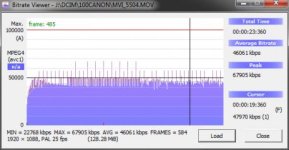
CBR 0,1
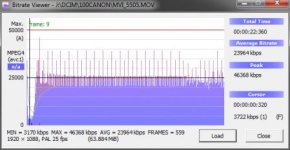
CBR 2,0
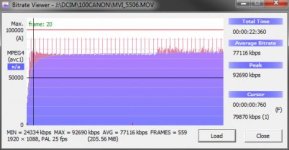
CBR 3,0
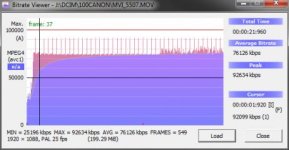
Qscale 16
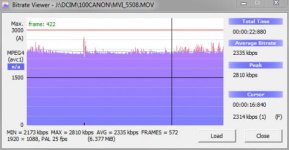
Qscale 8
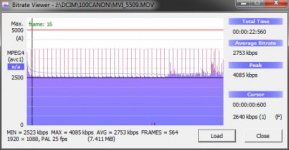
Qscale 0
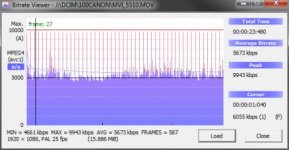
Qscale -8
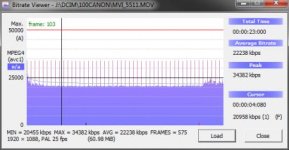
Qscale -10
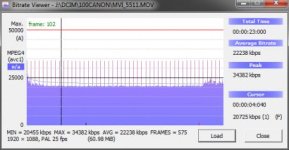
Qscale -12
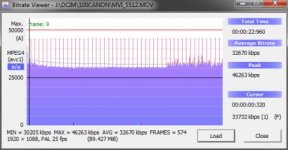
Qscale -16
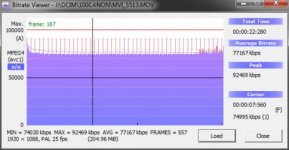
Best regards,
Dorian
Every shot is about 20 seconds on a static scene with ISO 1250 and CineStyle.
FW Standard
CBR 0,1
CBR 2,0
CBR 3,0
Qscale 16
Qscale 8
Qscale 0
Qscale -8
Qscale -10
Qscale -12
Qscale -16
Best regards,
Dorian
DorianVasco
Member
Hi Alex, I'll send you some of the clips this evening.
CF01, I use a Transcend 16GB Class 10 card. But the high bitrates are only possible if recording without audio. With audio I can record at CBR 1,7 maximum.
Hmm, would it possible to set the quality for audio that gets recorded? Often I use sound out of the cam just for control and later sync with another audio recorder. For that, a compressed mono channel would be just fine and would save some bit rate.
Best regards,
Dorian
CF01, I use a Transcend 16GB Class 10 card. But the high bitrates are only possible if recording without audio. With audio I can record at CBR 1,7 maximum.
Hmm, would it possible to set the quality for audio that gets recorded? Often I use sound out of the cam just for control and later sync with another audio recorder. For that, a compressed mono channel would be just fine and would save some bit rate.
Best regards,
Dorian
Mirko Zaru
New member
I wanted to propose some new cropmarks to expand the
creativity of filmmakers looking to the past of cinema. I
then added a blend of crop seems almost all kinds of old
films that have contributed to the largest cinema in the
world.
I enclose everything in this file:
http://www.montipramafilms.com/cropmks_cinemahistory.rar
I would ask Alex if you can make packages languages
... Let me explain:
autoexec.bin can load external file whit menu language?
It would be an interesting solution, in a way that different
people around the world to make language packs ... ML in
this way become a multilingual product easier to use for
everyone
You can still make suggestions for the logo or the latest
version of ML is the final logo?
Thanks again for the wonderful work, I hope to give a little
help where I can.
Ps: if the realization of small icons for the menu you can
apply (as is in CANON Menù)?
creativity of filmmakers looking to the past of cinema. I
then added a blend of crop seems almost all kinds of old
films that have contributed to the largest cinema in the
world.
I enclose everything in this file:
http://www.montipramafilms.com/cropmks_cinemahistory.rar
I would ask Alex if you can make packages languages
... Let me explain:
autoexec.bin can load external file whit menu language?
It would be an interesting solution, in a way that different
people around the world to make language packs ... ML in
this way become a multilingual product easier to use for
everyone
You can still make suggestions for the logo or the latest
version of ML is the final logo?
Thanks again for the wonderful work, I hope to give a little
help where I can.
Ps: if the realization of small icons for the menu you can
apply (as is in CANON Menù)?
Mirko Zaru
New member
Prewiev Cropmarks Monti Prama Films for Magic Lantern:

Download:
http://www.montipramafilms.com/cropmks_cinemahistory.rar
Ciao,
Mirko Zaru
http://www.montipramafilms.com
Download:
http://www.montipramafilms.com/cropmks_cinemahistory.rar
Ciao,
Mirko Zaru
http://www.montipramafilms.com
Last edited:
Mirko Zaru
New member
My old SCREENSTART Logo for Magic Lantern Easterbunny release:

Ciao
Mirko Zaru
Ciao
Mirko Zaru
The cropmarks are very nice, can I submit them to ML cropmark repository?
The ones less wide than 16:9 are only usable in photo mode. Or do they work with an external HDMI recording device?
The Schneider cropmark has moire and aliasing
Typo: Kiss X4 instead of Kiss kiss 4
The ones less wide than 16:9 are only usable in photo mode. Or do they work with an external HDMI recording device?
The Schneider cropmark has moire and aliasing
Typo: Kiss X4 instead of Kiss kiss 4
Mirko Zaru
New member
Ok
Ok
Ok alex, changed x4 kiss!
You have evaluated the proposal for the multi-language menu?
You can certainly put them in the archive cropmarks ML
Ok
Ok alex, changed x4 kiss!
You have evaluated the proposal for the multi-language menu?
You can certainly put them in the archive cropmarks ML
The cropmarks are very nice, can I submit them to ML cropmark repository?
The ones less wide than 16:9 are only usable in photo mode. Or do they work with an external HDMI recording device?
The Schneider cropmark has moire and aliasing
Typo: Kiss X4 instead of Kiss kiss 4
Mirko Zaru
New member
I confirm the bug has been fixed, thank you thank you!! now bitrates are high