Magic Lantern enables 14-bit RAW CinemaDNG on 5D

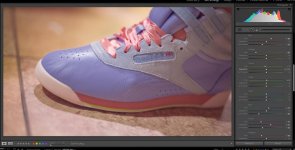
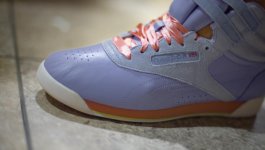
It is bugging me that I do not have the time right now to dive into the RAW video. I want to take it for a spin to see how it compares to the still side of the camera. This shoe is a pretty good test as it has some tough tones along with a solid neutral in the grey suede. A grey card, a still and a video frame all from the same time would really show how the video can represent colors compared to the stills. Dusty, your colors are close but the neutral went to light blue.
 
It is bugging me that I do not have the time right now to dive into the RAW video. I want to take it for a spin to see how it compares to the still side of the camera. This shoe is a pretty good test as it has some tough tones along with a solid neutral in the grey suede. A grey card, a still and a video frame all from the same time would really show how the video can represent colors compared to the stills. Dusty, your colors are close but the neutral went to light blue.
I agree, which is why I asked what lighting type Kholi used on his sample. It's obviously not strobe whereas the product shot from Rebok is clearly stobe. And if you are shooting Rebok for catalogue I'm going to assume you have high quality strobe systems. Feel free to download the DNG and take a stab at it yourself though. Mine was done completely in Lightroom. I just wanted to give Kholi his burnt orange stripe on the sole without affecting the other colors too much....
 
Here is a quick attempt. The color profile says embedded, so I could not change it. I have included the color sliders in LR to show the changes.

Shoe DNG.jpg
 
The nature footage above is amazing! I can not believe this is the 5DMKIII we are seeing. I hope an SSD recording option can be made because this completely changes the investment in this camera.
 
Here is a quick attempt. The color profile says embedded, so I could not change it. I have included the color sliders in LR to show the changes.

View attachment 72123

Yeah, first thing I did in LR4 before I moved to ACR was attempt to adjust camera profile, but had the same issue.

Also noticed the comparison stills posted on another site, one camera showed the candle as reddish orange and the 5D Raw was pinkish. Not sure which one was the accurate color.

All in all it's not a big deal and I'm wagering that it hasn't borked anyone's shots. It can be keyed etc. pretty easily, and I haven't really noticed it today while shooting.

FYI I did throw a grey card into the beach stuff today, just a torn square of it, I'll try to remember to post those for you before I delete them. Converting stuff to CinemaDNG right now, interesting note is that you can't do anything with the CinemaDNG raw tab (exposure etc) when messing with 5D footage, or maybe I need to update R9?

Squig have you bothered with it?

Edit here: Not sure what happened but the exposure tab works after a restart. Weird.
 
Last edited:
Kholi, I do not know if you shoot much RAW stills (probably do), but I always use a WhiBal card. Just take a shot of it in the lighting environment you are in and use the color picker in LR to get perfect white balance. I would assume that it would work the same for 5D RAW footage. Just get it in the frame while rolling and your are set.

I imagine that the process will be improved from camera through RAW editor to NLE in order to have color managed environment. There is also the RGB to YUV conversion which requires some special settings in LR as well. RAW is just great for color.
 
Kholi, I do not know if you shoot much RAW stills (probably do), but I always use a WhiBal card. Just take a shot of it in the lighting environment you are in and use the color picker in LR to get perfect white balance. I would assume that it would work the same for 5D RAW footage. Just get it in the frame while rolling and your are set.

I imagine that the process will be improved from camera through RAW editor to NLE in order to have color managed environment. There is also the RGB to YUV conversion which requires some special settings in LR as well. RAW is just great for color.

Not a lot of stills, just raw video (RED and Blackmagic). Usually just use a grey card to spot on a clip every so often (daylight). If I'm just messin' though, don't bother with it. Tend to just pull the wb in R9 from a wall or something, not the most accurate way to do it of course but tends to work okay for random stuff. I did break out a slice today, though. Works the same for sure, balances out pretty well.

When 5DtoRGB updates for the RAW files and will allow you to batch CinemaDNG and ProRes proxies at the same time with the same filename, then I can't really see any reason aside from cost to play that anyone with a 5D3 wouldn't use it.

Should add, I actually do not know if the 5DtoRGB team's working on the batch converter deal, but they're pretty on about including formats if they can.
 
Here is a quick attempt. The color profile says embedded, so I could not change it. I have included the color sliders in LR to show the changes.

View attachment 72123

Thats because it's a DNG and not a CR2 RAW file. DNG doesn't carry the camera profile (like faithful, neutral, standard). But, you can still calibrate the camera in the "calibration" tab under develop. I see your trying to calibrate using HSL. First calibrate the camera in the calibration tab (after a quick white point pick. You need to still tell the program what is white), then start in the HSL sliders to narrow in (think of the HSL kinda like secondaries).

Only camera RAW files supported by ACR (which is the exact same as lightroom and vice-versa, not a bit of difference) will read the camera profiles (MK2, MK3, nikons, sonys, blah blah blah). DNG= Digital negative. It's an open source archive format. Created for future standard when or if things like Canons CR2 moves onto something else. Most photographers convert all their Canon, nikon, medium format back RAW backed up to DNG for this very reason (well, ones that want to truly future proof their work).

Think of camera profiles, printer profiles, monitor profiles as zip codes. You could try and mail something with just the street name and number, but without that zip code, the post office doesn't know where to really send it. Same thing with profiling digital devices. And in ACR, the camera profile you can select from is not quite the same as the profile set in camera. It's just Adobes interpretation of it. Thus why its called "camera faithful, camera standard" and so on and not "Canon faithful, Canon Standard" . Go ahead, open a tiff from the Canon CR2 and reimport into lightroom. Profile will just say "embedded". Now convert the CR2 (stands for camera raw 2 by the way) to a DNG with adobes DNG converter and import that DNG into Lightroom. Same thing, profile will only say "embedded".


I'll post it again but my version was from lightroom and lightroom only. Burnt orange displayed under and un-answered question to Kholi which was, "What kind of light source did you use for this DNG"? I spent maybe 2 minutes in lightroom with this DNG.
Kholi shoe.jpg
 
Last edited:
Since this is the most active thread currently, i would really appreciate if someone tell me whether 5d mark iii vibrates during sensor cleaning when it is turned on? Mine does not vibrate but i do see animation of sensor cleaning when i turn on or off my 5d mark iii. i just got it yesterday.

sorry to interject.
 
Since this is the most active thread currently, i would really appreciate if someone tell me whether 5d mark iii vibrates during sensor cleaning when it is turned on? Mine does not vibrate but i do see animation of sensor cleaning when i turn on or off my 5d mark iii. i just got it yesterday.

sorry to interject.
Not that I've ever felt.
 
So to sum up the current state of the ML Raw hack for the Canon 5d3:

You can record until you run out of card space, and the files are no longer corrupt - they should extract with raw2dng at least on a PC/Linux.
The 5x (1:1) crop mode is getting better; there are better crop marks available instead of the "17 to the left, 8 up" as was in the beginning.
Cheapest 64GB cards are from Komputerbay, but you'll roll the dice getting one that'll do 1920x1080. I'm batting .333 on these (4th on en route).

Current known headaches (for me) besides the tedious post workflow:

1. Onboard audio drops audio frames and is out of sync. You can't just shuffle it around on a timeline for a long take either; the audio will always be ahead/behind the video. It's a pain in the butt IMO.
2. As of right now, any zooming in/out while recording often times leads to a +1EV exposure shift. I'm not talking about 1:1 mode either - grab a 24-70 lens, shoot and zoom. This can be corrected in Lightroom, but it's a pain (you'll have to manually adjust exposure on the "wrong" files and re-sync JUST those dngs so all will match.
3. The 1:1 mode still isn't perfectly dead center; any attempts to pull back (zoom out) will result in zooming to the left or right; not like one would think from the dead center.

Other than that - record your audio externally and don't plan any type of slow zoom shots and you'll be fine. Think fo the progress they've made in such a short time! I recorded a 63GB file and it was over 12 minutes straight without any problems.
 
Sparky33 -- How are you activating the 1:1 crop mode with June2nd build? Couldn't figure that out.
 
Who wears those colour boots anyway? :Drogar-BigGrin(DBG)

I just got back from shooting my first raw narrative scene, ML didn't skip a beat. I shot about 250Gb! I didn't have much time to light it, it's a showreel piece for some actor mates so I was mostly focussed on performance.

Kholi make sure you set process 2010 in ACR or you'll get sudden exposure changes, I think lightroom has the same problem.
 
It's been okay on the lexar 128 1000x if I'm careful about reloading modules, etc.

also running everything through the CinemaDNG converter, only had an issue with one clip, not sure what happened. But definitely more at home in R9.

Whats the 1:1 crop about? Is there a guide to enabling it on june2 build? I rolled back after reading your post and it was a lot better.
 
I shot with the June 2 build. Something strange happened with June 3 so I wouldn't trust it in the field.

I haven't been playing with the 1:1 crop much, did you try the 5x zoom button?

Teaser from today, very rough grade ACR + film convert.

 
Back
Top