Magic Lantern enables 14-bit RAW CinemaDNG on 5D

External audio syncs fine. Internal audio is losing packets, and thus goes out of sync in a way that can't be fixed with just one sync edit (must be cut & resync'd multiple times).

What I've been doing in the meantime is a 103% time stretch which seems to be "ok" for now. I wouldn't use onboard audio for critical speaking / lip sync / interviews though.
 
Squig, few questions (sorry for not reading far enough, trying to maximize my time with it tomorrow and can't find these answers):

1. Is it normal for the current June 3rd build to place the last DNG from the prior file at the beginning of the following clip?

2. Have you witnessed any issues with Orange or Red colors? I'm seeing burnt oranges are turning pink, or hotter orange turning pink. (Using Neutral)

3. How are camera profiles (Neutral, etc) affecting color? Any tests?

4. Have you observed any different behavior in regards to color when setting white balance to daylight or tungsten under a specific temperature (as in shooting daylight when the scene is clearly tungsten, but white balancing in post). I ask this because it does seem like things are being "baked in" in a way, and I wonder if this is doing anything one way or another. Probably shouldn't, but this also probably shouldn't exist (yet) in the first place.

Thanks.
 
3) AFAIK, camera profiles don't affect color, you're recording RAW in sensor color space (XYZ), all the color management happens in post. This frees you to use any profile you prefer for monitoring (and also to increase sharpness, as a focus aid! test that this doesn't affect RAW recorded video before you use it, but I'm quite confident it will be fine)

4) I also thought WB didn't affect recorded RAW footage?

(I've played with a 5D2-RAW, but I don't have it with me anymore...)
 
Neither should have any effect, just asking to make sure there wasn't something weird going on for the most part.

Also, just seeing that the red/orange to pink thing isn't limited to mylsef, has noone else noticed it though? Does it have something to do with ACR/LR4?
 
http://youtu.be/PG3b4UT0WxQA little teaser, shot RAW from a wedding last saturday, on second and third shots developed in LR, with auto correction, as an experiment, first shot in AE.\
I will upload to Vimeo as well soon, with no sharping..

https://vimeo.com/67629157
 
Last edited:
Squig, few questions (sorry for not reading far enough, trying to maximize my time with it tomorrow and can't find these answers):

1. Is it normal for the current June 3rd build to place the last DNG from the prior file at the beginning of the following clip?

2. Have you witnessed any issues with Orange or Red colors? I'm seeing burnt oranges are turning pink, or hotter orange turning pink. (Using Neutral)

3. How are camera profiles (Neutral, etc) affecting color? Any tests?

4. Have you observed any different behavior in regards to color when setting white balance to daylight or tungsten under a specific temperature (as in shooting daylight when the scene is clearly tungsten, but white balancing in post). I ask this because it does seem like things are being "baked in" in a way, and I wonder if this is doing anything one way or another. Probably shouldn't, but this also probably shouldn't exist (yet) in the first place.

Thanks.


I haven't noticed the DNG thing, that's most likely a raw2dng issue, what version are you using?

I'm shooting a narrative scene tomorrow and I did a quick test of June 3 and something strange happened like it started recording H.264 and raw so I'm going back to June 2 for the shoot.

Orange turning to pink, I'll have to look into it, haven't noticed to date.

Like Samuel said on the profiles, white balance isn't burnt in either, looks like the raw data is daylight balanced, shooting tungsten is orange but daylight is pretty much spot on.
 
Oh the devs have noticed a magenta cast so that's probably what's fooking with the orange.

Couple more important tips-

Set the pic type in the Canon menu to small jpeg, it frees up ram for ML and gives you faster write speeds.

I'm shooting with the standard profile for focus, you can turn the sharpness up too :shocked:

Set FPS override to 24 exact and you have to set 24p in the Canon menu too, if you don't set FPS override your sound might go OOS.

If your card is struggling turn global draw off, I think it's about a 2MB/s difference.

Turn the speaker volume up to 5 and the beep tone frequency to 880Hz, it's a fatter tone for sync.

Internal audio doesn't stay in sync, devs haven't got to it yet.

ExFat format your cards for 4Gb+ file recording. (you can't ExFat format in-camera). And don't forget to enable the bootflag on the card.

If you fill the card there's a workaround in post to open the last file.
 
Last edited:
I had a look at some reds and oranges, they look ok to me under tungsten light. Visioncolor are working on an ACR profile and conversion to CinemaDNG happened yesterday so Resolve is now an option.
 
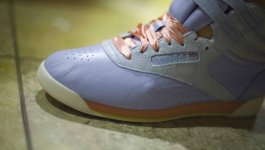
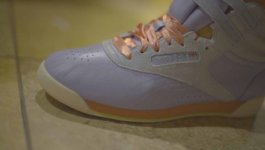
ReebokO.jpg


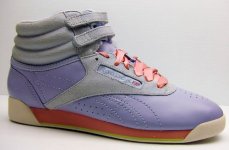
Unfortunately it's not just a magenta cast (although that's there, it's easy to balance that out, not a big deal.) but the pink in this image -- strings and sole, are supposed to be burnt orange.

I've glanced at some comparison shots between the 5D and other cameras and if there's something red or orange in the frame, the 5D renders it pink/magenta completely. It has to be a pretty stark red or orange, BV1 has this issue with far Red colors, turning them orangeish instead.

Again, though it could be ACR. GOing to have to use my Alienware to try out the CInemaDNG thing.
 
Kholi,

Can you shoot a RAW still with a grey card in the frame of the same image and post it for comparison? I am looking forward to trying the RAW video on the MKIII as I shoot a lot of RAW stills but am too busy for the next month or so. I have found the colors in LR along with a custom profile I created in the Adobe DNG profiler to have amazing color accuracy. This is for stills so I wonder if something gets skewed on the video side.
 
Kholi,

Can you shoot a RAW still with a grey card in the frame of the same image and post it for comparison? I am looking forward to trying the RAW video on the MKIII as I shoot a lot of RAW stills but am too busy for the next month or so. I have found the colors in LR along with a custom profile I created in the Adobe DNG profiler to have amazing color accuracy. This is for stills so I wonder if something gets skewed on the video side.


Good idea, didn't think of that.

Honestly, I guess I'm just trying to blame myself before blaming the camera. We agree, ACR/LR4 are pretty accurate, can't see what they would be be doing to color. It could also happen in the Raw2Dng conversion.

I'm waiting for the grey to burn off here so I can take both BV1 and 5D3 out to shoot. If I can get anything worth posting I will, but will definitely take a moment to shoot a still and compare the color there.
 
https://docs.google.com/file/d/0B3KWmIyLh-rjRHdCdElFdUFxRHM/edit?usp=sharing - DNG link

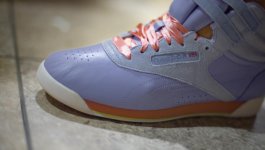
Edit: reference photo from the web:

REEBOK.jpg


I'd say the exposure is pretty spot on, however the ISO's at about 1600 if I remember right.

Still trying to wrap my brain around the ISO thing, it has such a great impact on the footage as far as noise goes...

Also wouldn't MIND it being pink? Problem is that it's supposed to match shorts/pants of the same color and a hat. Costume.
 
Last edited:
It looks pink when I open it too, but as I guessed it seems to be a problem with the Red Primary calibration. The other half of the issue is the green-magenta slider from the white balance setting.

In the image below, I have pushed the green-magenta slider towards green, then I've gone to the Camera Calibration tab in ACR, to push Red Primary to the right (both hue and saturation, to around +60), then I have compensated by lowering overall saturation. I think it goes in the right direction, but I have no idea how far I have to dial it.
000248.jpg


I explored this kind of adjustment when I was trying to make a Flaat for the 5D3+RAW: it makes very saturated colors slightly more accurate (that pesky red swatch). But there's a downside: not-so-saturated and pastel tones go off.
 

Attachments

  • 000248.jpg
    000248.jpg
    27.5 KB · Views: 0
Last edited:
Your results are pretty on as far as what you get when you go to toy with sliders to try and fix it.

Ideally, though, you would key this. Sliders would affect skin values too much in this case. =T

It's probably not such a huge deal, just wondering if anyone else sawr it before now.

Also had an issue last night, under a close-to-tungsten kelvin, where stark blue became outright violet. Looking at the same shirt right this moment (and wondering why it's taking so long for the sun to come out..) under daylight I don't see the same issue.

Thanks for glancing at it.
 
* no, I hadn't noticed it, at least not this much
* these particular sliders are not really that harmful: you can push them quite far and side-effects remain modest (including skin tones)
* you're welcome! I'm just trying to learn about the camera...
 
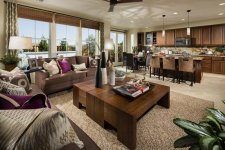
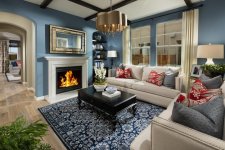
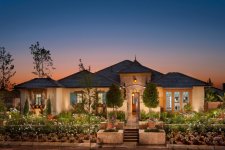
It looks like Kholi shot this using halogen and the example product shot he used is obviously shot with strobe. Just that will make it hard to match the two. Second, things reflect. That flooring is reflecting into that pink/red and the product shot is placed on what? White. Thirdly, Use your RAW conversion to "calibrate" a camera (lightroom has it in the bottom tool tab and you can further calibrate in the HSL sliders, then save the profile). Capture One and Lightroom Kholi. Use them.
I have my MK2 and 3's calibrated to my strobes, my halogens, my fluorescence, and my LED systems. Each calibration is different. When I'm out shooting architecture I predominately use strobes. Everything is down to a system. I import the footage and ONE click my preset and bam, ready for export. No white pointing or other adjustments for color balance.
Iriana-P5_Family Room to Kitchen.jpg
Iriana-P4_Living Room.jpg
 

Attachments

  • 33-1785_1.jpg
    33-1785_1.jpg
    102.6 KB · Views: 0
Back
Top