GH4 LOVIN' the GH4!

As soon as 4K Photo mode gets 24p, I'll be testing it out. Until then, it's pretty much a no-go for me. I just love the 24p look.
 
just did a quick unscientific smattering of tests of 4K PHOTO video and normal UHD 4K modes, same scene, same settings that I usually use: 0 -2 0 0 CINE-D 0-255. What I noticed is that 4K PHOTO seems to lock certain things in like 0-255, you can't change it. I have a 4k monitor and was looking at the adjustments live, as well as playing them back right in the camera to 4k monitor. The external monitor stops monitoring while recording 4K Photo mode.... maybe higher bitrate or something??

Overall, the images of 4K PHOTO and my settings seemed indentical to the eye on a 4k monitor: colors stayed, MAYBE 4K P was a pinch darker in the low dark details, but most notibly, 4K P seemed to drop the Noise Reduction to -3 to -5 range. I was able immitate the look by turning down NR.
Seems like 4K P mode forces video into the highest achievable quality settings: low or no NR, 0-255

Bitrates of the files were all in the ball park - they are different lengths unfortunately, so really can't be relied upon: 4K P bitrate 97.2, max 106Mbps, 5 seconds, UHD bitrate 95.5, max 106 Mbps, 8 seconds (a 3 second clip I did achieved bitrate of 85 - totally differen subject matter.
 
Yes, because it's meant as a means of acquiring stills, so I guess that's why they toss out the video-oriented tweaks.
 
Also, I'm not sure most external monitors could handle the weird frame sizes (2880 x 2880) as they're primed for HD and SD and possibly 2k primarily.
 
just did a quick unscientific smattering of tests of 4K PHOTO video and normal UHD 4K modes...

How do you go about extracting the photos? Is special software required? Sorry for jumping on this thread but I'm not fully understanding this feature yet!! I have some shoots coming up where extracting stills from 4k would be ideal.
 
@ astromann

Excellent ! Could you post the footage of the different profiles for comparison ?
 
Last edited:
How do you go about extracting the photos? Is special software required? Sorry for jumping on this thread but I'm not fully understanding this feature yet!! I have some shoots coming up where extracting stills from 4k would be ideal.

I did not mess with actual "photos" in 4K PHOTO mode, just video. I'm not sure how to extract photos but someone here might know
 
@ astromann

Excellent ! Could you post the footage of the different profiles for comparison ?

Hi The file sizes are large ...about 250 meg for each one.
Probably the best I could do is upload some screen caps if you want.
 
just did a quick unscientific smattering of tests of 4K PHOTO video and normal UHD 4K modes, same scene, same settings that I usually use: 0 -2 0 0 CINE-D 0-255. What I noticed is that 4K PHOTO seems to lock certain things in like 0-255, you can't change it. I have a 4k monitor and was looking at the adjustments live, as well as playing them back right in the camera to 4k monitor. The external monitor stops monitoring while recording 4K Photo mode.... maybe higher bitrate or something??

Overall, the images of 4K PHOTO and my settings seemed indentical to the eye on a 4k monitor: colors stayed, MAYBE 4K P was a pinch darker in the low dark details, but most notibly, 4K P seemed to drop the Noise Reduction to -3 to -5 range. I was able immitate the look by turning down NR.
Seems like 4K P mode forces video into the highest achievable quality settings: low or no NR, 0-255

Bitrates of the files were all in the ball park - they are different lengths unfortunately, so really can't be relied upon: 4K P bitrate 97.2, max 106Mbps, 5 seconds, UHD bitrate 95.5, max 106 Mbps, 8 seconds (a 3 second clip I did achieved bitrate of 85 - totally differen subject matter.

Interesting results, my monitor is a 27' 2560 x 1440, yep its possible because of the smaller pixels ratio to the screen size on your 4K monitor that the difference may be lessened.
I use mainly -3 to -5 noise reduction on my movie settings, except on certain scenes, so mine was at that setting anyway in movie mode.
And you are right it forces the 0-255 mode.
Anyways yeah on my monitor colors are definitely a touch more robust, and the contrast is deeper. its very easy to see, its quite noticeable, maybe try it in Natural mode...I would be interested what your findings are.
Cheers
 
k if I get some time, I'll try. that deeper contrast might be that darkness I noticed - my scene was mostly bright and not that colorful. I'll try natural. Also, I'm doing the standard 16x9 4k, not the other aspects
 
Yep Same...I have no anamorphic setup, so I just use 16x9 in 4K Photo, in Natural...and loving the look.
I also use the combination Manual and Auto Focus where the shutter button can do the 1 point AF and the Shutter + Focus ring does the manual zoom thing, very efficient and flexible, nice to have a solid focus setup.
Cheers
 
Can you really tell the difference between 25p and 24p look wise? You've got a really good eye my friend :)
I can, actually. :) The difference is quite subtle, but it's there. Whenever I watch a series shot for the BBC I can usually tell. Something about the way the motion plays is different. Not better or worse, just different.
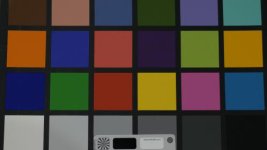
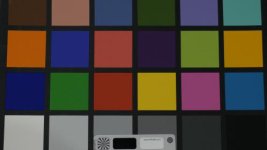
 
more unscientific tests, but a LITTLE more organized. they'll look like crap posted here, so I will share the original files:

https://copy.com/Ih84oLuDky8zdEmX

4k video VS 4k Photo modes - for shooting video. No winner or losers here, just different. Today it seems like there was MORE Noise Reduction or less Sharp on the 4K photo mode shooting video. Either way, to my eyes, the way I setup my video is almost identical to the 4K PHOTO mode.


* the slight color change in the 2nd from left white box was probably my arm blocking a light

vid 4k nat shp-2.jpg4kphoto nat.jpg

4kphoto.jpgvid 4k.jpg


4k vid nat shp-2 2.jpg4k photo nat 2.jpg

I forgot to label which is which - the shared online has file names - but in the end they were identical to me other than change in Sharp and/or NR, except in video mode I can control more settings on the fly.
 
However Cine-D with minimal adjustments (Positive or negative) to the Sharpness, Hue, Noise etc...it can look pretty good and I kinda like it.

Yes, Cine-D without any change to contrast or the shadow/hilight curve looks great for moderately contrasty scenes.

Cine-V I simply find too contrasty, too much differentiation between the highlights and shadows, too extreme for me.

To me this is the opposite of Cine-D, when you have to shoot low-contrast scenes and you need to boost the contrast.

I use the Standard profile as the intermediate setting between Cine-D and Cine-V, but I haven't figured out where to place the Natural profile in terms of subject contrast.
 
Is NATURAL a pinch brighter than Standard? There may be some kinda color differences as well, but if it looks good to ya, that is the important thing.

Dingo I agree with everything you say there. But, I have yet to reach for CINE-V for anything yet
 
I use Cine D for about 90% of the shots I take with the Gh4. Mostly at -1 or -2 contrast and I play with the master per depending on the scene.

Some grabs from a trip for a photo shoot I got taken this week.

grades 1.jpg

grades 2.jpg

100% Cine D in motion from a trip I took two weeks ago. (I do a lot of driving for my stills shoots).

https://vimeo.com/108019600

Oh yeah, everything you see here is the 14-140 V1 Lumix.
 
I think wwjd is close to being right about this.
When I look at a video...with the same settings in Natural profile -1, -1, -4, +1, +1 (from memory) I choose the 4K video every time, but when I grab a screencap from eash video...I can barely tell the difference...but I can when the video is playing.
So whatever floats your boat...you do get locked into 0 -255 in 4K photo mode, but (for me anyway) I like the look of it.
There is a very solid post from a user on Personal View about the why 4K photo mode is better (mainly to do with motion...and the compression in motion) you will have to hunt for it tho...I cant remember where it is exactly...probably in user reviews and opinions.
At the end of the day...they are close, it comes down to preference.
 
Back
Top