C200: I may have discovered my second C200 bug - Issues Resolved

puredrifting

Major Contributor
My first bug I think I have discovered is that mounting the CN-E 18-80 T4.4 lens to my C200 disables grip joystick function, while still allowing record and iris to work. I shot all day today with my Canon 70-200 2.8 IS II and the joystick function on the grip was 100%. I just got back to the office, swapped out the 70-200 for the 18-80 and same issue that I had yeserday, grip joystick access is turned off and completely non-responsive.

Was on my second shoot today with our new C200. Recording 4K internally and sending the 10-bit 4:2:2 1080 out via HDMi to our Ninja Blade. I was intently checking focus on the touchscreen and wasn't really paying too much attention to the Blade's screen. I checked magnify focus a few times to make sure that Face Tracking was doing a good job in tracking my fidgety interview subjects who were moving around in their chair. All was good, Face Tracking was working fine. I noticed that when I was hitting magnify on the camera that the screen on my Blade was recording the magnified image?!?!? Holy crap, I must have had something set incorrectly. At the next break, I dove into the menus and the manual. Page 83 of the manual says that you can set the magnify off out to the the SDI/HDMI terminals by simply selecting off in the Menu > Assistance Functions > Page 3 settings. There are three settings displayed on the page, Magn.:VF+Video Output, Magn.:SDI/HDMI Output and B&W During Magnify. On my camera, no matter if I set the second menu option to on or off, if I hit Magnify on the camera, it sends the magnified images out the HDMI. I don't have an SDI monitor test if SDI respnds the same way, but I would imagine it does. There doesn't seem to be any other way to disable the Magnify function off from going out the HDMI?!?!?

You can help me verify this, if you own a C200 by hooking up your HDMI monitor or HDMI input recorder to the HDMI and hit the Magnify button. See if it magnifies the output. Check if changing your menu setting to Off makes any difference in what the camera is outputting, because at least on my camera, the setting does nothing, the camera sends out the Magnified image regardless of how it is set. Also, if you own an SDI input monitor, please hook it up and test this., when you hit Magnify on the camera, does it send the Magnified signal out the SDI to your monitor, regardless of if you have that function to send it out the SDI output turned off?

I am kind of hosed by this today, On the first two interviews, I checked focus magnification several times so every time the client's editor comes across this, the 1080 output in going to jump to a fairly tight CU of the subjects face. It's like clunky in-camera editing. After the second interview when I discovered this issue, I, of course, didn't touch the Magnify button so those interviews 3 and 4 so they are good. But the first two are going to have several chunks that may or may not be usable. I was making a backup recording in 4K .MP4 of course, the 4K internal recording will be unaffected by this, I gave the 4K footage to the client, but have not yet delivered the 1080 footage (it's a 1080 project we are shooting). It was perfectly lit green screen so I am hoping that the 4k footage, even though it is 4:2:0, will key fine and we will be good. I recall when I had my GH4, that well lit UHD green screen used on a 1080 timeline seemed to key pretty well, even though that camera was also recording 4:2:0 color space? Is it true that if you take 4K 4:2:0 footage, you are somehow increasing the apparent color sampling when used at 1080? Ot is that some inaccurate post I read years ago?

Please hook up your monitors and recorders and let's figure out if this is a legitimate bug in the C200. I combed through the manual and the menus, I cannot locate any other options for this setting.
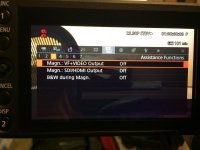
Assistance.jpg
 
Last edited:
whow that is weird!

Maybe those changes only take affect after a reboot of the camera (power off/on)
but that would be strange since on the c100 you can turn overlay on/off on the fly .

Bad luck man, your 4K files probably will key just fine so your likely saved that way.
These camera's get complexer each time so user debugging seems to be a sign of the times.
 
whow that is weird!

Maybe those changes only take affect after a reboot of the camera (power off/on)
but that would be strange since on the c100 you can turn overlay on/off on the fly .

Bad luck man, your 4K files probably will key just fine so your likely saved that way.
These camera's get complexer each time so user debugging seems to be a sign of the times.

I tried the rebooting multiple times, it has no effect on the overlay or the lens bug. I am going to contact Canon to discuss these issues but it would be good to get feedback from other C200 owners on if these two bugs are affecting them. Manufacturers can't consider an issue with one camera a bug in the software or firmware unless there is a critical mass of users affected. Who knows, these could just be issues with my camera and possibly are not bugs?
 
With my C200B it seems that the menu item just does the same thing that pressing the Magnification button does, which seems pointless. In my mind it should activate/deactivate the Magnification effect on the HDMI feed. I think that may be a bug.

With regards to the 18-80, I own a copy and the joystick on my side grip works fine in the menus. With that said, it didn't work at all at first. Focus Assist and Record were working but not the joystick. I had to really jam the connecter up into the camera before the joystick would do anything, now it works perfectly except I wish that a quick press in on it worked like it does on the C100. Such a quick way to adjust ISO or WB, etc.
 
With my C200B it seems that the menu item just does the same thing that pressing the Magnification button does, which seems pointless. In my mind it should activate/deactivate the Magnification effect on the HDMI feed. I think that may be a bug.

With regards to the 18-80, I own a copy and the joystick on my side grip works fine in the menus. With that said, it didn't work at all at first. Focus Assist and Record were working but not the joystick. I had to really jam the connecter up into the camera before the joystick would do anything, now it works perfectly except I wish that a quick press in on it worked like it does on the C100. Such a quick way to adjust ISO or WB, etc.

Thanks for checking. The way the menu items are labeled is kind of confusing, which is unusual for Canon, usually Canon menus are pretty clear and logical. So on your setup, is there any way to NOT have the Magnification function pass out of the HDMI? On my camera, no, unless there is some other way to turn that feature on and off that I haven't discovered yet.

Interesting performance on your 18-80 and camera. I tried removing and reseating the plug several times, it would never work with the 18-80 attached but switch to any other Canon lens and it works perfectly so I don't think it's the jack on mine. I too am missing the press the button to activate quick menus like we had on the C100, that was great feature that was even missing on the C300.
 
Last edited:
Here's what I determined with magnification behavior on my C200. I tested external monitors connected via HDMI and SDI. The behavior is the same with either connection. The magnification options in the menu system (see puredrifting's original post), are independent of one another; in other words, you can use the menu options to separately specify if magnified signals are sent to VF/Video and HDMI/SDI. So you could send magnified signal only to HDMI/SDI, only VF/Video or both. This is the case if you are using the menu system. However, if you use the button on the camera body, magnified signals will be sent to both VF/Video and HDMI/SDI - and both options become enabled in the menu system. It's possible this is the intended behavior - that the button on the camera enables both magnification options.

I wonder if the magnification button on the camera body can be remapped to magnification of VF/Video only, but I'm guessing the only possible remapping would be to bring up the menu options. You could then enable VF/Video magnification (only), but that would require quite a few more steps. I'll check that out when I have a change.
 
PD, have you thought about playing the 4K back out of the camera and re-record those on your blade so the client has a clean 1080 copy to work with?
 
PD, have you thought about playing the 4K back out of the camera and re-record those on your blade so the client has a clean 1080 copy to work with?

I could do that but I don't know what they would gain using the 4K converted to 1080 files, they already have the clean 4K recording? The real question is if it will key cleanly. I have the 1080 Prores backup with the magnify mistakes in it too, it would depend on which clips the editor uses as to whether or not they could use the Prores HQ 1080 files, the time code will match so conforming wouldn't be that difficult. At this point, I am going to send their compositor a few :10 samples of the 4K to see if it keys okay. The whole experience has been vexing as far as the Magnify button, is it a bug or is this the way Canon intended it to be? It makes no sense, if you are recording externally and accidentally hit the button, you have made your recording useless. As a sidebar, the magnified output looks good on the touchscreen, but recorded to 1080, it is not usable, it's all pixelated. Quite a problem, I am surprised I am the only one who has inadvertently made this mistake, it's my own fault, I should have been monitoring the Blade screen better, but it's Canon's fault that this issue is in the C200.
 
Here's what I determined with magnification behavior on my C200. I tested external monitors connected via HDMI and SDI. The behavior is the same with either connection. The magnification options in the menu system (see puredrifting's original post), are independent of one another; in other words, you can use the menu options to separately specify if magnified signals are sent to VF/Video and HDMI/SDI. So you could send magnified signal only to HDMI/SDI, only VF/Video or both. This is the case if you are using the menu system. However, if you use the button on the camera body, magnified signals will be sent to both VF/Video and HDMI/SDI - and both options become enabled in the menu system. It's possible this is the intended behavior - that the button on the camera enables both magnification options.

I wonder if the magnification button on the camera body can be remapped to magnification of VF/Video only, but I'm guessing the only possible remapping would be to bring up the menu options. You could then enable VF/Video magnification (only), but that would require quite a few more steps. I'll check that out when I have a change.

They key to really check on your camera is, is there a way to make the Magnify feature NOT to output from HDMI or SDI at all, ever. As of now, there is no way to do this on my copy. That's either a firmware/software defect or the most badly designed implementation of the Magnify feature on any camcorder ever made. As of now, on my camera, when recording externally, the Magnify button is a gotcha that can inadvertently screw up your external recording, not other pro camera behaves this way. As a matter of fact, on my other cameras, there is no physical was to output and record the Magnify feature, even if for some weird reason, you wanted to. The C200 seems to be the opposite, at least on my copy, there is no way to NOT externally record it.
 
They key to really check on your camera is, is there a way to make the Magnify feature NOT to output from HDMI or SDI at all, ever. As of now, there is no way to do this on my copy. That's either a firmware/software defect or the most badly designed implementation of the Magnify feature on any camcorder ever made. As of now, on my camera, when recording externally, the Magnify button is a gotcha that can inadvertently screw up your external recording, not other pro camera behaves this way. As a matter of fact, on my other cameras, there is no physical was to output and record the Magnify feature, even if for some weird reason, you wanted to. The C200 seems to be the opposite, at least on my copy, there is no way to NOT externally record it.

Neither have I found a way to have the magnify button not output to HDMI/SDI "at all, ever." As you have found, the button on the camera will magnify to HDMI/SDI regardless of the menu setting. By way of elaboration on my prior statement " It's possible this is the intended behavior - that the button on the camera enables both magnification options.", I wasn't endorsing the way it works now. I, too, suspect it is a bug; if it's not, it's a poor design. I have submitted a feedback report to Canon to that effect.
 
I spoke with Canon, there are some functions that are not apparent from the manual as follows:

1. For the CN-E 18-80 T4.4 and the CN-E 70-200 T4.4 lenses, you must make sure that the grip control function, first menu function, page 5, is switched to off. That is what was disabling the joystick while using those lenses. I had the grip zoom switched on, used the grip zoom control a bit, then forgot about it, went to some other still lenses, came back to the 18-80 and neglected to swtcih off the grip zoom which overrides the joystick menu control. The joystick would function with still lenses because the grip zoom options are only activated when you mount a compact CN-E servo lens.

2. Currently the Magnification button on the camera is set to the function "Magnification". This function magnifies over EVERY output. What you want to do is reassign that button to the function "Magn.: Video Output" instead. This will just magnify your Video Output, which is your touch screen. A quick, simple way to do this is hold the Menu button, then tap the Magnification Button (Number 1). This will bring you to the Assignable button menu for that button, and you'll see the proper option there. It makes no sense to me that the default is to have the HDMI and SDI magnification on, the shipping default should be having the Magnification not go out the HDMI and SDI outputs but that's how it ships.

So in the end, these issues were user error but it would be nice if the manual was clearer about these two issues. It may be buried in there somewhere that the grip zoom control locks out joystick menu function only when CN-E lenses are attached but I couldn't find it. Also, IMHO, the magnification issue it totally non-intuitive, the camera should come with the Magnification output via HDMI and SDI NOT enabled and you should have to manually turn that function on if for some reaon you want the Magnify function to go to your external monitor or recorder.
 
Last edited:
Hello puredrifting,

I'm glad that all the issues are resolved.

Regarding Magnification, don't forget that C200 sells in two (three) variants: with and without touchscreen.

If that function would be just to magnify HDMI, I guess that there would be more Magnification 'bugs' reported by those who bought it without and have SDI monitor, saying something like "Magnification button doesn't magnify".

How are you satisfied with Canon FPD-400D and Canon ZSD-300D combination? ZSD is clearly easy to use, but FPD in combination with all those focus assist modes must be joy?


Kind regards
 
Last edited:
...How are you satisfied with Canon FPD-400D and Canon ZSD-300D combination? ZSD is clearly easy to use, but FPD in combination with all those focus assist modes must be joy?


Kind regards

Honestly, I just received a missing Arri Rosette for mounting and using the ZSG-C10 on the 70-200 T4.4 yesterday so I was able to mount it to the lens finally. I have not yet tried the FPD-400D and ZSD-300D but doing so is on my list.
 
Back
Top