

puredrifting
Major Contributor
My first bug I think I have discovered is that mounting the CN-E 18-80 T4.4 lens to my C200 disables grip joystick function, while still allowing record and iris to work. I shot all day today with my Canon 70-200 2.8 IS II and the joystick function on the grip was 100%. I just got back to the office, swapped out the 70-200 for the 18-80 and same issue that I had yeserday, grip joystick access is turned off and completely non-responsive.
Was on my second shoot today with our new C200. Recording 4K internally and sending the 10-bit 4:2:2 1080 out via HDMi to our Ninja Blade. I was intently checking focus on the touchscreen and wasn't really paying too much attention to the Blade's screen. I checked magnify focus a few times to make sure that Face Tracking was doing a good job in tracking my fidgety interview subjects who were moving around in their chair. All was good, Face Tracking was working fine. I noticed that when I was hitting magnify on the camera that the screen on my Blade was recording the magnified image?!?!? Holy crap, I must have had something set incorrectly. At the next break, I dove into the menus and the manual. Page 83 of the manual says that you can set the magnify off out to the the SDI/HDMI terminals by simply selecting off in the Menu > Assistance Functions > Page 3 settings. There are three settings displayed on the page, Magn.:VF+Video Output, Magn.:SDI/HDMI Output and B&W During Magnify. On my camera, no matter if I set the second menu option to on or off, if I hit Magnify on the camera, it sends the magnified images out the HDMI. I don't have an SDI monitor test if SDI respnds the same way, but I would imagine it does. There doesn't seem to be any other way to disable the Magnify function off from going out the HDMI?!?!?
You can help me verify this, if you own a C200 by hooking up your HDMI monitor or HDMI input recorder to the HDMI and hit the Magnify button. See if it magnifies the output. Check if changing your menu setting to Off makes any difference in what the camera is outputting, because at least on my camera, the setting does nothing, the camera sends out the Magnified image regardless of how it is set. Also, if you own an SDI input monitor, please hook it up and test this., when you hit Magnify on the camera, does it send the Magnified signal out the SDI to your monitor, regardless of if you have that function to send it out the SDI output turned off?
I am kind of hosed by this today, On the first two interviews, I checked focus magnification several times so every time the client's editor comes across this, the 1080 output in going to jump to a fairly tight CU of the subjects face. It's like clunky in-camera editing. After the second interview when I discovered this issue, I, of course, didn't touch the Magnify button so those interviews 3 and 4 so they are good. But the first two are going to have several chunks that may or may not be usable. I was making a backup recording in 4K .MP4 of course, the 4K internal recording will be unaffected by this, I gave the 4K footage to the client, but have not yet delivered the 1080 footage (it's a 1080 project we are shooting). It was perfectly lit green screen so I am hoping that the 4k footage, even though it is 4:2:0, will key fine and we will be good. I recall when I had my GH4, that well lit UHD green screen used on a 1080 timeline seemed to key pretty well, even though that camera was also recording 4:2:0 color space? Is it true that if you take 4K 4:2:0 footage, you are somehow increasing the apparent color sampling when used at 1080? Ot is that some inaccurate post I read years ago?
Please hook up your monitors and recorders and let's figure out if this is a legitimate bug in the C200. I combed through the manual and the menus, I cannot locate any other options for this setting.
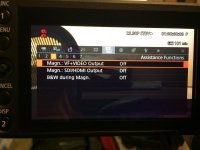
Was on my second shoot today with our new C200. Recording 4K internally and sending the 10-bit 4:2:2 1080 out via HDMi to our Ninja Blade. I was intently checking focus on the touchscreen and wasn't really paying too much attention to the Blade's screen. I checked magnify focus a few times to make sure that Face Tracking was doing a good job in tracking my fidgety interview subjects who were moving around in their chair. All was good, Face Tracking was working fine. I noticed that when I was hitting magnify on the camera that the screen on my Blade was recording the magnified image?!?!? Holy crap, I must have had something set incorrectly. At the next break, I dove into the menus and the manual. Page 83 of the manual says that you can set the magnify off out to the the SDI/HDMI terminals by simply selecting off in the Menu > Assistance Functions > Page 3 settings. There are three settings displayed on the page, Magn.:VF+Video Output, Magn.:SDI/HDMI Output and B&W During Magnify. On my camera, no matter if I set the second menu option to on or off, if I hit Magnify on the camera, it sends the magnified images out the HDMI. I don't have an SDI monitor test if SDI respnds the same way, but I would imagine it does. There doesn't seem to be any other way to disable the Magnify function off from going out the HDMI?!?!?
You can help me verify this, if you own a C200 by hooking up your HDMI monitor or HDMI input recorder to the HDMI and hit the Magnify button. See if it magnifies the output. Check if changing your menu setting to Off makes any difference in what the camera is outputting, because at least on my camera, the setting does nothing, the camera sends out the Magnified image regardless of how it is set. Also, if you own an SDI input monitor, please hook it up and test this., when you hit Magnify on the camera, does it send the Magnified signal out the SDI to your monitor, regardless of if you have that function to send it out the SDI output turned off?
I am kind of hosed by this today, On the first two interviews, I checked focus magnification several times so every time the client's editor comes across this, the 1080 output in going to jump to a fairly tight CU of the subjects face. It's like clunky in-camera editing. After the second interview when I discovered this issue, I, of course, didn't touch the Magnify button so those interviews 3 and 4 so they are good. But the first two are going to have several chunks that may or may not be usable. I was making a backup recording in 4K .MP4 of course, the 4K internal recording will be unaffected by this, I gave the 4K footage to the client, but have not yet delivered the 1080 footage (it's a 1080 project we are shooting). It was perfectly lit green screen so I am hoping that the 4k footage, even though it is 4:2:0, will key fine and we will be good. I recall when I had my GH4, that well lit UHD green screen used on a 1080 timeline seemed to key pretty well, even though that camera was also recording 4:2:0 color space? Is it true that if you take 4K 4:2:0 footage, you are somehow increasing the apparent color sampling when used at 1080? Ot is that some inaccurate post I read years ago?
Please hook up your monitors and recorders and let's figure out if this is a legitimate bug in the C200. I combed through the manual and the menus, I cannot locate any other options for this setting.
Last edited:

