Hyperdeck Shuttle 2.0 - Another External Recorder Option

Just to summarize the status from this lenghty thread (plus my own frustrating personal observations):

1. Some people claim that BMD DaVinci Resolve Lite can read and convert the Hyperdeck MXF files. I have not yet been able to get this to work on Win 7 x64. DaVinci Lite would open and play the Hyperdeck MXF video file though. I must be missing something that is critical.
2. The most recent version of the Calibrated{Q} Importer (actually $199 US) allows import of Hyperdeck MXF files by pretty much any NLE, etc. Both AE & PPro 5.5 will then read the files directly. Vegas Pro 11 will read the files via creation of a reference MOV file. The Importer comes with a utility that creates the QT reference file. I have tested both Vegas and CS5 on Win 7 x64. Keep in mind that if you download the free fully-functioning Importer demo, it will truncate all your imported clips at 30 seconds of video (until you purchase a license).
3. The open source ffmpeg variant ffmbc will read Avid DNxHD MXF files but it won't read the Hyperdeck "flavor". In a nutshell, the metadata in the Hyperdeck video and multiple audio MXF files have cross-references to each of the other two files and ffmbc presently can't handle such indexing. I have tested this on Win 7 x64. The author of ffmbc has posted on his website that he is willing to make the change, if enough people show interest (which I interpreted as "donate", which is reasonable).
4. Other open source software will not read, play or re-wrap the Hyperdeck MXF files. I've tried just about all of them that I could find. Some will in fact, read the MXF metadata, though, but that's it.
5. BMD staff have made some statements on the CC message board that they are working on adding another codec to the firmware. Just about everyone in the community has narrowed that speculation down to Cineform (Yay!) or ProRes (mild applause). Even if BMD has previously licensed the CFHD codec, I wonder what version of the codec that they have licensed?
6. You can import the Hyperdeck MXF files directly into Avid MC, but you have to do it in the way that was explained earlier in this thread. Just opening the video file will not work (Again, because of the cross-referencing issue in the metadata). I have not personally tested this.

Other than that, my Shuttle 2 is really a nice piece of hardware. My workaround to date, is to import the Hyperdeck MXF files to my Intensity Pro via HDMI. That approach has some obvious drawbacks. With BMD Media Express, you have only two 8 bit transcoding options, 8 bit YUV and 8 bit MJPEG. There goes the 10 bit depth from the DNxHD essence in the original MXF file. With GoPro Cineform Studio's HDLink, you can convert to CFHD and preserve the 10 bits. I have tested this on Win 7 x64. Please note here that I have not looked at issues related to super blacks, super white, etc.. Other people have posted problems with getting the Hyperdeck MXF file contents to look quite right colorwise in their NLE. I haven't noticed that yet, but I believe them.
 
I can try again with latest beta4 Resolve, but this one has removed ProRes exporter.

I also notice that Resolve ProRes implementation is not seams to be an Apple official, but based on ffmpeg. Exported HQ files don't keep typical Apple bitrates, but go way above, eg 300Mbit. It's good, but some people reported this files does not work properly on MAC. Strange as ffmpeg/ffmb ProRes files work fine on MAC.

Good to hear that CalibratedQ added support- this is quite good piece of software.

Cineform has only one version of it- license is rather related to resolution and eg 4:4:4 support. As far as I know even lowest license is up to HD resolution, 4:2:2, 10bit with many quality setting- so should be sufficient for use in HyperDeck. I would also assume BM licensed full SDK as this is what most companies do. In this case you can do way more than actual Cineform application offers- I had big conversation with David from CF and he said you can do a lot with SDK if you wish so :)
 
So, any further word on what this new codec will be? If it IS Cineform I will crap my pants - Been using cineform as an intermediate format in a DI workflow for about three years now - I love absolutely everything about it.

if it's once again, prores, then bleh.

Make it Cineform and I will pick one of these up the moment I read an announcement.
 
I, for one, have sworn off any software or hardware that requires transcoding or other time and resource consuming steps. If I can't plonk it on a time line and immediately start editing its costing me too much time, energy and money. That was the whole advantage of sold state drives. Otherwise you've stepped back to the equivalent of capturing tapes.

If I have to buy a reasonably priced codec or plug in to immediately edit, so be it. Otherwise I don't think its a mature product.
 
I, for one, have sworn off any software or hardware that requires transcoding or other time and resource consuming steps. If I can't plonk it on a time line and immediately start editing its costing me too much time, energy and money. That was the whole advantage of sold state drives. Otherwise you've stepped back to the equivalent of capturing tapes

Then hope and pray that the new codec will be cineform - with their free decoder, you can drop in and play cineform files in absolutely anything that supports .avi or .mov files. Premiere, Avid, FCP, FCPx, Nuke, Davinci, Media Player Classic, VLC, After Effects, Cinema 4D, PFTrack, Photoshop.....etc - In Windows and OSX. And it's damn fast, too.

Did I mention I'm a cineform fan? :p
 
me too!!
This is the only reason why I didn't upgrade from the ninja to the samurai for my af100 yet. I'm waiting to see who brings cineform into an external recorder. Then, I will place an order immediately :)
 
YES!!!!!
Thank you for listening Blackgmagic

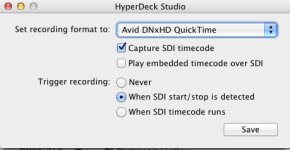
What's new in HyperDeck Utility 2.5 BETA 1


• Support for Avid DNxHD 220x recording to a Quicktime MOV file
• Timecode input support via RP-188
• Automatic record trigger via SDI record start/stop flag and incrementing timecode detection
 
I, for one, have sworn off any software or hardware that requires transcoding or other time and resource consuming steps. If I can't plonk it on a time line and immediately start editing its costing me too much time, energy and money. That was the whole advantage of sold state drives. Otherwise you've stepped back to the equivalent of capturing tapes.

If I have to buy a reasonably priced codec or plug in to immediately edit, so be it. Otherwise I don't think its a mature product.

I agree with your first point. It's really too bad that a simple command-line approach like ffmbc doesn't work, because all that does, is a rewrap from MXF to MOV with no change to the video stream. With a "normal" MXF file containing a DNxHD essence, the ffmbc rewrap process is almost as fast as just copying the file. Once you start transcoding from this to that, really what's the point? You are losing quality with each generation. You might as well either use uncompressed files on the Hyperdeck Shuttle 2 or just use the camera's native files. It's not like the initial generation of AVCHD is low quality.

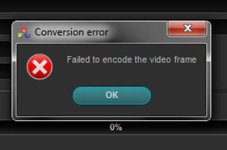
I want to add an update to my tests with DaVinci Resolve Lite on Win 7 x64. It is possible to convert the Hyperdeck MXF files to either DPX (which is nice if you are using a tracker program like Mocha) or to MXF. For some reason, the convert to MOV throws an error dialog box. I'm wondering if this error is specific to either Win 7 x64 or the version of QT that I installed (7.7.1):

DVRLite error.jpg

It also is possible to convert the original Hyperdeck MXF to a "normal" DNxHD MXF file using DaVinci Resolve Lite. I have no idea of whether it does a re-encode or a rewrap. At that point, ffmbc can be used to rewrap the file to MOV. But that seems like a lot of extra work and there's really no way of automating the process.
 
I, for one, have sworn off any software or hardware that requires transcoding or other time and resource consuming steps. If I can't plonk it on a time line and immediately start editing its costing me too much time, energy and money. That was the whole advantage of sold state drives. Otherwise you've stepped back to the equivalent of capturing tapes.

If I have to buy a reasonably priced codec or plug in to immediately edit, so be it. Otherwise I don't think its a mature product.

But this is down to NLE which you use.

I would never accept NLE these days, which needs to render timeline simply because source file does not match timeline settings- eg FCP. This is simply unacceptable and 5 or more years behind!
I don't use FCP and I can drag basically any format (except Hyperdeck MXF- hahaha) on timeline (also different size) and all works in RT. I can add 10 effects and still no rendering needed.

It's everyone's choice of NLE and workflow, but these days codecs may not be an issue if you use correct workflow/NLE. When you want 10bit than it's bit problematic, but 8bit is simple.

In the same time Cineform is great codec- most universal and highest available quality of all intermediate ones. Version up to 10bit/HD/4:2:2) is free now.
 
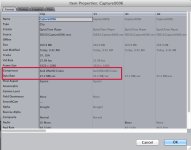
View attachment 48164View attachment 48165

Tested the Automatic triggering of Record via SDI Timecode - works sweet! Clips playback smooth in FCP 7. I'm a happy camper!
Here's a DNxHD Quicktime MOV with the new new 2.5 Beta 1 http://dve.s3.amazonaws.com/media/Capture0006.mov if anyone would like to confirm compatibility.

Great news- now Cineform support and we're happy :)

Do you know if it will record all 16 (or at least 8 channels) of 24bit audio from HD-SDI?

update:

Downloaded file, had a look at it and have answer :)

It does all 16 channels at 24bit- cool
:)
 
Last edited:
Tested the Automatic triggering of Record via SDI Timecode - works sweet! Clips playback smooth in FCP 7. I'm a happy camper!
Here's a DNxHD Quicktime MOV with the new new 2.5 Beta 1 http://dve.s3.amazonaws.com/media/Capture0006.mov if anyone would like to confirm compatibility.

I can't properly read that file on QuickTime 7.6.6, nor FCP 7. Got the sound but no image. I think I should install Avid QuickTime Codecs LE 2.3.2 (http://avid.custkb.com/avid/app/selfservice/search.jsp?DocId=372311), but it doesn't run on my OS 10.5.8 system. Before I upgrade my whole system, I wish someone could confirm that it works with the Avid codecs... Thanks.
 
I downloaded Avid QuickTime Codecs LE 2.3.2, and installed them on my Snow Leopard Mac Pro, and was able to both view the footage in the QT player 7.6.6, and import and play it in FCP 7 and FCP X.

Green screened mannikin with wind blowing her hair.

If that helps.
 
So in its current form with the latest upgrade can the Hyperdeck Shuttle record DNX HD MXF files with matching timecode from a Sony F3 by getting and embedding the timecode over the HD-SDI?

Can it also be auto triggered to record via incrementing time code or flags via SDI much like the KiPro Mini and pix240?
 
mov plays fine in quicktime and in final cut 7, but enabling my MX02 output in final cut, it doesn't play. I can turn it into pro res and all is fine.
 
Don't you have to match timeline setting to source file to be able to play in RT?
For me FCP7 is a joke these days with its limitations.
 
Guy, thanks for the clip. I was able to import it directly into Premiere Pro CS5.5! But, it plays very very slowly and I'm using a pretty fast hard drive. Is that typical for uncompressed?

Update: I converted to Cineform using AME and it plays much better! But --- the audio didn't stick with the video in the conversion (i.e., I just got video from the conversion)
 
Guy, thanks for the clip. I was able to import it directly into Premiere Pro CS5.5! But, it plays very very slowly and I'm using a pretty fast hard drive. Is that typical for uncompressed?

Update: I converted to Cineform using AME and it plays much better! But --- the audio didn't stick with the video in the conversion (i.e., I just got video from the conversion)

Is it DNxHD or uncompressed?
For uncompressed you need RAID- for smooth playback 200MB+ constant read.
DNxHD should play fine as long as you have something like i5 processor.

Try Edius NLE instead of Premiere:)
 
Back
Top