FS7: Green grass saturation

Wiil do. Not near camera at the moment and being a bit slack I haven't updated the SD card contents to my PC. When I do that I will upload the SLOG2/Custom file.

in the meantime if anyone wants to look at how the Scene File I uploaded looks on a stage shoot they could download a clip that has snatches of different scenes from a local amateur ballet's production of Swan Lake. This is from the mid shot camera at the back, top mic audio only, but it will give you an idea as to how the colors and skin tones look under stage lighting. The venue this was shot at has a very large theater with a long throw for the cameras so this was shot using an MTF B4 to S16 adapter with an 18 x Fuji lens. The MTF adapter adds close to a 1.32 crop so in effect the long end on this lens was 23.76 and I was using a lot of the long end. That's all bye the bye. Mainly the main thing to look at is the color, dynamic range and highlight handling with this scene file and modified manual knee settings. I find ballet dresses that flare outwards horizontally are prime candidates for highlight handling issues as they are lit so heavily from directly above front of stage. Feel free to comment :)

Edit: Forgot to mention the client wanted this shot in 1080i specifically for BD production. The download clip has been de-interlaced and rendered out at 50p.

Download: www.sendspace.com/pro/dl/jsj5ij

Chris Young
 
Last edited:
Right Doug I see.

I've only downloaded the first video set so far.

From a purely aesthetic point of view for my eye in group #1 it would be clip #338. In group #2 it would be #342 although I think #345 with a bit of contrast tweaking would also rate fairly highly. Group #3 on first pick I would go for #333 but would also think #334 would scrub up pretty good like #345 with a bit of contrast tickling. In summary to me if I was correct on my first comments as to which clips came from scene files and which clips come from LUTs I guess I prefer the scene files. Having said that some of the nicest pics I've shot come from well graded and adjusted LUTs.

Agree with Lenny. Often some of the best post comments I've had about "Nice pics!" most often come from scene files. It is what it is! Go figure.

Chris Young
 
this is a screen grab from my modified Lenny55 settings. 18-110, f4, +12db, it's almost dark, ooc. I am pretty impressed..

0538_0039.jpg


natural light in my living room, ooc, 5500K might be a tad too red/magenta

2017-11-19-1.jpg


quick fix in FCPX
2017-11-19-2.jpg


work in progress..
 
Last edited:
Not bad at all Clermond. To swing away from the magenta try knocking back the multi matrix 'R' phase by about MINUS 3-5 points. Careful not to go too far negative otherwise your pure reds will drift a little orange. The multi matrix is a bit finer but a similar result can be achieved in the matrix if you take the G-R a few points negative but this will have a slightly more global drift towards orange. A high red content can come from having the R-G (red into the green channel) a bit too high. You could try dropping that a bit. Haven't had a chance to try Lenny's settings yet. Just gotta find the time!

Chris Young
 
Thanks Chris, I will give it a try!

(have in mind it's STD5 but Matrix F55 REC709 like level -20 phase -5)

here's daylight "green" shot. This was how the thread started.. green in the shadow on the balcony and warm sunset rays on the gras

ooc

2017-11-19-3.jpg


added contrast, pulled back sky, 10sec in FCPX/ColorFinale

2017-11-19-4.jpg
 
Having said that some of the nicest pics I've shot come from well graded and adjusted LUTs.
I don't think you'll get an argument from anyone that shooting slog2 or 3cine in CineEI mode and then grading (with or without) LUT in post will give you the best results. That is, easily far & away - how I prefer to shoot and edit. But I still have those clients - or situations - where I need to hand over footage with a "look" already cooked in. Adding contrast or other minor tweaks to what should be a final look isn't "final" to me in this situation. I want to get it as close in camera as possible. And so, while I know this is always a "compromise" of sorts - I obsess a bit because initially I felt I could never get close to the same look (or colors) I got when grading my own footage. A one-size fits all scene file or Mlut to bake in - that handles many scenarios well - is becoming my holy grail.
 
Yes, Chris, I'd definitely like to see your Custom file too. I'm in the process of putting 15-20 different looks together on a single screen, so I can compare and contrast them all, and have a library of choices, so to speak. I will share it here once it's done.

I am definitely in the CINE EI, grade-it-in-post camp, but do have situations where I'd like to shoot it and be done with it.

Thanks again for sharing your knowledge. I've found it extremely helpful.
 
You are correct the A7 series of cameras are also from Sony but there any similarity ceases.
Chris Young

It's just annoying and surprising that the colors look closer to what the eye sees, out of the box, on the A7ii, especially given that the FS7 is marketed towards professionals.

There are more settings available, sure, but that still doesn't explain why are they configured in such a seemingly bizarre way by default.

Anyway I don't wan't to whine and if I don't understand well maybe I will in my next life.

I finally had the opportunity to visit a friend who has the same camera and I put it side by side with mine in his office. The lighting was a mix of bulbs and windows, I set both cameras to 5700k preset, rec709 custom, shutter 1/6 (the video is accelerated) and F4. Everything else factory defaults.

https://youtu.be/qV1H5rRfwXE (my camera is on the left side)

It seems that the greens produced are fairly identical. I can't say that mines are more saturated. Maybe even the contrary. Well, I guess I just can skip the repair shop step and begin trying messing with the settings.

Thank you.
 
Here is an interview sample shot with the CYV Custom 709 scene file I uploaded if anyone wishes to see how it performs in an interview situation. 1 minute long approx. To avoid poor web compression it can be be downloaded here:

www.sendspace.com/pro/dl/7c4b30

Chris Young
 
That looks great.

Did you say you would be able to upload the Scene File for that one? Is that the one the Sony reps liked?

Thanks again for sharing these things.
 
No that was shot on the Custom Mode Rec 709 Scene File I uploaded a week or so back. A lot of editors like it as it requires little grading.

I find a few of my clients like the look from the CYV Custom S-LOG2 scene file which is the one the Sony guys wanted. It obviously doesn't suit all situations by any means. I developed it for TV shoot delivery. I think what people like about it is that it gives you the dynamic range of S-LOG2, the ability to white balance and the ability to increase gain if needed. Bear in mind this 'look' was built around S-LOG so the native ISO of the file is 2000. It does require grading to taste to give it more sparkle. I sometimes use it with the Black level dropped to -3 to -5 if needed. Beware going any lower than -5 as that sits you right on the blanking. Anything under that is vision below black level which for TV is a no, no.

As it is a Hybrid type scene file, Custom Matrix plus LOG gamma , it does produce a 'look' that is neither a straight LOG or straight Custom 709 look. Feel free to experiment with it. Test it well before you use it on a job is my advice. As is usual with all these things it is very much a subjective assessment when you see the results. You either like it, hate it or go "Yeah it's okay I guess." Remember it needs grading to get the best out of it. Saying that though I had one editor say "No the client loves the look the way it is."

I use it with my Zebras at 60 for Zeb #1 and #75 for Zeb #2. If I'm shooting an interview as soon as I see Zeb one starting on the brightest part of the face that's my stop point. General scenes and outdoors I keep my 'average' peaks at or around the 75 IRE on the waveform which is approx 1.5 stops over S-LOG2's peak white at 59 IRE. Extreme peaks can go quite happily into the 80's but beware of the 90's as S-LOG2 will start to clip above about 91 IRE. Remember comes up best with grading.

Download here:

www.sendspace.com/pro/dl/zawdba

Chris Young
 
many thanks Chris. I didn't realise that there was a download link for your scene file. I will shoot a comparison of all as soon as I find the time.
 
No problems. Try away. If any of the files are of any use to anyone feel free to use them. What annoys me with the last sample is the interview subject would not let the make up girl 'de-shine' his head. Also we were not allowed to turn off any of the lights in that room. The upload is really just to give people an idea of how skin tones look with that Rec 709 Matrix. Camera was set at a Preset White Balance of 3400K.

Chris Young
 
Really great you are sharing all this. Very helpful to me where I'm at with the FS7.

I really appreciate you sharing your settings and approach in the above post, but I thought SLOG 2 clipped at 107 IRE and SLOG 3 at 93 IRE?

For the Custom Mode Rec 709 Scene File, is that the one you uploaded in Post #22 in this thread? I can't seem to find it anywhere else.

Thanks again!!
 
While you are correct in stating that the S-LOG2 value is higher at 107, I believe it is 109, but what we have to remember here is the following. What we are doing with a "Custom / S-LOG2" hybrid way of shooting is that we are using Custom Mode which is all based around Rec 709, even using the Hypergamma modes. So basically we have a broadcast gamut that is supposed to run between 0 and 100 IRE. The thing is we are not using a standard .45 type gamma as you typically would in 709 mode. We have concocted a 'hybrid' shooting mode using a combination of Rec 709 space and LOG space. In conjunction with one another they create a new space where the hard and fast rules of the 709 and LOG spaces don't fully apply. As I said earlier most of my scene file manipulations be they 709 or hybrid LOG Custom variants are for TV work.

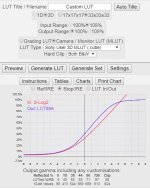
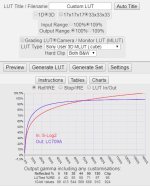
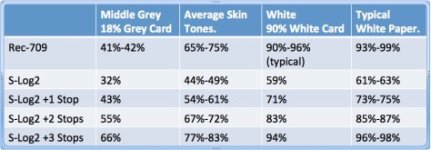
A couple of quick examples using camermanben's, Ben Turley's great LUTCalc showing you what the effect is with an input of S-LOG2 and an output of LC709A. In a way my Custom / S-LOG2 mode is a LOG shoot with a burnt in 709 color space... sort of. Have a look at the graphs below and you will see one represents Ref / IRE and the other is Stop / IRE. In both cases this indicate the clip level as being 98 IRE. In practice I feel safer using 90 IRE as my max limit. Also look at the small chart that gives you a pretty close indication as to what your maximum reflectance values are for a white card for example, 94 IRE. That is why I cautioned about wandering too far into the 90's. Three stops over on S-LOG2 is 94. I really don't want to pull much back from above three stops over exposure in post on a pure LOG shoot let alone of an over exposed file that has a 'baked in' look which is what a hybrid Custom / Log file is. That's my experience and so far it's kept me pretty much out of trouble.

SLOG2 - 709 Stop IRE.JPGSLOG2 - 709 Ref IRE.JPGSony LOG exposure-levels.jpg

The Custom Mode Rec 709 I uploaded was a few days back so if that's the one you are referring to then yes that's it. The last one referred to in post #52 is the Custom / S-LOG2 Scene File. The non conventional hybrid. On Panasonic's Varicams they have a number of shooting modes. V-Log and their version of a hybrid which is called V-Log 709. This is essentially V-Log in a 709 color space. It is a Log gamma but it has all the conventions of having to shoot within a 709 dynamic range. Care is required when shooting in LOG and especially this hybrid mode as there in no knee and so no highlight roll off shoulder. As I say I feel much safer keeping under the low 90s IRE mark as that is three stops above and it starts to get much harder in 709 space to meaningfully manipulate those high levels.

Chris Young
 
Last edited:
No problems. Over the years people have explained it to me when I was coming to grips with shooting and posting LOG material. No one owns the info it's just borrowed so when the time comes you just pass it forward. That's how we all learn:)

BTW, I should also have added by way of explanation the following info re the relative levels for pushing S-LOG2 a couple of stops.

If basing your exposures off a grey card you should be looking for these sorts of levels.

Standard level 32 IRE

1 stop over 43 IRE

2 stop over 55 IRE

and for a true 90% reflectance of a reference white card

Peak white should be 59 IRE

1 stop over is 71 IRE

2 stop over is 83 IRE

Plus or minus an IRE here or there between friends isn't going to break the bank but if you aim for those sorts of levels I think you will find yourself pretty safe. For me it's all been working pretty well.

Two stops over is about the most I ever go so that's why I tend to use 75 IRE as my average peaks with the odd extreme peaks going into the low to mid 80's knowing that any super peaks that might excursion into the low 90's is going to be recoverable in my Custom / S-LOG2 modes.

Chris Young
 
If I might ask one other point for my own clarification.

When you are shooting in Custom Mode, you've got the STD, HG, and S-LOG gamma categories. It sounds like even though the Custom mode is a hybrid concoction, the general rule of thumb to "overexpose" S-LOG by 1.5 stops or so still applies, which puts your Zebras right at 75, which is the same thing I would do for S-LOG without an MLUT in CINE EI mode.

However, for the HG and STD modes, do you see any need to overexpose beyond the generally recognized middle gray or 90% white values for those curves?

I have seen variability in recommendations for exposure for various scene files. And since Custom Mode is more of a WYSIWYG / Rec 709 space, is it more of a subjective setting based on what the operator sees?

I have shot almost exclusively in CINE EI, but seem to be having more occasions where I just need to shoot something and turn it around right then and there, so I'm less fluent on the Custom Mode side of things.

Thanks again.
 
My advice would be to never overexpose STD or HG. Hypergamma is actually intended to be slightly underexposed and then pulled up in post (see Alister Chapman's blogs.) However I suspect most people (like me I confess) use it as a WYSIWYG mode and expose it for a final look. Std gamma is meant for go home exposure. Personally I set my zebra at 60 for caucasian faces in STD and even HG. I find 70% too bright, but other people may differ and maybe I should experiment with brighter faces sometimes. In both custom modes though, you need to be very careful about not getting compression in faces. That's the knee in Std and the rolloff in HG which is different for each HG setting.
Generally safer to slightly underexpose and come up in post the to have to go down. Likewise you have lots of room to use gain in STD and HG - noise is not an issue until you get to 15 or 18 DB IMHO.
Basically its the opposite from Log.

The truly hybrid situation is shooting CINE EI SLog with a take home LUT burned in. Here you would not want to overexpose the Lutted look just like you wouldn't with Custom. However should you still overexpose the underlying Log- i.e shoot at say 1000EI or 800EI , or is it now OK to shoot at 2000? Lowering the EI will overexpose the underlying Slog but the LUT should compensate and you should expose for a good looking LUT. Advice on this forum has said its OK to shoot at 2000 that it won't be noisy , but I haven't tested it. ( That's a little confusing - hope I expressed it correctly.)
 
Last edited:
Back
Top