FS7: Green grass saturation

Hello,

A few months back I started to notice that my FS7 displays greener or yellowisher grass and leaves that what I would expect.

I didn't pay too much attention to it until I shot something with an A7ii as a B-cam.

Then by comparing the footages (the A7ii was set to Rec709, and the FS7 to factory defaults, same color temp for both), I came to the conclusion that the level of green on the FS7 seemed unacceptable.

So here are somme screenshots :

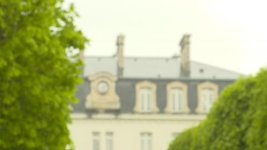
- 1st the A7ii
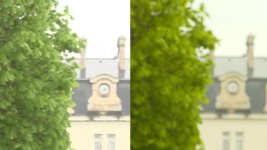
- then FS7
- both on the same scene
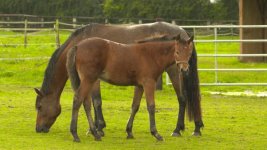
- then FS7 alone from a different scene
a7ii.jpg
fs7.jpg
a7ii and fs7.jpg
fs7 horse.jpg

Do you need my FS7 needs servicing ? What do you think I should do ? When I desaturate the grass in post I regain a lot of lost shades. To me there is clearly a problem.

Thank you.
Fred
 
I doubt your camera is broken.

If you are shooting 'baked' learn how to modify your matrix settings

if you are shooting log then use a different lut or just continue your correction in post.
 
Sam is correct. If you actually want any help you should post your settings.
If baked, how a camera responds to individual colors is a matrix issue and you should try different settings which are in the various supplied preset matrixes, or you can find stuff online. But don't go into the individual color matrixes unless you have done a lot of study first.
If you are in std gamma instead of a hyper gamma then ugly over saturated yellowish greens are very typical of greens that are somewhat overexposed and a hypergamma might help or just watch your exposure.

Its possible the multi-matrix could help that individual color, but I don't have much experience with it - be careful.

I used to work with a guy who changed matrixes for every shot on an Iky 79 and he always changed the greens when we were outside , but he was an expert.
 
I don't know what those defaults are, probably Standard 5 gamma which gives you the yellowish greens if they're too hot. You can watch them go yellow on a monitor as you raise the exposure . That may not be your issue though.
You should still post the specific settings and if you are new to the insides of your camera, there's plenty to read - probably a good idea to get Doug's book and/or read up on Alistair Chapman's website.
 
Last edited:
The sensors are different .. this must have some bearing.. maybe compare with another fs7 is a better idea.. both set to default or the same settings... Had an fs7 and my f5 on a shoot the other day.. and they had very different color temps for the over head office lights and thats meant to be the same sensor ! the f5 was a lot more green ..
 
By the way, If you're using a REC700 Type A, as in Alexa 709 LUT, it does contain much more green as Alexa LUT saturates more to the green. It could be your LUT that's different.
 
Thanks for your answers. I do want help ! Camera settings are factory defaults : custom rec709 and nothing else touched.

As others have said, to get the most from the FS-7 colour-wise, you need to either use Cine-EI mode, OR work with the various settings in Custom mode to get a 'baked-in' look that suits your tastes.

If you decide you prefer to stay in Custom mode (if for example, you want/need to add gain/iso in camera), then I've found you can get results that are pretty close (though obviously not identical) to shooting in Cine-EI, simply by switching "Matrix" to OFF in the paint menu. Additionally, you can then choose either Slog2 or Slog3 as your gamma curve, giving you access to the cameras full dynamic range.

Good luck!

jason
 
Don't you love Sony's floro green yellow grass in the STD5 baked in 709. A lot of us don't like this Sony green yellow hi luminance bias. Think of your color bars. Which one has the next highest luminance to the white bar? It's the yellow bar which should sit at 66 IRE in both PAL and NTSC and that they do. But unlike ARRI color science where as you wind up the luminance levels beyond that 66 IRE level the associated saturation starts to level out and the chroma levels stop pushing up much above 60 IRE or so. Even though the luminace level itself may be pushing well above that 60 IRE. Sadly not so with any of the Japanese brands. As the luminance levels push well past 66 IRE the chroma levels go way up along with them.

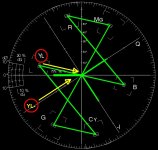
I usually find this floro green/yellow happens worst on very bright sunny days or very bright overcast day. On sunny days I find it is even worse if you are shooting directly into the direction of the sun. Basically how I tame this yellow/green bias is to use the Multi Matrix. Turn the MM on and work on the YL and YL- (minus) vectors. If you go negative values you are reducing the chroma levels and if you go positive you are increasing the chroma levels. The YL vector has the greatest influence as that YL is the Yellow vector. If you reduce the YL saturation you will start to tame this over saturation in the yellow vector. Likewise if you decrease the saturation in the YL- vector it will also tend to decrease the overall yellow saturation and your greens will start to look greener and more natural looking. Yhe YL- vector sits between the Yellow 'YL' and the Green 'G' vector. Have a look at the attached vector scope image to see what you will be adjusting. Also look at the composite 5 image JPG and you will get an idea of how the decrease in the YL vector saturation has a greater impact than the saturation decrease in the YL- vector. Often to get the optimum I adjust both to the negative. Often I find just winding to the YL to -30 works. If I have the time and the inclination I will fine tune with both vectors. Sometimes I find YL down to -25 and YL- down to -10 works well.

What I suggest you do is save a scene file save with the STD 5 Matrix and call it something like GREEN SAT DOWN OR - WHATEVER YOU WISH. Once you have done that reload that scene file and now go into the Multi Matrix and turn it on and try some of the above settings. Color is a very subjective personal thing and what some people like others hate. Come up with what you think looks natural and you are happy with and re-save that scene file for when you need it.

Chris Young

5 pic compile copy.jpgVScope with YL Vectors.jpg
 
Last edited:
Sadly not so with any of the Japanese brands.

Well the strange thing is that the A7ii is a sony device too but produced "normal" greens.

Anyway if I end up realizing that all FS7 share the same bias I will certainly follow your advice.

But isn't there a way to get a camera calibrated ? Same way a monitor, a printer, a scanner can be ? With some kind of probe ?
 
But isn't there a way to get a camera calibrated ? Same way a monitor, a printer, a scanner can be ? With some kind of probe ?

That is basically done by pointing the camera at a known target (ie colour card) and fiddling with the settings until the known colours from the chart land on known points on the vector scope.

The settings are then saved.
 
Chris, Thanks that's a good description of how you use the multi matrix (which I've been wary of just because I haven't read f anyone using it that way. ) Do you find you can use those settings as a general color setting or only for times when you have that green grass problem.? Also does it affect skin tones?
By the way its hard for me to see the color in those small jpgs. Anyway to pst them so we can see them larger?

Vildrockerfer - No there is no easy way to calibrate color other than what they already provide which is white balance. You do have
simple tools like Kelvin, a few different presets , level and phase, but the time honored way is to get into those matrix settings which are very tricky.
 
Correct me if I'm wrong : if there is no "automatic" or mechanical way to do it, it is because the required settings vary from one lighting (hence white balance) to the next... whereas a scanner always operates under the same lighting.
 
No - that's incorrect. Your camera already has sophisticated colorimetry built into it and designed by Sony engineers . That works fine by just hitting a white balance button. But you don't like the way they have set up that colorimetry, and you're not alone in that. If you want to change what they've given you there are lots of tools available, but you need to do some homework. There's no further help anyone can give you here. Start reading, trying different setups you find on the web, or hire a good tech to do it for you. Maybe what Chris is suggesting (below) is all you need.
 
Last edited:
Basically my default for ALL shooting on the FS7 is Multi Matrix YL @ -25. I just find the the FS7 and the the F5 tend too push to hard on the yellow vector in a Custom gamma setup. Doesn't affect skin tones. BTW I didn't mention that I also run the 'R' at -20 because I find the Red vector is over driven somewhat. BTW I don't run the Sony 709 matrix anyhow. I run my own derived off many hours on the scopes and charts. The R -20 drop has a very, very slight drop in the reds in skin colors. Somewhere between -10 to -20. Again a personal choice sort of thing. As a personal preference I prefer the slightly - values in the R vector. It is a very minor subtle drop. Try it, you can always go back. My background is that for many years I also worked as a TD on well over 400 OB's so was forever matching cameras. Often mixed cameras, Ikegami, Panasonic, Grass Valley-TDK, Thompson and Sony's. Mind you that is all done via CCU's but the same principles apply even when setting up a single camera. Chip charts, DSC charts, scopes etc.

With regards to vilrockerdefer comment. vilrockerdefer, You are correct the A7 series of cameras are also from Sony but there any similarity ceases. What we have to understand is that the FS7, F5, F55 and all the other 'broadcast' type production cameras actually run a full color paint matrix. This matrix is vastly different to the much less sophisticated setup we find in the X70, FS5, A7s and the A7r family. These run a color management and paint set up derived from photographic still camera techniques. For example you have an overall 'Phase' adjustment to the total color palette but not for each of the primary AND secondary vectors. You have a rather counter intuitive 'Color Depth' setting with just + and - values which actually increases or decreases the luminance in each of those colors. They get darker or brighter. All that is a long way removed from your traditional SMPTE matrix. Trying to match non SMPTE matrix cameras with SMPTE matrix cameras is very hard. Generally in matching it's easier to drag the SMPTE matrix to match the non matrix camera as the the SMPTE matrix has a massive amount of flexibility and range of adjustment that just isn't present in the X70, FS5, A7s and the A7 families. As a general rule still cameras don't need to be 'matched' in the same way as mixed cameras on a video shoot therefore never really required a broadcast matrix as such.

I'll upload larger stills people can download for a better look if they wish.

Edit: They can be downloaded here:

https://www.sendspace.com/pro/dl/k8vbln

Chris Young
 
Last edited:
Thanks Chris, I'l try that. And thanks for the comments on your background as that helps me take your suggestions seriously. :)

What are you starting with as the basic color setup first? Standard User Preset?
 
Last edited:
The examples I uploaded were just for an indication as to what happens when you pull and push these vectors around. On reflection I wasn't 100% accurate saying that that skin tones won't be affected. Any adjustment to any color vector will have some effect to varying degrees on another color. Think of a spider's web. If you grab a twig and pull gently on one part of the web you may move it let's say 1/4" or 6mm for us in metric land. That stretch move of 1/4" in let's say the top left corner of the web will generate certain responses in other parts of the web ranging from close to 1/4" to an almost imperceptible move of the web matrix at the furthest point being 180 degrees around the web from where you made the adjustment.

Again in the example given I set the camera to User Matrix OFF and the Multi Matrix ON. I've never used a camera with the standard factory matrix unless in a hurry to match a number of same brand cameras. With modern digital cameras that is a lot easier to do do as long their factory presets are within spec. Given the time the charts and measurement equipment I like to adjust a camera to squeeze the best I can out of it with regards to the standard Rec 709 look. LOG and LUTs that's a whole different thing and not a part of this discussion. The end result needs to be technically within spec but also look pleasing to the eye. Who's eye? Your eye generally. I've worked with TD's and directors who all have their comments to make. Some like the images a bit cooler, some a bit warmer. I know one who loves to crush blacks. Painting cameras is an artistic endeavour. Some love one look and some another. To save reinventing the wheel if anyone is interested into diving into the matrix they could do far worse than to check out Bennett Cain's blog where he goes over camera painting pretty thoroughly but in a pretty easy to understand manner. A lot of good pics on his blog to to illustrate exactly what he is talking about.

http://shootdatapost.com/about/

http://shootdatapost.com/blog/2009/4/19/painting-hd-cameras-pt-1-basic-colorimetryhtml

https://shootdatapost.com/?offset=1388945984618

Chris Young
 
What are you starting with as the basic color setup first? Standard User Preset?

I turn on the User Matrix which is all sitting a '0' and then make my primary adjustments using the charts and scopes to get it as 'technically' correct as I can. The next step for me then is to go to the Multi Matrix for the finer tuning.

I think it was Clermond who was mentioning the magenta bias of the FS7. This is horribly obvious in the LOG modes and needs a fair bit of correction to dial it out. If doing an interview in Rec 709 and you just want to drag a bit of the pinky / magenta out of the skin tones the quickest way to do this is just jump into the matrix and go for the Green into Red which is the G-R setting and go - (negative) values as this has a very strong influence in the yellow / magenta phase. Be careful though as you will push the skin tones more to the yellow / orange vector quite quickly. This will affect the reds as they will push towards an orange / red. Sometimes it can work wonders for skins that are rather florid pinky / magenta anyway. It's an old trick but it can work quite well as long as you don't have a red (Ferrari?) in the shot that has to be realized as accurately as possible.

Chris Young
 
Back
Top