FS7: Green grass saturation

Thanks again Chris. Those are absolutely great posts showing how the matrixes work . I either used those or something similar on the web when I set mine up , but you have far more experience than me.
What I did was set up the charts technically as close as possible first, then I took out a dozen magazine photos and tweaked it till it satisfied me a best as possible in as many color situations as i could. That idea I learned from my friend Tony Salgado now in LA who was genius with Matrix.

Did they old tube cameras even have multi-matrix settings? I don't recall Tony using them or even seeing them at all till more recently - hence my reluctance to touch them except when I had a shoot where one specific color needed a tweak. I think I've used it once or twice to change a back wall color but that's all.

I'm still curious though - You must have some matrix settings for the FS7 that you use as a default right? You can't go about that whole process from "0" everytime you pull the camera out for a shoot?

Incidentally if you get a chance let me know i what you think of the settings I posted. I can take the feedback - am a big boy. :)
 
Yes he covers it pretty well. I don't know if I would have the patience to sit and prepare all the material he has put together for the blog.

We all have our different ways to get to the end result we like. As much as it is a technical exercise it is also very much a subjective artistic decision on the final 'look' any of us might desire to achieve.
Dead right I don't start from zero. I have a basic Scene File that I use and very often it just gets used as is. In my scene file to get the reds technically correct the G-R is set to +8. Quite often though on an interview I might wind this down to '0' or even back as far as -5. I had one producer who loved an interview subject's look at -15 on the G-R. If that's what they want that's what I give them.

If you want to have a look at what I use as my base scene file download if from below. NOTE! You will find detail settings are turned on as these are the settings I use when shooting Center Crop S16 Mode with my B4 lenses. Just turn them off or re-set all the values if you don't need them. You will notice the Auto Knee is OFF as I find it does not do a decent enough job in quite a few circumstances. The Manual Knee settings were arrived at after a fair bit of in the field and scope adjustments. If you check the file out on a Macbeth chart I think you will find it looks pretty accurate. As always no responsibility if it blows your camera up or if your dog drops dead. You may like it or hate it or just go 'Meah!." Feel free to give it a whirl.

https://www.sendspace.com/pro/dl/xmxp4o

Chris Young

EDIT: Sorry. When I get the chance I will give your settings a whirl :)
 
This thread - even if started "green", as someone said - has become and eye-opener. Thanks so much, Chris :)

Piotr
 
Agree... and this is very timely for me. Chris - I also downloaded your scene file and want to give it a try along with Lenny's settings. I recently did a 3 camera shoot (2 Sony's & 1 Panny) - and had an eye-opening experience with the color of a dress and how the scene file I was using in the fs7 did not match what my eye or the Panny was seeing. Have never had this issue with CineEI mode... so I know it must have been something in those matrix / multi settings.
 
Basically my default for ALL shooting on the FS7 is Multi Matrix YL @ -25. I just find the the FS7 and the the F5 tend too push to hard on the yellow vector in a Custom gamma setup. Doesn't affect skin tones. BTW I didn't mention that I also run the 'R' at -20 because I find the Red vector is over driven somewhat. BTW I don't run the Sony 709 matrix anyhow. I run my own derived off many hours on the scopes and charts.

Just curious.

These adjustments you make on YL and R, do you also apply Scene Files to them or is this adjustment sufficient enough for what you are looking for? Do you use the YL and R as a generic adjustment across the board, no matter what other adjustments you might make?

Thanks.
 
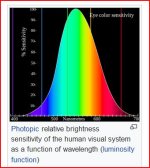
Hmm, yes and no. Not quite as simple as those particular values being generic with regards to their numeric values. For the example stills I uploaded I used the standard Rec 709 STD 5 Custom setting. The one the camera comes up with straight out of the box. In this the Preset Matrix is ON and the User Matrix is OFF. Those stills that I uploaded were uploaded just as an example so people could get an idea of what those adjustments in the Multi Matrix can do. Without touching the Multi Matrix I have developed my own Matrix setting for 709 by using the User Matrix, charts, scopes and a reasonable amount of time. On the charts the Scene File I uploaded is fully compliant on the scopes but a touch up on the chroma levels. That's all well and good on the bench. Like all of us I would imagine I want to check the settings in a variety of scenarios in outdoor daylight and indoors under tungsten and LED lighting. The real world in other words. In the real world in the visible spectrum for humans red, yellow and green are the most dominant colors. See the attached chart.

Overall with the FS7 in practice I find the Reds to be a little over the top so I've tamed them down in the Multi Matrix by dropping the R vector down by -20 points. Ferraris, fire engines, tomatoes, peppers, etc, for me at least, still look nice and 'true' red but not over amplified. As I explained in a previous post the Yellow is the next highest luminance color at around 66 IRE and its chroma level can go very high when exposed brightly or worse still over exposed. Hence my reason for turning down the Y level in the Multi Matrix to - 25/30 or thereabouts until I feel my green grass, trees, shirts, safety vests, yellow road signs or whatever look natural even when pushed pretty high on exposure.

The Matrix is a high level broad brush set of adjustment tools. The Multi Matrix is the next level down and has a finer and more subtle set of adjustments than the Matrix. Adjustments in the Multi Matrix don't have such a global effect overall as adjustments in the Matrix do. Think of a lens with a 90 degree focus throw as opposed to a lens with a 300 degree focus throw. The 300 degree throw is much more subtle and finer in adjustment than the 90 throw. To me the Matrix is where the main camera alignment is done to get the camera within tech spec. Although you can drift phase a little in there with out getting out of whack on the vector scope, to a degree at least. The Multi Matrix is where the finer more subjective 'painting' is done to get the more subtle tones you are after.

Back to your last sentence re 'generic.' I find on the FS7, and on other Sony cameras that regardless of where the final Matrix numbers may land that on the whole the R & Y Multi matrix numbers are always down on the negative side to some degree. What's the old saying? Beauty is in the eye of the beholder. For example to another operator / observer the higher reds may be totally satisfactory. The interesting thing is that is is well know amongst those who have studied the physiology of the human eye is that many colors, extreme reds, greens and yellows are perceived differently between the Caucasian eye and the oriental eye. Strange but true. Some people find that some colors are perceived differently in one eye as opposed to the other. Test yourself.

Not wanting to get too far of track but look at this quote regarding the cones in our eyes:

"For example, while the L cones have been referred to simply as red receptors, microspectrophotometry has shown that their peak sensitivity is in the greenish-yellow region of the spectrum." Check the little Photopic Relative Brightness chart again.

Photopic brightness.JPG

It is believed our hightened sensitivity to the green / yellow and red wave lengths of the spectrum is due to evolutionary development. Most green / yellow vegetation was good to eat. Red was the one to be wary of as it could mean good ripe strawberries or highly poisonous berries. Take a look at the pictures in this link:

http://bit.ly/2hLHwCR

What are the predominant colors in all these pictures? Green, yellow and red. Evolution has made us more sensitive to these wavelengths. Hence if the balance and veracity of these colors looks unnatural to the human eye in any given scene from a camera we sense it straight away. Now you can see why I pull the Red and Yellows back in the Multi Matrix to get a more subtle natural look. To my eye that is. For you how you perceive those parts of the spectrum maybe different.

For more on the physiology of the eye a brief outline can be seen here:

https://en.wikipedia.org/wiki/Color_vision

In my early years in the UK, many years ago now, I studied for a degree in film and photographic technology and all these questions regarding perception of color were part of the course. A great course to do.

https://www.westminster.ac.uk/news-...ence-courses-to-the-university-of-westminster

As time went by I became a member of SMPTE where all things regarding vision, color, perception, temporal and spatial motion etc, etc are always under study and development. It's some of that background training that influences me in trying to squeeze the most out of our cameras.

Chris Young
 
Last edited:
Further to what I was saying about the 'REDS' on the FS7 I just spotted this question regarding the reds on the new EVA1. Off this DVXuser forum.

"Also I had some tail lights and red to better test primary color highlights better, and was disappointed in how the scene file gamma curves compared to Vlog->V709. I don't suppose there is any way to get the right kind of desaturation of bright reds and other primaries with scene files is there?"

http://www.dvxuser.com/V6/showthread.php?357645-New-Master-Information-Thread-for-the-EVA1/page2

So someone else wondering how to tame those "reds" again. Does the EVA1 have a full Matrix and Sub or Multi Matrix? Hmm!

Chris Young
 
Yes interesting. Has Doug posted the results yet? For me I would suggest the following based purely on a technical assessment based on quality, freedom from artifacts and overall picture dynamic range distribution. As I said not taking the color or "look" into the assessment at all as any scene file or LUT can be 'created' in the case of a scene file or graded for a look in the case of a LUT.

Group A

0338 = SF
0339 = LUT
0340 = SF
0341 = SF

Group B

0342 = SF
0343 = SF
0344 = SF
0345 = LUT
0346 = SF

Group C

0333 = SF
0334 = LUT

Anyone else prepared to venture which is which on Doug's quiz?

I had a look at part 2 quickly with the Flag and I don't know but I've never seen the real Stars and Stripes look that magenta biased in real life.

Part 2 flag, 1 of.

StarsStripes.JPG

Not being an American but I've always felt the US flag to be more this color red.

american-flag-1.jpg


Chris Young
 
Chris, thanks for taking a look at the test shots and providing your feedback. But rather than trying to guess what they are, I really would like people to rank them in the order that they like each of the shots. Even if you don't like any of them, some must be worse than others. BTW, there are actually two videos with multiple test shots in each one. The original ProRes files can be downloaded.

Password: F55

Part 1

Part 2
 
A couple of years ago in a discussion on the "Dread Sony Custom Look" I posted a bunch of interviews - some of which were shot Custom (some Std gamma) and some SLog3 with only basic correction and some of the same subject in the same lighting. No one guessed them correctly - hence your can get a good Custom look.
 
Lenny - I've been doing quite a bit of testing lately on this mlut / custom topic with my fs7. Hope more folks make their picks with Doug's test. - I'm just generally interested in what "look" people prefer in a blind test.
But do have to say to you & Chris that I'm really liking what I see testing with both of your Std gammas scene files that you've posted in this forum. My assumption that shooting HG 7/8 - for more dynamic range gave a better WYSIWYG look - has been challenged with footage I've shot thus far.
 
Great to hear Mark. I agree the commonly expressed opinion that HG7/8 are always the best Custom options assumes that more DR is always better, but if the scene doesn't need it then you want to evaluate whether the increased highlight compression is helping or hurting the shot. For interviews I usually avoid it and prefer either STD 5 or HG4 if have highlight issues. I still use HG7 fairly often though - all depends on the shot.
Glad the scene files are working - let us know more when you finish testing. I'm eager to try out Chris'.
 
Lenny - I've been doing quite a bit of testing lately on this mlut / custom topic with my fs7.

Good one! The quest continues. When I get the chance I'll upload a couple of SLOG2 Custom setups. One of which had a couple of the Sony reps, local and from Japan running around looking for an SD card to save it on. They were studying it very closely on one of Sony's $25K Trimaster monitors on the Sony stand at the last SMPTE Exhibition in Sydney in July this year. Must admit I was a bit surprised at how excited they got by it all but if it floated their boat who am I to argue. BTW we loaded the SLOG2/Custom into both the FS7 and F5 and a couple of F5 shooters wanted to grab it as well.

Chris Young
 
Back
Top