C300: Green artifacts / patterns on C300 MK II Footage

I recently picked up a used C300 MK II and am wondering what's happening with my footage.

Green noise / weird patterns on wall: C300 1 Green Artifacts.jpg

Green reflection (only happens out of focus) weird pattern on wall again: C300 2 Green focus, werid patterns.jpg

Werid patterns on wall again: C300 3.jpg

Video examples:
https://www.youtube.com/watch?v=ctjVLOm4cgg

It's producing these weird patterns and green noise / reflections. I have to admit I'm using older lenses, could that be it?

Camera: C300 MK II
Lens:
Canon EF 24-105mm f/4L IS II USM (wide interview shot is Canon EF 50mm f/1.4 USM @ f1.6)
ISO: 400
frame rate: 24
Aputure: F/4 (wide interview shot is Canon EF 50mm f/1.4 USM @ f1.6)
Shutter: 1/48
Gamma: Clog 2
Space: BT 709
Matrix: Cinema EOS

Colour correction: Input LUt: BT709_CanonLog2-to-BT709_WideDR_33_FF_Ver.2.0

I would really appreciate any help
 
Last edited:
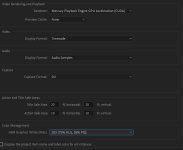
I am not editing with PP but this issue pops up so often in various FB camera groups you cannot avoid it :) There is somewhere a "10bit preference" but I don't remember exactly what that was. Maybe one of the Premiere guys can help? If you google for "Premiere Pro banding" you find a lot of hits
 
Last edited:
The green out of focus areas are from the chromatic aberration on the lens. It is possible that you can correct that by turning on the CA correction for the lens in the camera menu if it exists. The green banding looks like an issue with oversaturating low bit rate footage or possibly outputting a low bitrate video file from the NLE. I would not expect to see that type of footage from the 10bit 422 Canon footage. I wouldn't be surprised to see it if I added a LUT to the proxy footage from the SD card. Otherwise, it seems to be an issue with Premiere.
 
Thanks, yeah the green is definitely chromatic aberration which I can deal with. It's 12bit 4/4/4 footage so I'm really lost as to why I'm seeing this. I've changed all premiere settings to maximum bit depth and maximum render quality but still having issues, it's showing within Premiere, so it's not just an export issue. My monitor is admittedly not a 10-bit monitor, but it seems pretty obvious and looks awful for the end viewer. Can't seem to find a solution for Premiere that works - and no way of checking source footage other than the c300's small screen
 
Is it possible to share one of the same clips above in its original form so we can download and take a look?
 
How's this look to you?

cmO4K6N.jpg
 
No reflectors, had a 120D with Light dome II as key, and a 120d with a latern as a tiny but of fill. Used a quasar Q-LION as back light
 
Thank you so much for looking into this. This forum is awsome haha. That's crazy how much better it looks in FCPX. I can still notice it a tiny bit, but that's likely due to my monitor more than anything, do you have a 8/10 bit monitor (if so how does it look on your end)? I think moving forward I'm going to avoid CLOG 2 and hope that's the source problem. Need to figure out how I can get my premiere fixed.
 
Seemed to come up in Resolve fairly well. A little luma drop overall. Warper to remove a bit of greenish in the wall. CA correction to try to fix a little green/magenta on the bookcase verticles. A bit of luma and sat drop on the more fluorescent colors on the bookcase. Finally couldn't help myself, smoothed out her skin a little. All in all not much wrong with the image in the first place. Wish all incoming material looked as good as what you supplied.

Chris Young

C300 CC01_1.1.1.jpg
 
Last edited:
Same again but exported out at 16-235 video levels

Chris Young

EDIT: Just hate the color banding and shifts you see here once you upload the images!

C300 CC01_1.1.1.jpg
 
Last edited:
Thank you so much for looking into this. This forum is awsome haha. That's crazy how much better it looks in FCPX. I can still notice it a tiny bit, but that's likely due to my monitor more than anything, do you have a 8/10 bit monitor (if so how does it look on your end)? I think moving forward I'm going to avoid CLOG 2 and hope that's the source problem. Need to figure out how I can get my premiere fixed.

it's not a matter of Clog2, it will happen almost in every codec when you squeeze a big dynamic range in 8bit and 256 steps only. You cannot avoid it totally especially if your gradient is very flat. But for sure Premiere is doing a bad job with this. If you google for it you will find these complaints for a long time already. As I wrote before there is a setting which improves it but unfortunately I have no clue which is it.
 
So that you know it isn't just you - here are my results from Premiere:

As shot:

RawClip.jpg


LUT applied:
BT709_CanonLog2-to-BT709_WideDR_33_FF_Ver.2.0

Lutonly.jpg


PUSHED FURTHER TO EXAGGERATE ISSUES (contrast and saturation boosted):

LUTandmore.jpg


Here is the waveform as seen in the last framegrab - you can see the banding evident in the wall:

WAVE.png


Also worth noting I tried this in 2 different versions of Premiere I have installed (2020 and 2018) and had the same exact results in both.


And, for good measure I threw the clip into Resolve and this was the result:


As shot:

RAW-Resolve.jpg


LUT applied:
BT709_CanonLog2-to-BT709_WideDR_33_FF_Ver.2.0

LUT-Resolve.jpg


(guess I should be using Resolve)
 
Back
Top