
Erik Naso
Veteran
At this point I'm leaving it all at default settings. I need a baseline first.Erik, would you put the sharpness at -5 and the NR at 0 or leave both of them at 0? Thanks

Follow along with the video below to see how to install our site as a web app on your home screen.
Note: This feature may not be available in some browsers.
At this point I'm leaving it all at default settings. I need a baseline first.Erik, would you put the sharpness at -5 and the NR at 0 or leave both of them at 0? Thanks

Firmware V2.4 is up: http://av.jpn.support.panasonic.com/support/global/cs/dsc/download/fts/index2.html
Changelog: Improved V-Log L setting issue of firmware Ver 2.3
I'm happy staying with V2.3 for now.

8 bit V Log in low light: https://vimeo.com/138207167
8 bit V Log in daytime: https://vimeo.com/139454369
I cant seem to see whats so disatrous shooting internally..
... and this is why, Panasonic have annoyed me even more, and shows them not in the same mindset as Samsung et al, and the general 'firmware revolution' that is taking place in cameras and devices these days.
Before today I thought, okay firmware updates take time, they need to be evaluated and tested and the process for inclusion of improvements and fixes is a timely process.
No, it took less than 2 days for Panasonic to release a new firmware to fix a gapping hole that looses them money - yet usability issues, which have plagued us since the GH2? (didn't have a GH1) are still there, functionality that users have asked for, posted across multiple message boards over months and years - are yet to be incorporated.
We aren't asking for RAW, for 60fps - we are asking for crop marks, we are asking for autoISO etc - general usability issues.
This today, shows me that Panasonic aren't listening.
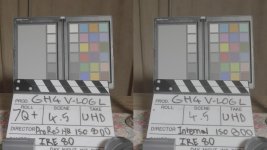
One thing I noticed is the 10bit ProRes HQ is a little darker than the internal recording. Highlights peaking at 80 IRE here.
It's greyed out in V Log L mode but reads 0-255What is the luminance set to? I think I remember I had this problem with my Ninja2 and it was something to do with the 0-255 vs 16-235

... and this is why, Panasonic have annoyed me even more, and shows them not in the same mindset as Samsung et al, and the general 'firmware revolution' that is taking place in cameras and devices these days.
Before today I thought, okay firmware updates take time, they need to be evaluated and tested and the process for inclusion of improvements and fixes is a timely process.
No, it took less than 2 days for Panasonic to release a new firmware to fix a gapping hole that looses them money - yet usability issues, which have plagued us since the GH2? (didn't have a GH1) are still there, functionality that users have asked for, posted across multiple message boards over months and years - are yet to be incorporated.
We aren't asking for RAW, for 60fps - we are asking for crop marks, we are asking for autoISO etc - general usability issues.
This today, shows me that Panasonic aren't listening.

for fun, last night I racheted up my MASTER PED to +15, SHADOW +5, HIGHLIGHTS -5, 0-255, Natural CONTRAST -5, SATURATION -5 and did some filming internally, compared to V-Log. Then checked white balance and corrected according to RGB Parade... colors LOOKED truer in VLOG a little bit, but the dark noise was not usable to me. And Natural the blacks were proper coloring, even lifted - not magen/greenish. Natural won out to me. MAYBE there was another .5 stop seen in really dark stuff, but it was filled with colors and junk, and no one would care about the .08% of that part of the screen that was that dark showing unimportant detail.
Noise tween that NATURAL setup and VLOG seemed equal, but cleaner in NATURAL.
I used the panny varicam lut - which works great correcting vlog - but I can nearly match it with manual grading.
It is better in most regards, but it does highlight the weakness of a highly compressed 8-bit signal.
They better make GH5 record 4:2:2 10bit internally, or tweaked the codec for log use.
Eric, I don't have an external monitor with histos etc... what should I set the Zebra to, to correctly expose gh4 vlog internal recording? and does the gh4 internal histogram stop around 80% on the lcd?
I dont know how IRE translates over to the GH4 onscreen info.

Well, use the zebras.
Set one at 55-60 and the other one at 80.