GH1, meet the Stouffer 4110C dynamic range test

would the NR be lower if we just lowered it to -2, or lowered it while raising the level of the other parameters.? I wonder because the manual seems to imply that lowering NR or leaving NR alone and raising other parameters are the same.
 
Glenn, thanks for the detailed comments - especially concerning the NR (noise reduction). Totally agree that some noise (which might even be lessened in post) is far preferable to blended together areas of the picture (mud) which I've often seen in some of my previous footage.

Not to hijack this thread, but it seems a good place to bring up the following since there are so many knowledgeable contributors here. And it may indeed be related to this discussion somehow. Does anyone know what might be causing faint horizontal lines in this video - almost like interlacing - most noticeable in the reds in places from about mid-frame to top? Can easily see it right above the chipmunk's ear. Again, sorry if this is off topic, but I've asked it in another thread without any replies and it's been bugging me quite a bit. If this is too far off topic I completely understand if someone wants to yell at me and I'll delete this part of the post.

I've attached a still and the clip can be seen here with info on settings, etc.: http://www.dvxuser.com/V6/showthread.php?t=187727

Any feedback is appreciated. And to echo what others have already said, the info in this thread (and others) related to Barry's tests plus the resulting comments have been invaluable.

EDIT: Well, now that I've been able to look at the attachment once posted the lines are very hard to see. They are much more easily seen in the footage.
 

Attachments

  • lines.jpg
    lines.jpg
    90.9 KB · Views: 0
I think I know what appears to be the "scan lines" in the bright red portions of your videos...

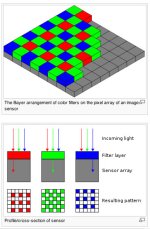
Unfortunately it's a problem that's inherent with single chip image sensors. There's a Bayer RGB filter in front of the GH-1's imager. The filter contains half as many red filters as green, also half as many blue as green. So when the image is down sampled from 12 megapixels to about 2.2 million pixels for 1080P, objects that are basically primary red simply have far less resolution than general areas of the image that consist of mixed colors. The effect also occurs in blue, but it's not as prevalent, since blue makes up the smallest percentage of a video image.

Big-time single chip cameras, such as Panavision's "Genesis" or the "Red" use very sophisticated software (and firmware) to de-bayer the final image stream. DV video exhibits the same type of problem due to the 4:1:1 nature of the encoding. This means that chroma information (such as your bright red flower) will only have .25 the resolution of the luminance channel. This is also why it's very hard to do a great chroma key from DV format video.

There's a good article at the following link that describes Bayer filters: http://en.wikipedia.org/wiki/Bayer_filter

For now, the only way I know to avoid the problem with a GH-1 or 5D or 7D is to avoid bright red objects. Also 1080P reduced via After Effects to 720P looks better regarding Bayer problems than 720P original footage.
 

Attachments

  • Bayer_filter.jpg
    Bayer_filter.jpg
    78.8 KB · Views: 0
Once again, thanks for the great explanation. This is the first clip I've shot with bright red in it, so also the first time I've noticed it. Guess since this clip was shot in 720p there's no way to reduce it, as your tip about 1080 reduced to 720 in AE explained. Will need to keep that in mind for future shooting, though.

It's really not all that bad and you need to be critiquing the image to notice it, I was just surprised to see it since I hadn't noticed it in any of my other footage.

Thanks again for all your help.
 
One of the biggest issues, and it's not just the GH1, is the 8Bit codec. These sensors are so noiseless/clean that it is just to much for the out of date 8bit codecs to handle, and we get banding or enhanced blockiness. It's to bad they don't have a built in dither function with a true noise to input at just the minimum level in theses DSLR's. I do this this for scans, printing etc. 8bit footage should be dithered in AE or etc then sent off to a 10bit or higher codec for archival and use the other for work the print.


Michael Pappas
http://www.pbase.com/Arrfilms
Arrfilms@hotmail.com
http://www.PappasArts.com
 
Anther related question:

From the many compressed online videos it appears to me that the WB in the GH1 is wildly off at times, especially in low light. Has anyone experimented with manually altering WB, not using a grey card but actually entering WB values, in low light and other extreme conditions? Does obessive monitoring of WB cure many of the perceived non-codec GH1 problems in extreme conditions? The reason that I include this question in a thread on dynamic range is that some of the results I see suggest, but certainly do not prove, that dynamic range is tied to WB in low light. But that could just be a perceptual effect that would not show up in a Stouffer test.

In my experience, the WB can be wildly off in artificial light. Some (but not all) flourescent and halogen lights in particular. In those situations, I'll set a custom WB by pointing the camera at something white and mostly that works a charm. Last night I was shooting on a train platform at night and the overhead lights were so ridiculously yellow that even custom WB couldn't cope. So I switched to B&W and it looked great :)
 
Back
Top