FS100 and Ninja: Yes, No, Maybe?

The new firmware is in the final stages of testing. As soon as this stage is completed it will be released. Keep an eye on our website.

Dave Shapton
Atomos
 
Dave,

What is the status of the Ninja being able to be remote triggered by the FS100 HDMI output with TC? I heard you guys are looking into it.
 
So . . . . Knowing that I'm shooting 24P and will definitely shoot some 1080p 60 for slow motion, does running everything into a Ninja gain me all that much in image quality to buy the Ninja?

*edit* apparently I misunderstood what the Ninja was supposed to do *

I ordered one for my FS-100 thinking it would hold more detail in the darks (and possibly highlights), and maybe a bit more latitude...but this is not the case. I'm actually sending my Ninja back to B&H.
 
Last edited:
Well, no, it shouldn't show any more info in the darks or the highlights. That's not what it's meant to do. What it should do is give you some higher color sampling, and more resistance to codec mush in highly detailed scenes.
 
..What it should do is give you some higher color sampling, and more resistance to codec mush ..

...Which should enable you to shoot a with a flatter camera profile gaining you wider DR and due to the increased color sampling the footage will not break when graded up to a decent contrast resulting in..

Ryan said:
hold (ing) more detail in the darks (and possibly highlights), and maybe a bit more latitude

??

S
 
Last edited:
Ryan,

Working in a 10 bit space will also help with grading. It's not going to improve the quality of your original 8-bit footage, but any changes you make will have 1024 levels per colour channel to map onto rather than 256. This will give you some of the benefits of increased latitude as the darks will not degrade as quickly when you push them.

Dave Shapton
Atomos
 
Dave you might clarify my 'understanding' of this

The 8 bit codec breaks in a grade really easily due to those lack of colours (256 vs 1024)

So if you shoot with a flat profile in the camera to gain DR the (8bit) footage will often artifact (particularly colour banding) when graded from flat to viewable

Super flat profiles are therefoer not advisable in an 8bit space

If you use a 10 bit recorder the footage can take more of a grade due to more colour information

You can therefore gain DR by shooting a flat camera profile and grading

ie

The recorder does not give more DR unless used hand in hand with a new camera profile

Shooting a 'regular' profile will not see any advantage beyond retention of detail (due to bit rate)

To get best results (from a recorder) one should be shooting with a profile aimed at the grading process

S
 
Last edited:
Morgan,

Please understand I'm not an expert when it comes to grading!

Recorders can only record what they're given, so, yes, if there's an 8 bit input to the recorder, that's what gets recorded.

The sole advantage with grading (apart from the increased bitrate/better codec and all of those pluses) is that there is more precision available when a colour is changed from the original. If you stay in an 8 bit space, then any change you make will have to be "forced" onto another of those 8 bit levels, whereas in a 10 bit space, you'll have four levels for each original one.

I wouldn't say that you'll get more DR; the 8 > 10 bit conversion doesn't put new information into your video, but you'll be able to modify it in more subtle ways.

Dave Shapton
Atomos
 
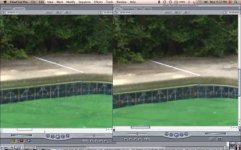
Seems that I can't get rid of the aliasing from the Ninja.
Here's a screenshot from FCP. the image on the left is from the Ninja, and the one on the right is from the SD card in the FS100.Screen shot 2011-07-25 at 9.32.29 PM.jpg
 
After Effects, Compressor, MB grinder. I have used compressor and after effects and they work well. I have not tried grinder but Atomos told me it works.
 
Guys this is what I used. Old mac Quicktime dev app called 'Dumpster'.

No transcoding or even saving of the entire file, its instant.


Open the file from the Atomos and change "Fields = 2 Details = 1" to "Fields = 1 Details = 0" click save (instant) import in to FCP, FCP will see the clip as progressive and drops into a progressive sequence.


http://www.mmfilm.co.uk/twitterpics/dumpster_grab.jpg


P.S. 'Dumpster' is an old Apple Dev program. You won't be able to run it in Lion. Just up to Snow.


I found someone who put a link on an Apple support page. (This is not my link) http://idisk.me.com/jrwalker4-Public/Dumpster.dmg
 
I don't think that's aliasing. It looks like the kind of trouble you get putting a Progressive clip on an Interlaced timeline. Try setting the timeline interlace settings to 'None'.

Unfortunately that does not work with these clips. They look soft at 100%. Zoom in and you will see the soft interlaced artefacts. The only quick way is by changing the flags on the file to show as Progressive. As my post a couple above http://www.mmfilm.co.uk/twitterpics/dumpster_grab.jpg . Then they will show perfect in FCP.
 
After Effects, Compressor, MB grinder. I have used compressor and after effects and they work well. I have not tried grinder but Atomos told me it works.

Thanks. I couldn't get grinder to work at all (latest version); it didn't seem to reverse telecine correctly, always leaving artifacts no matter what I did. Compressor worked perfectly after I got my frame rate correct. (oops!)

I hope Atomos' Stripper does the change in the metadata (?) of the file similar to James' method so that a recompress isn't necessary. You're not losing much if anything when recompressing ProRes but there is a time hit for sure.
 
Back
Top