GH4 Exposing V-LOG L

Here's internal, 8 bit 4:2:0 footage in After Effects CC 2015.

As you can see, the magenta macroblocking is quite prevalent.

Since we can see that 10 bit 4:2:2 ProRes footage DOESN'T appear to show macroblocking in After Effects, there is definitely something to the lack of bit depth causing the 8 bit footage to break up into magenta macroblocks.

VLogL-Test-4-AE-VLOG.jpg
That's not "macroblocking", it's YUV chroma smearing, caused, as you suspected, by inadequate encoding bit-depth. If there were macroblock artifacts in the image, you'd see faint horizontal and vertical patterns on the gray sidewalk where the hues of adjecent rectangular macroblocks did not quite match. What you see instead are irregular blotchy areas where the hues of the gray sidewalk alternate between purple and green color casts.

The reason this occurs is because the H.264 encoder allocates fewer bits to featureless low-contrast areas - it concentrates its available bitrate on high-contrast details instead. And among the few bits allotted to the gray sidewalk, most are used to encode Y-channel luminance details, while the UV chroma channels are severely shortchanged. As a result, the tonal discrimination is so crude that the closest not-exactly-gray hues the encoder can use have noticeably purple and green casts. Unfortunately, our eyes happen to be very sensitive to chroma smearing in this particular range of gray tones, and the mixture of purple and green hues is not an approximation we find esthetically pleasing.

I'm quite familiar with these types of encoder flaws because I put many hours into hacking the GH2's H.264 encoder with high-bitrate tricks that forced it to allocate significantly more bits into the UV chroma channels than the stock encoder. (My strategy was actually to limit spatial chroma resolution while increasing chroma bit-depth.) While I was satisfied with the improvements I obtained, it was nevertheless clear that these are fundamentally consumer-grade encoders optimized to produce compact and vibrant high-contrast movies, intended for immediate viewing rather than intensive color grading in post.

Seriously, if you want to use V-Log for anything more than subjective flavoring, don't shortchange yourself with an inadequate encoder. If you try to cheat the math, the results will not be truncated in favor of image quality, and you will likely find cases where the extreme reaches of your 12-stop dynamic range have been crushed into oblivion.
 
Last edited:
That's not "macroblocking", it's YUV chroma smearing, caused, as you suspected, by inadequate encoding bit-depth. If there were macroblock artifacts in the image, you'd see faint horizontal and vertical patterns on the gray sidewalk where the hues of adjecent rectangular macroblocks did not quite match. What you see instead are irregular blotchy areas where the hues of the gray sidewalk alternate between purple and green color casts.

The reason this occurs is because the H.264 encoder allocates fewer bits to featureless low-contrast areas - it concentrates its available bitrate on high-contrast details instead. And among the few bits allotted to the gray sidewalk, most are used to encode Y-channel luminance details, while the UV chroma channels are severely shortchanged. As a result, the tonal discrimination is so crude that the closest not-exactly-gray hues the encoder can use have noticeably purple and green casts. Unfortunately, our eyes happen to be very sensitive to chroma smearing in this particular range of gray tones, and the mixture of purple and green hues is not an approximation we find esthetically pleasing.

I'm quite familiar with these types of encoder flaws because I put many hours into hacking the GH2's H.264 encoder with high-bitrate tricks that forced it to allocate significantly more bits into the UV chroma channels than the stock encoder. (My strategy was actually to limit spatial chroma resolution while increasing chroma bit-depth.) While I was satisfied with the improvements I obtained, it was nevertheless clear that these are fundamentally consumer-grade encoders optimized to produce compact and vibrant high-contrast movies, intended for immediate viewing rather than intensive color grading in post.

Seriously, if you want to use V-Log for anything more than subjective flavoring, don't shortchange yourself with an inadequate encoder. If you try to cheat the math, the results will not be truncated in favor of image quality, and you will likely find cases where the extreme reaches of your 12-stop dynamic range have been crushed into oblivion.

Thank you :) Excellent explanation. I will refer to it as YUV chroma smearing from now on. It's good to have the correct definition as it helps others understand the core of the problem.

I'm in total agreeance with you - Vlog is useless in its 8 bit 4:2:0 internal recording form.

However, in its 10 bit 4:2:2 external form it looks to have higher dynamic range and colour depth over the linear profiles, as long as you are using the right NLE that supports ProRes properly. I guess if you record externally to DNxHD then Premiere won't have any issues either.

Hopefully the Adobe team can find the problem with ProRes conversion soon!

Cheers,

Paul :)
 
Last edited:
UGH! The more I shoot, the more I am afraid I'm just not going to be able to use V-LOG L with internal recording ... AT ALL.

I thought, well, I don't normally shoot grey walls, let's look at some more real world examples. I pointed my camera across the street and got this mess:

http://blog.josephmoore.name/wp-content/uploads/2015/09/roof.png

Look at the roof. I'm generally fairly forgiving of compression artifacts, but ... YUCK!

And that's with Art Adam's LUT. Use the official V-LOG709 LUT and it looks even worse.
 
it's YUV chroma smearing, caused, as you suspected, by inadequate encoding bit-depth.
Not to be contrarian, but I'm quite curious on this point... Do you find similar artifacts in other 8-bit codecs? 8-bit digital has been used for at least 20 years, yet I don't recall anyone complaining about this issue before. HDV was an 8-bit 4:2:0 codec that was substantially more bit-starved than the GH4's 100-megabit h.264; yet, I don't recall anyone ever complaining about magenta/green smearing. XDCAM-HD on the EX1 is an 8-bit 4:2:0 codec that uses inferior MPEG2 as compared to today's modern h.264 codecs, yet XDCAM-HD's been used for almost 7 years and I don't recall anyone complaining about chroma smearing like this. Canon's C-LOG is an 8-bit implementation of a LOG gamma in AVCHD, of all things, an 8-bit 4:2:0 codec, it's been used for three years, it allocates its first 10 stops pretty much identically bit-depth-wise to how the GH4 does its first 10 stops, and yet -- again, I haven't heard anyone complain about chroma smearing. Yet GH4 guys are complaining about this on the second day that VLOG was available.

Doesn't it logically follow that if this is something inherent to 8-bit, then the C100 must also have it? Or is it that the problem has always been there, but ... nobody noticed?

Does this issue show up when the GH4 is recorded in VLOG-L in AVCHD? That should be the most direct possible match to the C100...
 
Not to be contrarian, but I'm quite curious on this point... Do you find similar artifacts in other 8-bit codecs? 8-bit digital has been used for at least 20 years, yet I don't recall anyone complaining about this issue before. HDV was an 8-bit 4:2:0 codec that was substantially more bit-starved than the GH4's 100-megabit h.264; yet, I don't recall anyone ever complaining about magenta/green smearing. XDCAM-HD on the EX1 is an 8-bit 4:2:0 codec that uses inferior MPEG2 as compared to today's modern h.264 codecs, yet XDCAM-HD's been used for almost 7 years and I don't recall anyone complaining about chroma smearing like this. Canon's C-LOG is an 8-bit implementation of a LOG gamma in AVCHD, of all things, an 8-bit 4:2:0 codec, it's been used for three years, it allocates its first 10 stops pretty much identically bit-depth-wise to how the GH4 does its first 10 stops, and yet -- again, I haven't heard anyone complain about chroma smearing. Yet GH4 guys are complaining about this on the second day that VLOG was available.

Doesn't it logically follow that if this is something inherent to 8-bit, then the C100 must also have it? Or is it that the problem has always been there, but ... nobody noticed?

Does this issue show up when the GH4 is recorded in VLOG-L in AVCHD? That should be the most direct possible match to the C100...

Good points, Barry. I'll be looking into using AVCHD.
 
As much as this problem is annoying when it pops up, FilmConvert hides it pretty dang well with its film grain, so while I can't really use it for non-film projects that need to have a cleaner look, with most of the things I do my aim is that more organic, older film-y feel, so V-LOG L internal has a lot of potential for me. Can't wait to get an external 10-bit recorder, though... but... irony being, I'll still be using that only for big film-projects due to file sizes... hmmm...
 
Not only do different LUT's emphasize the error more or less, I'm also noticing that different decoders seem to do a better or worse job. Photoshop and Premiere really exaggerate the error, while FCPX and After Effects minimize it.

Panasonic's LUT in Premiere is almost unusable. The same footage in FCPX with the Finisher plug-in is more or less acceptable. (It's still there, but barely noticeable.)

Premiere + AA709
http://blog.josephmoore.name/wp-content/uploads/2015/09/roof.png

FCPX + Finisher
http://blog.josephmoore.name/wp-content/uploads/2015/09/roof_finisher_1080.png
 
Looks just as bad with AVCHD. Also tried MP4, and EX Tele mode for the hell of it. All show the issue.
Show the issue where -- in certain software? On the LCD? The most interesting test would be playback from the camera to a quality monitor. That would let us know whether it's inherent in the recording, or it's something that's being exaggerated by certain software.
 
Show the issue where -- in certain software? On the LCD? The most interesting test would be playback from the camera to a quality monitor. That would let us know whether it's inherent in the recording, or it's something that's being exaggerated by certain software.

On the LCD and with internal recording. Using the Varicam and AA LUT in FCP X.
 
I have found in general that Premiere Pro CC 2015 Lumetri Color doesn't handle LUT's very well. The C300 and Slog2 are just way off and unusable. Especially the C300 Clog LUT. Makes me think even more that grading LOG in Premiere Pro isn't a good idea.
 
On the LCD and with internal recording. Using the Varicam and AA LUT in FCP X.

Any chance you could run a comparable test with a C100, C300, JVC LS300, or any other 8-bit log? Would be nice to know if this is something inherent to 8-bit or if it's some peculiarity to the GH4...
 
I have found in general that Premiere Pro CC 2015 Lumetri Color doesn't handle LUT's very well. The C300 and Slog2 are just way off and unusable. Especially the C300 Clog LUT. Makes me think even more that grading LOG in Premiere Pro isn't a good idea.

That's where I'm landing. It's a bummer that Premiere's Lumetri functionality *still* isn't available in After Effects. But Color Finesse is still pretty great, and Film Convert works in both, so... Guess I'll just hop back on over there for grading. A little annoyance of an extra step, but whatever.
 
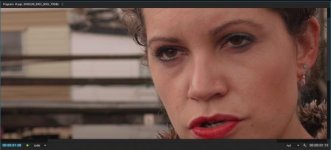
Here's a screenshot from my computer, Mac Book Pro. I do have CUDA capability, but I am in "Software Only" mode here. Not seeing anything too terrible, or am I missing a step? Also, I uploaded the image but I could not get it to appear at full scale. What's the trick.

Screen Shot 2015-09-19 at 12.49.24 AM.jpg
 
Scaled at 200% playback view

View attachment 105303
Looking at your image from Premiere, I can see the blotchy magenta problem, especially on her upper cheek (YUV chroma smear according to Lpowell).

If you load the same image into After Effects and make sure project depth is 32 bit, you'll see that the skin blotchiness is much less pronounced and all gradations are smoother.

It might help to see it by adjusting contrast a lot to bring out skin variations, then you'll have an easier time seeing it.

Regarding full size uploads, you need to host them offsite and provide a link to the image file, not use DVXUser as the host.

Cheers,

Paul :)
 
Last edited:
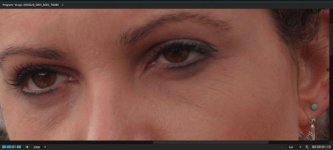
Here's what I'm talking about, blown up to 400% to make it easier to see.

Look at the scopes particularly, on the ProRes version, and notice how they appear to have large gaps between gradations instead of the much smaller gaps with the uncompressed 422 version (which I converted in After Effects).

See also how the magenta seems to appear blocky and super saturated, compared to the uncompressed version which blends the colours together much more organically?

render3ProRes.png


render3Uncompressed.png


Cheers,

Paul :)
 
Here's what I'm talking about, blown up to 400% to make it easier to see.

That looks pretty convincing to me. Damn.

It looks like I'll have to invest thousands of dollars in an external recorder just to use the $99 Vlog I already paid for but which was released for free. What a disappointment...

Paul, thanks for sorting this out for us. Even if it's bad news, I'd rather know than not know!
 
Back
Top