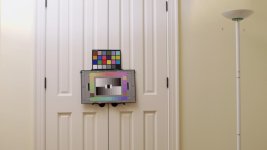
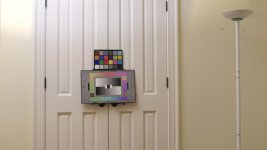
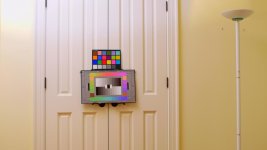
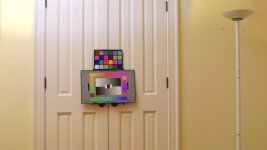
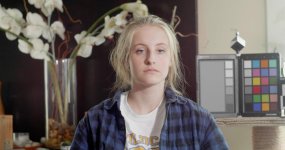
GH4 Exposing V-LOG L

Yep the road is a bit blotchy. Not pretty? That is entirely subjective. Personally I think the top image is quite pretty.

Of course this complex scene hides stuff - I can imagine that shooting for example in a cove in a studio could go to a very bad place.

A cursory look at this Vlog I am not in anyway surprised, a thin codec 'under exposed' is a mess in the shadows.. nothing new there :)

S
 
Now that you mention it, there's a daylight CFL that I forgot about. The main light was a tungsten 250, but that CFL might have been on as well, may account for the blue.

Still -- would you not agree that this is fifty million times better than Batutta's shot? This is 8-bit, 4:2:0, bitrate-starved AVCHD, and it was overexposed by two stops, and there's none of that colored pollution on it. I just cannot sit by idly and say "8-bit is to blame" because -- it isn't.

We'll have to see the results from other testers (Dusty's experiments and others) but -- it does no good to chase after red herrings. 8-bit is less than ideal, obviously, but it is not some inherently flawed system that is creating mandatory green/purple splotches. There might be something else to blame, but it's not the inherent qualities of 8-bit that are doing it.

I would still like to hear from Illya Friedman on this. There's no way a guy of his knowledge just "missed" something like what Batutta posted. There has to be some explanation, some process, that works and produces excellent results.

Thanks for the clarification on lighting.

I agree that your image looks much better than that of the GH4. I also agree that 8 bit by itself is not inherently bad. After all, my non-log profiles on the GH4 give me very pleasing images that my clients love as well.

So it's something in the way the GH4 has implemented the log profile that is causing the YUV chroma smearing, at least in its 8 bit internal form.

The 10 bit 422 external feed seems to be ok (arguments over using the maximum bit depth aside), as long as you don't try to edit ProRes 422HQ in Premiere Pro (a colour space/bit depth processing bug I guess).

YUV encoding seems to be the reason behind errors showing up as magenta/cyan/yellow, as opposed to RGB recording which would show up errors in the primary colour space.

Out of curiosity, what do the histogram and zebras show up like on the DVX200? Do they go from 0-100 IRE or are they clamped in some fashion?

Cheers,

Paul :)
 
Paul, maybe that is the reason for the color artefacts that we see in your picture.

I have started to test v-log v footage in Sony Vegas, using the Magic Bullet Looks plugin to apply the LUT. If I use the Vegas internal color correction to push saturation up dramatically (so something about 250%), I start to see similar color artefacts. BUT without doing that I do not see these artefacts. Neither in the internal recorded 8bit GH4 footage, nor in the 10bit ProRes 422 Shogun footage.

I have also started to test other LUTs - the Convergent design LUT, or the ArtAdams LUT. And compared them with the Panasonic VLogL to V709 GH4. Sure, there are some differences int those LUTs, but I do not have the impression that those differences are huge.

I am satisfied with first tests of shooting skin tones - the faces shoot internal seems to occure quite well and natural. Especially the difference in skin tones between CinemaD and v-logv is significant! While you have very organic skin tones with v-logv, Cinema D delivers an anorganic footage that has a clear videolook - not very nice in my first tests.

The saturation push was just to make the blocking easier to see.

I'm wondering if some people aren't seeing the differences I'm talking about because of their monitor setups not being calibrated, or able to display enough colour precision? That's why I posted my full screen captures earlier in the thread, with scopes showing, so that you could see the mathematical representation of the errors I'm seeing on screen.
 
Here's a full size PNG capture of the internal Portrait -5 -3 -5 -3 -2 profile clip I posted earlier:

http://www.visceralpsyche.com/misc/web_images/P1010048.png (13MB)

As you can see, it exhibits basically no strange YUV chroma smearing at all, and holds as much dynamic range as the V-Log clip IMHO, except better, because there's no colour artifacting to degrade the quality of the image.

Like Barry is saying, 8 bit 4:2:0 by itself is not the problem. The problem appears to lie in the way the GH4 is processing internal 8 bit V-Log L 4:2:0.

External 10 bit 4:2:2 V-Log L seems to work well, as long as you're not trying to use the ProRes output in Premiere Pro CC, as it appears to have an unrelated bug with processing ProRes422HQ in the 10bit colour space.

Cheers,

Paul :)
 
I've just uploaded a new ZIP file which contains the following:

P1010069.MP4 - Internal VLog Profile 4096x2160x24.00p, ISO 400, f5.6 1/160th shutter, Sharpness -3 NR -5, ETTR exposure

P1010070.MP4 - Internal Portrait Profile 4096x2160x24.00p, ISO 400, f5.6 1/160th shutter, Contrast -5 Sharpness -3 NR -5 Saturation -2 Hue 0, exposure kept identical to Vlog (sky is overexposed)

P1010071.RW2 - Internal RAW still 4608x3072, ISO 400, f5.6 1/500th shutter, ETTR exposure (you can crop the center portion out for 4096x2160 to match video files for comparison)

Grab it here (110MB): http://downloads.visceralpsyche.com/pix_e5_vlog_test/PanasonicGH4-Vlog-Portrait-RW2-Test-Files.zip

I put the 18% grey card in the left corner of each frame so you can easily white balance each file, plus I white balanced to the same card for the video files before rolling, to maximise each channel's dynamic range.

In short, this package should give you all the files you need to make A-B-C comparisons and see what the camera should be capable of, and what it is giving us in each mode.

The only thing not here is a 10 bit file, as I don't have an external recorder to test with sorry. But for 8 bit comparisons, this should be complete.

Look forward to seeing your analyses.... my conclusion is that VLog is presenting unacceptable YUV chroma smearing, whereas Portrait looks fine. Both images pale in comparison to the dynamic range of the RAW still, so I feel there's a lot more dynamic range Panasonic engineers could draw out on the video side even if it's 8 or 10 bit.

Cheers,

Paul :)
 
Last edited:
So it's something in the way the GH4 has implemented the log profile that is causing the YUV chroma smearing, at least in its 8 bit internal form.

I still cannot confirm what yo call chroma smearing. I do not see that here, neither with the internal 8bit recording, nor witth the Shogun. And at least not with the footage that I have shoot today here.

But I have not anaysed your files yet.
 
Last edited:
It's there (I can see it in the sidewalk) you'd just have to push and pull the hell out of that image to make it noticeable to the point of being a problem. Since you have to push V-LOG hard to even make it look natural, that's why the error is so evident.

I'm not really seeing an appreciable increase in dynamic range with V-LOG L, either. But what I can confirm is that V-LOG L definitely has better overall color rendition. It's meaningfully more accurate than any other profile. Natural is the closest, but Natural is still meaningfully wrong.

What I've confirmed repeatedly over the last few days is that – other than the color accuracy advantage of V-LUT L – the Natural profile set as such yields the most accurate image possible from the GH4:
-5
0
0
-4
-1
Shadow +2, Highlight -2

This gets you about 90% of the way to the same image as V-LOG > 709 LUT.

What we need is a LUT wizard to make a LUT to correct the color errors in the Natural profile. I'm reasonably sure a good 3D LUT could dial-in the color to being nearly perfect. (I wish I knew how to make a LUT!)
 
It's there (I can see it in the sidewalk) you'd just have to push and pull the hell out of that image to make it noticeable to the point of being a problem. Since you have to push V-LOG hard to even make it look natural, that's why the error is so evident.

I'm not really seeing an appreciable increase in dynamic range with V-LOG L, either. But what I can confirm is that V-LOG L definitely has better overall color rendition. It's meaningfully more accurate than any other profile. Natural is the closest, but Natural is still meaningfully wrong.

What I've confirmed repeatedly over the last few days is that – other than the color accuracy advantage of V-LUT L – the Natural profile set as such yields the most accurate image possible from the GH4:
-5
0
0
-4
-1
Shadow +2, Highlight -2

This gets you about 90% of the way to the same image as V-LOG > 709 LUT.

What we need is a LUT wizard to make a LUT to correct the color errors in the Natural profile. I'm reasonably sure a good 3D LUT could dial-in the color to being nearly perfect. (I wish I knew how to make a LUT!)

What we REALLY need (and I keep hammering at LUMIX's Twitter account with this) is the ability to create a custom profile by importing a LUT file via SD card on top of V-LOG L internally. I actually got a response to one of my Tweets about that and they said they're bringing that to the next "social media" report. Woohoo! But I still hammer on it regularly until we see it - I really think that will solve most of our issues. V-LOG L gives us the flexibility to get unique, totally original looks. We just need to get those original looks applied before compression...
 
What we REALLY need (and I keep hammering at LUMIX's Twitter account with this) is the ability to create a custom profile by importing a LUT file via SD card on top of V-LOG L internally. I actually got a response to one of my Tweets about that and they said they're bringing that to the next "social media" report. Woohoo! But I still hammer on it regularly until we see it - I really think that will solve most of our issues. V-LOG L gives us the flexibility to get unique, totally original looks. We just need to get those original looks applied before compression...
I'm not very confident that would solve this issue. In fact, I'm pretty confident that it would not. Panasonic would need to overhaul their image processing pipeline to kill this error at the root to make a meaningful difference. Otherwise, we're all just trying to apply a layer of make-up over the acne.
 
What are you talking about? The GH4 cannot use preview LUTs, as you can do that in the Shogun. So use a Shogun if you need that. Together with the waveform monitor you get a complete new tool to adjust v-log v to the limit of IRE79, and to control in an preview the later picture. And in your NLE you will be able to apply different LUTs anyway, at least in some systems.
 
What are you talking about? The GH4 cannot use preview LUTs, as you can do that in the Shogun. So use a Shogun if you need that. Together with the waveform monitor you get a complete new tool to adjust v-log v to the limit of IRE79, and to control in an preview the later picture. And in your NLE you will be able to apply different LUTs anyway, at least in some systems.
He's talking about doing the transformation before encoding. Baking it in. Kind of defeats the purpose of LOG encoding and LUT's, but I appreciate the spirit.
 
Okay, first things first -- that is astonishingly bad, profoundly unacceptable no matter how anyone wants to slice it.

But -- I'm still not sold that this is an 8-bit problem. It just isn't. Can't be. People have been using C-LOG for 3 years in AVCHD, 5 years in MPEG-2 8-bit, and nobody's complained about anything like this.

So -- while I don't have a GH4, I do have a DVX200 here, which uses VLOG-L. And my closet doors are surprisingly similar to yours. And my walls are nowhere near that yellow, but they do have a very pale tinge of yellow to them, so ... should be a reasonable comparison, yes?

I shot as you did -- AVCHD, in VLOG-L, in PH 24p mode, and I overexposed 2 stops as compared to what the auto-iris was saying proper exposure should be. I then brought the file into Vegas 12 and used its extremely limited LUT capability to apply an ACES sRGB lut, and then pulled a still from that (no grading, just slapping a LUT on it). By any reasonable estimation, my footage should look worse than yours, since it's equally 8-bit, same log curve, but I'm using a LUT that is almost certainly not designed to go with VLOG.

This is what I got.
doors.jpg

OMG--I have the same room! And I have done some experiments with different exposure values and saturation levels, comparing 10-bit 4:2:2 Vlog-L (recorded on an Atomos Samurai) with my trusty EPIC DRAGON. The lens I used on the GH4 was my Voightländer 17.5 (at f3.5 and f1.7).

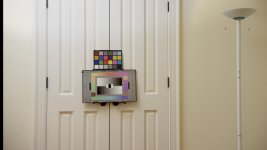
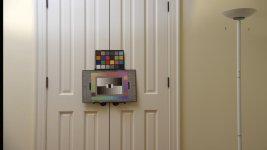
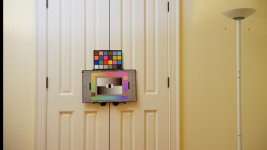
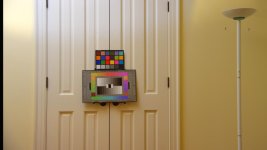
I'm happy to report that I, like you, don't see the horrid splotchiness that others have reported earlier in the thread (with other white doors and yellow walls). However, I made up a test in DaVinci Resolve and came up with some of my own thoughts about the GH4 and Vlog-L.

Here's a link to my GH4 Vlog files on dropbox. The thumbnails below are really just a tease for what's in the Dropbox folder.

Here's the process I used for generating these jpgs:

0. For my initial exposure level, I barely protected the highlight on the yellow wall (upper left) using the SHOGUN's RGB waveform monitor. I measured using the AA709 LUT for the GH4 and DC2/RG4 for the EPIC (with no LUT on the SHOGUN). I ensured that both waveform levels were consistent between the two cameras.

1. For GH4_SAT50 and EPIC_SAT50, I used the SHOGUN's RGB waveform monitor, I dialed in an approximation of a good white balance and tint on both cameras. For the GH4 I adjusted the WB until the R and B looked balanced, then I adjusted the color bias slightly toward G until R, G, and B were balanced for the highlights of the white doors. For the EPIC I did the same for the WB, but then used the TINT parameter to adjust the G to level up with the R and B.

2. I then shot short clips on both cameras (4:2:2 10-bit UHD ProRes HQ for the GH4 and 6K HD REDCODE 2:1 for the EPIC DRAGON).

3. After looking at the results (and in particular, the exposure level of the charts), I opened up two stops and shot short clips again. This provided much better exposure for the charts, but clipped highlights the GH4.

4. I trimmed the R3D clips from 24 frames down to 8 to make the dropbox folder a bit lighter to download.

5. I exported stills of the images for the two cameras at "normal" and "plus 2 stops" exposure, plus a second series with Saturation cranked up to 100 (from normal, which is 50).

The principle purpose of this test was to see whether white doors in a pale yellow room were a problem for the GH4 with Vlog-L or not. My answer is basically no: neither the SAT50 nor the SAT100 images show the kind of horrible blockiness reported elsewhere. But the images do show that color charts start looking very ugly and blocky when 2 stops underexposed. They also show that the GH4 can do brilliantly in the color department when the color charts are properly exposed, but that it lacks the dynamic range and highlight protection of the EPIC DRAGON, obviously.

I suspect that Vlog-L will do what I want, which is to make the GH4 easy to put into a Resolve grading workflow, but it won't do miracles. Specifically, it doesn't magically make the GH4 as good as EPIC DRAGON.
 

Attachments

  • EPIC_SAT50_Plus2.jpg
    EPIC_SAT50_Plus2.jpg
    32.7 KB · Views: 0
  • EPIC_SAT50.jpg
    EPIC_SAT50.jpg
    34.4 KB · Views: 0
  • EPIC_SAT100_Plus2.jpg
    EPIC_SAT100_Plus2.jpg
    34.3 KB · Views: 0
  • EPIC_SAT100.jpg
    EPIC_SAT100.jpg
    35.8 KB · Views: 0
  • GH4_SAT50_Plus2.jpg
    GH4_SAT50_Plus2.jpg
    34 KB · Views: 0
  • GH4_SAT50.jpg
    GH4_SAT50.jpg
    35 KB · Views: 0
  • GH4_SAT100_Plus2.jpg
    GH4_SAT100_Plus2.jpg
    35.6 KB · Views: 0
  • GH4_SAT100.jpg
    GH4_SAT100.jpg
    36.7 KB · Views: 0
What are you talking about? The GH4 cannot use preview LUTs, as you can do that in the Shogun. So use a Shogun if you need that. Together with the waveform monitor you get a complete new tool to adjust v-log v to the limit of IRE79, and to control in an preview the later picture. And in your NLE you will be able to apply different LUTs anyway, at least in some systems.

I'm talking about the ability to import LUTs through an SD card and put them on top of V-LOG L as a custom profile. My idea is to try to work around the 8-bit limitations while still recording internally, capturing a specific look, such as a FilmConvert film stock LUT in camera.

He's talking about doing the transformation before encoding. Baking it in. Kind of defeats the purpose of LOG encoding and LUT's, but I appreciate the spirit.

It does defeat the idea of LOG encoding and LUTs in post, but it would still allow us to capture exactly the look we want (with a little bit of planning) while still shooting internally. Because the baked-in look was captured before the compression, the artifacts would be minimized.

Heck, even if they just added a V-LOG L + V709 LUT custom profile and called it good, that'd be great.
 
password: LUT

Shot out of my window yesterday. I think the images speak for themselves...


Iso 400
Grading in Speedgrade
UHD 30p in a 1080p24 timeline
 
Last edited:

Shot out of my window yesterday. I think the images speak for themselves...


Iso 400
Grading in Speedgrade
UHD 30p in a 1080p24 timeline

Not sure VLOG is particularly suited for that scene. Maybe in 10bit out. I would think that if I were to shoot a sunset and want it saturated as such I would use a CineV or D profile. Or even others than VLOG.

I'm gonna stick with my guns as say that you need to full reset the camera and reload VLOG because your footage and the magenta blocking looks similar to what I had before doing a full reset. But keep in mind, you're stressing an 8bit 420 on a camera where VLOG was an afterthought.
 
OMG--I have the same room! And I have done some experiments with different exposure values and saturation levels, comparing 10-bit 4:2:2 Vlog-L (recorded on an Atomos Samurai) with my trusty EPIC DRAGON. The lens I used on the GH4 was my Voightländer 17.5 (at f3.5 and f1.7).

I'm happy to report that I, like you, don't see the horrid splotchiness that others have reported earlier in the thread (with other white doors and yellow walls). However, I made up a test in DaVinci Resolve and came up with some of my own thoughts about the GH4 and Vlog-L.

I'm not sure that wall is good test. The saturation may be masking the issue. You really need to shoot neutrals, or near neutrals, that's where the encoding error really stands out.

emma_vlog709_1080.jpg
 
Back
Top