
Navigation
Install the app
How to install the app on iOS
Follow along with the video below to see how to install our site as a web app on your home screen.
Note: This feature may not be available in some browsers.
More options
You are using an out of date browser. It may not display this or other websites correctly.
You should upgrade or use an alternative browser.
You should upgrade or use an alternative browser.
e-SATA cable
- Thread starter ramkuma
- Start date
I don't believe the HMC-150 has an e-Sata port on it, I believe what you think is eSATA is actually an HDMI output or the feature connector for Component output.
To do a transfer from the HMC-150 onto an eSATA drive connected to a Computer is possible in many ways, but not in a direct configuration as far as I know.
To do a transfer from the HMC-150 onto an eSATA drive connected to a Computer is possible in many ways, but not in a direct configuration as far as I know.

ramkuma
Well-known member
To do a transfer from the HMC-150 onto an eSATA drive connected to a Computer is possible in many ways, but not in a direct configuration as far as I know.
So how do you transfer footage from the camera to an external drive via e-SATA then? Thanks.
So how do you transfer footage from the camera to an external drive via e-SATA then? Thanks.
You don't. Dump the footage from the memory card to a computer. Then you can copy that footage to an HDD. If it's an external HDD that is in an enclosure with e-Sata, you can connect it to your computer via an e-Sata cable. Of course, that's assuming your computer has an e-Sata port.
ramkuma
Well-known member
How do you dump the footage from the memory card to the computer? I thought that was what the eSATA cable was for. I have only tried dumping a cliip with a USB cable. It was only a five second clip so it was not a problem, but I though the whole point of eSATA was to upload large clips? My computer does not have an eSATA port. Thanks.

Allen Ellis
Well-known member
I'm not quite sure where you're getting eSATA from. The camera doesn't have an eSATA port nor does it ship with an eSATA cable. To dump footage from the memory card to the computer, either connect the camera via USB as you did or take out the memory card and put it into a laptop or memory card-USB adapter.

Mike Harvey
Veteran
Your options to offload footage are:
Connect camera via USB to a computer.
Remove SDHC card and insert it into a computer or a card reader attached to a computer.
Unless you buy some sort of specialty drive specifically designed for the task you are talking about, there is no way to offload the footage directly to a portable hard drive. And the camera DOES NOT have an eSata port on it. I'm assuming you have that confused with the HDMI port.
Connect camera via USB to a computer.
Remove SDHC card and insert it into a computer or a card reader attached to a computer.
Unless you buy some sort of specialty drive specifically designed for the task you are talking about, there is no way to offload the footage directly to a portable hard drive. And the camera DOES NOT have an eSata port on it. I'm assuming you have that confused with the HDMI port.

Are you trying to capture video directly from the cam or copy the footage that has been recorded on to the SDHC card.
The latter is possible by simply removing the card from the cam, inserting it into a SDHC USB2 reader and copying the contents to your computer or a eSATA drive that is connected to your computer.
What experience do you have with video editing using AVCHD footage?
What computer and NLE do you use?
Have you edited video from other cameras?
The latter is possible by simply removing the card from the cam, inserting it into a SDHC USB2 reader and copying the contents to your computer or a eSATA drive that is connected to your computer.
What experience do you have with video editing using AVCHD footage?
What computer and NLE do you use?
Have you edited video from other cameras?
ramkuma
Well-known member
I'm not quite sure where you're getting eSATA from. The camera doesn't have an eSATA port nor does it ship with an eSATA cable. To dump footage from the memory card to the computer, either connect the camera via USB as you did or take out the memory card and put it into a laptop or memory card-USB adapter.
So I can use just a USB transfer? I was under the impression that one had to use eSATA because of the file sizes with film. If you can upload via USB, why would one want to use eSATA?
ramkuma
Well-known member
I'm assuming you have that confused with the HDMI port.
What is the difference between HDMI, eSata, and USB? Thanks.
ramkuma
Well-known member
Are you trying to capture video directly from the cam or copy the footage that has been recorded on to the SDHC card.
The latter is possible by simply removing the card from the cam, inserting it into a SDHC USB2 reader and copying the contents to your computer or a eSATA drive that is connected to your computer.
What experience do you have with video editing using AVCHD footage?
What computer and NLE do you use?
Have you edited video from other cameras?
I have never edited or uploaded digitial video before. I have figured out how to shoot footage with the HMC150 and now I am trying to figure out how to store the footage for archiving and future editing. I am trying to take footage I have shot on an SDHC card and upload it to an external drive and/or my computer hard drive for storage so that I can empty my card and shoot new stuff. I was under the impression that USB uploading would not work because it was too slow for such large files like HD digital film, that one had to use eSATA to upload footage onto a hard drive for storage. I use a Dell Computer desk top. I don't know what an "NLE" is. Thanks so much for your help.
Mike Harvey
Veteran
What is the difference between HDMI, eSata, and USB? Thanks.
eSATA and USB are data cables. HDMI is a digital video cable. You would use the HDMI to hook up the camera to an HDTV.
Mike Harvey
Veteran
I have never edited or uploaded digitial video before. I have figured out how to shoot footage with the HMC150 and now I am trying to figure out how to store the footage for archiving and future editing. I am trying to take footage I have shot on an SDHC card and upload it to an external drive and/or my computer hard drive for storage so that I can empty my card and shoot new stuff. I was under the impression that USB uploading would not work because it was too slow for such large files like HD digital film, that one had to use eSATA to upload footage onto a hard drive for storage. I use a Dell Computer desk top. I don't know what an "NLE" is. Thanks so much for your help.
NLE = Non-Linear Editor... basically any modern computer editing software (linear editing usually refers to old tape deck to tape deck setups).
As far as speed... USB is fine. I use a USB card reader to off load the cards onto my desktop. Besides, you're also limited by the speed of the SDHC card itself, so you wouldn't see much of a difference between USB and eSATA even if eSATA was an option.

MadHMC150
DVXuser Sponsor
Maybe I missed what type of computer you are using.
I found this to be great: Its a express card reader, I just leave it in my express slot on my Mac Book Pro and can plug in the camera SDHC cards anytime. No need for cables and to have the camera on. Some laptops have a SDHC card reader built in, does yours? Then you don't need anything else... There is no difference between all these, as they said you are limited by the read speed of the SDHC card, not the device transferring it.
http://www.bhphotovideo.com/c/produ...D_109_A11_Multi_Card_ExpressCard_Adapter.html
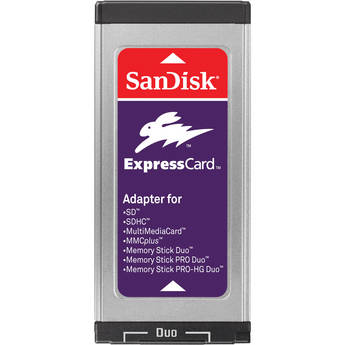
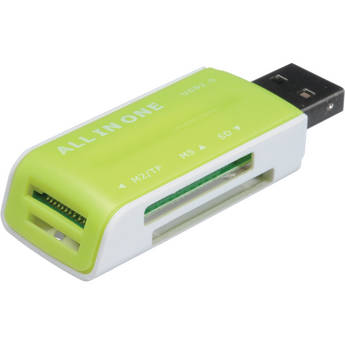
and if you want to use a USB port, you need a USB Card Reader for SDHC cards like this: (Havent used, just giving example)
http://www.bhphotovideo.com/c/product/502433-REG/GGI_SDHC_Secure_Digital_SD_SDHC_Memory.html
I found this to be great: Its a express card reader, I just leave it in my express slot on my Mac Book Pro and can plug in the camera SDHC cards anytime. No need for cables and to have the camera on. Some laptops have a SDHC card reader built in, does yours? Then you don't need anything else... There is no difference between all these, as they said you are limited by the read speed of the SDHC card, not the device transferring it.
http://www.bhphotovideo.com/c/produ...D_109_A11_Multi_Card_ExpressCard_Adapter.html
and if you want to use a USB port, you need a USB Card Reader for SDHC cards like this: (Havent used, just giving example)
http://www.bhphotovideo.com/c/product/502433-REG/GGI_SDHC_Secure_Digital_SD_SDHC_Memory.html
Last edited:
Allen Ellis
Well-known member
For what it's worth, I've found my laptop's built-in SD reader is around 30% slower than the free USB adapter Transcend sent me with my 16GB card. Bizarre.
Mike Harvey
Veteran
What is a USB card reader? Why not just use a cable from your camera to your laptop, or put the card in the USB port on your laptop? Thanks for the great information.
Well... it's not physically possible to put the SDHC card in the USB port, so you need a card reader to do so (as per MadHMC150's examples). As to why not hookup the camera... I just don't want to dig out my camera every time I need to edit or offload something. I find it's just easier to leave a $10 card reader permanently attached to my desktop than dig out my camera and find a place on my crowded desk where it won't fall off two or three times a week.
ramkuma
Well-known member
Some laptops have a SDHC card reader built in, does yours?
I don't have a laptop---I have a Dell desk top. I don't know if it has an SDHC card reader nor an "express slot." It appears my Dell only has USB ports. Thanks much for the information, I would be clueless without this board.

BrianMurphy
Veteran
About a year or so ago when I bought my HMC 150 I also bought some wonderful Transcend Class 6 cards for "peanuts" and the deal was buy a card and get a free reader. Check out the discount sales outlets and you may find the same deal. Like Mike says who would want to drag out the camera everytime ?
I don't have a laptop---I have a Dell desk top. I don't know if it has an SDHC card reader nor an "express slot." It appears my Dell only has USB ports. Thanks much for the information, I would be clueless without this board.
I recommend the Lexar USB reader for you....