DVX100B Problem with Video

Hi guys. Just got my new DVX100B a few months ago. I mostly used Sony Betacam SP cameras in the past.
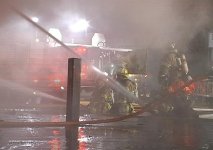
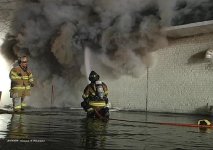
I have notice that on most of the videos that I shoot at night, there is a bunch of lines that go through part of the video with any bright light, or strobe light.
I shoot a lot of fires for the fire department and news media, so I get it a lot.

Here is a link on a recent fire I shot for my fire department......
FIRE Video and frame grabs link

As you can see on several of the photos, those lines I am talking about.
Is this normal? Is there anything that can be done? Or is it some type of computer interference problem....

Thanks for the help!

Jim
Philadelphia Fire Films
 

Attachments
  • Pdvd_021.jpg
    Pdvd_021.jpg
    65.9 KB · Views: 0
Last edited:
I am unable to watch your clip at the moment, as I am in dialup land this weekend.

However, it sounds like what you are describing is known as streaking. It is not an uncommon side effect of smaller chip cameras when they encounter bright, direct light sources, such as strobe lights, or the sun, etc. Often times you will get a blue vertical streak or something similar.

This is streaking. It happens. Some cameras will be more likely to have this problem than others. It is much more common in smaller chip cameras.

I shoot with an HVX and haven't really encountered this problem, at least not nearly to the extent I have seen with other cameras in the past.

Jason
 
This is what CCD streaking looks like. Look at the big vertical stripe caused by the car's headlight. Is that the kind of thing you're seeing?
FX1%20vertical%20flare%20from%20headlight.jpg
 
Maybe it is an interlacing problem. Where in philly do you live if you mind me asking. I live next to the Rocky steps.
 
Barry_Green said:
This is what CCD streaking looks like. Look at the big vertical stripe caused by the car's headlight. Is that the kind of thing you're seeing?
FX1%20vertical%20flare%20from%20headlight.jpg
Hi. No. Here is the frame grab of one fo the photos...
 

Attachments

  • Pdvd_022.jpg
    Pdvd_022.jpg
    55 KB · Views: 0
PhilaFireFilms said:
Sorry, but what do you mean by interlace?

No need to apologize. You came to the right place to ask pretty bigtime questions.

Read everything you will ever need to know about interlacing here:http://en.wikipedia.org/wiki/Interlacing

Have you played around with the camera's 24p functionality yet? From the stills, it sure appears to be some sort of strange interlacing problem... although I have never seen anything like that night shot with severe horizontal lines.
 
i'd say it's interlacing. what mode are you shooting in and editing? have you watched it on a regular tv? interlacing is most noticeable during movement...so though that one pic seems still...the smoke is moving across the lights. thus movement and therefore noticeable interlacing. outside of that those are some great shots!
 
DVX has a slight learning curve. It took me a while to learn what I know now.(made a lot of mistakes last year) Did you get Barry's book/dvd with it? Cuz those grabs look like interlacing to me. So progressive might be a better choice. There is alot of information on this site. Using the search function helps. Higher quality tapes also help I have learned.
 
Yeah, that's what I was thinking...What kind of tapes are you using? I don't know if it was just me but when I first purchasted my camera I used a TDK DV tape and had it in there for a few test shots and the quality seemed way under par...I threw them out and have stuck with Pani Master DV tapes....Smooth sailing since....

If not that then if you watch the footage straight from the camera do you see those lines? I went to your site and watched the video you have at the top of the page and that looked pretty good to me....Could be you're capture software....
 
It's interlacing for sure man.
first of all stop editing on movie maker because it sucks.
second of all you need to know on what format you are shooting on your camera and then when you edit it the settings in the program you are editing with need to be the same.
And when you go to export to movie or whatever you need to check that the settings are the same as how you shoot.
if you don't get this I can explain more just tell me how you shot and what program you are working with
 
PhilaFireFilms said:
Thanks... I just would think that a good quality camera like the 100b wouldn't have that problem.
It doesn't have a problem. Were you shooting in 60i?

edit: just read above that you learned what interlace was for the first time. -- korimickster is always on top of things. he's helped me a few times on the boards.

start shooting progressive and seriously, quit using moviemaker =) it's junk.
 
Back
Top