GH2 Confused about timelapse with GH2

longcipher

Active member
Please don't flame me - BUT - I've been reading various threads about the GH2 and timelapse and am actually confused at this point. What I want to do is pretty simple -- I need to shoot a couple short timelapses of a storefront for some marketing videos. I've read about using the mechanical shutter, the electronic shutter in burst mode, etc.

What exactly do I need --- which intervalometer works best with the GH2? -- and what is the best/easiest method? I want to get everything I need by this weekend so I can do some tests before next Tues & Wed's shoots.

Thanks!
 
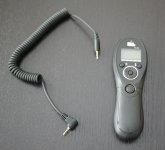
This is what I own and use with my GH2. Available on Amazon:

studiohut.jpg

EDIT: I see someone posted the same thing while I was replying. So that's 2 votes for this little device.

Oh, and the Amazon.com description says: "Note: This remote has a fixed wire which can NOT be interchanged with other cables." It said this when I ordered mine about 4 months back, but the one they sent me has a detachable wire, which actually I prefer. If you order one, perhaps you could tell us if yours came with a detachable or fixed wire.

shutter.jpg
 
Last edited:
+1 for the intervalometer time controller. You can get these for like $12 and they simply plug into your GH2/1 and trigger the shutter.
I found that with my GH2 when using a class 10 card and shooting RAW, i had to turn the intervals down to 3 secs or longer (in day light). Any faster, and you camera may not have finished clearing it's buffer and wont take the next photo... so you'll have a small gap in your sequence. At night, its a whole different ball game, since you camera will need to be taking a longer exposure anyhow... so your looking at about 10-30 between each shot.
[COLOR=#fafafa !important]

[/COLOR]​
small-logo.png
 
The advantage of using an intervalometer and shooting JPEGs over simply time-warping a normal video is that the when shooting single JPEG images you can set the shutter speed to whatever you want - ideally half the shooting interval, which creates a very nice, cinematic 180 degree motion blur. You can always spot amateur timelapses right away based on the motion characteristics like that.
 
Do you know if this will work with a GH1? The list of compatible cameras on Amazon shows the GH2, but does not call out the GH1.
 
Thanks folks! I just ordered my intervalometer with one-day shipping - it should be here on Thursday and I'll let you know about the cable. I'll do a couple practice shoots before Tuesday so I don't look like too much of a fool at the shoot. Again, thanks for the help!
 
I'm beginning to relegate my GH2 to a "timelapse camera". It's that good for it. 16:9 stills = awesome.
Good luck.
 
Do you know if this will work with a GH1? The list of compatible cameras on Amazon shows the GH2, but does not call out the GH1.
I think the answer is yes. I had one, bought from a Hong Kong vendor in eBay, that works for the GH1. Then it now also works on the GH2 bought months afterwards,,, Al
 
Thanks, Al. That sounds logical. If the device you bought works for both your GH1 and GH2, then the connector must be the same on both cams. Thanks for the info.
 
Thanks, Al. That sounds logical. If the device you bought works for both your GH1 and GH2, then the connector must be the same on both cams. Thanks for the info.

I can confirm that. The jack is indeed the same for intervalometers (2.5mm input, etc.)

Also, having shot a lot of timelapse with it, I would note a few things if this is your first shoot.

- Set your white balance to anything other than AWB before you shoot. Otherwise the color varies.
- Shoot in manual mode, unless you want flicker as aperture or shutter adjusts over the shoot.
- Set your focus to manual. I cannot stress this enough. Every early shoot where I forgot to do this ended up unusable.
- Shooting at your maximum resolution and 16:9 mode gives you the maximum flexibility for post (pan and crop/Ken Burns effect) or for the future (4K projection, etc.). Remember that all film aspect ratios commonly in use are 16:9 or wider (2.35/2.39/2.40 to one being very common) so there is usually not point in a more vertical aspect ratio for timelapse.
- Slower shutter speeds mean less chance of shutter variation over the course of the shoot.

Good luck!
 
@stoneinapond

There are a lot of different ways to deal with it, but it is a tricky problem. Personally, since I've been shoot an average of 600,000-1.2 million timelapse exposures for while now, I don't mind shooting a lot of additional exposures through bracketing.

The GH2 isn't as flexible as the recent top of the line Canon or Nikon cameras when bracketing, nor does it compare to the flexibility of their cheaper ones in concert with a Promote Systems Promote Control. But it can do 7 exposures at 1 stop intervals (a 7 stop range that compares nicely to the 5 stop range available with the onboard bracketing for say a Canon 50D). That's not enough to fully capture the light change from sunset to dark, but if you set your lowest exposure to overexpose slightly, you'll be able to do pretty decently.

These exposures can then be crossfaded in your timeline. There are various approaches to this, but I personally using the "decimate by x" feature in VirtualDub to create a video clip for each set of exposures. Another approach is to use a program like Photomatix Pro to merge to HDR and tonemap.

Note that "merging to HDR" does not tend to work very well when most of the exposures are black, though. :) You can use the same program use an averaging algorithim.

Another option (that unfortunately I have yet to see demonstrated on the GH2) is bulb-ramping (where the shutter speed gets varied smoothly over time instead of re-calculated for each exposure). This is an optional addition to the Promote Control and may be included in the Magic Lantern Firmware hack for Canon cameras.

Anyway, long story short - it's not the easiest thing to deal with and there's no perfect approach. I almost never shoot a shot that changes in light that much with the GH2 and rely on a Canon DSLR instead. If you go the Canon route, you usually have your choice of the Promote Control or Magic Lantern Firmware.

I haven't ever used Magic Lantern because at least one high profile individual had it brick their camera and I'm a little cautious (though it was likely a highly unusual incident).

If you want to know more about timelapse, TimeScapes.org is a good resource.
 
By the way, I used to shoot timelapse in program mode on a Panasonic travel-zoom. Looking back on it, I really notice the flicker I mentioned as the camera increased and decreased shutter speed throughout sunrise or sunset shoots.

However, it was great for night shoots. Setting the exposure to +2EV in program mode (the camera didn't have manual) and shooting 1 second exposures at ISO 100 gave some great sequences that I look back on much more fondly.
 
The GH2 isn't as flexible as the recent top of the line Canon or Nikon cameras when bracketing, nor does it compare to the flexibility of their cheaper ones in concert with a Promote Systems Promote Control. But it can do 7 exposures at 1 stop intervals (a 7 stop range that compares nicely to the 5 stop range available with the onboard bracketing for say a Canon 50D). That's not enough to fully capture the light change from sunset to dark, but if you set your lowest exposure to overexpose slightly, you'll be able to do pretty decently.

I'm not sure I understand how bracketing can be used in a longer series of exposures.

And sunset to dark seems easier to achieve than dark to sunrise.


Another option....is bulb-ramping (where the shutter speed gets varied smoothly over time instead of re-calculated for each exposure).

I remember seeing a video of that technique a while back. If memory serves, the person I saw doing it had a homemade contraption that looked very complex. But it seemed like a very good way to go.

Many thanks for your response.
 
@stoneinapond The device I think you're remembering is the "Little Bramper" with Bramper being derived from "bulb-ramper". I was intrigued by it and glad to see them implement some of that functionality in the Promote Systems Promote Control. The Promote Control is generally simple to use, but I haven't tried a bulb-ramping sequence with it yet. Hopefully next month. Though I believe the Little Bramper had the capacity to connect a light meter in some complex fashion, something that the Promote Control (last I checked) does not.

As to the bracketed timelapse question, here is how it works on the GH2.

- Configure your bracketing settings in the menu. I typically have it set the shooting order as "-, 0, +" so that I can make better sense of it later.
- Turn the dial on top-front-right of the GH2 to bracket mode (one step below burst mode).
- Make sure that you're shooting to the right aspect ratio and file format (as RAW files are usually too big for a long timelapse).
- Set your intervalometer to shoot a sequence of "" exposures (on most intervalometers that would mean infinite) and then set the exposure time for each set to be long enough to shoot a full bracketed set.
- Set your intervalometer to shoot each sequence at the desired interval, but test to make sure that card activity indicator (the one on the upper right hand of the GH2 screen) stops showing between each sequence. Otherwise, you'll run into problems.
- Start your timelapse sequence.

That way, when you go to edit the sequence, you'll have a 7 stop range of exposures to choose from and cross-fade for your final sequence. When done well, this is almost entirely transparent, depending on the amount of motion in the scene.

As regards separating the images shoot at each exposure setting into their own sequences, that's a software specific issue. Like I said, I use VirtualDub and save each exposure as its own video file before I open them in my NLE.

Another option is to use thumbnail view in an image browser (or the Finder or Windows Explorer) and resize that view until each row has the same number of pictures, then lasso a selection around the column of pictures you want and drop them into a folder named after the exposure (-3, -2, -1, 0, +1, +2, +3).

After that, you may need to use a renaming tool to get your video software to see them as a sequence. Fast Stone Image Viewer and Adobe Lightroom have that functionality built in.

It's not that hard, but I'd be lying if I said I couldn't understand why some photographers hire me to do it for them.
 
Oh, and the original credit for the "lasso selection" idea goes to MiLapse, who tossed the idea my way back in 2010 when I first had that issue on my old TZ-5. :)
 
Per,

Please indulge me one more time. What you are saying is that I do a regular timelapse, but each single shot would include a bracketed sequence?
 
Back
Top