GH2 Confused about timelapse with GH2

Per,

Please indulge me one more time. What you are saying is that I do a regular timelapse, but each single shot would include a bracketed sequence?


Start with a single still photo:

If you shoot a bracket of 5 photos, you can later select the one photo that has the best exposure and start developing that photo in lightroom/photoshop.

OR

You can merge the 5 photos together to get a single HDR photo.
​


Okay, since a timelapse sequence is nothing more than playing back a series of still photos (let's call them frames that you play back at 30 fps), you can do the same thing with the timelapse.

Only when shooting for timelapse, if you're doing a sunset shot, set your EV-2 so that it is correctly exposed (your EV+2 will be grossly over-exposed).

Here's an example (note that I shot this sequence to do an HDR, so the EV-2 is too dark to be my "correctly exposed" image but it's still useful for illustrating purposes):
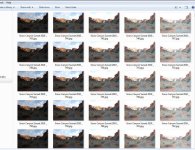
bracket.jpg

So you shoot each frame bracketed and then separate the various exposures to create 5 identical sequences. So all EV -2 photos go into 1 folder, EV-1 in a second folder, EV 0 in a third folder, EV+1 in a forth folder, and of course EV+2 in a fifth folder.

So after putting them into 5 folders (using the method attributed to milapse but done by a lot of people for years before):
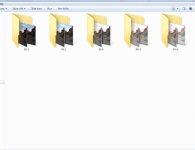
folder.jpg

Then you go into each folder and batch rename all the images in the EV-2 folder so they are sequential (I use this super powerful renaming tool: Advanced Renamer). Import the EV-2 sequence into your NLE and you've got a timelapse that is under exposed by EV-2. Do the same thing for each of the other 4 folders and you'll have 5 separate and identical sequences, the only difference being the exposure. You can then cross dissolve between these 5 sequences as you wish.

So your EV-2 sequence would be exposed correctly at the start of the sequence, and by the end, your EV+2 will be exposed correctly.

Now, you can extend this whole process out even further if you have a long enough interval between frames. How? Add a full stop ND to the front of your lens and start your EV-2 correctly exposed. By the time your EV 0 is the correctly exposed image in your bracket, carefully pull the ND filter and your EV-1 will become your correctly exposed image.
 
Last edited:
Interesting discussion. I didn't see anyone mention that you can get respectable timelapse simply by hacking the firmware. Not necessarily as flexible as the methods being discussed here, but hey it's free!

http://vimeo.com/m/31989989
 
@GrahamH Actually, that was mentioned early on. But it has two major limitations: shutter speed and resolution.

I honestly find it slightly baffling when people choose to shoot timelapse at a lower resolution (like 2K) when they could do it 3K, 4K, 5K, etc.

If intervalometers were more expensive, I could understand, but from my perspective there are relatively few scenarios where shooting timelapse in video mode could be considered a better (or even comparable) alternative. The main reason people usually give is that they don't want to wear out the shutter.
 
@StoneInAPond I'm glad Keylight answered your question already. :) A few additional notes on shooting.

- If you are going to be adjusting anything on your camera during the shoot, make sure your tripod and camera are very secure. There is nothing worse than having the shoot broken in half by unintended motion. That's why I generally don't muck around with it - I often carry too many cameras on a shoot to be able to use an especially heavy tripod for each one without an assistant.

- Whether you set -2EV to be a proper exposure or to be over-exposed at the start of the sunset depends on how long you'll be shooting before vs after the sunset. If the bulk of your shots will be before the sunset, this makes sense. I usually start my shoots an hour before sunset or less so I try to over-expose -2EV so that I can go longer into the night before I'm too underexposed.

When I use my Promote Control, I'll often use brackets across 16 stops (instead of 7 stops) for a transition like that.

Oh and if you're checking out renaming tools "Renamer" is another great one from http://www.den4b.com.
 
- If you are going to be adjusting anything on your camera during the shoot, make sure your tripod and camera are very secure. There is nothing worse than having the shoot broken in half by unintended motion.

Yeah, already learnt that one.

- Whether you set -2EV to be a proper exposure or to be over-exposed at the start of the sunset depends on how long you'll be shooting before vs after the sunset. If the bulk of your shots will be before the sunset, this makes sense. I usually start my shoots an hour before sunset or less so I try to over-expose -2EV so that I can go longer into the night before I'm too underexposed.

Thing is, I want to do the opposite, a sunrise. I guess I'm going to have to do it across two mornings, one to see what the maximum daylight exposure should be and then the shoot the next morning.

Oh and if you're checking out renaming tools "Renamer" is another great one from http://www.den4b.com.

Windows only. But I'll find something. Thanks again.
 
Thing is, I want to do the opposite, a sunrise. I guess I'm going to have to do it across two mornings, one to see what the maximum daylight exposure should be and then the shoot the next morning.

Here's a Mac renaming tool that others on the site have mentioned: R-name

As for setting up exposure for a sunrise: Look up the time for sunrise and sunset for your location. The night before your sunrise, check your exposure levels the same amount of time before sunset as you plan on shooting for the END of the sunrise. You can then work backwards. So if you want to shoot from before sunrise to 30 minutes after sunrise, record the levels at 30 minutes before sunset. That'll be what you want to set your camera to so EV-2 will properly expose (or if you're doing 9 brackets, EV-3). Won't be exactly right, but will be close.

On a separate note, keep in mind that you should test how long it takes to record all the images in a bracket set to memory. You need to make sure the camera's buffer is totally empty before firing your next bracket set, or over time you camera buffer will fill up and you'll start missing shots. On my old D200 (which is what I shot that timelapse I posted earlier in the thread) I needed an interval of 8 seconds when shooting a bracket of 5 shots. If I had an interval of 7 seconds, then the camera buffer would have still been writing last image to memory while firing the first image of the next bracket set. I seem to recall the D200 had enough buffer to hold about 25 jpgs in buffer, and after 40 bracket sets the buffer would finally be full and the camera would start delaying firing new frames until space in the buffer opened.

This buffer issue is a function of 2 things - the speed at which your camera can process and transfer images from buffer to memory, and the speed of the memory.

You might check out this blog post for more information on buffer issue as it relates to the GH2. This site posts the buffer flush speeds for the GH2 as follows:

2 seconds after 9 Large/Fine JPEGs
15 seconds after 7 RAW files
22 seconds after 7 RAW+ L/F JPEG files

*Note: Buffer clearing times measured with a SanDisk Extreme III 30MB/sec 8GB SDHC card. Slower cards will produce correspondingly slower clearing times. Slow cards may also limit length of bursts in continuous mode. ISO sensitivity and noise reduction settings can also affect cycle times and burst mode performance.
[TABLE="width: 500, align: center"]
[TR]
[/TR]
[/TABLE]

The GH2 is one of the slower cameras these days, and shooting bracketed RAW isn't normally a viable option. Of course, I prefer shooting RAW, but if I'm doing a shot with a lot of transition (sunrise, sunset, clear to cloudy, direct sunlight to shade...) then I'll do bracketed jpgs.

Good luck. Hope you'll post your results.
 
Last edited:
Here's a Mac renaming tool that others on the site have mentioned: R-name

Good luck. Hope you'll post your results.

Keylight - excellent information. So helpful. Will download the Mac app.

Obviously right now I have a lot of experimentation to go through, to figure out buffer rates, exposures, tests to make sure I can do this in my sleep. This is really very early preparation for a trip to Hawaii in September where I want to timelapse the sunrise over Haleakala in Maui. I will most probably only have one attempt at it and I want to try and get something out of it!

So yes, I'll post my attempt even if it's only merely close to acceptable. But it will be a while. :thumbsup:

In the meantime, again, many thanks. Love this place.
 
@StoneInAPond If you are shooting sunrises instead of sunsets, you can also reverse my advice.

- Set +3EV to be as dark as you are comfortable with for your dark exposures. The more you underexpose that part, the longer you can go into the daytime before it overexposes heavily.
- Clouds, water, citylights, etc. all have more reflected light so you make it easier to maintain interest in the timelapse during the dark period if you have at least some discernable visual interest like that. Without an element like that, it will be difficult to underexpose sufficiently to make the technique work.

Also, Panasonic reported that they shortened the time required to shoot a bracketed sequence in Firmware 1.11 from version 1.0, so if you haven't updated yet, you might want to try that.

@KeyLight Glad to see you echo my earlier advice about checking the buffer when setting the intervalometer.
 
- Set +3EV to be as dark as you are comfortable with for your dark exposures. The more you underexpose that part, the longer you can go into the daytime before it overexposes heavily.
- Clouds, water, citylights, etc. all have more reflected light so you make it easier to maintain interest in the timelapse during the dark period if you have at least some discernable visual interest like that. Without an element like that, it will be difficult to underexpose sufficiently to make the technique work.

Also, Panasonic reported that they shortened the time required to shoot a bracketed sequence in Firmware 1.11 from version 1.0, so if you haven't updated yet, you might want to try that.

All wonderful advice. Yes, I upgraded my firmware, so that is good. I think in my specific case there will little to see prior to sunrise, but I won't really know until I get there. If I have time I may go up there the night before and do a sunset.

Any general advice on lenses to use? My initial thought was that they should be fast, but perhaps that is not necessary. Would love to hear any opinions.

Thanks!
 
Any general advice on lenses to use? My initial thought was that they should be fast, but perhaps that is not necessary. Would love to hear any opinions.

Thanks!

The GH2 is pretty bad in low light. I would go with a fast lens to try to capture any remaining stars in the twilight before sunrise. Even more so because you'll be shooting in an area where you should have a pretty dark sky.
 
I would go with a fast lens to try to capture any remaining stars in the twilight before sunrise. Even more so because you'll be shooting in an area where you should have a pretty dark sky.

Hadn't even thought of that. That's exciting if the weather holds. I hope I can capture what I'm seeing in my head.

Time to get down to some work!

Hope I'm not being redundant with another hearty round of thanks. :thumbsup:
 
Did a quick informal test this evening with 2 different SD cards. I set the camera to manual, with a shutter speed of 1 second, recording RAW, in burst L mode.

The first card was a 32GB Class 10 Adata that's given me a lot of reliable performance. After 23 seconds of photos, it started to slow down (the buffer was full).

The second card was the new version of the SanDisk Extreme (45 MB/s) that I got on Amazon. (Note some of the pics on Amazon show the older 30MB/s card, but they're shipping the newer 45MB/s card now.) This card kept recording photos for about 1 1/2 minutes before it started slowing.

I then tested write speed of a single RAW photo:

Adata took almost 4 seconds to write to memory.
SanDisk took almost 2 seconds to write to memory.

So using the SanDisk, I could do a RAW timelapse with a 1 second shutter and an interval of 3 seconds, and I should be good. Using the Adata, I'd bump that up to an interval of 5 seconds (6 to be safe).
 
Last edited:
Thanks for confirming that the intervalometer works with the GH1, and also for all of the other great advice from everyone in this thread. I've never tried any time-lapse, but I enjoy the effects (when done well). I hope to acquire an intervalometer before my vacation in a few weeks. I should even have some time to try it out, since, well: I'll be on vacation for a week, and not slaving away too many hours/day at work. :-) I'll be sure to take advantage of all the great advice in this thread. DVXUser is a really special forum where experts willingly share some of their hard-earned tips that are clearly based on real experience (and usually have links to some of their work to demonstrate results).
 
FYI, here's a timelapse that used the technique I described earlier in this thread. Shot it last fall, never did anything with it and came across it this evening and threw it together. Some flickering in a few spots, which GBDeflicker could probably have dealt with, but not worth the time to go back and re-render.

 
Back
Top