FS7: Compression artifacts: XAVC-I "feature", or my FS7 malfunction?

Chris, was your test footage LOG, or something else? Asking, because all my examples have consistently been in S-Log3/S-Gamut3.Cine; in Custom mode and using Standard or Hyper Gamms, I do not have such heavy macroblocking in the sky area. Whereas in Log - well, the FS7 is not on par with GH5's V-Log L and the funny thing is I was wondering if my B-cam would provide IQ high enough to intercut with the FS7, haha...

Piotr
 
It was all S-Log3/S-Gamut3.Cine Piotr. To try to work out just what is going on with XAVC-I. Given time I will try some more experiments just to satisfy my own curiosity :) I'm curious to see if the Long GOP will do as good a job or as I'm seeing here slightly better in HD than the I-Frame. All I was doing in the previous investigations was to see what the block structure was. None of the results I obtained was from graded footage. The block structure seen in the JPG exports were straight from the unadulterated SLOG3 footage. I'm seeing the same in HD which is what I shoot most.
Chris Young
CYV Productions
Sydney
 
Thanks Chris. I still have this gut feeling that all the XAVC-I shortcomings that you and many other users (here, on the Sony forum, and in the 2 main Facebook user groups I participate) are talking about aren't exactly the same as what I'm trying to diagnose in this thread :(

So far, I've been using my FS7 (recently accompanied by my GH5, and occasionally A7Rii) for 2-camera coverages of classical music live events. With the lighting conditions of a typical classical music venues, and my frame compositions never involving large stretches of low detail, single color areas - the FS7 IQ hasn't been leaving much to be desired; generally dark scenes with just the main subject (the musicians) lit in the typical "concert" way, I always enjoyed grading the footage for HDR10 in Resolve. With all the contrast and beautiful specular highlights on the instruments, etc., my FS7 footage has been very rewarding in this kind of grading.

However - for the reasons irrelevant to this thread's main subject - I will be shooting less and less of the live concerts, and switching to general subjects more and more in the coming years. I'm even planning to start producing short clips of nature, architecture and alike which could bring some profits as "stock footage" in the future... And those will inevitably involve uncontrolled and changing light conditions, including clear of overcast stretches of the sky... Which is exactly why the problem, which I've seen since the very beginning of using my FS7, is now coming back as an important and difficult to overcome obstacle to my plans.

The entire uncompressed image path - from the sensor to the HDMI and/or RAW SDI output - is working perfectly, which enables recording absolutely clean footage on my Shogun Inferno. But having the Inferno with me at all times is not what I'd be looking forward to with enthusiasm at all; I bought the Atomos recorder with my B-cam in mind! Sure you could say "just send the FS7 in for servicing, and stop ranting on the forum" - but somehow I do not believe that Sony serivce would be able to somehow make the XAVC internal recording great, not without me being able to convince them my problem is something more than the "normal" noise and banding issues all FS7 shooters encounter when recording S-Log...

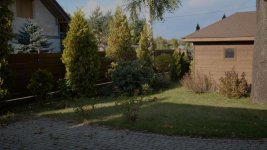
This is why I'm still looking for examples of similar scenery, shot in S-Log3 and encoded internally with the XAVC-I codec, either suffering from exactly the same as I'm seeing here - or completely free of it. Especially with the latter, if I could present the Sony Prime Support with it side by side a picture like the one below, they could not possibly say that my camera performs "within the specs" but would have to actually repair it.

Piotr
 

Attachments

  • sky.jpg
    sky.jpg
    20.5 KB · Views: 0
That file there is clearly something wrong!

Just a thought have u tried slog2 - I'm beginning to think the file is a bit thicker.
 
Sam - which specifically do you mean by "that file"? There are now 3 short mxf clips in my Dropbox; while they all show the artifacts I'd appreciate it if you said which one caught your attention the most. Because you see - for some people, there is nothing unusual in them :(

Thanks,

Piotr
 
Bingo! Areas like the sky (be it blue or overcast) is rendered much better with S-Log2 than S-Log3; this is the quality I'd expect from the 500 Mbps XAVC-I codec. Alister - in his detailed guide to the FS7 - says S-log3 should better be used; I now wonder in which specific scenery/light is S-log3/S-Gamut3.Cine giving cleaner results than S-Log2/S-Gamut?

Piotr
 
I've been an advocate for the use of S-LOG2 for outdoor shooting in all of my training videos and books for the past four years. If your observations are correct, then its just one more reason why S-LOG2 is superior.
 
Doug - there is no doubt S-Log2 gives cleaner results; somehow I was under the impression that S-Log3, being a CineON knock-off etc., would be better... Perhaps it's safer against hard-clipping the highlights, with its gentle roll-off - but sky (even overcast) being usually the brightest part of any outdoor scenery, the extra range that S-Log2 actually records (as opposed to roll-off) makes exposing so much easier... Even with the 709(800) MLUT on the monitor, I can use my Zebra at some 105% and simply back off a bit when even a small trace of it appears. Also whether I'm at the verge of hard clipping is much easier seen on this tiny WFM; with S-Log3 over-exposing is virtually illegible on it...

Piotr

PS. I'd risk the verdict that with the S-Log3 curve heavily compressing the highlights, the faint color information in the sky is "lost" and causes all sort of artifacts. Wheres S-Log2, as long as it doesn't clip (which only occurs at some 106 IRE, afair), preserves the color information much better - hence no artifacts at all :)
 
Last edited:
Sam - which specifically do you mean by "that file"? There are now 3 short mxf clips in my Dropbox; while they all show the artifacts I'd appreciate it if you said which one caught your attention the most. Because you see - for some people, there is nothing unusual in them :(

Thanks,

Piotr

There is a file attached to your post - on my phone (!) it has crazy blocking in the sky.

The only time I've had really crazy blocking was when I made a shot black and white.

---

2vs3 I've used 3 from the get go as the Sony data looks like it would have more latitude - but having tested slog2 a bit I'm thinking it is better for the "skinny" xavc codec (skinny compared to raw or whatever) - I'm thinking 3 is designed for future wide dr capture cameras or f65 or whatever. I had a lot of problems with slog1 which seems great when recorded 444 but terrible on 420 f3 internal
 
Last edited:
There is a file attached to your post - on my phone (!) it has crazy blocking in the sky.l

But the only file attached (as opposed to "linked to") has not been a video clip, but a single clip from one of them - overdone in purpose to exhibit what's really going on in the problem area and draw attention of those who still maintain my clips look "normal" to where and what they should be looking for in the actual clips, which all are straight from camera (untouched). So you cannot draw conclusion from that "file".

Otherwise - I fully agree with you; in fact I did a thorough testing today of the same scene shot with S-Log2/3 and XAVC I/L (after having made sure yesterday that external recording in DNxHR/ProRes/CDNG on my Shogun are still the highest quality imaginable, meaning my FS7 unit's uncompressed signal path from the sensor all the way down to HDMI and RAW SDI output is not faulty).

Definitely - for outdoor shooting with scenes and lighting like those discussed here - S-Log2 is the way to go; it's as clean as my GH5 V-Log L picture while offers much lower noise in shadows.

Thanks to all who participated in my thread; Best Regards

Piotr
 
Piotr

I don’t think there is much point in anyone else trying to replicate your blocking issues. Basically I think it best to analyse where I think your problem lies in your 184_0080_1 sample.

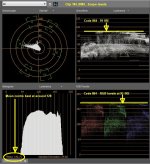
What I’m seeing in Resolve and Vegas is the following. The 0080 clip is showing peak level Code Values of 864 on the Waveform. This equates to about 91 IRE. This is above even the recommended reflectance level of 90 IRE for ITU-R709 let alone LOG. In my experience this is way too high a level to grade easily in S-LOG 3. You will notice that the peak levels are starting to clip at this level. This is also reflected in the Parade where all the channels, R, G and B are starting to hard clip at the Code Values of 864. The higher the exposure up the S-LOG3 curve means you have far more compression in the higher stops which makes LOG much harder to expand and grade.

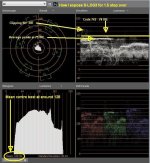
Let’s look at the published White Peak level of S-LOG3. On the IRE scale this equates to 61 IRE. This equates to a Code Value of 598, way below your values of 864. Most of us know that S-LOG3 can handle over exposure levels of up to about two stops above 61 IRE quite happily. As a rough rule of thumb, it’s not perfect because of the LOG curve but close enough for this exercise you can use the 10 IRE per stop rule. On this rule of thumb you would have a two stop over exposure putting your peak levels at around 81 IRE, from memory it’s around 83 IRE. I’m finding S-LOG3 works very well with a general over exposure of about 1.5 stops over for the majority of the peaks in any given scene. On the 10 IRE ‘rule of thumb’ this equates to around 71 IRE, again from memory I think it is 71 IRE. Keeping your average peaks at 75 IRE gives you head room for any extreme reflected or point source light or overall high levels to push up into the 2 and 2 and a bit stops 80-85 IRE zone without too many problems. As can be observed from the WFM scope shots your clip is pushing into the 90+ IRE zone. This can cause problems because of high compression levels at these peak exposure levels. Well this has been my experience in the past. I can only tell you what works for me. I’m never seeing the issues you are having using the above exposure guidelines.

I would strongly suggest trying to get hold of a copy “Ultimate Exposure Guide For Sony F5/F55” put out by Dennis (starcentral) Hingsberg, who has already contributed to this post. Even though this is for the F5/55 series a massive amount of it is applicable to the FS7 when it comes to understanding S-LOG3 exposure levels. It’s all in there and I feel pretty sure if you follow his exposure guides your problems will all but disappear. Dennis covers the subject in a scope and manner that is not really possible in the domain of a forum post.

http://www.hingsberg.com/

Here is timeline shot of your clip. I’m not saying it is a perfect grade by any means but I include it to show that even with about THREE stops of over exposure it is still possible to pull your sky levels back without the extreme blocking you are exhibiting. Following this are two JPGs. This grade was done at 32-bit full range with an ACES compositing gamma of 0.7 in the default ACES color space using the ACES RRT view transform as I found this workspace the best to recover these three stop over exposure excursions. The first JPG shows the levels I am seeing from your 184_0080_1 clip and the second set of levels is a representation of the approx 1.5 stop over levels I shoot S-LOG3 at.

QFHD sample grade 1280 upload.jpgClip 184_0080_1 Scopes 01.jpgCYV average exposure scope levels 01.JPG

Good luck :)

Chris Young
CYV Productions
Sydney
 
Hi Chris,

Wow - an excellent analysis, thank you! Just a couple of points from my perspective:

1. The "91 IE" peak in the waveform is at the uppermost part of the scene, while the most severe macroblocking, banding and pulsing is on the dark gray cloud between the tree and the barn

2. Yes, I did overexposed more than usually (perhaps more than I should) because I wanted to avoid noise in the deep shadow area in the lower portion of the scene

3. Not all 3 clips that I uploaded show such overexposure, while all of them show those artifacts in the sky and/or clouds; the overexposure in this particular clip is thus not representative as the common source of the problem in all three clips

Anyway, Thanks again an Regards

Piotr
 
Anyway, Gentlemen - after really extensive testing, here are my conclusions:

1. S-Log2 is rendering the highlights much better than S-Log3; even if it's possible to clip it above recovery - as long as not hard-clipped, it retains the color information in the sky/clouds much better and when brought down in grading, they are clean and do not show macroblocking similar to my examples (which were all S-Log3). TBH, even better in this regard are DNxHR and/or CDNG files recorded by shogun Inferno from the RAW SDI output - even S-Log3 (which is applied by Inferno before encoding) is 100% clean - not just in the shadows, but also in the highlights weve been discussing here as far from perfect when encoded with XAVC codec!

2. I'm going to overexpose by 1 stop at the maximum; 2 stops is too high (especially with S-Log3, but even S-log2 cannot be graded with HDR in mind if the highlights are at the verge of clipping)

3. I do have some observation on the way such close to clipping areas are decoded in my workflow; it's very difficult to retain detail and color of clouds in the sky, with patches of clear blue sky visible through them here and there. It will take me some more time to test which is the culprit but the most suspicious are (in order of the workflow path):

a. the way highlights in Log footage are decoded in Resolve (be it RCM, ACEScc, or even LUT-based workflows such as Loagrist)
b. my Decklink 12G video card: colors in highlights are turning into light grey areas easily and suddenly, even when the levels aren't too high at all
c. my Samsung SUHD TV, used as a grading monitor: it's said to have maximum brightness of more than 1,000 nits but when highlights occupy to large an area, it turns light grey without details but with lots of "busy pixels"

I guess however I will move the discussion of the above aspects to the BMD Resolve forum, as both software and hardware aspects are involved so some input from BMW Support engineers might be necessary - and they are present and active on that forum... At this point, I'd like to once again thank all of you guys who have been patient with me here, and tried to help with their interpretation of the source of my problems :) This forum rocks!

Piotr
 
Nobody has answered my question over on the BMD Forum - perhaps some of you guys could share some thoughts? To make my question short:

- when grading FS7's S-Log footage (XAVC-I) in Resolve using RCM or ACES, do you ever have to use the "Highlights" control - and specifically, dial it down considerably in order to recover and retain the color information in highlights areas like the sky?

The control is located in the second page of controls, under the main color manipulators (wheels, bars etc.). The manual says all those second page controls are the same ones that can be found inside the Camera RAW panel... I used to never need using them before, but now I'm noticing that using just the basic tools (offset, gain etc.) isn't enough; for instance the picture being too dark I crank the Gain up - and while I'm getting correct level values, the color information in highlights are lost... It wasn't that way before, so I even suspect some hardware issues (with my Decklink 12G card, or perhaps the Samsung SUHD monitor). What do you think?

Piotr
 

Attachments

  • Highlights and Shadows.JPG
    Highlights and Shadows.JPG
    11.6 KB · Views: 0
OK guys - my FS7 warranty expiration coming quick, I've had no excuse but conduct a series of more serious tests if i wanted to avoid sending my unit in for inspection by Sony (which would bring nothing, most probably)...

So - using both S-log2 and 3 - I recorded my favorite test scenery in Cine EI mode, using the generally accepted method of overexposing by 1-2 stops by rating my camera as 500, 800, 1500 and 2000 ISO and "correcting" exposure as presented to me by the camera's P1:709(800%) MLUT. This more methodological approach has brought some fruits I'd like to share with you here, and ask for comments and thoughts.

Well - my conclusion could be put this way:

1. When large areas of bright (not necessarily white) areas are present in bright outdoor scenery (mostly the sky - clear or overcast), never and I mean it: NEVER overexpose at all, or by half--a-stop at the max. It' s simply untrue that the FS7 is so tolerant with highlight clipping that one can always bring the blown highlight information back in post; you can recover most of it - but in the form that has been the subject of all the "artifacting" examples I posted in this (and the other one) threads. It's enough a little, single "hole" in the sky with un-recovered color information exists, and it sparks the whole sequence of calamities because the XAVC-I codec is unable to handle it gracefully; instead - on decode - you will see lots of macroblocking, posterization and what-not around this area, and even if it wasn't large at all, it will cover the entire neighborhood (in this example - the sky and clouds in it, as well as any contrasty fore-ground objects against the sky). Believe me - it is NOT recoverable even in capable grading system like Resolve! Conclusin: with a scenery like this, adopt 2000 ISO as the true FS7 sensitivity, and forget about over-exposing it - even if you end up with darker areas of excessive noise, it can be done away so easily using just the Motion component of Resolve NR set to just 10 (for 3 frames). Believe me - such a light NR still allows XAVC-I 4K@50p clips to play real-time on my system, and leaves detail virtually intact. A very affordable price for maintaining clean highlights without artifacts whatsoever! Even that beautiful deep blue gradation in clear sky can be preserved, and look as gorgeous as it usually does with HGs...

2. The darker/lower contrast the scene, the higher you can go with over-exposing Log on the FS7 - but never go as high as Alister has been touting for so long that it's become a de-facto standard among S-Log shooters; here is a relevant excerpt (from the "Detailed guide to the Cine El Mode" chapter of the "pxw-fs7-guide-full-version-10.pdf" document):

"Set the L/M/H gain/EI switch to M (800EI) for general
purpose shooting. Use H (2000EI) for very bright, high key
scenes with few shadows. Use L (640EI) for scenes with
few highlights where shadow information is important.

Expose by looking at the viewfinder image with the
MLUT applied. For the 709(800) MLUT use conventional
exposure levels
" [end quote]

I'll repeat: whenever a relatively large area of high brightness is present in your scene, forget about rating the FS7 800 (not to mention 640) ISO; rate it 2000 and be very careful with those highlights, never allowing more that just a single "hint" of (properly predefined) Zebra in them. So basically - bye bye, simple exposing methods like ETTR, a no-no with XAVC-I !!!

Of course, for less bright (or even outright dim) scenery, the according Alister's recommendations remain valid, but still with the caveat that the purposeful over-exposure, applied with the plan in your mind to "cover" the mids' and shadows' noise by being able to offset everything down in post by 1-2 stops, should be revised and only assume 0.5-1 stops at the max. Because, basing on my (this time) extensive testing, the bottom line is IMO:

While it's relatively easy to get rid of the mids' & shadows' noise, the highs' over-exposure artifacts we've been discussing in this thread can be impossible to repair without much more aggressive NR or application of FXes like Film Grain, or both...

Piotr

PS. The much cleaner highlights I'm getting with S-Log2 than those with S-Log3 is another proof for my theory...
 
Last edited:
Piotr

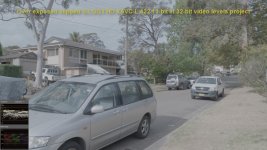
For some reason you are having a struggle with your FS7 and S-LOG3 grading. I'm just not having the issues you are having. As to the robustness of the XAVC codec on the whole it's not too bad. Below is 1) an example of a purposely over exposed S-LOG3 clip where you can actually see the highlights clip on the WFM. 2) is the same image graded with a 709 LUT and some curves adjustment. This was purposely pushed way harder than I would ever push a grade a clip just to demonstrate that even an over exposure as bad as this example can be retrieved to make a usable shot without the image going to breaking point. I think it holds up pretty well after the heavy grade. I don't know what it is in your workflow that's causing you your problems. it is a puzzle?

BTW I shot this using XAVC-L which as you know is the Long GOP variant of XAVC that everyone says doesn't hold up to heavy grading as well as the I Frame variant. I very rarely see any issues with either codec. In fact IMO the Long GOP version retains fine detail better, has better edge tansitions on extreme contrast edges and generally produces a better image. There again though that's just my experience others obviously find otherwise.

S-LOG3 Ungraded + scopes.jpgS-LOG3 Hard graded to 1v PP + scopes.jpg
 
You mention it "by the way" only, but your using XAVC-L instead of my XAVC-I makes the whole difference. In my experiments, I aimed the camera at my infamous "3/4 high detail (grass, foliage etc.) PLUS 1/4 low detail (partially clouded sky)" scene. I connected my RAW-SDI (to maintain full 10bit 422 at all framerates) output straight to my 49" grading monitor (through my Decklink 12G card and BM Medai Express), and - while observing the WFM - upped the exposure by 0.5, 1 and 2 stops above what the "correct" exposure of 2,000 ISO-rated FS7 would be. Looking at the bright low detail area, I could see how those slight exposure changes caused all sort of stuff to happen (from a macro-blocks surrounded, ugly, yellowish "hole" in otherwise white/light blue of the clouded sky, through more holes like this but w/o any color information (blown-out completely), through the entire area of interest covered with all sorts of banding/macro-blocking, to said area totally and irrecoverably blown-out with the highest over-exposure). Doing these changes and observations, I was of course recording all this - in 3 different formats:

- XAVC-I (internally)
- XAVC -L (inernally)
- DNxHR HQX (on my Inferno)

I did the experiment in S-Log2 and S-Log3, then set up a Resolve project and started grading the clips I created, again observing both the WFM and the actual picture on the same monitor. Let me repeat what i found:

- the XAVC-L clips echoed the behavior I had seen live, but the "holes" of blown-out areas, as well as any macro-blocking and/or banding got covered by this fine "compression grain" which many (all?) inter-frame compression codecs produce; it almost acted as the film grain FX and prevented the critical area from developing any unacceptable artifacts like macroblocking, posterization, banding and other form of "busy pixels" (e.g. mosquito noise)

- the XAVC-I clips behaved exactly the same in terms of brightness changes, but once a spot of discolored "hole" appeared - it's edges got terribly blocky which in turn triggered artifacting all over the area in question. You could say that the intra-frame compression was unable to mask these flaws (like the XAVC-L did with grain), which could act as a sort of a "artifact-masking FX"

- the high bandwidth DNxHR (or Prores which I also tried) did echo what I had seen live almost perfectly 1:1 - it neither masked it nor made worse

The pattern has been exactly the same with S-Log2 and S-Log3, with the only difference of brightness levels it has all been happening (which is natural, considering knee-like behavior of S-Log3 vs. hard clipping of S-Log2 at some 106 IRE where the former would never even get.

So I'll stand by my conclusion that while over-exposing Log in order to fight shadow noise, one must not adopt the easy attitude "forget diminishing the room for highlights - with S-Log2/3 they are recoverable, anyway" as light-heartedly as some people suggest in their "over-expose S-Log2/3 by 1-2 stops" recipes. Quite the opposite: properly exposing highlights is much more difficult with S-Log2/3 than mids & shadows; my experiment did not prove it's easier with one codec than another - it only showed the unwanted results of improperly exposed highlights can be somewhat masked by some, while over-emphasized by others (XAVC-I in particular).

Piotr

Disclaimers:

- the phenomena described aren't present at all with STD or HG curves and 709 color space
- even the worst codec (XAVC-I which amplifies the described artifacting) doesn't make footage unwatchable when the screen isn't big enough
- even on a really big screen, the artifacts are totally acceptable with the best codecs (like Prores or DNxHR HQX)
 
Last edited:
Back
Top