moldcad
Veteran
Dear Friends,
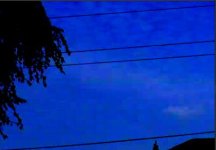
So - after some 18 months of using my FS7 - unfortunately I must re-investigate the problem I wrote about on this forum at the very beginning of my FS7 ownership. Some of you may remember my complaints about the compression artifacts in large areas of single color, like the blue skies; at that time I was new to many aspects of FS7 technology so I posted my findings under a rather misleading thread title:
http://www.dvxuser.com/V6/showthread.php?346566-nasty-artefact-on-clear-blue-sky-with-FS7-kit-lens
The title suggested that the artifact was related to the kit lens (which it was not); my "diagnosis" then evolved through a number of other suspected factors - and finally, I gave up believing that what proved to be nasty compression macroblocking was only present in my Log footage, and present in UHD@25fps footage more often then 50p...
Well - in the meantime I purchased 2 other cameras (the A7Rii and GH5), as well as the Shogun Inferno recorder; comparing all those different image sensors, codex and encoding formats now make me believe that those really nasty artifacts are present in all sort of FS7 footage I managed to acquire during the period: be it UHD or 4K, only XAVC-I (recorded internally, of course - I never inspected XAVC-L or MPEG though), it may be Log or HG (shot in CineEI or custom mode) and no matter if 25 or 50 fps
As my FS7 warranty will expire in several months, I can still simply send the camera off for servicing - but I'd like to avoid it if unnecessary, i.e. if you guys help me establish above any doubt that it's the FS7 codec's "feature" and not any malfunction of the camera. Of course this would only be possible if I uploaded a reasonably short but representative clip for you to judge. So here's a couple of questions:
1. Which software would you recommend to use for trimming my longer clips to get just a 2-4 seconds clip(s) which does not differ from the original at all? I'm afraid that cutting and exporting such a clip in Resolve might introduce some nuances making it difficult to assess - is there a tool capable of cutting XAVC-I UHD mxf files without re-compression?
2. Would any of you guys volunteer to download such a clip and help me answer the above, all-important question whether what I'm seeing (and hating) is actually normal under some circumstances, or it is some sort of malfunction manifesting itself?
I'd really appreciate it very much if someone helped me with the assessment; thank you all in advance
Piotr
So - after some 18 months of using my FS7 - unfortunately I must re-investigate the problem I wrote about on this forum at the very beginning of my FS7 ownership. Some of you may remember my complaints about the compression artifacts in large areas of single color, like the blue skies; at that time I was new to many aspects of FS7 technology so I posted my findings under a rather misleading thread title:
http://www.dvxuser.com/V6/showthread.php?346566-nasty-artefact-on-clear-blue-sky-with-FS7-kit-lens
The title suggested that the artifact was related to the kit lens (which it was not); my "diagnosis" then evolved through a number of other suspected factors - and finally, I gave up believing that what proved to be nasty compression macroblocking was only present in my Log footage, and present in UHD@25fps footage more often then 50p...
Well - in the meantime I purchased 2 other cameras (the A7Rii and GH5), as well as the Shogun Inferno recorder; comparing all those different image sensors, codex and encoding formats now make me believe that those really nasty artifacts are present in all sort of FS7 footage I managed to acquire during the period: be it UHD or 4K, only XAVC-I (recorded internally, of course - I never inspected XAVC-L or MPEG though), it may be Log or HG (shot in CineEI or custom mode) and no matter if 25 or 50 fps
As my FS7 warranty will expire in several months, I can still simply send the camera off for servicing - but I'd like to avoid it if unnecessary, i.e. if you guys help me establish above any doubt that it's the FS7 codec's "feature" and not any malfunction of the camera. Of course this would only be possible if I uploaded a reasonably short but representative clip for you to judge. So here's a couple of questions:
1. Which software would you recommend to use for trimming my longer clips to get just a 2-4 seconds clip(s) which does not differ from the original at all? I'm afraid that cutting and exporting such a clip in Resolve might introduce some nuances making it difficult to assess - is there a tool capable of cutting XAVC-I UHD mxf files without re-compression?
2. Would any of you guys volunteer to download such a clip and help me answer the above, all-important question whether what I'm seeing (and hating) is actually normal under some circumstances, or it is some sort of malfunction manifesting itself?
I'd really appreciate it very much if someone helped me with the assessment; thank you all in advance
Piotr