FS7: Compression artifacts: XAVC-I "feature", or my FS7 malfunction?

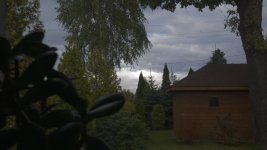
Dennis - thank you for trying to help, but unfortunately something very, very nasty is happening in my FS7 internal recording in S-Log3; the XAVC-I codec just doesn't handle the blue channel well. I am uploading a snapshot from my GH5 - similar scenery (different light though); please load it into Resolve and grade (the grabs come from a HDR project here, but it doesn't matter as there also is the ungraded version). The sky is truly Blue (not Cyan - although this may be due to different weather, time of day etc.), there is some beautiful gradation to it and there is not a single macroblocking visible! Yes, you can find some different faults in this footage - but hey, it comes from an $2,000 mirrorless cam, and an ordinary H.264 codec in Long GoP form and 150 Mbps bit rate...

Here is the link to the folder with screens: https://www.dropbox.com/sh/lgvnkb3j6e6xr4h/AADOFRLCZmEzLeAWLygtwx7va?dl=0


So I'll tell you what I'll be doing:

- as soon as the wheather is right (to get a comparable image), I'll record again on the FS7 - only this time in XAVC-I, XAVC-L AND in DNxHR HQ on my Shogun Inferno

- if the Inferno version is at least comparable quality to the GH5, I'll send my FS7 for repair

- if they say it's within specs, or don't fix it for any other reason - I'm going to sell my FS7 before it loses value :(

Please tell me what you're finding in my GH5 screen dumps; pity that Browse is unable to trim a shorter clip without re-compressing - but I doubt any software can smart-render Long GoP footage. Cheers

Piotr
 
Last edited:
The thing is the 10-bit mode of nVidia is only available with DirectX on high-end Geforce cards, and OpenGL on Quadros.

Piotr

Exactly and this is what we are using on Nvidia's advice after talking to them. 2 x 1080 cards. They have confirmed we are monitoring in full 10-bit with both Resolve and Vegas in 32-bit floting point mode. This is their standard web response to the question:


"How can I enable 10-bit per color support (30-bit color) in my Geforce graphics card in programs such as Adobe Premiere Pro / Adobe Photoshop?"

NVIDIA Geforce graphics cards have offered 10-bit per color out to a full screen Direct X surface since the Geforce 200 series GPUs. Due to the way most applications use traditional Windows API functions to create the application UI and viewport display, this method is not used for professional applications such as Adobe Premiere Pro and Adobe Photoshop. These programs use OpenGL 10-bit per color buffers which require an NVIDIA Quadro GPU with DisplayPort connector. A small number of monitors support 10-bit per color with Quadro graphics cards over DVI.

http://nvidia.custhelp.com/app/answers/detail/a_id/3011/related/1

Incidentally we are also running through a Decklink card in 10-bit HD through to a Grade 2 Sony CRT BVM monitor. I didn't mention this previously as it was not relevant to the 4K artifact issue. This monitor we still find gives us the best blacks and truest images via the Decklink. This is the monitor we use for final color approval. Even for 4k which is down-rezzed to HD for viewing on this CRT.

Without going through a big explanation this video explains pretty quickly what we are doing to get the 10-bit path open.

https://www.youtube.com/watch?v=7-PSFc1nc2c

As regards the issues you are talking about this has been raised in a number of forums over the years specifically with the I-Frame version of XAVC. Artifacts are sometimes seen in XAVC-I footage but not in the same footage shot in XAVC-L in HD. unfortunately for UHD "L" doesn't offer a 10-bit solution. An interesting discussion was had some time back about these very issues on the Sony FS7 Forum. Pages 2 and 3 have some interesting observations. Doug Jensen was involved in these posts and also had some observations after seeing artifact issues in someone else's footage. Whether the camera was to blame in the end I don't know but the artifact issues were seen in both Catalyst and Premiere which would lead one to suspect the camera in that particular case.

https://community.sony.com/t5/FS7/XAVC-I-Quality/td-p/496131

I would still suggest the camera gets checked out though as you still have that warranty time left. Again though all said and done I had no issues getting a perfectly good artifact free on spec grade out of the short SLOG3 clip you uploaded.

Chris Young
CYV Productions
Sydney
 
Fair enough, Chris - I meant Resolve specifically, and 10-bit monitoring is currently impossible with nVidia cards, as you know. As to my problem - well, looks like the only solution would either be external recording to better codec or getting Class 480 XAVC in future fw upgrade from Sony...

Piotr
 
. . . well, looks like the only solution would either be external recording to better codec or getting Class 480 XAVC in future fw upgrade from Sony...
Piotr

Or you could just chalk it up as a fluke and move on. Unless you are seeing it all the time, what difference does it make? I'm not saying you may not have have legitimate concerne, but really, what difference does it make? No camera is perfect. I can see flaws in my F55 footage if I look close enough. There are compromises in every thing we do. That's my advice, and I give it with the utmost sincerity and respect so please don't come back at me with guns blazing.
 
It's true. At the end of the day, these are just boxes that are providing us moving images. What they are already capable of is tremendous.
 
Or you could just chalk it up as a fluke and move on. Unless you are seeing it all the time, what difference does it make? I'm not saying you may not have have legitimate concerne, but really, what difference does it make? No camera is perfect. I can see flaws in my F55 footage if I look close enough. There are compromises in every thing we do. That's my advice, and I give it with the utmost sincerity and respect so please don't come back at me with guns blazing.

No blazing guns, Doug :) - I fully appreciate your sincere advise. And to be honest, for the last 1.5 years I've been doing exactly what you're advising - it's the comparison of my FS7's IQ with what has been intended merely a B-cam to it (the GH5, and also the A7Rii under certain conditions) which made me frustrated again... Oh well; will try to talk to the Prime Support and proceed basing on what they say, I guess.

Regards,

Piotr
 
Understood. Class 480, if it comes for the FS7 though won't do much for us unfortunately as it only supports up to 29.97p. Most our work is 50p these days. We do a lot of dance and sport for TV and they still want that 50i "smoothness" of motion. I say if that's the look they want why no shoot 50i. "Oh no we want progressive!" I give up some times. Hope you issue gets sorted.

Chris Young
CYV Productions
Sydney
 
Doug has a great point. Sure there are times with the FS7 that I run into image issues but they are few and most often doesn't really matter in the final edit when grading and post decisions are done. Frankly I've had very few issues once I learned the limits of the FS7.
 
Yeah... I've already came to terms with the fact that - while being a really great, flexible camera - the FS7 (or should I say, the XAVC codec as implemented on it) simply doesn't create the best picture in UHD/4K, even when compared with todays' mirrorless cameras like Sony's own A7R/S ii, or Panasonic's GH5. However what concerns me is the fact that reading through many similar threads, I see people pointing out various codec's shortcomings but not exactly the one we've discussed in this thread. Meaning that my unit might be faulty, after all... So - as I mentioned earlier - I'll be sending it in for servicing, unless someone comes up with a link to some footage with exactly the same artifacts; in this case I'll simply start using my Inferno in situations where the top IQ is obligatory.

So once again please help me out by providing such a link - to your own footage or anything you might have come across in the Internet. Thanks!

Piotr

PS. Has anyone had time and patience to actually download the screen grabs with the exact same scenery but shot with my GH5? Do you agree that - while perhaps the picture has been slightly over-sharpened in-camera (I've cranked the sharpening down considerably in my profiles ever since) - there is virtually no macro-blocking in the blue sky, which is created on my FS7 with the XAVC-I codec and S-log3? And the GH5 footage is also log (V-Log L, to be exact)...
 
Last edited:
I think it's the low sensor pixel count on the FS7 that doesn't make it as detailed as a A7S and even more so compared to the A7RII but the codec on the FS7 is much better than what's inside the A7-series. Then again I like the smooth image I get out of the FS7. Detailed yet not overly sharp looking.
 
I definitely agree there is no perfect camera, and they all have their quirks. Personally, I've found AVC-I to be a good robust codec, just as good as Canon or Panasonic's. And I have had issues with noise / artifacts when shooting blue skies. However, I wouldn't say that the FS7 is not capable of creating phenomenal imagery right up there on top.

It is interesting that you say "The sky is truly blue," not cyan, because Art Adams has shown that sgamut3.cine is certainly capable of rendering blue. But then again, you say it could be the weather.

http://www.dvinfo.net/article/acquisition/sonyxdcam/sony_sgamut_vs_sgamut3.html

I just think that there are so many variables involved it is hard to generalize about the entire camera system, including its codec. And the concern is that you don't want to throw the baby out with the bath water. But again, if it's not want you want, that's understandable too.

If you do some side-by-side tests, it would be nice to see how SLOG2, SGamut fares. I have only had the FS7 for six months, so I'm still finding my way with it. But I would say it is one of the finest cameras I've owned.
 
Understood. Class 480, if it comes for the FS7 though won't do much for us unfortunately as it only supports up to 29.97p.

Chris - why would you say this? I googled the "XAVX-I Class 480" and the very first reault has been Alister's article on his XDCAM USer blog; here is what he says:

"[...] 480Mb/s at 24/25/30fps. At 50 and 60fps it runs at a whopping 960Mb/s, this is the top limit for XAVC in it’s current form."

So where does your information about Class 480 only limited to up to 30fps in UHD/4K? If what Alister says is true (and I've always lived under the impression that this less compressed codec is not limited to the slower fps), we'd all benefit tremendously from getting it implemented by Sony in their future fw upgrade for our FS7. Alas - unlike the FS5, which is receiving new firmware on regular basis - the FS7 almost looks abandoned in this area; I asked about it a long time ago on the Sony Community board, but the thread remains inconclusive:

https://community.sony.com/t5/FS7/Is-XAVC-480-Mbps-coming-to-the-FS7/m-p/599722#M8956

What is the opinion on the subject on this forum? Why would Sony keep preventing us from getting the very best quality from this wonderful camera - would it become "too good" with XAVC-I Class 480 codec? I really don't think so, and the arrival of MK II version raised my hopes that there would be further firmware upgrades for the FS7 - unfortunately, still nothing on the horizon :(

Piotr

PS. Reading further in the Alister's article, here is an excerpt which made me even more excited, as - even though I do not do fast action etc, nor any TV station demands 50p from me rather than 25p - I'm grading all my stuff for HDR10:

"Class 480 is seen as a mastering format by Sony. The extra data and lower compression makes it particularly suited to HDR productions"

So, the elusive possibility of XAVC-I 480 finally coming to our FS7 cameras, after all, is the only hope for me that I could get enough quality without actually recording to my Shogun Inferno. The more so that the XAVC-L, as implemented now, is indeed only 8bit which excludes it from my possible usage (also pity, as - seeing how my GH5 produces much better IQ than the FS7 does with XAVC-I, and with its H.264 Long GoP codec at just 150 Mbps - it's quite possible the compression artifacts discussed in this thread could be much less of a problem with XAVC-L)...
 
Last edited:
Pitor,

XAVC as spec, can go up to 60p (960Mbps) but in terms of implementation on the F5 and F55 it is maxed out at 30p. I think Alister should have been a bit more careful in his article, and at least specified "while XAVC can theoretically go up to … . .. the XXX camera's only support XXXXX." Keep in mind also that internally the F5 and F55 seem to max out around 600Mbps so even if Sony provisioned 60p using XAVC 480 you could not record it.

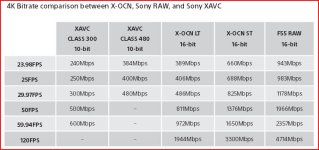
Relative to 24fps I put this chart together to help show producers the differences in compression quality I can offer them when shooting with my F55:

Screen_Shot_2017-10-05_at_7.58.28_PM.png
 
Thanks Dennis - I stand corrected (even if it was technically possible, and if Sony ever decided to provide us the FS7 users with XAVC 480 - it certainly wouldn't surpassed to F5/55 capabilities).

Back to my problem: browsing through my older recordings, I have found a clip which shows the artifact in question in an even more pronounced way than in the clip I have uploaded earlier. Interestingly - even though it's still more or less the same scenery - the sky was overcast with dark clouds, meaning that it's probably not simple overexposing in the Blue Channel... I really don't know what to think of it; should anyone of you guys want to comment, I uploaded a Resolve HDR10 project ("blue.drp") and the offending clip. They can be downloaded from the same Dropbox directory as my previous FS7 clip (the simple project contains some more media, so after you open it in Resolve they will be missing - but please see what's happening to the "184_0080_1.mxf" clip):

http://redirect.viglink.com/?format...www.dropbox.com/sh/kt1ke062m...KMo590Bia?dl=0

Piotr
 
Pitor ~

I have to agree with starcentral.

I could be wrong but I don't think so. I would be happy to be proven wrong :) My information about XAVC Class 480 stems from a number of sources. Sure the actual original design top limit for XAVC was 960Mbps but as yet I'm sure it doesn't exist, at least not in camera recording. If you are talking about recording X-OCN LT, ST or RAW with the AXS-R7 then the F5/F55 will support 50, 59.94 and 120 FPS but this is not XAVC.

In encoding to create XAVC Class 480 50/60p files then yes this can be done. These 50/60p profiles are already available in software like TotalCode Studio where the bit rate for 59.94p tops out at 958955Mbps. Out of curiosity I created a number of 50p Class 480 files for test purposes. With a dual 10 core Xeon and GTX 1080 cards the files were quite manageable.

Class 480 04.JPG

Where do I get this Class 480 information from you ask? Primarily from Sony itself as published in their CineAlta magazine. See below

CineAlta Issue 8, Published on Oct 28, 2016

https://issuu.com/sonyprofessional/docs/cinealta_issue_8_issuu_file/5

Plus there are other numerous references to Class 480 topping out at 25p for PAL

https://www.vahire.com/wp-content/uploads/Sony-PMW-F55-Specifications-2.pdf

Newsshooter lists the following for Class 480 with v8.0 upgrade for the F5/F55:

V8.00 features for F55 and F5

XAVC 4K/QFHD Class480 (PMW-F55 and PMW-F5 with CBKZ-55FX)

"XAVC 4K Class480 can be recorded and playback when the system frequency is set to 23.98, 24.0, 25.0, or 29.97. And XAVC QFHD Class480 can be recorded and playback when the system frequency is set to 23.98, 25.0, or 29.97."

http://www.newsshooter.com/2016/10/...-f5-and-f55-enabling-xavc-class480-recording/

Again happy to be proven wrong but I think my information is correct.

Chris Young
CYV Productions
Sydney
 
Thanks Chris for confirming what Dennis said; I stand corrected.

Just finished comparing the same scene recorded with my FS7 in Slog3 and recorded internally with XAVC-I AND on my Shogun Inferno, using the NDxHR HQX codec. I didn't do this straightforward comparo in waiting for a sunny weather, as I believed the artifacts has something to do with my Blue channel overloading but after inspecting the old clip I uploaded for you guys to assess as per my last post, I decided to go with it regardless of the lighting. My findings are as expected:

- the XAVC-I vesrion is full of artefacts, similar (and someimes even worse) to those in the "184_0080_1.mxf" clip
- the DNxHR HQX vesrion is pristine

Conclusions? Well - if what I'm seeing in the XAVC clips (including "184_0080_1.mxf" which you can see for yourself, following the link in my previous message) is "normal", then I'm absolutely disappointed and just cannot believe how can any of you say that you would happily accept this quality. However, I hope this is not normal and something is wrong with my camera (well, not entire camera - the sensor is fine, otherwise the Shogun would record the same artifacts; but with how the internal codec works in S-log3). :(

Piotr
 
Can you post a screen shot with 100% and 200% crops of the artifacts you see?

Upon "normal" grade of your 180_1 mxf file I don't really see a single defect, do you? I'd almost suggest the issue is worsening with whatever you are doing in your post production workflow, ie. HDR, grade, etc.. ?
 
Yes Dennis, the glitch is also present in SDR grading. What's more - today 's tests would suggest it's getting worse ; I'll prepare a short clip and upload it again tomorrow morning. Thanks

Piotr
 
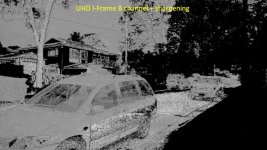
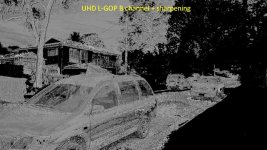
This whole thread on macro blocking on XAVC-I got me thinking. I’ve had a few post guys say to me that the minute you start to apply any degree of sharpening on XAVC-I it starts to degrade pretty quickly. Though when you use the same degree of sharpening on XAVC-L the fineness of details and artefacts around extreme contrast edges appear to be considerably better. Two of samples I have uploaded have had some aggressive sharpening done to them. More than I would ever use but this level of sharpening was chosen for this exercise to demonstrate the issue.

Now I have not had any issues with XAVC-I in any way but this whole discussion got me to thinking that I need some empirical proof just for my own satisfaction. So today I grabbed the FS7 and rolled off a few seconds of 4:2:2 10-bit XAVX-I UHD 50p at 500Mbps and a few more of 4:2:0 8-bit XAVC-L (Long GOP) UHD 50p at 150Mbps.

To put it bluntly I was pretty amazed at the difference in the two different encode modes with regards to the macro block sizes, the macro block evenness of distribution and finally the two codecs ability to maintain fine detail in ALL channels, primary R, G and B and the secondary C, M, Y channels. The I-Frame Blue channel really shows macro blocks in the sky region to a greater extent than the L-GOP frame in the Blue channel.

At this point of my observations without a shade of a doubt the XAVC-L clearly outshines the XAVC-I on static scenes with regards to macro blocking. Why I wonder? I think it may be down to the fact that MPEGLA who developed the AVC/H.264 (MPEG-4 Part 10) codec designed this codec from the ground up as a 4:2:0 Long GOP codec. After spending considerable time and money doing so they came up with a very efficient 4:2:0 Long GOP codec that works very well. Every other variant based on this codec are proprietary versions from the likes of Sony, Panasonic etc. Their collective iterations of I-Frame H.264 codecs based on their own 4:2:2 10-bit developments of the original MPEG-4 Part 10 codec just don’t seem to have the same efficiency. Well not at the bits rates we are seeing in the 4:2:2 I-Frame variants. Just surmising here but I think for I-Frame based 10-bit H.264 we may need to see much higher bit rates. This is probably why Sony has pushed into the Class480 codec at 24/25/30p to get the higher bit rate. I believe the reason that a 50/60p XAVC Class 480 codec will not see the light of day on the current crop of cameras is due to the fact that Sony’s current FPGAs don’t have that capability.

The next exercise will be to see how the two encode modes stack up against one another with some decent motion. Then the final comparison will be to see how the two codecs stack up against one another with ‘normal’ levels of grading.

Having now seen and experienced these results I will be doing some considerable comparison tests to satisfy my curiosity as to whether to use the XAVC-L version for certain shoots/applications. The fine detail retention superiority of the ‘L’ codec over the ‘I’ codec has surprised me somewhat. These were all pulled from a 32-bit Gamma 1.000 (linear) ACES version 0.7 ACES Default color space using the View Transform of ACES RRT (sRGB) and using a Hue/Saturation influence mask on each channel as this really does pick out the encoding blocks. Not that I think this makes a great difference as I am seeing the same sorts of results in a normal ITU-R709 color space.

In the meantime here are two reduced size frame grabs for a rough comparison between the I-Frame and L-GOP codecs. If you want to see them at full size of 3840 x 2160 you can download the R, G and B comparisons grabs with a couple of sharpened ones, I and L frame from the Blue channel. The link is:

https://www.sendspace.com/pro/dl/pxprt7

Any observations would be interesting to listen to.

Chris Young
CYV Productions
Sydney

UHD I-Frame B channel + sharpening 1280.jpgUHD L-GOP B channel + sharpening 1280.jpg
 
Last edited:
As promised, a grab from HD XAVC-I. Please enlarge and inspect the cloud; all those block move and pulse so the picture is unacceptable...

https://www.dropbox.com/s/bm7ielfwwjiy4zk/blocks.jpg?dl=0

And here is a link to a punched-in screen fragment:
https://www.dropbox.com/s/72hbsoq268xvbhi/zoomed.png?dl=0

Piotr

PS. This comes from HD footage as I was originally planning to upload a clip, so wanted a more manageable size. But after seeing the macro-blocking even more pronounced than in UHD/4K (with DNxHR version still clean and brilliant), plus having read Chris'es post, I gave up and only uploaded a single screen grab - from Vegas Pro 32-bit float and not Resolve this time...

PPS. You might think the picture is too dark; maybe so - but it's absolutely perfect level-wise on my grading monitor...

So is all this "within the specs", or should I be sending my camera in for repair?!!!
 

Attachments

  • blocks.jpg
    blocks.jpg
    65.6 KB · Views: 0
Last edited:
Back
Top