C500: C500 II SDI / HDMI Monitor Out Issues

robotfist

Active member
So I finally got to shoot with the C500 II all day. The camera shoots gorgeous images and that experience makes me want one pretty bad. That being said, I think my biggest issue with the camera are the outputs. It was only my first time to use it, but Canon really needs to work out their output situation.

We had a SmallHD 7" Touch monitor and a 17" monitor for video village. We could not run video out of both SDI's simultaneously on the camera. Additionally, if we tried to run out of the HDMI, it disabled the SDI ports. Not too happy about this at all.

As far as the 2 SDI ports go, as I understand it, the 2nd SDI port is a "12G" SDI port and only works with 12G monitors. Does that mean, if I've got a director's monitor that accepts 12G inputs hooked up to the 2nd port, I can then use the first SDI port for my 7" on-camera monitor? Is it even possible to have both SDI ports on the C500 II simultaneously?

Also, I realize that I can always just hook the video village monitor up to the pass through SDI port on my SmalHD monitor. And that worked for us for the 1st couple hours of the day. But SmallHD is not known as the most reliable brand in the world, and this brand new 7" Touch Monitor (only been used once) decided to stop feeding a signal out the pass through SDI port. So our video village died. We then tried the HDMI on the camera, but then lost the on-camera monitor hooked up to SDI. So in the end the client/director got to see the larger image in video village and my team had to monitor through the C500's tiny monitor, which was less than ideal on a shoot like this. I always prefer to just go direct out of camera, with as few boxes, convertors and bulls*%t interrupting the feed and this SmallHD output failure is precisely why I like to keep things simple. I'd like to not have to rely on SDI splitters, convertors and pass through devices when using this camera.

That all been said, this camera shoots absolutely gorgeous footage. It just blew me away. And despite these shortcomings, it made me want one pretty bad.
 
Last edited:
That 12G SDI port will only send the signal that is being recorded, so if you're recording 4K you need a monitor that can accept a full 4K signal, if you're recording 5.9K you're probably just plain out of luck (unless you have a monitor that accepts a 5.9k raw signal?). I only have peripherals that accept a 1080/2k signal so like you experienced, this "extra" port is useless.
 
Does that mean, if I've got a director's monitor that accepts 12G inputs hooked up to the 2nd port, I can then use the first SDI port for my 7" on-camera monitor? Is it even possible to have both SDI ports on the C500 II simultaneously?.

Yes.. both mon and sdi ports work at the same time. I believe blackMagic’s video assist monitor/recorder is 12g and will down convert as well... plus it’s under $800 I think. Came-tv and Lilliput make decent 4K production monitors for under $2k that are 12g as well.. or there’s Teridek bolt 4K, but that’s getting a little pricey.. point is there are some options, they just aren’t last years options :).
 
That 12G SDI port will only send the signal that is being recorded, so if you're recording 4K you need a monitor that can accept a full 4K signal, if you're recording 5.9K you're probably just plain out of luck (unless you have a monitor that accepts a 5.9k raw signal?). I only have peripherals that accept a 1080/2k signal so like you experienced, this "extra" port is useless.
yeah the 5.9k thing is a bit weird.. even canon’s pricey production monitors don’t accept that signal.. at least as I read the specs. Maybe that will be their big NAB announcement, a 45,000 monitor for the 16k camera. :)!
 
It’s weird it doesn’t at least let you output a simultaneous 1080 signal from the Monitor SDI and the HDMI. The camera has all these great output ports on the back, and you can only use one.
 
It’s weird it doesn’t at least let you output a simultaneous 1080 signal from the Monitor SDI and the HDMI. The camera has all these great output ports on the back, and you can only use one.

Not to sidetrack too much but this is reminiscent of the C200 inability to simultaneously use HDMI and SDI at the same time. Seems like Canon always makes the outputs a compromise, not sure why?
 
Not to sidetrack too much but this is reminiscent of the C200 inability to simultaneously use HDMI and SDI at the same time. Seems like Canon always makes the outputs a compromise, not sure why?

I think it might have to do with the HDMI being able to send out a 4K signal and the SDI monitor terminal only being able to send out a 2K signal. On the C300 MKII, it seemed that the HDMI and SDI terminals were sending out the same video signal and using the same processor which allowed both ports to function at the same time. On the C500 II, it looks like you are stuck with only one port in order to allow the HDMI to send out 4K. The two ports are probably still using a single processor shared between them. I mean, it would be nice if you just choose to send out a 1080p signal from both the HDMI and SDI, but I guess not.
 
That 12G SDI port will only send the signal that is being recorded, so if you're recording 4K you need a monitor that can accept a full 4K signal, if you're recording 5.9K you're probably just plain out of luck (unless you have a monitor that accepts a 5.9k raw signal?). I only have peripherals that accept a 1080/2k signal so like you experienced, this "extra" port is useless.

Is that true? The 12G port sends an uncompressed 5.9k video signal out when you're recording 5.9k raw?

That seems unlikely. I'd have thought the 12G signal tops out at 4k (and therefore will send out a 4k signal whether you're recording 4k or 5.9k).
 
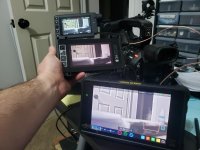
Had to check this out, so I plugged in my monitors and it seems to work fine for me. Both in 6k raw and xavc, it sends a 4k signal out the sdi and monitor ports. Picture evidence attached.
Details on this: SDI port to Shogun Inferno's 12G input. MON port to Smallhd 503. The Smallhd is a 1080 monitor, not sure if it's 12G. But while recording, the picture remained on all 3. I didn't test HDMI because HDMI sucks.

c500monitor.jpg
 
Last edited:
Seriously this is good to know. Not being smart but which one is your color reference?:D

Chris Young
 
The C500 II does not output RAW at all. On the C300 II, the Atomos could recognize the Canon RAW 4K signal, but not the 12bit 2K signal from the same port. I have a monitor that can't recognize hdmi 1080 29.97p from the C300 MKII, but does fine at 23.98p. Some of Canon's cameras send out out 60p or psf no matter what the recording mode. I've learned to never expect that a monitor will work with a Canon until I have tested it.
 
Seriously this is good to know. Not being smart but which one is your color reference?:D

Chris Young

You know, I noticed how the color was a bit off haha. I had the lut on the canon monitor, the other two are plain feeds, but with the lut off, the canon monitor matches closest to what I'm seeing on the computer. The shogun and the smallhd have a magenta tint to them.
 
WTF does Canon NOT get? Put enough outputs that work ALL THE TIME on the cameras to serve a professional production environment.

I had a few big shoots this past weekend and we used our P2 VariCam's. Saturday, we had a three camera live show. Needed a clean feed from each camera to transmission, a clean feed to the multi-viewer/big monitor for our QC and the producer and "monitor" feeds for our on-cam monitors. Done. No sweat. And all with cameras that were introduced at least 12 years ago.

Every camera should have at least TWO SDI OUTS(one clean) that work ALL OF THE TIME and ideally at least one "monitor" out that can function as "monitor" or clean. In addition to a dedicated port for a real EVF.
 
I'm completely with you Run&Gun. This is a major flaw with the C500mkii. There are currently no solutions to scale down from the SDI OUT terminal unless you're using a rack mounted option from AJA or 2 separate converters from Blackmagic. Best I can come up with is a splitter from Freak Show out of the MON OUT: https://www.bhphotovideo.com/c/prod...i_distribution_amplifier.html?sts=pi-ps&pim=Y but this needs to be powered. I'm receiving this passive option tomorrow and will test: https://www.bhphotovideo.com/c/product/1204959-REG/apantac_da_2hd_1_x_2_passive.html
 
You know, I noticed how the color was a bit off haha. I had the lut on the canon monitor, the other two are plain feeds, but with the lut off, the canon monitor matches closest to what I'm seeing on the computer. The shogun and the smallhd have a magenta tint to them.

Thanks for the heads up.

Chris Young
 
I've also been struggling with this limitation as well. Currently I'm using my Odyssey 7Q+ to downconvert the SDI OUT signal when shooting in 4K. The Odyssey tops out at 4K30 and it means having a big monitor on my rig.

Decimator has a new 12G-Cross box hitting the market soon. It will accept 4K60 and downconvert it to 6G/3G/HD/SD, as well as serve as a 4-way splitter, turning the clean out into 4 clean SDI outs and a HDMI out. Not as big as an Odyssey, but still another box to hang off the camera and power. https://www.bhphotovideo.com/c/prod...or_12g_cross_4k_hdmi_sdi_cross_converter.html

I'm hoping Canon will address backward compatibility via firmware, but that might be a longshot. It's not logical to assume everyone will upgrade to 12G monitoring or assume that everyone needs to monitor in 12G when shooting 4K.
 
Back
Top