Navigation
Install the app
How to install the app on iOS
Follow along with the video below to see how to install our site as a web app on your home screen.
Note: This feature may not be available in some browsers.
More options
You are using an out of date browser. It may not display this or other websites correctly.
You should upgrade or use an alternative browser.
You should upgrade or use an alternative browser.
Best Compression for 50min DVD
- Thread starter SurJones
- Start date

I used the MPEG-2 6.2Mbps 2-pass 16:9 best quality encode for video, and the Dolby2 audio preset which I modify to include -31 normalization.
Or I use BitVice with a maximum bit rate of 7 and a target of 6.5 along with Dolby2 audio out of Compressor.
Or I use BitVice with a maximum bit rate of 7 and a target of 6.5 along with Dolby2 audio out of Compressor.
David S. said:I used the MPEG-2 6.2Mbps 2-pass 16:9 best quality encode for video, and the Dolby2 audio preset which I modify to include -31 normalization.
Or I use BitVice with a maximum bit rate of 7 and a target of 6.5 along with Dolby2 audio out of Compressor.
I use the same compressor settings. No need to change them manualy. great results!
On what machine?
I don't see a lot gain in two pass VBR. But if this is a commercial venture, sit and wait and go to sleep.
I don't see a lot gain in two pass VBR. But if this is a commercial venture, sit and wait and go to sleep.

kwoff
Well-known member
That amount of time would not be unusual, particularly if you have applied any filters or effects to your footage in FCP. Sometimes during the first few minutes of encoding the estimate of the time remaining will decrease quite a bit. I have had it change from 12 hours to eight hours on occasion.
Kevin
Kevin

SurJones
Veteran
I have a Dual 2.5 With 2.5gig ram. Did CC, and a couple filters. When doing just a Export Quicktime, it takes 20mins. Is there a quality differnece from going straight to compressor, or going QT out and then into compressor.
Also I set up a marker where I want my chapters, and the on export I select DVDSP something, And when imported the master into DVDSP I did not see any chapters imported. ALSO tried Chapter Markers and when imported into DVDSP, I dont see any chapter markers as well.
Also I set up a marker where I want my chapters, and the on export I select DVDSP something, And when imported the master into DVDSP I did not see any chapters imported. ALSO tried Chapter Markers and when imported into DVDSP, I dont see any chapter markers as well.
Last edited:
How did you set up your markers? Exact procedure.
I also export self contained. That seems faster.
For markers, you have to m, then m again without selecting the timeline.
Just position the CTI where the marker goes, hit m-m and then click on the chapter marker button and name your marker
I also export self contained. That seems faster.
For markers, you have to m, then m again without selecting the timeline.
Just position the CTI where the marker goes, hit m-m and then click on the chapter marker button and name your marker

cinemakinoeye
Well-known member
FCP includes compression markers at each cut point which helps the MPEG-2 ecoder decide what to do.
Two pass encoding is worth the extra compression time in terms of final look.
Not unusual for MPEG-2 compression to take a long, long time on slower machines. Apple's MPEG-2 encooder used in Compressor is also not the fastest kid on the block.
I often leave MPEG-2 compressions running overnight. Good investment is a UPS so you need not worry about the power going out in the middle of a long compression if you're doing work on a deadline.
Two pass encoding is worth the extra compression time in terms of final look.
Not unusual for MPEG-2 compression to take a long, long time on slower machines. Apple's MPEG-2 encooder used in Compressor is also not the fastest kid on the block.
I often leave MPEG-2 compressions running overnight. Good investment is a UPS so you need not worry about the power going out in the middle of a long compression if you're doing work on a deadline.
SurJones
Veteran
Okay, I have 29 chapters. This is going to SD-DVD so I need to make sure it is the best quality. I want this DVD to be built for LCD's and plasma TVs, but at the sametime viewable on regular TV's. I am running to into major issues. This being my first project. This is all an experience.
My goal:
Create a DVD that will be able to play on Regular tv's with without cutting picture.
Create a DVD that will play widescreen on LCD, Plasmas, cinema dsiplays.
I want the my First Play to be widescreen. and on regular tv's first play will have the letterbox?
Get the best picture quality I can
P.S. I am reading my FC Studio books, but we are talking hundreds of pages. So Iam doing my part. However. If someone can also help me on here. That would be cool as well. I am stil going to read for more futher indpeth and options, but for this project, I need to get done asap, so help is appreciated.
My goal:
Create a DVD that will be able to play on Regular tv's with without cutting picture.
Create a DVD that will play widescreen on LCD, Plasmas, cinema dsiplays.
I want the my First Play to be widescreen. and on regular tv's first play will have the letterbox?
Get the best picture quality I can
P.S. I am reading my FC Studio books, but we are talking hundreds of pages. So Iam doing my part. However. If someone can also help me on here. That would be cool as well. I am stil going to read for more futher indpeth and options, but for this project, I need to get done asap, so help is appreciated.
Hi there,
I think there are a couple of things to consider when you go from FCP to DVD studio pro.
1) First would be the frame rate if you shot 24p you can actually encode your DVD so that it does not have the redundant frames from the pull-up.
For that I believe you need to use compressor, and to read the DVDSP manual can't remember the page but just make a search for "frame rate".
2) When you encode do not max out the bit rate it is not going to do you any good since lots of DVD players are just not going to be able to play back higher bit rates and the client will just think the DVD is broken or something went really wrong.
Use dual pass (I wish we could do more passes like in some the pc only apps).
3) If you are doing some simple DVD authoring I would just throw the footage in DVDSP and let the program do the encoding in the background while you author the DVD . Compressor has the tendency to screw things up sometimes even if I must say they improved things in the last couple of updates.
4) When you are doing the authoring I believe you can script the DVD to conform to the preferences of the DVD player (so you can set it to play letter-boxed or zoomed in so to appear 4:3) or you can just do 2 versions as in the blockbuster releases a widescreen one and a 4:3 with automatic panning.
I saw the screen-grabs and your setup, I really loved what you did with that, it was inspiring and it opens the doors for theatrical recordings with a camera that is just not supposed to be used for that. I am really new to the HVX world (I think they sold thousands of cameras with that rebate and you'll see thousands like me hanging around the forum). I have been in post-production just for a second longer so I hope that my post is going to help you finish your DVD.
Ultimately what I would do is: open DVDSP setup the project, and throw in your export and let DVDSP take care of the compression (you can fine tune the settings in the preferences).
Cheers
Aldo
I think there are a couple of things to consider when you go from FCP to DVD studio pro.
1) First would be the frame rate if you shot 24p you can actually encode your DVD so that it does not have the redundant frames from the pull-up.
For that I believe you need to use compressor, and to read the DVDSP manual can't remember the page but just make a search for "frame rate".
2) When you encode do not max out the bit rate it is not going to do you any good since lots of DVD players are just not going to be able to play back higher bit rates and the client will just think the DVD is broken or something went really wrong.
Use dual pass (I wish we could do more passes like in some the pc only apps).
3) If you are doing some simple DVD authoring I would just throw the footage in DVDSP and let the program do the encoding in the background while you author the DVD . Compressor has the tendency to screw things up sometimes even if I must say they improved things in the last couple of updates.
4) When you are doing the authoring I believe you can script the DVD to conform to the preferences of the DVD player (so you can set it to play letter-boxed or zoomed in so to appear 4:3) or you can just do 2 versions as in the blockbuster releases a widescreen one and a 4:3 with automatic panning.
I saw the screen-grabs and your setup, I really loved what you did with that, it was inspiring and it opens the doors for theatrical recordings with a camera that is just not supposed to be used for that. I am really new to the HVX world (I think they sold thousands of cameras with that rebate and you'll see thousands like me hanging around the forum). I have been in post-production just for a second longer so I hope that my post is going to help you finish your DVD.
Ultimately what I would do is: open DVDSP setup the project, and throw in your export and let DVDSP take care of the compression (you can fine tune the settings in the preferences).
Cheers
Aldo
David S. said:I used the MPEG-2 6.2Mbps 2-pass 16:9 best quality encode for video, and the Dolby2 audio preset which I modify to include -31 normalization.
Or I use BitVice with a maximum bit rate of 7 and a target of 6.5 along with Dolby2 audio out of Compressor.
Hi i am trying to do the same thing. Completely new to this, but after doing
Export>Compressor > DVD 90min> Mpeg2 2-pass 16:9
all i get is a ".compressor" file. What do i do with this and how do i burn it to a dvd?
thanks
SurJones
Veteran
Okay, So I took my QT master and drug into DVDSP. When the DVD was finished The quality was horrible on my Cinema display. It almost look interlaced. Horrible lines. My FBI warning looked like crap and hard to read. First play looks like fuzzy, like a GIF would if you had a gradient and exported as a GIF instead of a JPEG. I used Motion's Blocks as my FirstPlay
2 Pass, Best, and 5.5 adn 7.2 on bit rate. Also lags when dvd first starts.
NOW I put it in a regular TV+attached DVD combo, and OH MY GOD!!!. Picture was not all in, Checked against Action safe, and it was missing everything outside of it. Picture color was blown out. unbearable for me. Text was still bad, but it was okay. DVD was also lagging when starting and in middle of firstplay. FirstPlay looks the same as above.... Also the when the people are running and jumping around. Inches and inches of ghosting or tracing (whatever you want to call it)
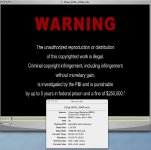
I found a Folder on my desktop that said MPEG. In it had Video and audio. See amsple photo. The videos titles look like what I view on my apple DVD player on Cinema display. Also see the info ,and compare the original text clarity and info. Night and Day. I seriously want to cry.
Extremely bumbed and in need of help.
2 Pass, Best, and 5.5 adn 7.2 on bit rate. Also lags when dvd first starts.
NOW I put it in a regular TV+attached DVD combo, and OH MY GOD!!!. Picture was not all in, Checked against Action safe, and it was missing everything outside of it. Picture color was blown out. unbearable for me. Text was still bad, but it was okay. DVD was also lagging when starting and in middle of firstplay. FirstPlay looks the same as above.... Also the when the people are running and jumping around. Inches and inches of ghosting or tracing (whatever you want to call it)
I found a Folder on my desktop that said MPEG. In it had Video and audio. See amsple photo. The videos titles look like what I view on my apple DVD player on Cinema display. Also see the info ,and compare the original text clarity and info. Night and Day. I seriously want to cry.
Extremely bumbed and in need of help.
Attachments
Last edited:

Justyn
Veteran
Patrick... Welcome to the world of DVD authoring.. You will get a lot of those aweful things compared to your pristine HD footage. I'd say to check it on a nice TV with a progressive scan.. upconvertind DVD player...
Don't worry it'll come together.. I've been burning DVDs since 2001... so it's come a long way
Don't worry it'll come together.. I've been burning DVDs since 2001... so it's come a long way

ullanta
Veteran
Just in case... markers have to be set on the top of the timeline, not within a clip, to be recognized as chapter markers.
As for the exporting times.... I'm not sure, but exporting from the time line to Compressor rather than exporting to Quicktime DV then using Compressor might cause re-rendering of everything at high time cost, but with the benefit of feeding Compressor uncompressed frames rather than DV-compressed frames. I may be wrong, but that would make sense .
As for the exporting times.... I'm not sure, but exporting from the time line to Compressor rather than exporting to Quicktime DV then using Compressor might cause re-rendering of everything at high time cost, but with the benefit of feeding Compressor uncompressed frames rather than DV-compressed frames. I may be wrong, but that would make sense .
We produce SD DVDs from 720/24pn footage regularly.
We always go out a component feed progressive DVD player.
Ours look fabulous.
We always go out a component feed progressive DVD player.
Ours look fabulous.
Justyn
Veteran
Yes... the DVD process is a very very slow one. To do 20 minutes just took my dual G5 about 2.5 hours or so to export.
As far as chapters and chapter markers.. very easy here. Like said, use your m button.. hold it down to get to the marker screen. Then type in the name and push the add chapter marker button. This is what DVDSP needs.
From there, export out the timeline as a quicktime file. Don't do self-contained unless you want to create a master.. it'll just be quicker to use a reference file. From this export window you should add the DVDSP markers option from the pull down...
From here, you have the option to encode in DVDSP or compressor. I like compressor as it gives times and also has more variables.. and I think it's faster than DVDSP... You can also check the quicktime referecne file to make sure that the chapters are there.. They will show up in quicktime player as well...
Hope this helps.. Send me a PM if you need more info. It's definitely a long process though to get back to DVD... Where are the blueray disks? Having to downgrade the image so much on DVD really does hurt!
As far as chapters and chapter markers.. very easy here. Like said, use your m button.. hold it down to get to the marker screen. Then type in the name and push the add chapter marker button. This is what DVDSP needs.
From there, export out the timeline as a quicktime file. Don't do self-contained unless you want to create a master.. it'll just be quicker to use a reference file. From this export window you should add the DVDSP markers option from the pull down...
From here, you have the option to encode in DVDSP or compressor. I like compressor as it gives times and also has more variables.. and I think it's faster than DVDSP... You can also check the quicktime referecne file to make sure that the chapters are there.. They will show up in quicktime player as well...
Hope this helps.. Send me a PM if you need more info. It's definitely a long process though to get back to DVD... Where are the blueray disks? Having to downgrade the image so much on DVD really does hurt!
Justin is right the the dvd process is a slow one, I like the idea of going component out to a dvd recorder but doing so leaves you with no options for authoring the DVD.
It seems to me that you did not have a chance to monitor your footage on a regular TV.
Don't forget to check your footage with the scopes, final cut has finally live ones take advantage of them. For what I understand from your message it looks like during CC you over-saturated your colors, in particular check the vector-scope and make sure that you are within the 100% ring, if you are outside the 100% just back down the saturation than render and recheck the scopes (after rendering FCP raises the gamma it is a bizarre bug that has been there forever) it might take several attempts to actually get a decent result.
Your LCD has definitely a larger luma/color range than regular TVs especially don't forget that blacks on a tv are way grayer and that whites when they clip might cause noise on older tv sets, the whiter the signal the more energy is sent to the tube, apply a broadcast safe and back up your midrange .
Than there is the entire issue of the gamma shift that occurs when you monitor to a TV without a proper card. That is the reason why I love the idea to just go component out to DVD it seems the best way to ensure that WYSIWYG.
The trails.. almost sounds like frame blending.
If you are going the compressor route exporting as a reference file seems like the smarter way to do it even if I don't know if it is going to retain the I-frame placement(fcp puts an I-frame for each cut in the timeline) but if you have a 50 min long program without cuts it is not going to make a difference. What I would do do is to create a custom setting out of one of the presets that best suits your needs and then test the part of the footage that was giving you the biggest trails you can setup input and output points in compressor and just compress few seconds before you submit just save your batch so you can rinse and repeat.
You are basically on-lining your program, It is not easy and post facilities charge in the thousands to ensure proper quality outputs since the workflow for a simple Digibeta out might have more than 100 steps.
I apologize if I gave too much informations
I hope I did not confuse you.
Good luck
I am sure you'll figure it out
Cheers
Aldo
It seems to me that you did not have a chance to monitor your footage on a regular TV.
Don't forget to check your footage with the scopes, final cut has finally live ones take advantage of them. For what I understand from your message it looks like during CC you over-saturated your colors, in particular check the vector-scope and make sure that you are within the 100% ring, if you are outside the 100% just back down the saturation than render and recheck the scopes (after rendering FCP raises the gamma it is a bizarre bug that has been there forever) it might take several attempts to actually get a decent result.
Your LCD has definitely a larger luma/color range than regular TVs especially don't forget that blacks on a tv are way grayer and that whites when they clip might cause noise on older tv sets, the whiter the signal the more energy is sent to the tube, apply a broadcast safe and back up your midrange .
Than there is the entire issue of the gamma shift that occurs when you monitor to a TV without a proper card. That is the reason why I love the idea to just go component out to DVD it seems the best way to ensure that WYSIWYG.
The trails.. almost sounds like frame blending.
If you are going the compressor route exporting as a reference file seems like the smarter way to do it even if I don't know if it is going to retain the I-frame placement(fcp puts an I-frame for each cut in the timeline) but if you have a 50 min long program without cuts it is not going to make a difference. What I would do do is to create a custom setting out of one of the presets that best suits your needs and then test the part of the footage that was giving you the biggest trails you can setup input and output points in compressor and just compress few seconds before you submit just save your batch so you can rinse and repeat.
You are basically on-lining your program, It is not easy and post facilities charge in the thousands to ensure proper quality outputs since the workflow for a simple Digibeta out might have more than 100 steps.
I apologize if I gave too much informations
I hope I did not confuse you.
Good luck
I am sure you'll figure it out
Cheers
Aldo
SurJones
Veteran
Here is an update. Text looks 100% on HD cinema Display. 100% on TueFLat TV+DVD combo, and 100% on 46" HDTV LCD.
HD CINEMA DIPLAY: Colors are near 100% of edited version.
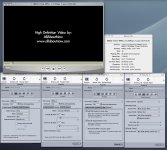
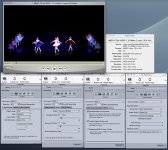
ISSUES: Interlacing looking lines still appear on HD Cinema Display. (see picture)
46" HDTV LCD: Color is pretty good, a little blown out but nothing unbareable. ISSUES: I get Dark Eyes. Which I now call Death eyes. Where they eyes and sockets look completely black. Not good. Minor to not noticeable Interlacing lines. I want none at all.
32" TrueFlat TV+DVD combo: Color was close to 90% of edit verion.
Issues: Minor Death eyes. Not as bad as the HDTV LCD. I woudl say 60%. Minor to not interlacing lines. More than HDTV LCD.
DVD was exported the first time with a HDTV 720p, which was 1280x720. I changed in the exporting feature in Motion. IN THIS VERION I exported the FULL RES, which is 1920x1080, and looks better, HOWEVER the first version was not that bad at HDTV 720p on the 46" HDTV LCD as it was on the 32" TrueFlat TV+DVD combo.
FCP shows all my levels are within legal.
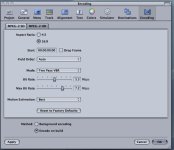
I am posting my compression settings, Maybe you guys have help me fine tune them so I can get rid of the blasted-nabit Interlacing lines.
HD CINEMA DIPLAY: Colors are near 100% of edited version.
ISSUES: Interlacing looking lines still appear on HD Cinema Display. (see picture)
46" HDTV LCD: Color is pretty good, a little blown out but nothing unbareable. ISSUES: I get Dark Eyes. Which I now call Death eyes. Where they eyes and sockets look completely black. Not good. Minor to not noticeable Interlacing lines. I want none at all.
32" TrueFlat TV+DVD combo: Color was close to 90% of edit verion.
Issues: Minor Death eyes. Not as bad as the HDTV LCD. I woudl say 60%. Minor to not interlacing lines. More than HDTV LCD.
DVD was exported the first time with a HDTV 720p, which was 1280x720. I changed in the exporting feature in Motion. IN THIS VERION I exported the FULL RES, which is 1920x1080, and looks better, HOWEVER the first version was not that bad at HDTV 720p on the 46" HDTV LCD as it was on the 32" TrueFlat TV+DVD combo.
FCP shows all my levels are within legal.
I am posting my compression settings, Maybe you guys have help me fine tune them so I can get rid of the blasted-nabit Interlacing lines.