AVCHD encoder research

@Crunchy.. seems that AVCHD can't really handle sustained bitrates of much more than 53mbps (and that rate will usually cause an error pretty fast). It's evidently much more processesor intensive (which makes sense), as mjpegs can be written at significantly higher speeds.

more strangeness...

Panned on some trees and other foliage.
fooliage_not_static_24PN.png


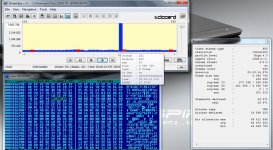
Note the rogue p-frame, followed by three i-frames.

Each i-frame in that cluster has a different GOP#, even tho there is no actual group (no p-frames) for two of them.
 
crunchy,

There isn't any logical difference between the quotes. I was agreeing with him and just meant that there was no need to confirm the findings. It was my theory that was crap, not his.

Chris
 
Last edited:
modulr,

Yeah, I've captured several 1080 rogue frames that show multiple I frames in a row, empty frames, non-key I frames (I don't even know what that is), etc... I guess whatever breaks every now and then really breaks hard sometimes.

I'm impressed that your card actually recorded all that data instead of simply producing a write error. I suspect the reason we rarely see these kind of captures is because they usually result in a lockup or write error.

Have you got a hex editor? It might be interesting to confirm that the rogue I frames contain a bunch of null data. You can do that by looking at data between the offset value (shown in a popup when you place the cursor over one of the frame bars) and the next frame's offset value. I believe you can get a free version of "Winhex" (a very good hex editor) to look at the file.

Chris
 
Last edited:
Guys, anyone able to write simple utility to look for this zero blocks and finding showing all information we have about them.
I need to know location of this bug, as we can have bug in TS muxer and not related to video encoder at all.
 
I'll take a crack at it for you. The files look pretty easy to parse into these little blocks. Does C# work for you?

Chris
 
Have you got a hex editor? It might be interesting to confirm that the rogue I frames contain a bunch of null data. You can do that by looking at data between the offset value (shown in a popup when you place the cursor over one of the frame bars) and the next frame's offset value. I believe you can get a free version of "Winhex" (a very good hex editor) to look at the file.

Chris

Loaded up the hex editor. Unfortunately it seems this particular scene is not loaded with nulls on any of the rogue frames.
 
They can be a little hard to find. Search for "47 10 11 1x 00 00 00 00" (where x can be any value). If you want to avoid wildcards, just use 1 for x. With big files Winhex's scroll bars can zip right past the data and you'll never see it.

I'm going to write a little utility that finds them automatically.

Chris
 
Problem is not only to find them.
But understand that this constant header mean.

As for C# - it is not important as it is one time utility.
Useful thing could be to make simple TS file parsing to just see different blocks and their types and indicate this rogue blocks.
As we can see StreamEye bug on top of GH1 bug here.
 
They can be a little hard to find. Search for "47 10 11 1x 00 00 00 00" (where x can be any value). If you want to avoid wildcards, just use 1 for x. With big files Winhex's scroll bars can zip right past the data and you'll never see it.
Chris, non-null rogue frame here as well. Also, header is 47 50 11.
 

Attachments

  • 00018 non-null rogue p-frame.jpg
    00018 non-null rogue p-frame.jpg
    123.3 KB · Views: 0
that is subframe information ... need analyze full frame between previous 000001 and next 000001 pattern, as it is packet header, and there will be info about that subheaders is auduo/video/system information or anythyng else ...
 
The rogue frames do contain some valid data - it's just that there are null frames appended to them - so they appear a little bit before the next frame starts.

Chris
 
Vitaliy,

I've started on the utility. The blocks are all 192 bytes from beginning to end. The headers look to be fairly easy to decode as well, I just have to figure out what they all mean and at what level they are operating. Shouldn't take me more than a day or two.

If you let me know which version of the MS C# compiler you use I'll make sure to produce a source code project that is compatible.

Chris
 
Vitaliy,

I've started on the utility. The blocks are all 192 bytes from beginning to end. The headers look to be fairly easy to decode as well, I just have to figure out what they all mean and at what level they are operating. Shouldn't take me more than a day or two.
If you let me know which version of the MS C# compiler you use I'll make sure to produce a source code project that is compatible.
Chris

You can look at Elecard utility for block info.
Also look at TS specifications.

As for C#, I don't use it at all, so any MS compiler will do :-)
You can finely make this utility yourself without looking at me.
 
DaLIV,

You can produce your own files.

Using Native 24p/25p will pretty much always produce rogue frames, even if nothing else has been changed in the firmware.

For the "black" test use these settings and shoot with the body cap on instead of using a lens. The first will produce 1080 24pN rogue frames in FHD mode on every second GOP. SH, H, and L modes will too. In fact as far as I can tell, all 720p modes produce rogue frames with the "black" test, even with the factory firmware.

[Information]
Comment=Settings H
SD_Card=Transcend Class 10
Camera=GH1 v1.32
[Settings]
Prevent version compare=Checked
Native 24p/25p=Checked
Video Bitrate FHD/SH=50000000
Overall Bitrate=52000000
Limiting Bitrate=60000000

Chris
 
Vitaliy,

Yup, that's what I'm doing. OK, I'll just use the latest version of C#. You can get a free version of C# anyway, if you want to.

Chris
 
Yes, it seems that bug had been present in firmware for long time.
As all that 24p patch does is to switch progressive flag (and this is on for 720p by default).
Generally Panasonic firmware style break countless rules on module based programming.
As each module have clear assumption of input data parameters and uses inside constants directly related to this, instead of asking parent module or calculate constants from known input parameters.
But Panasonic is quite good, as I know other company who uses up to 7 layers of abstraction even for simplest things in their products. I don't even know how they made it work. And this products sell in millions :-)
 
checked. simple gui not correctly parse and display content.
on 00075.mts (modur) :
frame# @ GUI @ frame POSITION identified by "picture parameter set" field (search for 0000000168) which persist before each frame I or P ... in file @ frame type
106 @ 17a8704 @ 17a872e @ P
107 @ 17d75c4 @ 17d75ee @ P
108 @ 1a7eac4 @ 18061dd @ I
109 @ 1d3a184 @ 186bd2e @ P
110 @ 2005ec4 @ 18a0fae @ P
in gui #110 slice is in fact #144

anomalies found :
slice #108 breaked by PAT and PMT fields of stream (PID 0, PID 0x100, PID 0x1001) -< seems that is reason why streameye GUI continue calculation between slices and sum some slices to one (not sure).

same situation on file of svecher. so file contents seems ok.

check frame count in your media player and streameye ... you will see diffirence between frame counts ...
 
Last edited:
Back
Top