AVCHD encoder research

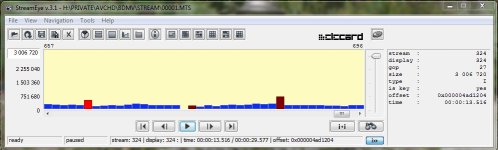
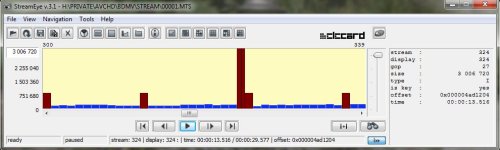
Note that it really is two I frames in a row, and not a bad display of the stream, there are 11 P frames on either side of the two I frames. The GOP is apparently set to 12.

Chris

Funny.
Anyway, I think that bug is the same as in large P frame.
In it just transfer all available framerate to next rame.
 
Testing 3.37d:

It works as expected...

Video bitrate adjustment FHD/SH 50000000
Video bitrate adjustment H 38000000
Video bitrate adjustment L 30000000
Overall bitrate adjustment 52000000
Limiting bitrate adjustment 60000000
When experimenting with these settings I had a thought that it would be great to switch SH mode to record in 1080p mode instead of 720p. This way FHD mode can be set to higher bitrate mode and SH to lower, so we can test two sets of bitrates without changes in the scene. This will also be useful in real-world scenario, as FHD mode can be set to "experimental" high-quality settings, while SH the stable ones (say the PTools "C" settings). This way if there are problems encountered with FHD you just change the mode instead of re-flashing firmware.
 
I've been doing some more testing of AVCHD Native 24p mode and have some new results - and they are rather strange showing I frames that are not key frames, empty frames, etc.....

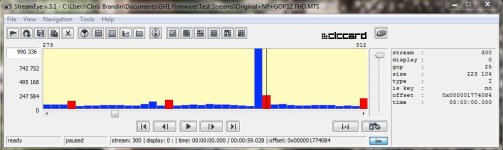
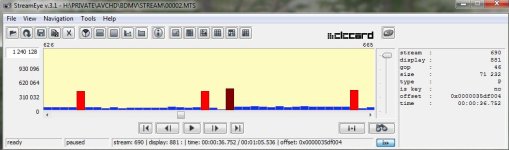
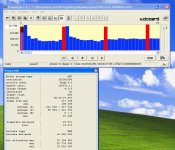
In the pictures attached the red bars are non-key I frames, the brown ones are key I frames, and the blue P frames. The one with mostly brown I frames was captured with 50, 52, 60, 24pN settings. You'll notice that it has a rogue I frame. I've also attached a picture from the same capture that shows a mixture of key and non-key I frames plus a completely empty P frame (it is completely empty, I checked).

Also attached is a capture using the 24pN patch and nothing else. Except for the very first I frame is it composed of only non-key I frames and the rogue frame is a P frame.

I noticed that total GOP's (the I frame plus the 11 following P frames) containing rogue frames add up to almost exactly twice the size of the normal ones around them.

This is all very strange and seems to indicate that whatever is going on with Native 24p mode, it's not going to be easy to explain.

Chris
 

Attachments

  • Rogue I.jpg
    Rogue I.jpg
    50.9 KB · Views: 0
  • Mix Frames.jpg
    Mix Frames.jpg
    50.5 KB · Views: 0
  • Factory 24pN.jpg
    Factory 24pN.jpg
    51.8 KB · Views: 0
Last edited:
I just noticed that the I frame in the screenshot with the empty frame has the I frame in the wrong place and that it should be where the empty frame is. I wonder if there could be a bug in StreamEye or if this is what is really happening.

Chris
 
Vitaliy,

Are we sure that the old "Video Buffer" setting really doesn't do anything? I've been looking at my test results and it's hard to believe that the CODEC can have so many errors in it. The only thing I can think of that would cause so many different appearing failures is some kind of buffer overrun condition.

If you think it would be helpful I would be willing to run some tests with the various buffer settings, but you'd have to put the Video Buffer setting back into PTool.

Chris
 
More AVCHD Native 24p strangeness.

Chris
Variable GOP length capability would actually be a very useful development, if performed in an intelligent manner. For example, if encoder was capable of "deciding" in the middle of GOP that P frame sizes are hitting a certain upper threshold, in which case it might as well produce an I frame to better allocate available bandwidth.
 
I agree, it could be a nice addition, but it would require processing many frames twice and the CPU might not be able to handle that. Or, at least if it can it will detract from being able to do other things well.

As far as I know the GH1 is intended to operate as a fixed GOP CODEC, so what we are seeing is almost certainly bugs - and that's not good.

Theoretically, from a card bandwidth standpoint the camera should be able to do the equivalent of something like 70,72,80 settings, or better at Native 24p. Imagine how cool that would be! Unfortunately it looks like the rogue frames, although not producing bad looking footage, raise the instantaneous bitrate so high it locks the camera sometimes even though the overall bitrate is well below what the camera can handle.

I don't get any of these problems when I don't check Native 24p/25p.

Chris
 
Frame rate fun

Frame rate fun

Doing a little research regarding the 23.971 frame rate issue reported by Elecard StreamEye on AVCHD files produced with Native patch, here is something I came across on Doom9's forums (http://forum.doom9.org/archive/index.php/t-133070.html)
One more question to the Gods of h264:

For Blu-Ray movies I've getting:

num_units_in_tick: 1001
time_scale: 48000
interlaced: false
Why is that not 24000? How can I get from time_scale/num_units_in_tick to the real framerate? Of course I could hardcode a conversion from 48000 to 24000, but I'd prefer a mathematical way to get the "right" framerate.
'cause this is _field_ rate, not frame rate. it doesn't depend on sequence scan/coding mode - it is so for both progressive and interlaced sequences.
So, using example above, Blue-Ray DVD movies' frame rate is 48000 / 1001 / 2 = 23.976. Sounds about right ...

GH1's 720p files have num_units_in_tick value of '1001' and time_scale of '120000'. 120000 / 1001 / 2 = 59.94. I think this method is working ...

Sony NEX5 test footage: num_units_in_tick value of '4800' and time_scale of '240000'. 240000 / 4800 / 2 = 25. Must have been a PAL version that DPReview got.

Native patch files have num_units_in_tick value of '2503' and time_scale of '120000'. 120000 / 2503 / 2 = 23.971. Interesting ;) Can these values be changed?
 
Fantastic work done on this FW so far but just wondering, Does anyone know if the native 24/25pn patch is still being improved or have we moved on to other things? I couldn't find a conclusion to this other than the spikes contain garbage info, but nothing about removing them or why they are there?

The Official firmware tester thread has this info

1. Native 24p/25p patch modified to prevent freezing on playback.
2. 24p/25p native (done)


Is it generally accepted that this limitation is what we have and the fastest cards we can buy are the only solution.
 
Vitaliy,

Has anything changed with the Native 24p/25p option? If so, I'll run all my tests again.

Chris
 
Vitaliy,
Has anything changed with the Native 24p/25p option? If so, I'll run all my tests again.
Chris
Well, I ran two tests for the new Preset Bitrate patches at "A" AVCHD Settings. Static death chart shot looks clean as a bell at low level; no rogue frames in sight. High Five! Can't do anymore testing tonight, so if anyone wants to continue pushing these (slightly up) feel free. I'm mildly excited :bath:

P.S. For some reason, can't attach .ini files, so remove the dummy .txt extension at the end.
P.S.2. After reviewing several clips shot outdoors I can confirm that rogue P-frames are still there, although they haven't crashed or generated the "Slow card error." But I've only been shooting at "A" Settings.
 

Attachments

  • 00005 sete.jpg
    00005 sete.jpg
    89.7 KB · Views: 0
  • 00003 setf.jpg
    00003 setf.jpg
    87.6 KB · Views: 0
  • sete.ini.txt
    sete.ini.txt
    293 bytes · Views: 0
  • setf.ini.txt
    setf.ini.txt
    317 bytes · Views: 0
Last edited:
I tried the A settings this morning with the recommended preset bitrate. Good news is that I haven't been able to crash ordinary scenes that used to cause freezing. Bad news is that the pulsing (muddy) I frame bug is still present, and is still always preceded by a duplicate P frame (though it doesn't look to be quite as severe, but these are casual outdoor tests). Funny though, there now seems to be a rare GOP that are all the same - a group of 15 identical frames - I'm wondering if that's what would have crashed the camera with the old settings. I'm gonna try and crank up the bitrates some today
 
Code:
FHS/SH Bitrate		33	34	35	36	37	37	50	50	60	60	53	53	50	50
H Bitrate		33	34	35	36	37	37	50	50	60	60	90	90	36	36
L Bitrate		33	34	35	36	37	37	50	50	60	60	36	36	26	26
Overall Bitrate		33	34	35	36	37	37	50	50	60	60	53	53	50	50
Limiting Bitrate	33	34	35	36	37	37	50	50	60	60	53	53	50	50
														
Preset Bitrate 1	330	340	350	360	370	370	500	500	600	600	530	530	500	500
Preset Bitrate 2	330	340	350	360	370	370	500	500	600	600	530	530	500	500
														
Measured FHD Bitrate	30.9	31.6	32.5	33.3	34.5	34.5	46.4	46.4	FAIL	FAIL	48.6	48.7	46.1	46.8
Measured SH Bitrate	31	31.8	31.5	33.4	2.5	34.8	13	46.8	22.1	56	49.8	49.7	13	46.8
Measured H Bitrate	31	31.8	32.8	33.4	2.6	34.8	12.9	46.9	22.1	56.1	FAIL	FAIL	33.8	33.9
Measured L Bitrate	30.9	31.7	32.9	33.7	2.6	34.8	13	46.8	22.1	55.9	34	33.9	24.3	24.5
														
Shutter Speed		1/50th	1/50th	1/50th	1/50th	1/50th	1/60th	1/50th	1/60th	1/50th	1/60th	1/50th	1/60th	1/50th	1/60th

Testing was done using the star chart.

Observations:
When the 720p SH/H/L options exceed a value of 36 AND the shutter speed is slower than 1/60th, the resulting bitrate gets cut drastically.. usually by a third or more.

These are the first setting where I've been able to predict everything that would happen on outcome. As a matter of fact, the last 2 sets of are such that I can get the highest bitrate possible with shutter speeds sloer than 1/60th (H Mode) and if needed achieve the high bitrates with shutter speeds faster than 1/60th as well (SH mode).

I would like to go back and retest the last set of values with both preset bitrates off, but I ran out of full battery. In the past, the resulting bitrate numbers have always been somewhat mysterious depending on what's input.

Hope this is helpful.
 
Last edited:
Code:
FHS/SH Bitrate        33    34    35    36    37    37    50    50    60    60    53    53    50    50
H Bitrate        33    34    35    36    37    37    50    50    60    60    90    90    36    36
L Bitrate        33    34    35    36    37    37    50    50    60    60    36    36    26    26
Overall Bitrate        33    34    35    36    37    37    50    50    60    60    53    53    50    50
Limiting Bitrate    33    34    35    36    37    37    50    50    60    60    53    53    50    50
                                                        
Preset Bitrate 1    330    340    350    360    370    370    500    500    600    600    530    530    500    500
Preset Bitrate 2    330    340    350    360    370    370    500    500    600    600    530    530    500    500
                                                        
Measured FHD Bitrate    30.9    31.6    32.5    33.3    34.5    34.5    46.4    46.4    FAIL    FAIL    48.6    48.7    46.1    46.8
Measured SH Bitrate    31    31.8    31.5    33.4    2.5    34.8    13    46.8    22.1    56    49.8    49.7    13    46.8
Measured H Bitrate    31    31.8    32.8    33.4    2.6    34.8    12.9    46.9    22.1    56.1    FAIL    FAIL    33.8    33.9
Measured L Bitrate    30.9    31.7    32.9    33.7    2.6    34.8    13    46.8    22.1    55.9    34    33.9    24.3    24.5
                                                        
Shutter Speed        1/50th    1/50th    1/50th    1/50th    1/50th    1/60th    1/50th    1/60th    1/50th    1/60th    1/50th    1/60th    1/50th    1/60th
Testing was done using the star chart.

Observations:
When the 720p SH/H/L options exceed a value of 36 AND the shutter speed is slower than 1/60th, the resulting bitrate gets cut drastically.. usually by a third or more.

These are the first setting where I've been able to predict everything that would happen on outcome. As a matter of fact, the last 2 sets of are such that I can get the highest bitrate possible with shutter speeds sloer than 1/60th (H Mode) and if needed achieve the high bitrates with shutter speeds faster than 1/60th as well (SH mode).

I would like to go back and retest the last set of values with both preset bitrates off, but I ran out of full battery. In the past, the resulting bitrate numbers have always been somewhat mysterious depending on what's input.

Hope this is helpful.

Hey,

I just start to test for myself and Ive got a question about your tests:

In your settings, what does preset bitrate mean or where do I input these values?

Thanks!
 
I have been researching the relationship between various bitrate settings. The following ini files were used for the tests:

[Information]
Comment=Settings A
SD_Card=Transcend Class 10
Camera=GH1 v1.32
[Settings]
Prevent version compare=Checked
Video Bitrate FHD/SH=50000000
Overall Bitrate=52000000
Limiting Bitrate=60000000

[Information]
Comment=Settings B
SD_Card=Transcend Class 10
Camera=GH1 v1.32
[Settings]
Prevent version compare=Checked
Video Bitrate FHD/SH=50000000
Overall Bitrate=52000000
Limiting Bitrate=60000000
Preset bitrate=500
Preset bitrate 2=500

[Information]
Comment=Settings C
SD_Card=Transcend Class 10
Camera=GH1 v1.32
[Settings]
Prevent version compare=Checked
Video Bitrate FHD/SH=50000000
Video Bitrate H=32000000
Video Bitrate L=22000000
Overall Bitrate=52000000
Limiting Bitrate=60000000

[Information]
Comment=Settings D
SD_Card=Transcend Class 10
Camera=GH1 v1.32
[Settings]
Prevent version compare=Checked
Video Bitrate FHD/SH=50000000
Video Bitrate H=32000000
Video Bitrate L=22000000
Overall Bitrate=52000000
Limiting Bitrate=60000000
Preset bitrate=500
Preset bitrate 2=500

Basically, these are all the suggested "C" settings. The differences are that A only has the basic settings set, B has the preset bitrates set to 500 added, C has H and L set to 32 and 22 respectively, and D has those set as well as the preset bitrates set to 500. Each configuration was tested in all modes for 1 minute each. The numbers in the table below indicate the resulting file sizes. If a failure occurred the number of seconds captured are indicated as well.

Here are the results:

...........A............B............C............D
FHD...339........340.......FAIL-1.....FAIL-1
SH.....329.....FAIL-1/2....333........FAIL-0
H........93..........93.........218........FAIL-8
L........63..........63..........151........LOCKUP


I ran these tests several times and always got virtually identical results.

Examination of clips with StreamEye produced what one would expect. The interesting thing is that the failed clips (when any data was captured at all) looked the same as the successful ones - which is surprising.

Conclusion: H and L settings do affect the behavior of the CODEC when the camera is operating in FHD and SH mode. However, the outcome is not affected whatsoever - only stability is. The preset bitrate settings also affect behavior - but not outcome. Note that when H, L, and both preset bitrate options were set the CODEC failed all the time in all modes.

These tests were done by focusing the camera on a highly detailed scene and then pressing record. By accident I forgot to focus first once and the test came out better. Autofocus was turned on so within a couple of seconds the scene was brought into focus, but there was no failure. This peaked my curiosity so I ran all the tests again; but this time I made sure the camera was out of focus at the beginning. The tests came out much better, although a couple of modes still failed. FHD mode, however, never failed - and I tried all the tests several times.

Chris
 
Last edited:
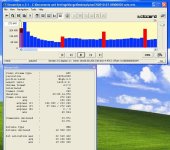
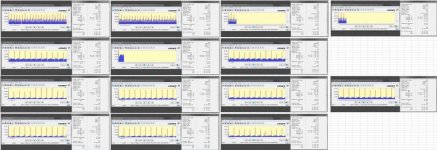
Here are the StreamEye captures. There are several interesting conclusions to be drawn - especially since the results were repeatable. Note, for example, that FHD mode always failed after 1.5 seconds in the C and D tests. The only difference between C and D tests versus A and B tests is that the H and L values were set in the C and D tests.

Chris
 

Attachments

  • CLBTests.jpg
    CLBTests.jpg
    70.5 KB · Views: 0
Last edited:
Native 24p not checked. I tested that too - and it still exhibits the strange behavior I've already documented.

I wonder if there are just a bunch of buffer overrun failures occurring. That would explain the lack of differences in the StreamEye data for successful versus failed captures. I think the GH1 firmware doesn't have much error detection in it.

Chris
 
Conclusion: H and L settings do affect the behavior of the CODEC when the camera is operating in FHD and SH mode. However, the outcome is not affected whatsoever - only stability is. The preset bitrate settings also affect behavior - but not outcome. Note that when H, L, and both preset bitrate options were set the CODEC failed all the time in all modes.

Very interesting findings, Chris. I have been conversing with Richtrav, who has been testing your set stable B settings + Native 24p/25p and finding that setup very unstable. The settings you found most problematic I have found problem-free with a simple addition of Native 24p/25p patch (http://www.dvxuser.com/V6/showpost.php?p=2047668&postcount=265). Very interesting indeed ...

I wonder if there are just a bunch of buffer overrun failures occurring. That would explain the lack of differences in the StreamEye data for successful versus failed captures. I think the GH1 firmware doesn't have much error detection in it.
Speaking without knowledge of architectural specifics here, but the big difference between 24P and 24PsF modes seems to be that within a span of 1 GOP cycle:
1) in the former case (12) - 1 full size (1900x1080) I frames must be written + 11 smaller P frames.
2) In the latter case (15) - 2 half size (1900x504) I frames + 28 smaller half-size P frames.
Both cycles are completed within 1/2 second, so in the latter case we can see that data is chopped into smaller chunks in a faster cycle, which probably helps clearing the buffer faster.

I'm still trying to understand the exact mechanism of how 24 frames that become 48 fields are then "conformed" to 60 field per second "timeline" [so to speak]. Found this article that needs to be read and understood in detail.
 
Back
Top