
Navigation
Install the app
How to install the app on iOS
Follow along with the video below to see how to install our site as a web app on your home screen.
Note: This feature may not be available in some browsers.
More options
You are using an out of date browser. It may not display this or other websites correctly.
You should upgrade or use an alternative browser.
You should upgrade or use an alternative browser.
Audio Recording with XLR mic
- Thread starter NorBro
- Start date

kgimedia
Well-known member
I don't record audio much with my camera. I will have to soon.
I have an XLR microphone that I used with my HMC150. Can I just get an XLR to 3.5mm adapter and use that microphone with my T3i?
Will that work?
Thank you.
Quick answer is maybe. Long answer involves the type of mic and adapter. I could list all the possible options but more info is needed to answer the question accurately. Even then the answer will be you really need a mixer and Magic Lantern to make it work well.

Michael Carter
Veteran
Your best bet if you don't have a lot of cash: use the 150 as your audio recorder. You'll get far better audio. Record with the Canon's mic and use it to synch.
If you really really need to record to the t2i, the minimum gear you need is:
An XLR phantom power box (if the mic requires external phantom power) about $30;
A transformer-balanced converter (XLR to mini, low impedance to high) - those are about $35 if you hunt around. You really want to convert to high impedance vs. just soldering up a cable.
And the ML patch for manual audio will make a big difference. Even if you use a mixer, the camera's going to apply auto-gain to the signal which doesn't sound very nice.
If you really really need to record to the t2i, the minimum gear you need is:
An XLR phantom power box (if the mic requires external phantom power) about $30;
A transformer-balanced converter (XLR to mini, low impedance to high) - those are about $35 if you hunt around. You really want to convert to high impedance vs. just soldering up a cable.
And the ML patch for manual audio will make a big difference. Even if you use a mixer, the camera's going to apply auto-gain to the signal which doesn't sound very nice.

wgzn
Veteran
+1 to that!Your best bet if you don't have a lot of cash: use the 150 as your audio recorder. You'll get far better audio. Record with the Canon's mic and use it to synch.

M. Gilden
Canon DSLR Moderator
I actually borrowed a 3.5mm mic to test it out...can anyone confirm that the mic records to the left channel and the built-in mic records to the right channel?
Is there anyway to turn off the built-in mic if I wanted to?
Thank you.
I think you need to check your magic lantern settings.
M. Gilden
Canon DSLR Moderator
The audio tab.
Without ML, the internal mic shuts off when something is plugged in. With ML, you have quite a few options: force external, force internal, auto detect (like the default firmware), or int+ext (which sounds like what you are describing- one channel on the left, another on the right).
Assuming your cables are all good, I'd say you need to check what input ML is set to use.
Without ML, the internal mic shuts off when something is plugged in. With ML, you have quite a few options: force external, force internal, auto detect (like the default firmware), or int+ext (which sounds like what you are describing- one channel on the left, another on the right).
Assuming your cables are all good, I'd say you need to check what input ML is set to use.
M. Gilden
Canon DSLR Moderator
Hmm, I guess I'm confused because I don't have an audio tab. I definitely went through all of them that's why I didn't see anything about audio..maybe I'm missing something...
What version of ML are you using? Unless you are using a super early build, the modern ones have tabs, and the first one is audio.

NorBro
Major Contributor
I just installed it 2 weeks ago so I'm assuming the latest version. If I press the menu button, I get 12 tabs..by default only 6. The first tab is LiveV.
I had audio disabled because I shoot with the 2.0 bitrate (Alex recommends disabling audio) so for a second I thought that's why I wasn't getting the audio tab...but yea, I still don't see any tab called 'Audio'.
Tabs I have:
liveV
expo
movie
shoot
focus
display
tweaks
play
config
power
debug
help
I had audio disabled because I shoot with the 2.0 bitrate (Alex recommends disabling audio) so for a second I thought that's why I wasn't getting the audio tab...but yea, I still don't see any tab called 'Audio'.
Tabs I have:
liveV
expo
movie
shoot
focus
display
tweaks
play
config
power
debug
help
M. Gilden
Canon DSLR Moderator
I just installed it 2 weeks ago so I'm assuming the latest version. If I press the menu button, I get 12 tabs..by default only 6. The first tab is LiveV.
I had audio disabled because I shoot with the 2.0 bitrate (Alex recommends disabling audio) so for a second I thought that's why I wasn't getting the audio tab...but yea, I still don't see any tab called 'Audio'.
Tabs I have:
liveV
expo
movie
shoot
focus
display
tweaks
play
config
power
debug
help
Weird, unless A1ex took it out in his latest version (I'm still using version 0.2.2 from a few months ago), the first tab should be Audio. Under Help the first option should be "about", click that and see what version you are using.
Meanwhile, try running the camera without magic lantern (use a different card or format this one) and see if the mic records to both channels. This really sounds like an ML configuration problem to me.
NorBro
Major Contributor
I'm running version "Magic Lantern pre0.2.2"
I definitely went through every single option (there are like 30 all combined throughout the tabs) and read what each one does. I'm definitely good with this kind of stuff and if I saw some audio options, I'm predicting I would be able to figure it out, but I don't see ANY audio controls at all besides turning audio meters on or off.
I can confirm that it's definitely a split because when I hit the shotgun or the onboard, each channels spike separately.
Those audio options you mentioned in an earlier post sound great, but I don't have them!! haha
I will post on the ML board where Alex answers issues/questions and see what's good...
I definitely went through every single option (there are like 30 all combined throughout the tabs) and read what each one does. I'm definitely good with this kind of stuff and if I saw some audio options, I'm predicting I would be able to figure it out, but I don't see ANY audio controls at all besides turning audio meters on or off.
I can confirm that it's definitely a split because when I hit the shotgun or the onboard, each channels spike separately.
Those audio options you mentioned in an earlier post sound great, but I don't have them!! haha
I will post on the ML board where Alex answers issues/questions and see what's good...
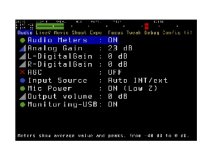
NorBro
Major Contributor
From ML site:
Audio Tab
Manual audio controls.
This menu is only available on 550D/T2i and 60D.
The 600D/T3i already has manual audio control, but right now it's not possible to change audio settings from Magic Lantern. You can only use audio meters during recording.
PROBLEM SOLVED - NO AUDIO TAB on T3i!
Audio Tab
Manual audio controls.
This menu is only available on 550D/T2i and 60D.
The 600D/T3i already has manual audio control, but right now it's not possible to change audio settings from Magic Lantern. You can only use audio meters during recording.
PROBLEM SOLVED - NO AUDIO TAB on T3i!