
Navigation
Install the app
How to install the app on iOS
Follow along with the video below to see how to install our site as a web app on your home screen.
Note: This feature may not be available in some browsers.
More options
You are using an out of date browser. It may not display this or other websites correctly.
You should upgrade or use an alternative browser.
You should upgrade or use an alternative browser.
Atomos Ninja Now Shipping According To Press Release - SDI Samurai at $1495.00 USD
- Thread starter David Saraceno
- Start date
groveChuck
U-matic Member
Hmm... maybe there'll be a group buy on... Seven Samurai?
David Shapton
Well-known member
If I got the Proress Samurai and you guys added Cineform to the line up would that be updated via firmware or would it require new hardware thus a new unit?
New codecs on Ninja and Samurai are added through firmware. There is no need to upgrade the hardware.
Dave
Atomos
David Shapton
Well-known member
Barry,
You're right that HD-SDI is in many ways a superior connector, and that's why it's rightly regarded as the professional's choice. But where we might disagree in a nuanced way is that we don't think that HDMI is useless. Used with locking connectors, and with proper cable management, the digits are the same, and so there are cases where the Ninja is a good choice. The first of these is where there is simply no alternative (because a camera only has HDMI) and the second is where people might want to do some work with a Ninja in the few months before Samurai appears, and/or they might want to save some money.
The good news is that people have a choice, which exactly why we've pre-announced the Samurai.
Dave
Atomos
You're right that HD-SDI is in many ways a superior connector, and that's why it's rightly regarded as the professional's choice. But where we might disagree in a nuanced way is that we don't think that HDMI is useless. Used with locking connectors, and with proper cable management, the digits are the same, and so there are cases where the Ninja is a good choice. The first of these is where there is simply no alternative (because a camera only has HDMI) and the second is where people might want to do some work with a Ninja in the few months before Samurai appears, and/or they might want to save some money.
The good news is that people have a choice, which exactly why we've pre-announced the Samurai.
Dave
Atomos

Oliver Rush
Well-known member
I was wondering what the best flavor of prores would be with the AF100 and an external recorder like the Samurai? I would think 422HQ would be overkill as the af100 is only 8 bit, so would LT be good enough, or would the extra data of normal prores422 be advantageous? I really dont know, as I dont use prores other than currently with my AF100 internal recordings which I transcode into LT... so yea, what is the current consensus on most suitable level of prores for the AF100.

Oliver from what I see Prores 422LT is the acceptable choice and from my experience its enough to transport any data youre getting to card. That said I use prores422 generally as Im always of the mind - well, it cant hurt to have the extra (unless you struggle for drive space) and IMO these things wont differ a great deal when shooting to a ninja / samurai, but Id be happy to be proved incorrect on that.
Gary Senda
Well-known member
Hi David,
does the Samurai start to record automatically when the camera starts to recording? Is there any Time Code trigger?
Regards
Gary
does the Samurai start to record automatically when the camera starts to recording? Is there any Time Code trigger?
Regards
Gary
David Shapton
Well-known member
does the Samurai start to record automatically when the camera starts to recording? Is there any Time Code trigger?
Yes.
Dave
Atomos
Alpha Beta Omega
Veteran
Samurai seams very competitive and thanks David for being here and enlightening us.
Last edited:
Gary Senda
Well-known member
Yes.
Dave
Atomos
Simply wonderful: so we can record AVCHD clips contemporary the ProRes files, with the same TC
Thank you
Gary

Bern Caughey
Veteran
When the Samurai ships it be great if there was a dedicated hood available.
Best,
Bern
Best,
Bern

bgundu
Veteran
That's the gravy stuff. Let's make sure the meat and potatoes are good first. 
When the Samurai ships it be great if there was a dedicated hood available.
Best,
Bern
Bern Caughey
Veteran
That's the gravy stuff. Let's make sure the meat and potatoes are good first.
I humbly disagree.
What use is a touch screen/monitor if you can't see it outdoors? A case, & cables, I can source easily, but finding a proper hood is a pain.
DIY cardboard versions don't turn my crank.
Best,
Bern
bgundu
Veteran
True enough. I was just implying that I would like to see a fully functioning unit before I see them designing a hood. I'm OK with a DIY hood with a unit that records 24p without pulldown than a 60i recorder with a slick hood
I humbly disagree.
What use is a touch screen/monitor if you can't see it outdoors? A case, & cables, I can source easily, but finding a proper hood is a pain.
DIY cardboard versions don't turn my crank.
Best,
Bern
Barry_Green
Moderator
Time code trigger is okay, but please implement the SDI record-start flag for triggering recording. The Nano does timecode triggering, but it means that you can only ever use it with rec-run recording. You can't use that in any sort of synchronized multi-camera recording system because the free-run timecode would keep the external recorder always rolling.Is there any Time Code trigger?
There's a flag in the SDI data stream that gets sent when you start recording and when you stop recording. It would be very helpful if you would implement the ability for the Samurai to detect that flag to start and stop recording. Timecode would be good too; really it would be best if it had both.

Guy_Cochran
DVXUser Sponsor


Included dual battery charger, two Sony style NP batteries, two Master Caddies, Master Caddy dock (FW 800, USB 2.0, USB 3.0 and eSata)

Note Size of iPhone to compare - the Ninja is tiny!

Rear of Ninja with both batteries loaded. Attached via Noga arm to AF100.


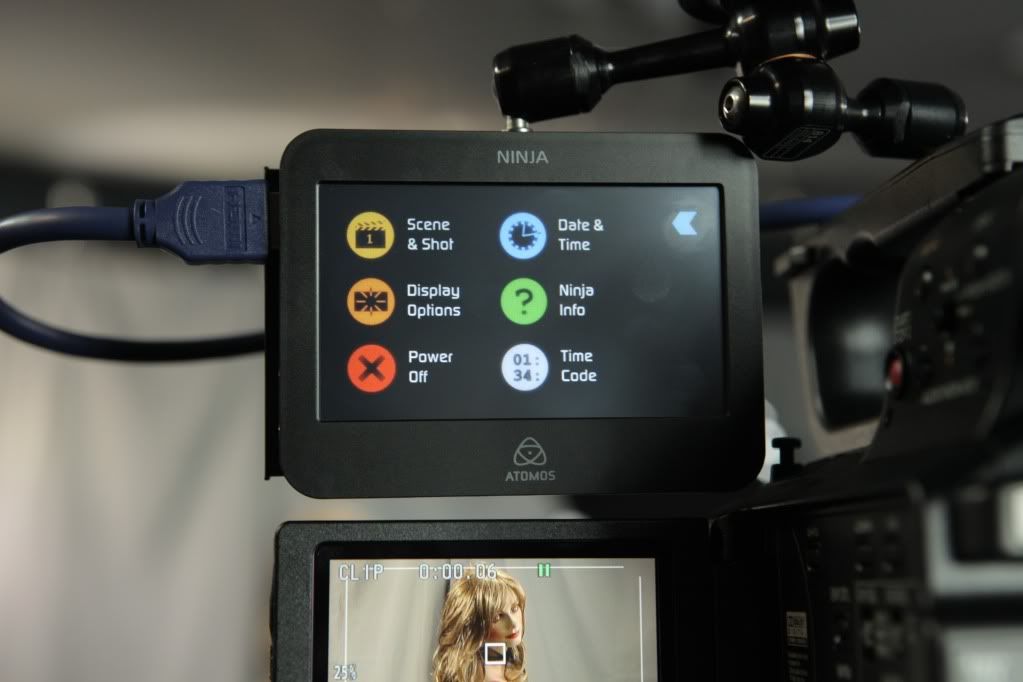
Note 1/4-20 Threading on top and bottom. Utilizing a Manfrotto 814 Noga arm

So far I've captured with a Seagate Momentus 7200RPM drive. AJA System Test shows 60MB/sec Read and Writes when connected via FW800 in the Master Caddy Docking Station. Captures perfect via HDMI in ProRes HQ - data rate appears as 223Mbps in FCP. File is 1080i 59.94. With the AF100 connected, the only option is 1080i 59.94 via HDMI.
Playback in the unit does work at this point in time, although the included paperwork stated that it would be at low res. I tested it, it does appear blocky when played back internally. Captures are pristine, however, if you need perfect playback there will be a future firmware update.
Instruction manual can be downloaded here
I'm impressed with the build quality. For a first generation product it is solid. Even the battery latches hold the battery tight when swung around or pushed with force. Fully load with Master caddy/drive, along with two batteries, it weighs in at 1lb 9oz on my digital scale.
We just received 10 Ninjas in today at the DVeStore. I'm keeping 1 for me. 3 were pre-sold. So 6 are left. DVeStore is a proud DVXuser Sponsor. DVXusers may wish to utilize the usual "dvxuser" coupon code for additional savings. http://www.dvestore.com/products/Atomos-Ninja.html


Andrew J. Allsbury
Well-known member
We primarily shoot 30p. Can the ninja do this? Or are there only options for 24p within 60i and 60i? Thanks guys.
bgundu
Veteran
I believe 30p is in an upcoming firmware release.
We primarily shoot 30p. Can the ninja do this? Or are there only options for 24p within 60i and 60i? Thanks guys.