Anyone having card speed issues, please try again without native 24p

Svart, are you saying you get this error without applying any bitrate settings? Just the native 24p only? As I have at least a dozen of files on a tripod with the 24p patch and never had this problem. I can even post the .mts files.

If I'm understanding correctly, you probably haven't seen an error because you have a good enough card to handle the spikes.

I think to sum up Svart's point here (and correct me if I'm wrong)...

X settings at 24P = FAIL!
X settings at 60i = PASS!
Where x = same settings in both instances...
WHY?!??


Right? Meaning, if it were the fault of the card... why would the same settings fail depending on 24P or 60i? Shouldn't it be the same bitrate, so it should either pass on both or fail on both?

And I did ask Vitaliy which would be better to shoot at for bitrate (since CS5 handles 24P and 60i equally well) and he answered 60i, although the answer was a bit vague. He did seem to indicate that there's a difference, though. I think those parts have since been deleted from the main hack project thread.
 
60-62-70 failed star chart test.
GOP 15
60i / 24wrapper - non24pn
class 10 extreme

2nd test
Filmed in normal light within room- Camera recorded with out issue. Recording appears to be cleaner than c settings....

Star chart is extreme circumstances- My other settings I filmed over an hour of material in two days no issues in 24PN- however when I filmed
the chart- Card write error.


3rd test adjusted settings to 58-60-68

Filmed Star Chart in 24PN- FAILED
Filmed Star Chart in 60i wrapper - RECORDED OVER 1 MIN, THEN I STOPPED CAMERA- GOOD IMAGE QUALITY.

Going to re-test the 60-62-70 / 60i/24 wrapper again- Since the quality looked good, and the world isn't a star chart... :-)


Pappas
 
Last edited:
Did you mean that you turned off native 24p and you got it to record continuously? Because it sounds like you said the opposite but then said you think there is a problem with the 24p patch. Please clarify.

When 24p is on...write error on staitc shot
when 24p is off...no write error....recorded continuously.

and to add again I have 2 sdhc cards that can handle bitrate up to 70+mbs so really 44mb avchd with occasional spikes should not cause a problem should it not?

Indeed the problem isnt a major one with static shots...but one that could be fixed with some kind of patch methinks.
 
Last edited:
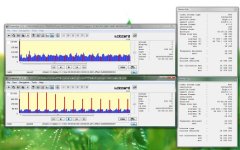
Just in the process of collecting my benchmark tests results using original firmware to be able to compare with modified firmware and guess what when static using the chart bitrates are considerably higher. I couldn't believe it. I made an animation that I could play to hunt down mud in detailed colours which works pretty well but this chart is just a killer for testing bitrate, and so simple too.

Streameye shows when static I frames peak at 353k and average out at 266k never dropping but when doing the swirl of death I frames float around 77k mark. P frames are the opposite with static lower at around 54k and moving 69k. I can't process MJPEG on Streameye but using Splash Lite i get bitrates of 30Mbps fluctuating on moving and 32Mpbs fairly constant on static with the chart.

So going by what I have seen static detailed shots are actually more taxing on card write speed than moving detailed shots. Explains why people are getting write error on static shots? Would this mean that shooting at "C" setting with 24/25fps patch results in a higher bitrate, possibly similar to that of shooting with the higher 60-62-70 without 24/25 fps patch but with less buffer?

I will do shots with moderately upped bitrates and 24/25patch on/off and see what I get then but I wouldn't be surprised if its the same.
 

Attachments

  • Untitled-1.jpg
    Untitled-1.jpg
    97.3 KB · Views: 0
Last edited:
Just in the process of collecting my benchmark tests results using original firmware to be able to compare with modified firmware and guess what when static using the chart bitrates they are considerably higher. I couldn't believe it.

Streameye shows when static I frames peak at 353k and average out at 266k never dropping but when doing the swirl of death I frames float around 77k mark. P frames are the opposite with static lower at around 54k and moving 69k.

So going by what I have seen static detailed shots are actually more on card write speed than moving detailed shots. Explains why people are getting write error on static shots?


This is EXACTLY the test I was looking to do!

THANK YOU!

This proves what I am seeing and what I suspected without a doubt.

I'm not sure what is next. The huge I frames seem to be a known issue however I'm not sure Vitaliy can do anything about it yet without the original firmware software.
 
Actually it really does make sense. If the shot is static there is going to be more detail because there is no motion blur. At a shutter speed of 1/50 there is going to be quite a lot of detail blur even in scenes that don't move much.

I wonder how things behave when a fast shutter speed is used. Does the bit-rate go up? I'm going to try this out.

Chris
 
Interesting!

Interesting!

Just in the process of collecting my benchmark tests results using original firmware to be able to compare with modified firmware and guess what when static using the chart bitrates are considerably higher. I couldn't believe it. I made an animation that I could play to hunt down mud in detailed colours which works pretty well but this chart is just a killer for testing bitrate, and so simple too.

Streameye shows when static I frames peak at 353k and average out at 266k never dropping but when doing the swirl of death I frames float around 77k mark. P frames are the opposite with static lower at around 54k and moving 69k. I can't process MJPEG on Streameye but using Splash Lite i get bitrates of 30Mbps fluctuating on moving and 32Mpbs fairly constant on static with the chart.

So going by what I have seen static detailed shots are actually more taxing on card write speed than moving detailed shots. Explains why people are getting write error on static shots? Would this mean that shooting at "C" setting with 24/25fps patch results in a higher bitrate, possibly similar to that of shooting with the higher 60-62-70 without 24/25 fps patch but with less buffer?

I will do shots with moderately upped bitrates and 24/25patch on/off and see what I get then but I wouldn't be surprised if its the same.

Honestly, I am so happy with the 60,62,70 and 25p in the 50i wrapper that am not sure I am bothered about getting it better, especially as with the 14-140 zoom RS seems a none issue too. For 24p guys I see it slightly different though for sure, so am very interested in your progress, as a 24p option with max bitrate is still something high(incl me for some projects)on everybodys wish list, together with the live out and sound monitor.:2vrolijk_08:
 
Another thing that occured to me is that Noise Reduction and Sharpening settings may play a big role here. Normally I set these both to -2 and do it all in post - which I think is pretty typical. However, if you look at it logically it may not be the best way to go. Sharpening adds detail so it should probably be left at -2. Noise reduction removes detail (ideally mostly meaningless detail), so it may make sense to set it higher. In other words, it may ultimately be better to do the noise reduction in camera.

Even if you were to lock the camera down on an optical bench, there would still be a several pixels of jitter from frame to frame because of micro-movement of the physical parts on the camera. Even if you could eliminate all that there would still be 1 pixel of jitter just because of the sensor.

Chris
 
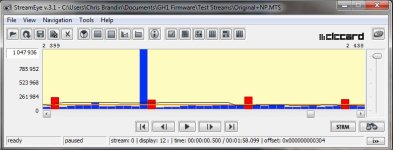
I tried 24p native with no other settings changed except GOP, which I set to 12. This should be the exact equivalent to the wrapped factory default setting except that it is native 24p (the GOP correlates to 1/2 sec in both cases). I got the pulse.

Now I'm going to try the same setup with the GOP at 15. It's sure beginning to look like pulsing is caused by the native 24p setting and nothing else, though.

Chris
 
Another note, Vitaliy suggested changing GOP. I personally could not find a GOP setting that worked for me. I suggest those who have been able to reproduce this problem try alternate GOP settings and see if you can get it to work.

I have a feeling that this issue isn't that simple though.
 
Come to think of it, with a low noise reduction setting every pixel in every frame will change slightly frame to frame.

chris
 
Yup, pulsing still occurs even if the only patch applied to the firmware is Native 24p/25p.

Chris
 

Attachments

  • Native24pOnly.jpg
    Native24pOnly.jpg
    45.2 KB · Views: 0
thanks for testing and putting it in the official hack sub-forum. At least we know what it is finally and how to test for it now.
 
Thanks for posting that screen capture, cbrandin. It shows exactly the problem I described in my earlier post:
http://dvxuser.com/V6/showpost.php?p=2024242&postcount=120

What is apparently happening is that when the bitrate drops too low, (e.g. when filming a static, unchanging scene) there's a build up of excess bits that the codec sporatically discharges in a single huge P-frame at the end of a GOP. This produces a brief, but radical boost in the bitrate that is higher than many SD cards can handle, resulting in a write speed error.

What is needed is a patch that will enable the codec to run at as low a bitrate as needed, without generating bloated P-frames from time to time.
 
Acually, I suspect that it is just a flat out bug in the CODEC and is not related to any kind of data build-up. It's probably something like a subroutine being called at the wrong time producing a spike of junk data.

Chris
 
Or a bug that fills empty frames with junk. Heck, it could be a million things at this point.

The problem is that this AVC lite is not really conforming to AVC specs and it seems to be a hack job full of hard coding and lack of error handling.
 
Acually, I suspect that it is just a flat out bug in the CODEC and is not related to any kind of data build-up.
Perhaps it is a bug, but I've only seen these spiked P-frames in otherwise low bitrate streams. They only seem to appear when the codec has a lot more bitrate than it needs to use to encode the stream.
 
Hmmm... that's interesting. I'm going to have a close look at all my test files to see if any other patterns emerge.

Chris
 
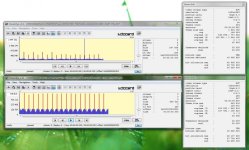
Just did the 24/25 Patch vs no patch using conservative "B" 32Mbit settings. v1.33 has no patch and v1.34 has patch. Mud was reduced but still there in my mud testing clip, will do test "C"settings to see if it reduces even more which i'm hoping it will.

No patch shows stable quite consistent I frames throughout floating around the 550k mark max bitrate 30Mbit.

Native Patch shows higher I frames at 740k then drops half way through with a max bitrate of 43Mbit. It also drops a big fat P frame turd nearing the end ..ha Stunk the whole room up.

So can we mark this down as another example of the native 24/25p patch bumping up bitrate over non patched and potentially freezing shots? Shooting native isn't high on my priorities, stability is so I am quite content shooting without patch =)

By the way do you guys notice your batteries not lasting as long as they used to with upped bitrates? I had a fairly fresh battery that I used for 2 maybe 3 patches still indicating full after the most recent patch, did some short clip tests that lasted maybe 5mins, dumped files to comp via card reader, then back to do the Native patch and it was down to one bar already and died shortly after. Really surprised me.
 

Attachments

  • 134-Native-patch-vs-133-none.jpg
    134-Native-patch-vs-133-none.jpg
    94.2 KB · Views: 0
Just to add: my Transcend 6 16GB card would crap out with the "B" 32Mbit settings when I film my daffodil of death test with Native 24/25p ON; however, the same tests appear to work perfectly fine when I turn 24/25p OFF. (note: I am only performing stability testing at this time).
 
Back
Top