A7s sample footage

Lots of color at magic hour today.

ggbkBIW.jpg

Iz6miAE.jpg

IHui7C3.jpg
 
Last edited:
@squig you mean KDX log? No I had M31 > rec 709

@cyork very nice

I really need to find some time and test all this out. This slog2 is killing me and since i'm not great at grading, it makes it worst!
 
@squig you mean KDX log? No I had M31 > rec 709

@cyork very nice

I really need to find some time and test all this out. This slog2 is killing me and since i'm not great at grading, it makes it worst!

If you had exposed by about a half stop to a full stop less, it would have made a big difference. Seriously, didn't use film convert on this grade but a quick pass with filmconvert looked great after reducing exposure and changing film emulation. Just a little less exposure for that sweet spot and you're there, man!
 
Na Kholi's PP.

Exposure looked ok to me.

I just made an s-curve and then filmconvert, no other work.
 
Last edited:
If you had exposed by about a half stop to a full stop less, it would have made a big difference. Seriously, didn't use film convert on this grade but a quick pass with filmconvert looked great after reducing exposure and changing film emulation. Just a little less exposure for that sweet spot and you're there, man!

Yup, I need to mess with it a little more.
 
Wow, really nice footage Cyork.
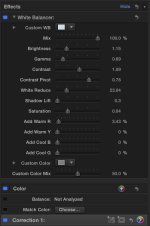
I did a simple correction using final cut, and CineFlares 'white balancer' on your shot Strancali.
Vimeo does seem to accentuate the magentas in my highlights more than my original, but it's there too..
https://vimeo.com/101483944
Password: slog2test

Here are my settings if anyones interested-->

Strancali settings.jpg
 
Nice job, PTRrush, I like that treatment. It's a bit flatter in a good way that I was tempted to go too. I can see we both had trouble with that white wall trim. I keyed like 4 things in that video and that was one of them. Still couldn't tame it, lol
 
Remmeber, the winner is not the one with more DR, but the one that gives the most balanced DR.
Lots of stops in the highlights is what we want.
The 21stop chart is great to measure the total DR, but I still prefer under/over exposure test to see where that DR is allocated.
Wise words.
 
After a day with the A7s I can say it's not for everyone. The dynamic range is huge but that extra sensitivity makes it a very sensitive camera if you know what I mean. You can't just point and shoot with S-log like it's a GH4 or MK3 raw. And the rolling shutter in full frame mode is atrocious. I was shooting off the shoulder (not balanced) with a 50mm lens and I got jello. With a lot of TLC it should look amazing but it has a lot of issues. I managed to induce the highlight aliasing and the purple smudges without too much effort. This thing is very light hungry, I wouldn't even attempt to underexpose S-log (well I did).
Nothing beats wise advice from wise experience, especially specs on paper :-)
 
Nothing beats wise advice from wise experience, especially specs on paper :-)

This camera's like McDonald's to me. "I'm loving it". I think the standard profile shoots pretty damn awesome footage so if people are having that hard of a time with Slog2, don't shoot it. Plenty of other good gammas read to bake some cookies with. The jello is not that bad unless you shoot like a spaz or expect to hand hold a friggin DSLR (which never looks as good as a heavier camera or rigged camera, imo). The highlight aliasing is nasty with certain exposures or certain hues of stage lighting but it's not in every shot. That's just a Sony problem that needs fixing and it'll just have to be taken into consideration. The GH4 actually handles stage lighting really well but bring that speedbooster unless you want your footage to look like crayon. Each tool with it's own uses and flaws. Unless you want to spend on a camera what you could have just rented.
 
I tried one of the cine profiles, it had about 3 or 4 stops less dynamic range than S-Log, sky was totally blown out.
 
Wow, really nice footage Cyork.
I did a simple correction using final cut, and CineFlares 'white balancer' on your shot Strancali.
Vimeo does seem to accentuate the magentas in my highlights more than my original, but it's there too..
https://vimeo.com/101483944
Password: slog2test

Here are my settings if anyones interested-->

View attachment 89206

Very nice correction PTRush. Can't u just desaturate the highlights to get rid of the magentas in the highlights? I also used the soft clip function in Davinci.
6_1.1.6.jpg7_1.1.7.jpg

5_1.1.3.jpg4_1.1.2.jpg
 
Very nice correction PTRush. Can't u just desaturate the highlights to get rid of the magentas in the highlights? I also used the soft clip function in Davinci.

Perfect TajJackson! I was able to remove the magenta cast this morning in final cut without having to go into resolve, but the skin tone did take a hit.. nothing too noticeable. What's the 'soft clip" function do? Is it feathering your highlight matte?

Cineflare White Balanceer is $49 on their site and is a replacement for the easy color picker from final cup legacy. http://cineflare.com/white-balancer/ It also has some other great sliders to help bring the snap back into log footage. I also like Iridus Tonalizer, but I think its been abandoned.

Final Cut is really great editor these days. Does a pretty good job keeping up with the changing landscape. I wouldn't be using it unless a producer I worked with hadn't asked me to edit his micro doc in FCPx. I really never looked back after that =]

Here are a few screens from a day with K-log, and my son at the pool. I had a tough time with these because I was fumbling around with exposure, and the Heliopan Vari ND I use.
This was more of an experiment with a grade, as opposed to color correction. Notice the difference in water color in the bottom two.

Screen Shot 2014-07-15 at 12.56.34 AM.jpgScreen Shot 2014-07-15 at 12.57.37 AM.jpgScreen Shot 2014-07-15 at 12.58.33 AM.jpg
 
Back
Top