A7s sample footage

Resolve doesn't scale anything if the source is interpreted and imported as data levels; what you see is what you have in the file, no need to pull down whites there is nothing else up there. If it is interpreted and imported as video levels the source range is expanded from 16-235 to 0-255 (0-1023 in scopes); that's also what your two last screenshots show - the video levels import increases contrast due to the expansion of the legal range. And in the case of video levels interpretation of a source you can indeed have invisible whites and blacks (below 0 and above 1023 on the scopes). I'd say Resolve handles the video/data levels thing in a robust and predictable way unlike other applications.

Curious to see the DPX files though.
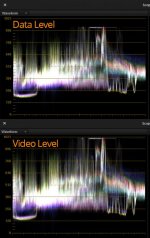
This is a version not gained in any way.

vdiedata.jpg

So why does the data version not go to 1023 and shows an even more raised black level?

Is there any overall project setting i've not found?

One of the reasons i don't use Resolve is that the scopes are showing a dithered image, it does this automagically whereas SpeedGrade will show the banding and quantisation in the waveform. Sadly SG doesn't like XAVC otherwise i'd be doing it in there and i'm not so convinced of the transcode to get it there.

In SG if you gain up an image you will see the banding immediately. In Resolve you won't. It's dithering it. Pretty damn useless IMHO...

cheers
Paul
 
This is a version not gained in any way.

View attachment 88931

So why does the data version not go to 1023 and shows an even more raised black level?

Is there any overall project setting i've not found?

One of the reasons i don't use Resolve is that the scopes are showing a dithered image, it does this automagically whereas SpeedGrade will show the banding and quantisation in the waveform. Sadly SG doesn't like XAVC otherwise i'd be doing it in there and i'm not so convinced of the transcode to get it there.

In SG if you gain up an image you will see the banding immediately. In Resolve you won't. It's dithering it. Pretty damn useless IMHO...

cheers
Paul

It is all acting as expected in Resolve. :)
The data levels version has the real values as they are in the file. It is not that the data levels version has raised blacks, rather the video levels version has the blacks lowered after import: the video levels interpreted version has the range scaled on import, thus decreasing blacks and increasing whites.
I suggest you shoot a severely overexposed image so that we have the white clip level established without doubts. And then maybe shoot a pure black image (with the lens cap on), for the black level.
 
This is just a question from the back of the class from a guy who's doing his best to follow a discussion that's a little over his head ...

Looking at Paul's waveform I see blacks are at 128 (what unit is this ... 128 whats?), but the image also clipped a little near the middle-right side. Does this mean this shot should have had a lower exposure--to make use of 0-28 and avoid clipping?
 
This is just a question from the back of the class from a guy who's doing his best to follow a discussion that's a little over his head ...

Looking at Paul's waveform I see blacks are at 128 (what unit is this ... 128 whats?), but the image also clipped a little near the middle-right side. Does this mean this shot should have had a lower exposure--to make use of 0-28 and avoid clipping?

128 in the 0-1023 range in which Resolve scales all numbers for scopes display; 128 would be 32 in the 0-255 range. It is not obvious whether what you see in the middle-right is clipped; if you look closely you will see values above the fat white line (which is representing the sky). I suggest waiting for exact white and black clip tests before getting to conclusions. :)
 
It is all acting as expected in Resolve. :)
The data levels version has the real values as they are in the file. It is not that the data levels version has raised blacks, rather the video levels version has the blacks lowered after import: the video levels interpreted version has the range scaled on import, thus decreasing blacks and increasing whites.
I suggest you shoot a severely overexposed image so that we have the white clip level established without doubts. And then maybe shoot a pure black image (with the lens cap on), for the black level.

What i'm struggling with is data levels don't really have a meaning for YUV source. They only really mean something if the underlying data is RGB.

By the look of it we are saying that actually the range of values for Slog2 off this camera is 219 discreet steps? *if* data levels are showing us what's in the file? I don't think this is the case. In after effects when this XAVC is imported i get super brights - the data level waveform suggests that there are no superbrights (otherwise it would go to white). Yes that is clipping, or at least should be. Whether Resolve is automagically trying to reconstruct anything i don't know.

Paul,

By chance are you seeing less banding in the HDMI signal versus the XAVCS?

It's difficult for me to tell because as i mentioned Resolve is auto dithering.

I will shoot XAVC vs DPX, and i will try to transcode the XAVC into something i can get into Nuke or SpeedGrade then i can tell about the banding differences.

In truth you will only really see the banding if you apply an Slog2 LUT to get the dynamic range back into scene linear. Afterall that is the point of Slog, it's a scene linear representation of the, well, scene :)

cheers
Paul
 
It's difficult for me to tell because as i mentioned Resolve is auto dithering.

I will shoot XAVC vs DPX, and i will try to transcode the XAVC into something i can get into Nuke or SpeedGrade then i can tell about the banding differences.

In truth you will only really see the banding if you apply an Slog2 LUT to get the dynamic range back into scene linear. Afterall that is the point of Slog, it's a scene linear representation of the, well, scene :)

cheers
Paul


THanks for taking some time out to test, man. Everyone's really helpful, either straight up knowledge or dropping examples.

I'm doing something wrong, on my end, because I can't seem to find a balance between banding in shadows/low end and maximizing DR. =[ It's also banding that I can see right on the LCD, and so far what I see there sits in the XAVCS file.

I did actually manage to get the Decklink 4K card into my new tower yesterday, after many hours, so I can finally try to pull a 4K signal out of the camera. Going to do that today for sure.
 
Can someone post a photo of the banding their seeing? I have yet to see anything unless I fear the grade apart.
 
THanks for taking some time out to test, man. Everyone's really helpful, either straight up knowledge or dropping examples.

I'm doing something wrong, on my end, because I can't seem to find a balance between banding in shadows/low end and maximizing DR. =[ It's also banding that I can see right on the LCD, and so far what I see there sits in the XAVCS file.

I did actually manage to get the Decklink 4K card into my new tower yesterday, after many hours, so I can finally try to pull a 4K signal out of the camera. Going to do that today for sure.

Just getting started (sadly i can't devote as much time as i'd like, so it will be piecemeal),

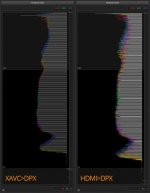
I shot the scene, XAVC Slog and then out via the HDMI to DPX. I took the XAVC into After Effects and output DPX files.

Took both sets of DPX into Speedgrade to look at their histograms.

You can see the 8 bit banding very easily (compared to resolve...) in an ideal world there would be no black lines on the histogram, what is interesting so far is that the HDMI DPX appear's to have more data in, this could well mean that banding is present on the XAVC and not the HDMI. It might mean that the XAVC is decimating the image more.

Kholi, what sort of situation are you seeing banding, maybe i can mimic this.

I will start looking at Slog LUTS now to see *really* how this stuff holds up, or not...

(this image is being scaled by the website - the original res shows everything more clearly)

banding.jpg

cheers
Paul
 
And here's where it gets more interesting.

So set of DPX files transcoded from the XAVC and DPX files from the HDMI via the O7Q.

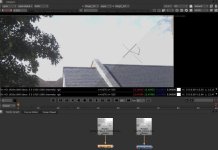
Both of these into Nuke, where i have them going through an Slog2 curve (the math is from Sony engineering, it's not a LUT, i think it was from the F65 or similar). The purpose of the curve is to 'bend' the light capture back into real scene linear space.

What is interesting is that the XAVC is exhibiting a bit more range, you're looking at 13.2 stops vs 12.4 in the HDMI DPX, this can be seen in the sky at the edge of the clouds. I've adjusted my viewer exposure down 5 stops to see the sky properly. Those over bright reds are doing this, red hasn't clipped.

The overall levels between the HDMI and the XAVC are slightly different too (visible in the original files). The blacks in the DPX version are darker (0.04 vs 0.06 in linear). Perhaps the HDMI is RGB out as mentioned and these differences are part of that process?

So it looks like the HDMI has more tonal range, but the XAVC is offering marginally higher highlights.

Of course this is assuming that the chain from HDMI to the screen is valid and in fact that the O7Q is not adding anything to the mix.

Next step is to see if i can compensate for this exposure difference to tell how different the range really is...

nukeA7.jpg
 
What i'm struggling with is data levels don't really have a meaning for YUV source. They only really mean something if the underlying data is RGB.

By the look of it we are saying that actually the range of values for Slog2 off this camera is 219 discreet steps? *if* data levels are showing us what's in the file? I don't think this is the case. In after effects when this XAVC is imported i get super brights - the data level waveform suggests that there are no superbrights (otherwise it would go to white). Yes that is clipping, or at least should be. Whether Resolve is automagically trying to reconstruct anything i don't know.

You can think of the data/video levels setting as a setting that governs the coefficients of the YUV->RGB transform matrix (and that's what it is in reality).
Maybe the DPX files for a clipped/crushed image will shed more light on what's in the source image data and where are the clipping points.

I am not sure the transcode from XAVC to DPX (done in AE or wherever) can be trusted? [As in, not sure how AE handles superbrights, etc.]
You should see more precision in the DPX HDMI because you have both more color info (less chroma subsampling) and no compression; blocks compression tends to kill some tonality.
 
What is interesting is that the XAVC is exhibiting a bit more range, you're looking at 13.2 stops vs 12.4 in the HDMI DPX, this can be seen in the sky at the edge of the clouds. I've adjusted my viewer exposure down 5 stops to see the sky properly.

Weirdness.
 
You can think of the data/video levels setting as a setting that governs the coefficients of the YUV->RGB transform matrix (and that's what it is in reality).
Maybe the DPX files for a clipped/crushed image will shed more light on what's in the source image data and where are the clipping points.

I am not sure the transcode from XAVC to DPX (done in AE or wherever) can be trusted? [As in, not sure how AE handles superbrights, etc.]
You should see more precision in the DPX HDMI because you have both more color info (less chroma subsampling) and no compression; blocks compression tends to kill some tonality.

I think it can be trusted in this case, it seems to be about right from what i can tell.

If quicktime is involved then all bets are off, if you want to see how much of a nightmare it is: http://bit.ly/1gJMlCu

I'm still unsure why the unbending of the YUV-RGB is 16-235 for data levels. Why isn't it 0 to 255 then?

cheers
Paul
 
I think it can be trusted in this case, it seems to be about right from what i can tell.

If quicktime is involved then all bets are off, if you want to see how much of a nightmare it is: http://bit.ly/1gJMlCu

I'm still unsure why the unbending of the YUV-RGB is 16-235 for data levels. Why isn't it 0 to 255 then?

cheers
Paul

But I don't think data levels interpreted YUV is converted to 16-235 RGB, if that's what you mean by unbending?
Can you (or someone else) capture a couple of 1 second videos, one pitch black (lens cap video), and another with lots of clipping white (for example, a light source in frame), and post them online? :) (XAVC, default s-log2 settings)
 
Okay some updates on my end (Sadly I'm coming to the end of my A7S time, but really glad I got to help out! Thanks Strancali!)

- My banding issue: purely underexposing like Villagehouse said. The camera has a lot of DR, and we need some solid PicPros to maximize it, but the banding isn't terrible. I mean, it's there, but it's not terrible.
- My decklink extreme's running and I was able to glance at the 1080P > ProRes HQ422: XAVCS is so good. I can confirm what Paul said about the XAVCS "advantage" in highlights. Weird, but the ProRes is just a hair sharper, and certainly helps with macroblocking during motion. The difference was really clear to me when panning. As it should have been.
- I was ALSO able to shoot some 4K after sorting out communication issues! 4K looks really solid, but very noisy (I expected this, some others won't). I personally don't care about noise, and would probably opt to shoot 4K with this camera for two reasons...
... 1 - In my opinion it maximizes what the camera can give you (of course at an expense) and the 4K as 4K actually looks great. It isn't just for 4K > 1080.
... 2 - The APS-C mode @ 4K actually looks much more usable to me. THIS is great, because I couldn't see myself using APS-C mode in camera. Such a large bonus.

I've been inside doing this, I have to figure out a way to get the tower to a door and run the HDMI cable (I have a pretty long cable so that's no issue), maybe I can grab some exterior 4K to show you guys before it's all over.

RE Noise: it's mostly chroma, which isn't hard to tear out with Neat or R11's noise reduction. I'm able to burn through 4K ProRes HQ 422 with a few nodes of NR on my tower, was very easy to see this change in real time. Looks great.

I seriously wish this camera cost a little less. >.<
 
Sorry this is the silliest cap ever but I'm in the office so:


Should be able to right click and DL the 4K JPG.
 
quick question for those who have shot in XAVC-S: What sdxc cards did you use? Trying figuring out the write speed required, but I'm no maths person. I don't trust my calculations xP
 
Back
Top